As a feature improvement to enhance the aesthetic, a selector to choose the color of the active hint. The choices could include the current Pop-orange, Pop-blue and a light grey that suit the Dark theme. These three colors should be adequate to make most theme choices a bit easier on the eye. The Active Hint Color Selector could live in the Pop-Shell settings found in the Extensions App.
 derpmatt
All 20 comments
For what it's worth, I would also really appreciate this feature.
 chrisjonesBSU
on 28 Aug 2020
chrisjonesBSU
on 28 Aug 2020
I agree.
(Thanks to all for tiling.)
On Fri, 28 Aug 2020 at 12:46, Chris Jones notifications@github.com wrote:
For what it's worth, I would also really appreciate this feature.
—
You are receiving this because you are subscribed to this thread.
Reply to this email directly, view it on GitHub
https://github.com/pop-os/shell/issues/462#issuecomment-682868754, or
unsubscribe
https://github.com/notifications/unsubscribe-auth/ALCCCKTVIQSVO6KATDJHO6DSC7NNTANCNFSM4PHMAU2Q
.
 anzanhoshin
on 28 Aug 2020
anzanhoshin
on 28 Aug 2020
This I believe would need UX advise from System76 design team. Or can simply do a quick drop down of those orange and blue colors.
 jmmaranan
on 4 Sep 2020
jmmaranan
on 4 Sep 2020
I've been informed that a community member is working on this. I'm not sure who, but the effort is certainly appreciated. Maybe we'll see it soon.
derpmatt
on 6 Sep 2020
@maria-komarova We need UX assistance for a color picker for the Pop Shell panel menu to change the active hint color
 mmstick
on 6 Sep 2020
mmstick
on 6 Sep 2020
@mmstick @ids1024 would something like that be feasible?
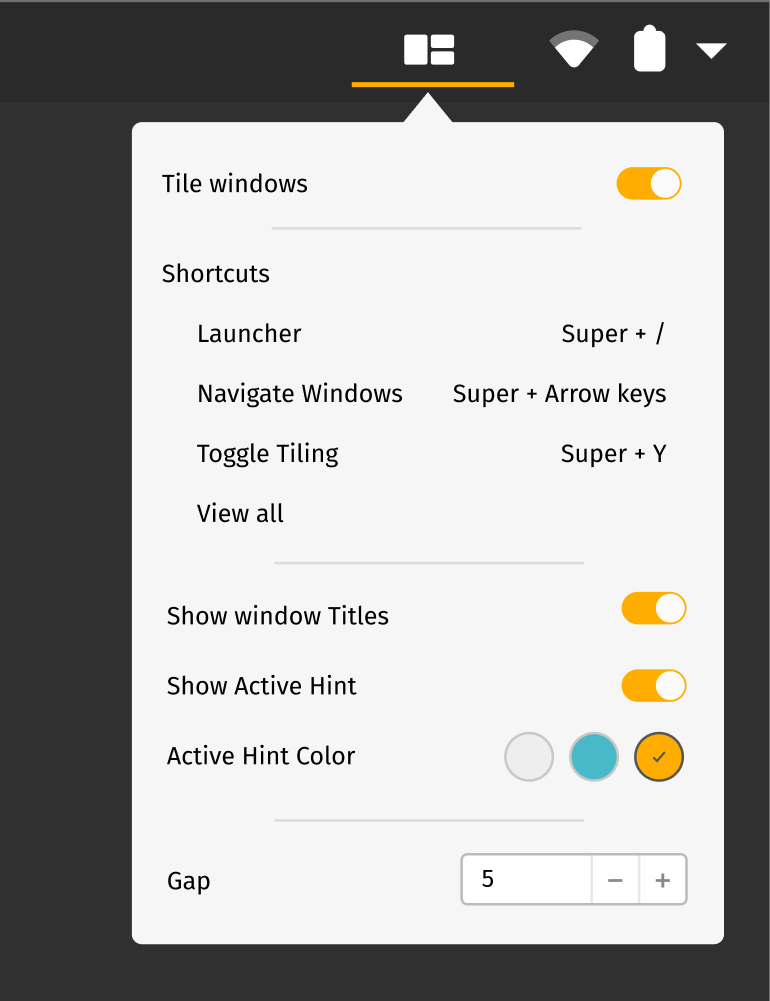
In terms of the colors light grey is pretty tricky, especially if we go with the 3px hint as discussed in #219. Light grey blends with the a lot of windows that have a light background. I have tried quite a few different shades of grey and most of them were most visible next to the header. I'm still trying to figure out the neutral that might work best here.
In terms of the other colors I like the idea of using orange and blue. The selection will need to change depending on the dark versus light mode.
 maria-komarova
on 15 Sep 2020
maria-komarova
on 15 Sep 2020
I think this should be a one color circle with a color wheel (perhaps from @ids1024 keyboard backlight work) that opens when clicked.
 WatchMkr
on 15 Sep 2020
WatchMkr
on 15 Sep 2020
That would work too if we would like to provide an opportunity for choosing any color. This is the case when we would need black though since this is not the backlight but just the color. So we might just use GTK color chooser.
maria-komarova
on 15 Sep 2020
Colour wheel would be excellent.
On Mon, 14 Sep 2020 at 18:31, maria-komarova notifications@github.com
wrote:
That would work too if we would like to provide an opportunity for
choosing any color. This is the case when we would need black though since
this is not the backlight but just the color. So we might just use GTK
color chooser.—
You are receiving this because you commented.
Reply to this email directly, view it on GitHub
https://github.com/pop-os/shell/issues/462#issuecomment-692348085, or
unsubscribe
https://github.com/notifications/unsubscribe-auth/ALCCCKSZBR3S7L7E7JPKFKTSF2KVFANCNFSM4PHMAU2Q
.
--
With palm to palm,
Anzan Hoshin roshi
roshi@pop-os: ~# sudo apt-get liberate -rf
http://wwzc.org
anzanhoshin
on 15 Sep 2020
@ids1024 do you know if it would be possible to have the dialog with the color wheel be adjusted so that we can have it with the control of the black here and without it for the Keyboard backlight as in #102? And if so what would be the effort required? One of the difficulties can come from the setting here being part of the Shell so I am not sure how much of the problem that might be.
Here are the mockups for what will need to be displayed here. When someone clicks on the Active Hint Color, the dialog with the color chooser opens and one should be able to set the color there.
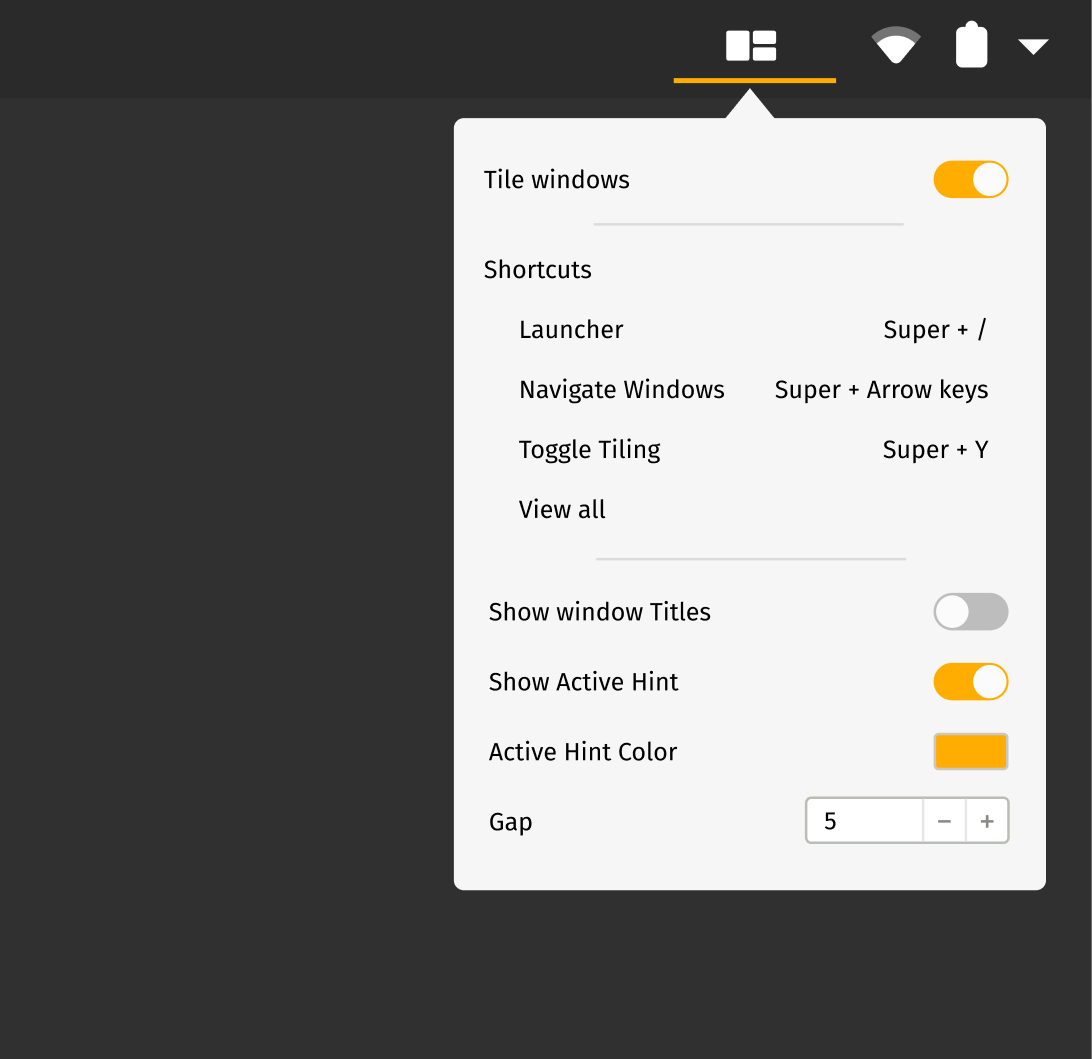
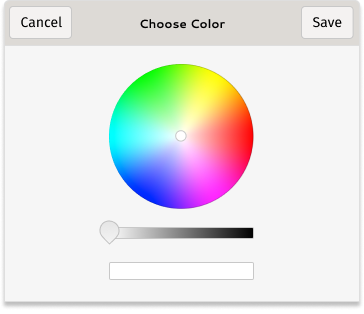
maria-komarova
on 15 Sep 2020
It don't think it would be too hard to update the color dialog to support that. The color wheel provided a "hue" and "saturation", which is converted to RGB with a hard coded "value" of 1.0. It shouldn't be too complicated to set the value with a slider.
One of the difficulties can come from the setting here being part of the Shell so I am not sure how much of the problem that might be.
I believe the shell is rendered with Clutter instead of Gtk (Gnome is weird). So GTK widgets can't be used in the shell. But it could open a separate program (like the "Pop!_Shell Keyboard Shortcuts dialog" window that opens when clicking "view all" here).
 ids1024
on 15 Sep 2020
ids1024
on 15 Sep 2020
With Pop!_Shell shortcuts it is mostly just the information window. But in this case the selected color should then be applied to the hint. Could that part be tricky?
maria-komarova
on 15 Sep 2020
I assume it wouldn't be too hard to have clutter render something in a particular color, and have it dynamically update based on what hint color is set (Though gsettings? Or would that be a .css file somewhere in the home directory?).
But that's probably a question for @mmstick, since he has experience in Gnome shell extension development.
ids1024
on 15 Sep 2020
The hint is powered by css being an St.Bin. Clutter does not seem to know CSS. The current collected styles are loaded via Gio File. We can probably manipulate those at runtime. We can also write them to file temp on $HOME/hint.css somewhere alongside config.json. And trigger an event on the css utility loader similar to how dark and light are loaded today.
jmmaranan
on 15 Sep 2020
You can make it so that clicking on it opens a GTK Window. We can launch GTK windows from GJS.
As for styling, we can dynamically generate CSS strings at runtime to add on top of existing style classes.
mmstick
on 15 Sep 2020
@mmstick - sure, I will work on this sometime this weekend
jmmaranan
on 17 Sep 2020
Hello everyone, here is a sneak peek. I will send an MR soon. Do not mind it losing focus, for some reason it always goes back to Peek.
https://www.dropbox.com/s/yrom2fwq64c4d42/Peek%202020-09-20%2018-10.webm?dl=0
@mmstick - there are some process changes on how the gsettings/schemas are consumed, will have to review it with engineering if below is acceptable:
sudo cp schemas/*.xml /usr/share/glib-2.0/schemas && sudo glib-compile-schemas /usr/share/glib-2.0/schemas
Also, I cannot find a library to make it look like a Color wheel, it seems to be needed to be done via Cairo. I do not know cairo.
jmmaranan
on 21 Sep 2020
Besides the color, the thickness is another factor in the hinting being _easy on the eyes_. Any color that is too thick will look weird and _too thick_ is subjective.
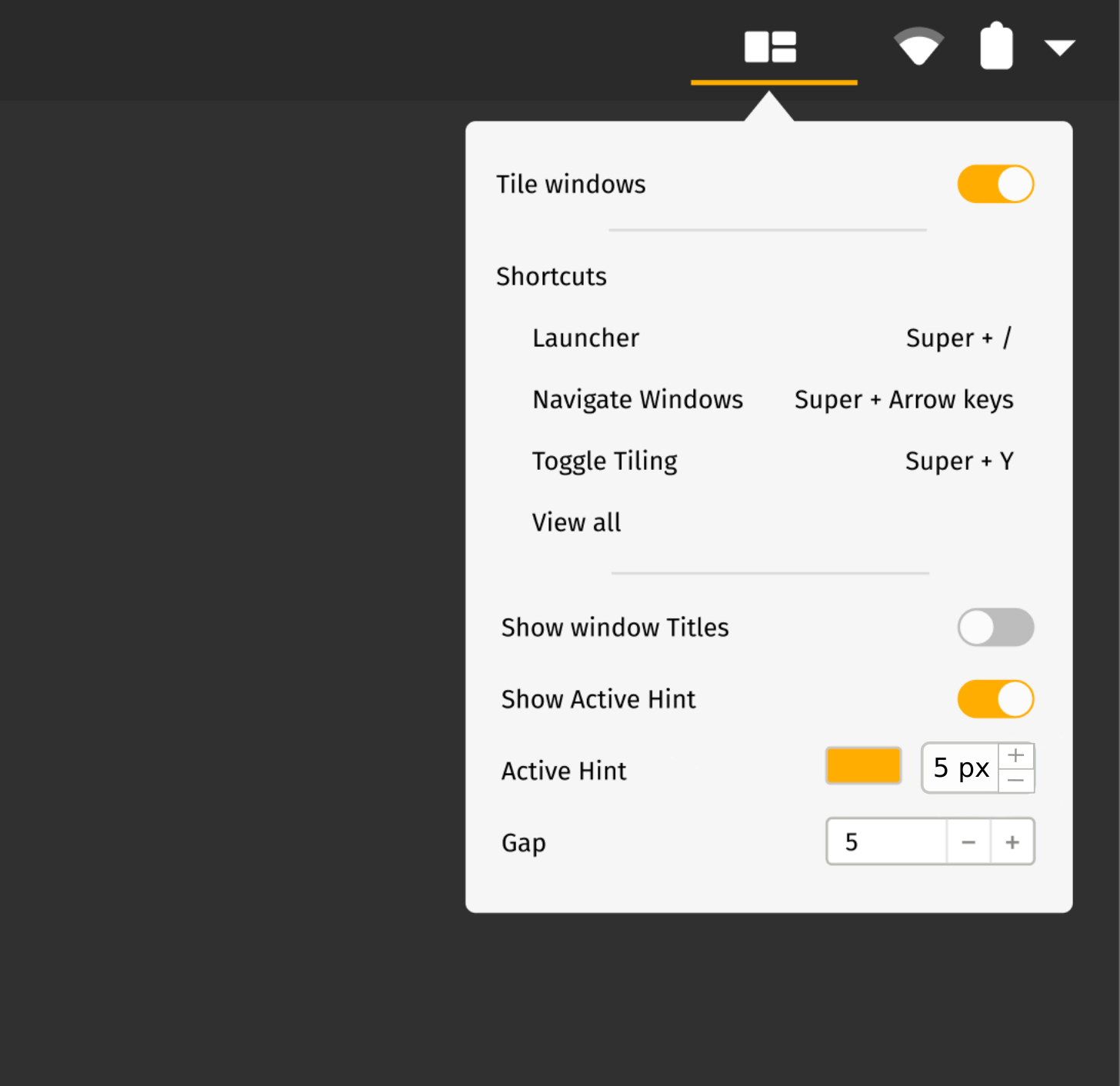
Edit: Just realized this probably should belong in another issue tagged with _enhancement_.
 JoelMon
on 21 Sep 2020
JoelMon
on 21 Sep 2020
The border thickness is discussed on #219. Unless System76 UX design thinks otherwise to include that in the UX. Yes please open another feature request for thickness.
jmmaranan
on 21 Sep 2020
Hello everyone, here is a sneak peek. I will send an MR soon. Do not mind it losing focus, for some reason it always goes back to Peek.
https://www.dropbox.com/s/yrom2fwq64c4d42/Peek%202020-09-20%2018-10.webm?dl=0
This is amazing and exceeds any expectation I had when suggesting it.
derpmatt
on 23 Sep 2020
Related issues
 herder
·
6Comments
herder
·
6Comments
 BTBlueSkies
·
6Comments
BTBlueSkies
·
6Comments
 Dark-Matter7232
·
7Comments
Dark-Matter7232
·
7Comments
 rengare
·
5Comments
rengare
·
5Comments
 TomFaulkner
·
4Comments
TomFaulkner
·
4Comments
Most helpful comment
Hello everyone, here is a sneak peek. I will send an MR soon. Do not mind it losing focus, for some reason it always goes back to Peek.
https://www.dropbox.com/s/yrom2fwq64c4d42/Peek%202020-09-20%2018-10.webm?dl=0
@mmstick - there are some process changes on how the gsettings/schemas are consumed, will have to review it with engineering if below is acceptable:
Also, I cannot find a library to make it look like a Color wheel, it seems to be needed to be done via Cairo. I do not know cairo.