Shell: Pop Shell does not respect shell theme choice
Distribution (run cat /etc/os-release):
NAME=Fedora
VERSION="32 (Workstation Edition)"
ID=fedora
VERSION_ID=32
VERSION_CODENAME=""
PLATFORM_ID="platform:f32"
PRETTY_NAME="Fedora 32 (Workstation Edition)"
ANSI_COLOR="0;34"
LOGO=fedora-logo-icon
CPE_NAME="cpe:/o:fedoraproject:fedora:32"
HOME_URL="https://fedoraproject.org/"
DOCUMENTATION_URL="https://docs.fedoraproject.org/en-US/fedora/f32/system-administrators-guide/"
SUPPORT_URL="https://fedoraproject.org/wiki/Communicating_and_getting_help"
BUG_REPORT_URL="https://bugzilla.redhat.com/"
REDHAT_BUGZILLA_PRODUCT="Fedora"
REDHAT_BUGZILLA_PRODUCT_VERSION=32
REDHAT_SUPPORT_PRODUCT="Fedora"
REDHAT_SUPPORT_PRODUCT_VERSION=32
PRIVACY_POLICY_URL="https://fedoraproject.org/wiki/Legal:PrivacyPolicy"
VARIANT="Workstation Edition"
VARIANT_ID=workstation
Related Application and/or Package Version (run apt policy pop-shell or provide the latest commit if building locally):
commit
Issue/Bug Description:
when using non default shell theme, pop shell reverts my choice of theme to system default shell theme on session start(restart or login)
Steps to reproduce (if you know):
Select a non default shell theme and logout or restart, pop shell will revert the theme to default
Expected behavior:
Shell theme should be as it was before login/restart
 Dark-Matter7232
All 7 comments
Same for me.
Using:
NAME="Pop!_OS"
VERSION="20.04 LTS"
ID=pop
ID_LIKE="ubuntu debian"
PRETTY_NAME="Pop!_OS 20.04 LTS"
VERSION_ID="20.04"
HOME_URL="https://system76.com/pop"
SUPPORT_URL="http://support.system76.com"
BUG_REPORT_URL="https://github.com/pop-os/pop/issues"
PRIVACY_POLICY_URL="https://system76.com/privacy"
VERSION_CODENAME=focal
UBUNTU_CODENAME=focal
LOGO=distributor-logo-pop-os
 sdkmor
on 2 May 2020
sdkmor
on 2 May 2020
Same problem here. I'm using Manjaro with default theme "Matcha-sea". Once I enable pop-shell extention the shell theme will behaviour like Adwaita Dark.
Using:
NAME="Manjaro Linux"
ID=manjaro
ID_LIKE=arch
PRETTY_NAME="Manjaro Linux"
ANSI_COLOR="1;32"
HOME_URL="https://www.manjaro.org/"
SUPPORT_URL="https://www.manjaro.org/"
BUG_REPORT_URL="https://bugs.manjaro.org/"
LOGO=manjarolinux
 patrick-tang
on 2 May 2020
patrick-tang
on 2 May 2020
I think someone else also reported same issue here:
https://github.com/pop-os/shell/issues/230
patrick-tang
on 2 May 2020
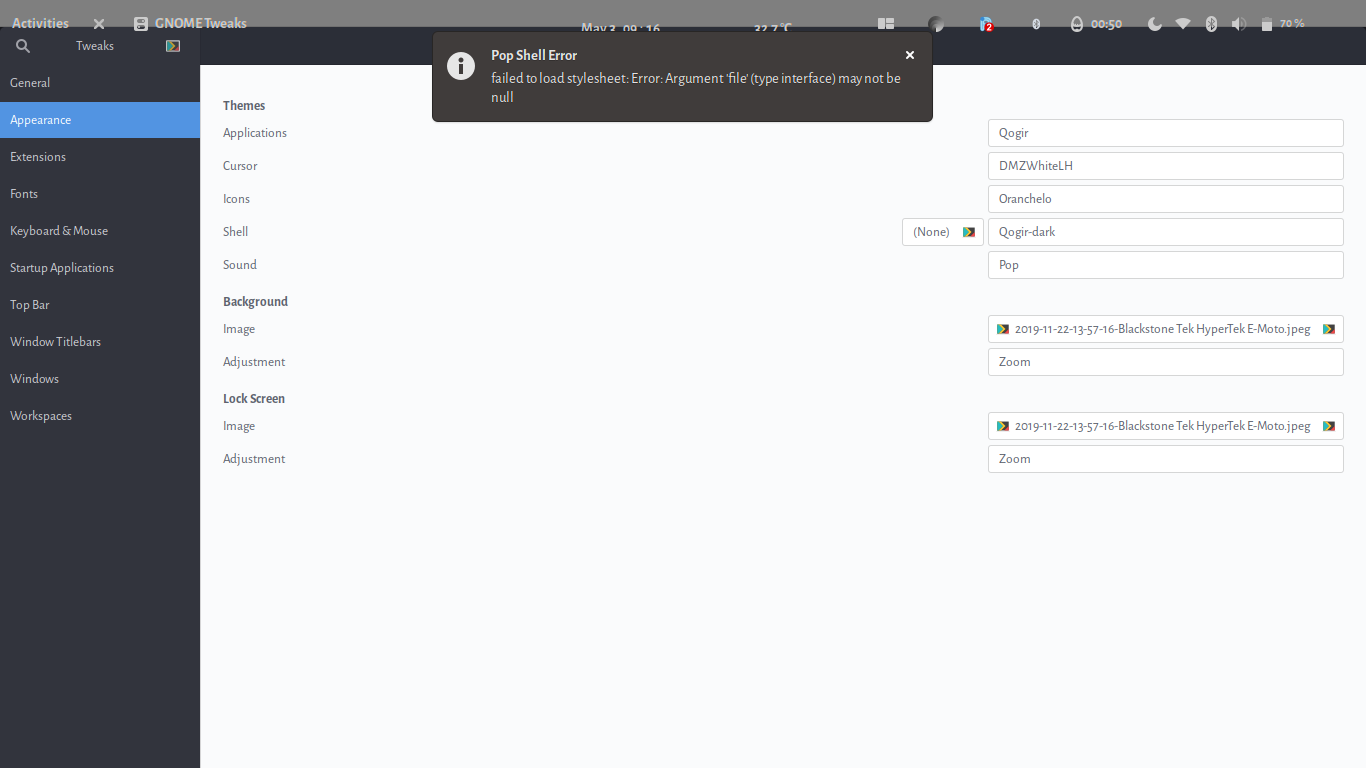
can confirm the same plus getting this error while changing themes (attached).
Pop Shell Error:
failed to load stylesheet: Error: Argument 'file' (type interface) may not be null.
 nitinsareen
on 3 May 2020
nitinsareen
on 3 May 2020
Same here:
NAME="Pop!_OS"
VERSION="20.04 LTS"
ID=pop
ID_LIKE="ubuntu debian"
PRETTY_NAME="Pop!_OS 20.04 LTS"
VERSION_ID="20.04"
HOME_URL="https://system76.com/pop"
SUPPORT_URL="http://support.system76.com"
BUG_REPORT_URL="https://github.com/pop-os/pop/issues"
PRIVACY_POLICY_URL="https://system76.com/privacy"
VERSION_CODENAME=focal
UBUNTU_CODENAME=focal
LOGO=distributor-logo-pop-os
 wout-junius
on 3 May 2020
wout-junius
on 3 May 2020
Well I encountered the same issue and decided to fix it
Just clone the branch for my PR #271 and compile the extension yourself
I've tested this with multiple themes and they all work fine
 jambonmcyeah
on 4 May 2020
jambonmcyeah
on 4 May 2020
Same here:
NAME="Pop!_OS"
VERSION="20.04 LTS"
ID=pop
ID_LIKE="ubuntu debian"
PRETTY_NAME="Pop!_OS 20.04 LTS"
VERSION_ID="20.04"
HOME_URL="https://system76.com/pop"
SUPPORT_URL="http://support.system76.com"
BUG_REPORT_URL="https://github.com/pop-os/pop/issues"
PRIVACY_POLICY_URL="https://system76.com/privacy"
VERSION_CODENAME=focal
UBUNTU_CODENAME=focal
LOGO=distributor-logo-pop-os
Temporary Solution:
sudo gedit /usr/share/gnome-shell/modes/pop.json
{
    "parentMode": "user",
//    "stylesheetName": "gnome-shell.css",
//    "themeResourceName": "theme/Pop/gnome-shell-theme.gresource",
    "enabledExtensions": [
        "[email protected]",
        "[email protected]",
        "[email protected]",
        "desktop-icons@csoriano",
        "[email protected]",
        "[email protected]",
        "[email protected]",
        "[email protected]"
}
After _turn off_ and _turn on_ user themes in Gnome Tweaks
 birobirobiro
on 5 May 2020
birobirobiro
on 5 May 2020
Related issues
 duboisf
·
4Comments
duboisf
·
4Comments
 diegobernardes
·
3Comments
diegobernardes
·
3Comments
 JoelMon
·
4Comments
JoelMon
·
4Comments
 rengare
·
5Comments
rengare
·
5Comments
 carlwgeorge
·
8Comments
carlwgeorge
·
8Comments
Most helpful comment
Same here:
Temporary Solution:
sudo gedit /usr/share/gnome-shell/modes/pop.json