Distribution (run cat /etc/os-release):
NAME="Pop!_OS"
VERSION="20.04 LTS"
ID=pop
ID_LIKE="ubuntu debian"
PRETTY_NAME="Pop!_OS 20.04 LTS"
VERSION_ID="20.04"
HOME_URL="https://pop.system76.com"
SUPPORT_URL="https://support.system76.com"
BUG_REPORT_URL="https://github.com/pop-os/pop/issues"
PRIVACY_POLICY_URL="https://system76.com/privacy"
VERSION_CODENAME=focal
UBUNTU_CODENAME=focal
LOGO=distributor-logo-pop-os
Related Application and/or Package Version (run apt policy $PACKAGE NAME):
Issue/Bug Description:
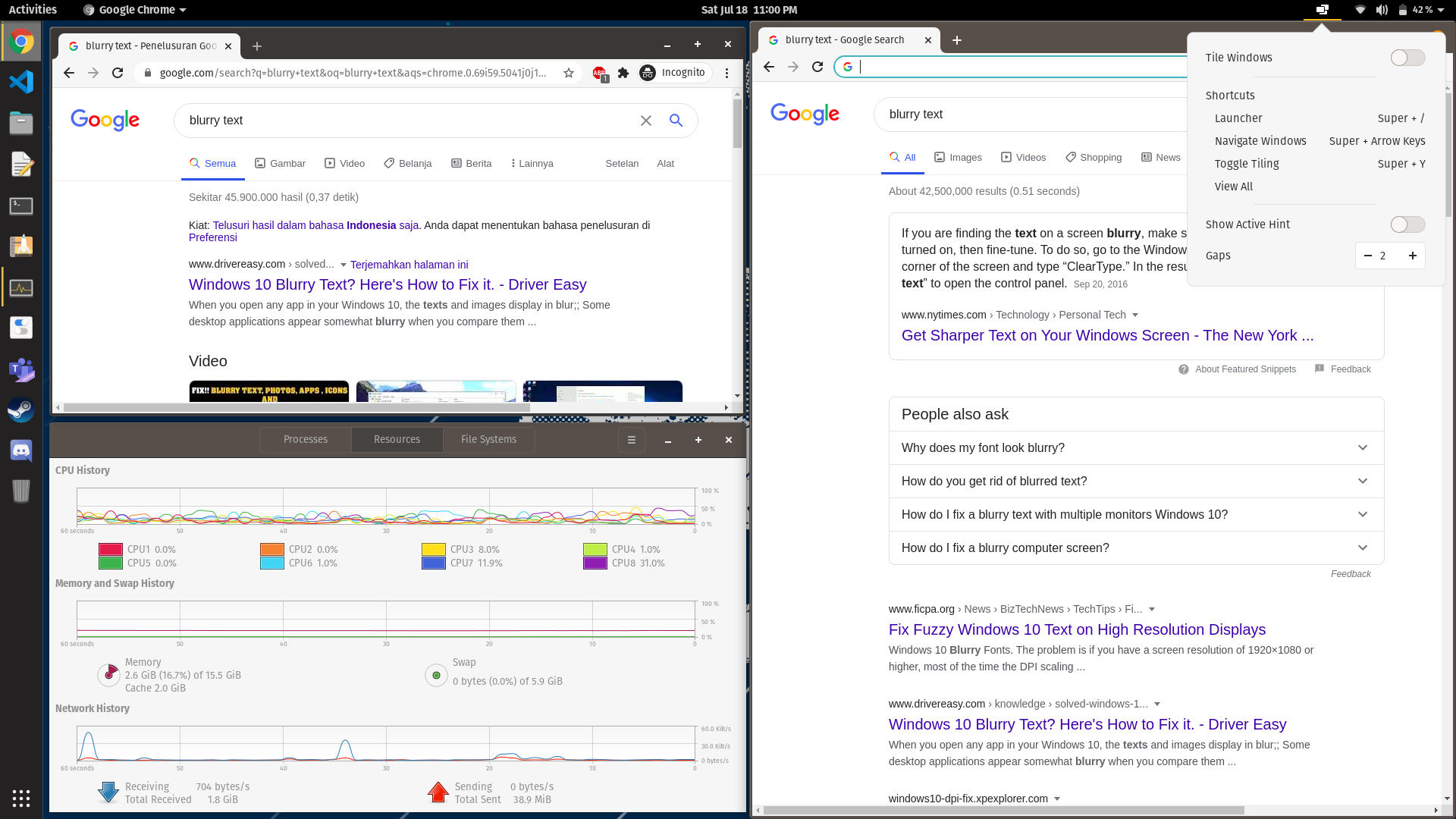
Hi guys, I got this issue where some of application looks blurry on PopOS when I turn on tile windows function.
The weird things is, in once screen, not all apps will look blurry (in my case only half-right part of the screen).
I can not really confirm that tile windows function is causing this, because when I exit the tile windows function, the blurry text is not gone, after I turn off the tile windows I still need to maximize/move/resize windows to make it look sharp again.
Steps to reproduce (if you know):
To reproduce:
- Have some apps already opened (file manager, terminal, chrome), then turn on tile windows function on PopOS.
- Put file manager in left half of the screen and move chrome and terminal to the right-half side of the screen. (in my case, Chrome on top, Terminal on bottom)
- Initially, both terminal and chrome will look blurry.
- Click on Terminal --> text instantly becomes sharp
- Click on Chrome --> text stays blurry.
Note: with tile windows on, if I maximize Chrome windows, text instantly looks sharp, however if I minimize again (and it goes back to right-top part of the screen), it gets blurry again.
To resolve:
- Close tile windows function, at this time text is still blurry
- Maximize Chrome window, text will look sharper. And even so, if I try to minimize again, text will still look sharp. (even if it goes back to previous position)
Expected behavior:
Text should stay sharp at all times.
Other Notes:
My screenshot picture does not exactly same with the reproduction steps that I mentioned above but it can be seen that blurry text is there (on chrome on right part of the screen).
Additional: tried to change browser into Firefox and Firefox behaves like Terminal (looks sharp when I get focus on it)
Blurry text on chrome (right half) when tiling windows is on:

Sharp text after tiling windows is turned off and chrome windows is maximized and then minimized:
 RedTuxedo
All 24 comments
@RedTuxedo - I think this is a limitation of the Clutter API that is currently being used by pop-shell to move windows. Re-focusing on the window or hover on it will make it clearer again.
 jmmaranan
on 31 Jul 2020
jmmaranan
on 31 Jul 2020
@RedTuxedo - I think this is a limitation of the Clutter API that is currently being used by pop-shell to move windows. Re-focusing on the window or hover on it will make it clearer again.
@jmmaranan not really in my case, even re-focusing or hovering on doesn;t make it sharper, however I do understand that this is not a big priority since not everyone is using tiling features.
RedTuxedo
on 4 Aug 2020
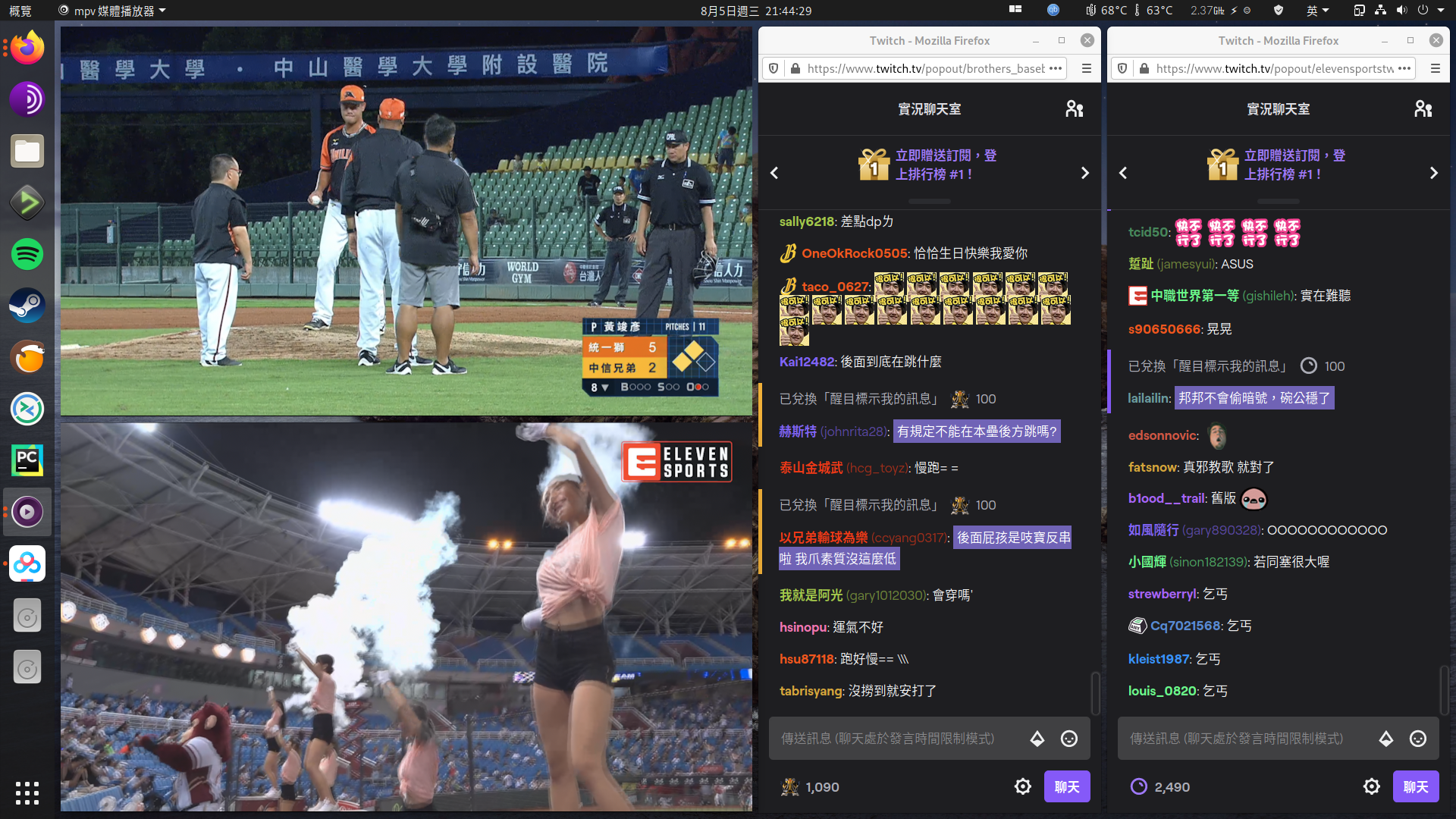
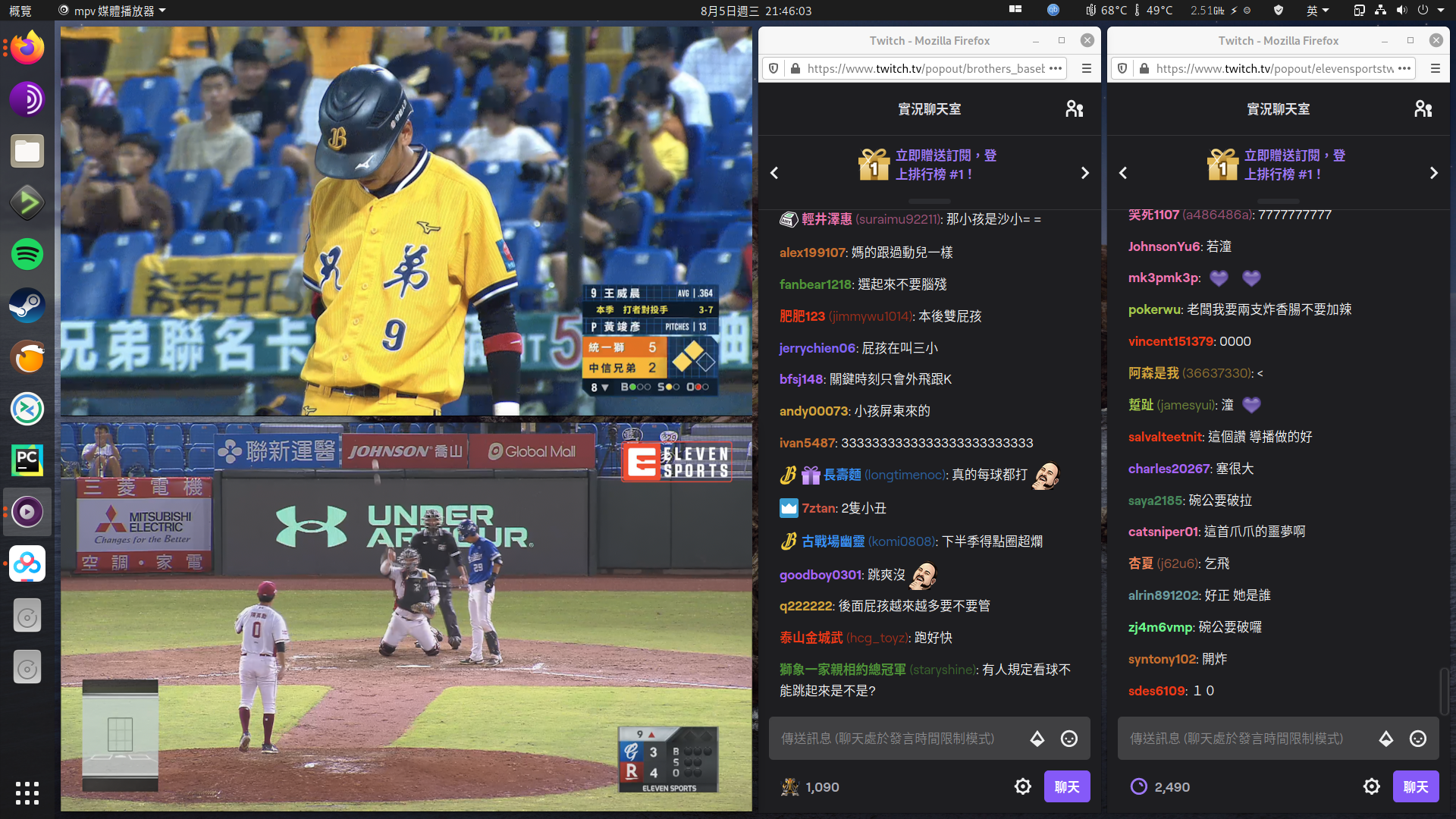
@jmmaranan Not only text, but also the image/video, and it only happens to the bottom window.
It affects a lot when I'm watching streams in this situation.
@RedTuxedo - I think this is a limitation of the Clutter API that is currently being used by pop-shell to move windows. Re-focusing on the window or hover on it will make it clearer again.
@jmmaranan not really in my case, even re-focusing or hovering on doesn;t make it sharper, however I do understand that this is not a big priority since not everyone is using tiling features.
Not re-focusing or hovering on it, you need to move the window.
 laichiaheng
on 5 Aug 2020
laichiaheng
on 5 Aug 2020
That is correct. In my case, I have the window raise option. Or moving the window would fix it. And only occurs on lower half tiled windows. If you get a really not readable screen that might be a different issue altogether.
jmmaranan
on 5 Aug 2020
I have a strong feeling that it's a side effect of the animations applied to windows when they are moved. There have been bug reports filed upstream for windows having this blurry effect after unmaximizing or unfullscreening them, and I believe those have been fixed. Will need to track down the particular issue they fixed, and how they fixed it.
 mmstick
on 5 Aug 2020
mmstick
on 5 Aug 2020
@mmstick The problem is not solved, you still need to hover your mouse on the window.
Sometimes, it doesn't fix the problem either, so the problem still exists.
laichiaheng
on 9 Aug 2020
@mmstick - setting ext.animate_windows = false fixes it but we lose the UX especially when grab/swap windows. When slowing down the tweener (149 to 1000), can see that any bottom half windows underneath the window that's moving becomes blurry. Probably not caused by the unmaximize or unfullscreen. Maybe put animations in prefs.js but this has been there for a long time, and user workaround is to focus on the window.
Also, I do not see it becoming blurry in a second monitor on the right (with 4 windows tiled to it)
jmmaranan
on 9 Aug 2020
@mmstick - setting
ext.animate_windows = falsefixes it but we lose the UX especially when grab/swap windows. When slowing down the tweener (149 to 1000), can see that any bottom half windows underneath the window that's moving becomes blurry. Probably not caused by the unmaximize or unfullscreen. Maybe put animations in prefs.js but this has been there for a long time, and user workaround is to focus on the window.
Also, I do not see it becoming blurry in a second monitor on the right (with 4 windows tiled to it)
Try to open 5 windows, and close the last 2 windows, the 2nd window will be blurry.
It's how it happens when I open the 4th window.

laichiaheng
on 12 Aug 2020
What I'm seeing is that, with animations disabled, the issue still occurs but the affected window is quickly redrawn after it blurs. It's very easy to see and reproduce by resizing the VLC playlist window.
 marksumm
on 6 Sep 2020
marksumm
on 6 Sep 2020
Any progress?
laichiaheng
on 16 Sep 2020
@laichiaheng The cause hasn't been found yet
mmstick
on 16 Sep 2020
I couldn't fix this by disabling animations, but disabling "Snap to Grid (Floating Mode)" enabled in Pop shell extension settings has fixed it for me.
marksumm
on 27 Sep 2020
I couldn't fix this by disabling animations, but disabling "Snap to Grid (Floating Mode)" enabled in Pop shell extension settings has fixed it for me.
What does the Snap to Grip mode do? Could someone explain it to me?
laichiaheng
on 29 Sep 2020
It constrains the landing position of a dragged window, so that it is grid-aligned. If it is enabled, you will see that dragged windows do not always land exactly where you release them and instead they float into the nearest "correct" place.
marksumm
on 29 Sep 2020
I can confirm that I haven't seen any more instance of blurry text once I turned off the grid option and I've been using stacked tiling mode on too. I had to have to log out and back in to fix blurry text once a day before that.
 MikhailTNY
on 2 Oct 2020
MikhailTNY
on 2 Oct 2020
Weird, it has always been disabled.
laichiaheng
on 2 Oct 2020
Disabling snap-to-grid fixes the blurry windows even with auto-tiling?
mmstick
on 2 Oct 2020
Disabling snap-to-grid fixes the blurry windows even with auto-tiling?
Not for me.
laichiaheng
on 3 Oct 2020
Hi,
I installed the Pop shell the other day since seeing the stacking mode for tiling you folks have; I think it's excellent. However I'm also getting the blurry fonts issue. I have a 100% repro case.
In a fresh workspace, open Tilix and VS Code side-by-side (it works with gnome-terminal too). Tilix on the left, VS Code on the right. Switch to Tilix, and enable stacking on that window with Super+S. This triggers a small animation on the Tilix window (showing the new header bar for the stack) and blurs the fonts on the VS Code window. The fonts remain blurred until I move the window a little with the mouse, or I switch to the window and toggle stacking on it (which animates it, I guess, and clears the blur).
It works in reverse too, with VS Code being on the left and Tilix being in the right, but the Tilix blur clears as soon as it's focused. It's always the window on the right that gets blurred though, never the one on the left. Where can I disable the animations to test out if that affects it?
 Tinche
on 5 Oct 2020
Tinche
on 5 Oct 2020
I think I narrowed down my particular issue - it only happens when I have a persistent vertical dock enabled. Either the Ubuntu dock or Dash to Dock will trigger the problem. As soon as I disable both extensions the problem goes away. Which is unfortunate since I really want a persistent vertical dock :)
Tinche
on 5 Oct 2020
I think I narrowed down my particular issue - it only happens when I have a persistent vertical dock enabled. Either the Ubuntu dock or Dash to Dock will trigger the problem. As soon as I disable both extensions the problem goes away. Which is unfortunate since I really want a persistent vertical dock :)
It happens without dock, too.
laichiaheng
on 6 Oct 2020
I can confirm I also reproduce this issue on Arch Linux using GNOME DE. It does not occur consistently for me, but I have seen it happen for both chromium and Arduino IDE, and usually after another window is opened, filling the workspace with over 3 windows.
I was worried this was maybe an issue with my graphics driver, but I traced it to pop-shell after being unable to reproduce the problem when tiling is turned off.
Snap to grid mode on pop-shell for me has always been disabled.
I can confirm that the blur only occurs for fonts on my system, since images remain clear. I did some research on blurry fonts for GNOME, and they seem to occur mainly on Wayland, but I tested this on default GNOME, GNOME w/ Xorg, and GNOME classic on my system, and I reproduce the issues there too.
 GeneralPoxter
on 21 Oct 2020
GeneralPoxter
on 21 Oct 2020
It's been a while since there have been updates on this issue, but I found that both moving the window around, resizing the window, or just entering and exiting Window Management Mode with Super + Enter + Enter seem to remove the font blur.
I'm really looking forward to a fix for this since it's really a significant nuisance when working with multiple windows in a workspace.
EDIT:
@mmstick, in #192 you suggested using some "hacky workaround" to get rid of the blur. I was wondering whether it would be feasible for pop-shell to "simulate" the effect of entering and exiting Window Management Mode (probably something involving redrawing) for every window after every event (e.g. new window, window movement, window resize, etc.) as a crude fix to the blur?
ANOTHER EDIT:
A fix for me was to change the text scaling factor to something like 1.20 through the GNOME tweak tool. For some reason, that seems to get rid of the blurry fonts - and may be of interest to any developers trying to debug this.
GeneralPoxter
on 29 Oct 2020
Still no any clue?
laichiaheng
on 2 Dec 2020
Related issues
 carlwgeorge
·
8Comments
carlwgeorge
·
8Comments
 BTBlueSkies
·
6Comments
BTBlueSkies
·
6Comments
 depletionmode
·
7Comments
depletionmode
·
7Comments
 Dark-Matter7232
·
7Comments
Dark-Matter7232
·
7Comments
 VariabileAleatoria
·
3Comments
VariabileAleatoria
·
3Comments
Most helpful comment
I couldn't fix this by disabling animations, but disabling "Snap to Grid (Floating Mode)" enabled in Pop shell extension settings has fixed it for me.