Sharp: composite with blend dest-in produces white halo
$ npx envinfo --binaries --languages --system --utilities
  System:
    OS: macOS Mojave 10.14.4
    CPU: (4) x64 Intel(R) Core(TM) i7-6567U CPU @ 3.30GHz
    Memory: 125.10 MB / 16.00 GB
    Shell: 3.2.57 - /bin/bash
  Binaries:
    Node: 11.14.0 - /usr/local/bin/node
    npm: 6.9.0 - /usr/local/bin/npm
    Watchman: 4.9.0 - /usr/local/bin/watchman
  Utilities:
    Make: 3.81 - /usr/bin/make
    GCC: 10.14. - /usr/bin/gcc
    Git: 2.21.0 - /usr/local/bin/git
  Languages:
    Bash: 3.2.57 - /bin/bash
    Java: 1.8.0_202 - /usr/bin/javac
    Perl: 5.18.2 - /usr/bin/perl
    PHP: 7.1.23 - /usr/bin/php
    Python: 2.7.10 - /usr/bin/python
    Ruby: 2.3.7p456 - /usr/bin/ruby
Using the new powerful composite api to cut out a non-rectangular mask of a gray image with the blend mode dest-in seems to produce a strange light edge on the masked result. The effect only seems to apply to antialiased shapes, such as circles. For some reason, this bug is also not present when the image to be cut is either completely white or completely black.
I would expect the following code to produce a gray circle on a black background, but what I get is a gray circle with a thin white halo on a black background, as seen in the image below.
const sharp = require("sharp");

const square = sharp(
  Buffer.from(
    '<svg viewBox="0 0 100 100"><rect width="100" height="100" fill="#222" /></svg>',
    "utf-8"
  )
);

const circle = sharp(
  Buffer.from(
    '<svg viewBox="0 0 100 100"><circle cx="50" cy="50" r="30" fill="#000" /></svg>',
    "utf-8"
  )
);

circle.toBuffer().then(circleBuffer =>
  square
    .composite([{ input: circleBuffer, blend: "dest-in" }])
    /* Removing alpha to make the issue visible
       regardless of image viewer default background */
    .removeAlpha()
    .toFile("./test.png")
);

 aeirola
All 10 comments
I played around with the code some more in search for a workaround to the issue. Although I did not find one, I did find another interesting visual manifestation of the same issue.
The following code draws a solid purple image, and applies a linear gradient fade mask on it with composite blend dest-in. I would expect the resulting image to be a gradient with consistent colour and smooth alpha gradient from 0 to 1.
const sharp = require("sharp");

const square = sharp(
  Buffer.from(
    '<svg viewBox="0 0 100 100"><rect width="100" height="100" fill="#80F" /></svg>',
    "utf-8"
  )
);

const fade = sharp(
  Buffer.from(
    `<svg viewBox="0 0 100 100">
        <defs>
            <linearGradient id="fade">
                <stop offset="0" stop-opacity="0" />
                <stop offset="1" stop-opacity="1" />
            </linearGradient>
        </defs>
        <rect width="100" height="100" fill="url('#fade')" />
    </svg>`,
    "utf-8"
  )
);

fade
  .toBuffer()
  .then(fadeBuffer =>
    square
      .composite([{ input: fadeBuffer, blend: "dest-in" }])
      .toFile("./test.png")
  );
But with this issue, the color is somehow skewed by the dest-in composition blend into a more pink color as the opacity decreases, as seen in the image below:
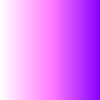
So the issue is not directly related to any shapes or their borders, but seems to be more related to alpha channels in general.
Since the behaviour seemed so consistent, I had to check the documentation for the specification of the blend modes. https://www.cairographics.org/operators/#dest_in does specify that the result colour (xR) should always match the destination image colour (xB). Unfortunately I don't have the expertise required to verify that the libvips implementation works as specified.
aeirola
on 28 Apr 2019
Hello, I think this is working as expected.
Composite will premultiply images, blend, then unpremultiply. Premultiplication scales the image by the alpha (so RGB values get much darker in transparent areas), unpremultiplication does the opposite: it'll brighten pixels in very transparent areas.
dest-in multiplies the alphas but just takes one of the images, so in this case, since the square is not transparent, you're effectively taking the alpha from one image and the RGB from another. Since the output RGB has not been premultiplied with the result alpha, it'll become much brighter (your speckles) in highly transparent areas on unpremultiply.
 jcupitt
on 28 Apr 2019
jcupitt
on 28 Apr 2019
Though imagemagick seems to handle this differently:
composite -compose Dst_In circle.png square.png x.png



I'm missing something! I'll have a look.
jcupitt
on 28 Apr 2019
Workaround: rather than removing the alpha, try flattening it out, it should remove the sparkles.
I made a libvips issue: https://github.com/libvips/libvips/issues/1301
jcupitt
on 28 Apr 2019
Hi, thanks for taking the time to investigate the issue.
I'm not really sure what premultiplication means, and I think the composite API is more user-friendly if the user of the API doesn't need to be concerned about implementation details.
I'm afraid flattening the image doesn't help me, as my intention is to produce a transparent image. In the bug report I just used removeAlpha in order for the effect of the bug to be visible on the white background of the GitHub page layout.
aeirola
on 29 Apr 2019
I just mean when trying to simulate what your image will look like on a black background, use flatten with background=0, not removeAlpha. The sparkles you are seeing are in a transparent part of the image, so they won't be visible.
Here's what your sparkle image looks like on a black background:

jcupitt
on 29 Apr 2019
Ah, I think I see what you mean @jcupitt . The use of removeAlpha exaggerates the white edge in the image which, as you mentioned, only appears on transparent pixels. Unfortunately, those white pixels are still partially visible but seem to match a visually appealing antialiasing when viewed on a completely black background.
So while flatten with a black background produces nice result, changing the background to something lighter, as in the code
const sharp = require("sharp");

const square = sharp(
  Buffer.from(
    '<svg viewBox="0 0 100 100"><rect width="100" height="100" fill="#222" /></svg>',
    "utf-8"
  )
);

const circle = sharp(
  Buffer.from(
    '<svg viewBox="0 0 100 100"><circle cx="50" cy="50" r="30" fill="#000" /></svg>',
    "utf-8"
  )
);

circle
  .toBuffer()
  .then(circleBuffer =>
    square.composite([{ input: circleBuffer, blend: "dest-in" }]).toBuffer()
  )
  .then(compositeBuffer =>
    sharp(compositeBuffer)
      .flatten({ background: { r: 40, g: 40, b: 40 } })
      .toFile("./test.png")
  );
(P.S. for some reason flatten didn't seem to work without writing to a buffer in between. Edit: created issue #1677 )
I get the result

Similarly, the issue is visible when opening the unflattened image in an image viewer like macOS Preview in dark mode as here
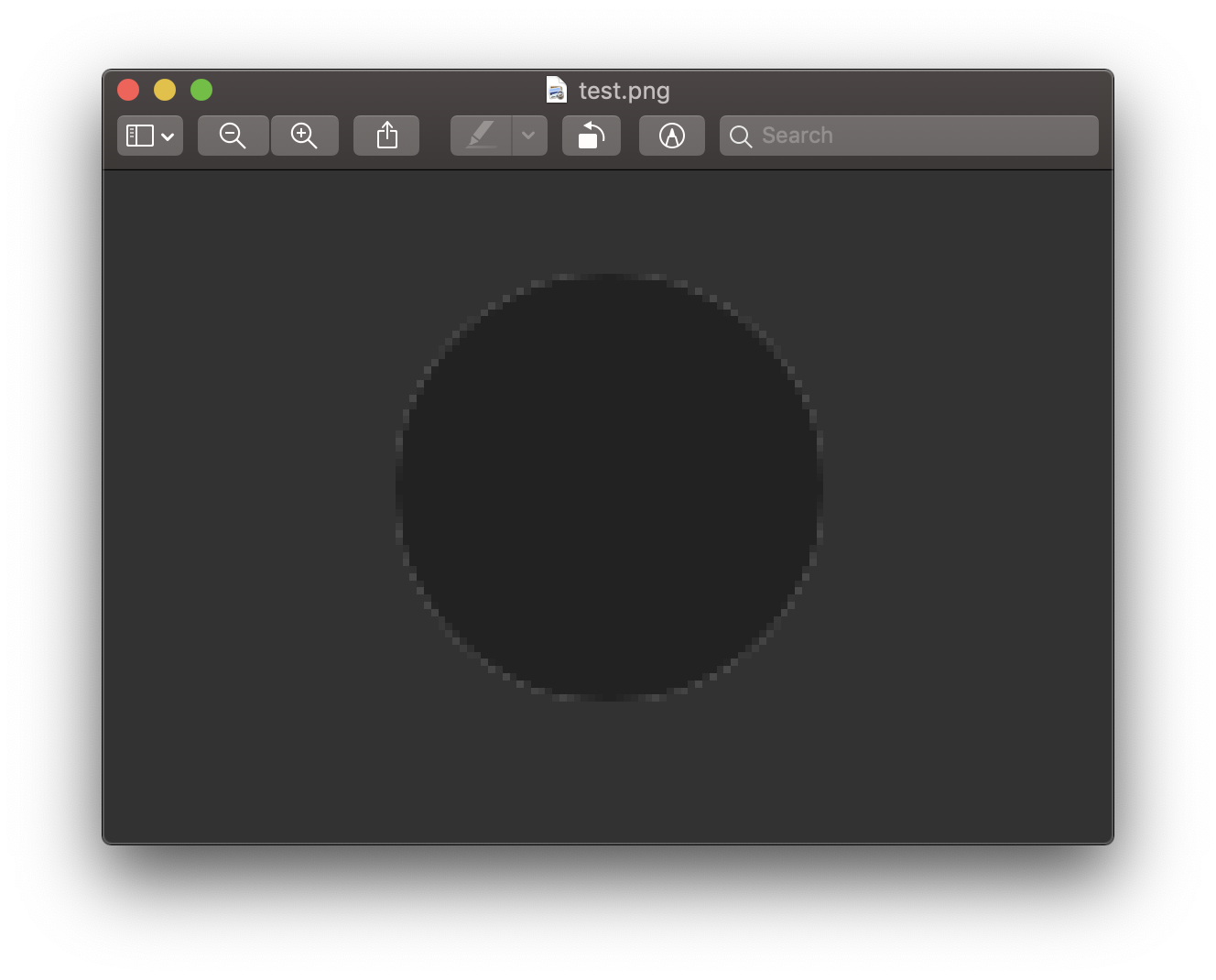
So the while flatten can be used as a workaround if the background is guaranteed to be black, it doesn't seem to help in the general case.
aeirola
on 29 Apr 2019
This has been fixed and merged to master. It'll be in 8.8.
Thanks for reporting this!
jcupitt
on 8 May 2019
This compositing issue is the only thing blocking my use of sharp. Is there a way to already use libvips 8.8.0 with sharp 0.22? Version 0.23 seems to still take some time looking at the milestones.
 Monokai
on 28 Jul 2019
Monokai
on 28 Jul 2019
sharp v0.23.0 is now available.
 lovell
on 29 Jul 2019
lovell
on 29 Jul 2019
Related issues
 AVVS
·
3Comments
AVVS
·
3Comments
 terbooter
·
3Comments
terbooter
·
3Comments
 sansroman
·
3Comments
sansroman
·
3Comments
 OleVik
·
3Comments
OleVik
·
3Comments
 tomercagan
·
3Comments
tomercagan
·
3Comments
Most helpful comment
This has been fixed and merged to master. It'll be in 8.8.
Thanks for reporting this!