Sharp: CentOS 7: Node 10.12.0 requiring zlib 1.2.9
Have a look at this thread.
https://github.com/barisusakli/nodebb-plugin-imgur/issues/35
I had to revert to node 10.8.0 in order for this component not to cause a problem.
I did not try the versions in between.
 sorvani
All 11 comments
I'm having the same issue on 6.14.3, also on CentOS 7. Same ZLIB 1.2.9 requirement, but the OS only provides 1.2.7. Was working till a recent app update.
 scottalanmiller
on 23 Oct 2018
scottalanmiller
on 23 Oct 2018
Hello, the Error: /lib64/libz.so.1: version ZLIB_1.2.9' not found message is caused by something other than sharp depending on an older system-level zlib shared library before require('sharp') is used.
Known causes of this are:
- When using Electron on Linux - see #892
- When
node-canvasis a (transient) dependency - see #843 - When Node has been compiled using the
--with-system-zlibflag - see #1405
If the only thing that has changed is the version of Node then the latter could be part of the reason. Perhaps the way in which Node is packaged for Centos 7 has recently changed?
If you're able to narrow down the specific version of Node when things start to break that will be very helpful.
 lovell
on 24 Oct 2018
lovell
on 24 Oct 2018
In my case, Node was not updated.
scottalanmiller
on 24 Oct 2018
@sorvani @scottalanmiller Were either of you able to make any progress with this?
lovell
on 19 Nov 2018
I changed versions of node to get around it. I will look at updates in a bit and see what it does now.
sorvani
on 19 Nov 2018
Same here, went to a lower version of NodeJS to avoid the issue.
scottalanmiller
on 21 Nov 2018
Thanks for the updates. How is Node installed on these machines? From source or a prebuilt package from a repo? If from a repo, with what config?
I suspect a --with-system-zlib or --shared-zlib build flag was added somewhere between Node 10.8.0 and 10.12.0 to whatever is building it. If you're able to determine the specific version of Node at which it stopped working, that would be very helpful.
lovell
on 21 Nov 2018
I installed node with nvm, and nvm was installed from here: https://github.com/creationix/nvm
sorvani
on 25 Nov 2018
This afternoon, I went through and installed node versions v10.8.0 through v10.13.0.
nvm install v10.9.0
..
nvm install v10.13.0

I then tried each one with this process.
nvm use v10.8.0
npm rebuild
./nodebb stop
./nodebb build
./nodebb start
Then I tried to paste in an image to a post. Now it works for every single version.
The only difference in my system related to node, is I updated npm after seeing this alert.
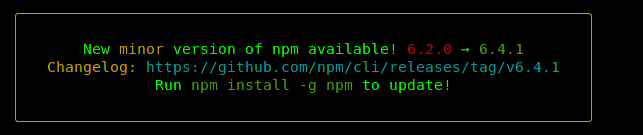
I have no idea why everything seems to now work normally with all versions.
sorvani
on 25 Nov 2018
Thank you for the update. Perhaps there was something temporarily wrong with one of the CentOS 7 versions of Node. Please feel free to re-open if you're able to narrow this down to a specific release of Node.
lovell
on 4 Dec 2018
I had the same story with CentOS 7 and zlib 1.2.7
I tried to update system zlib which as a very bad idea. My VPS stopped work at all, then I recover the server with backup and stumble upon this article: https://unix.stackexchange.com/questions/476450/trying-to-resolve-dependency-on-libz-so-1zlib-1-2-9
I just repeat the answer that helped me out:
I created these directories:
mkdir /opt/zlib
cd /opt/zlib
mkdir /1.2.11
mkdir /src
I then moved into /opt/zlib/src and:
wget https://github.com/madler/zlib/archive/v1.2.11.tar.gz
I then decompressed it and moved into the directory containing the config just as I'm sure you did and then ran this:
tar -zxf v1.2.11.tar.gz
cd zlib-1.2.11
./configure --prefix=/opt/zlib/1.2.11
Then I ran make and make install.
make; make install;
That put the libraries in:
/opt/zlib/1.2.11/lib
I then ran this command to see ZLIB_1.2.9 available:
strings -d /opt/zlib/1.2.11/lib/libz.so | grep ^ZLIB
Lastly, I modify ~/.bashrc and append this:
export LD_LIBRARY_PATH=/opt/zlib/1.2.11/lib:/usr/lib64:$LD_LIBRARY_PATH
After this steps problem disappeared.
 kahurangitama
on 11 Dec 2018
kahurangitama
on 11 Dec 2018
Related issues
 zhump
·
3Comments
zhump
·
3Comments
 AVVS
·
3Comments
AVVS
·
3Comments
 OleVik
·
3Comments
OleVik
·
3Comments
 jaydenseric
·
3Comments
jaydenseric
·
3Comments
 genifycom
·
3Comments
genifycom
·
3Comments
Most helpful comment
I had the same story with CentOS 7 and zlib 1.2.7
I tried to update system zlib which as a very bad idea. My VPS stopped work at all, then I recover the server with backup and stumble upon this article: https://unix.stackexchange.com/questions/476450/trying-to-resolve-dependency-on-libz-so-1zlib-1-2-9
I just repeat the answer that helped me out:
I created these directories:
I then moved into /opt/zlib/src and:
I then decompressed it and moved into the directory containing the config just as I'm sure you did and then ran this:
Then I ran make and make install.
That put the libraries in:
I then ran this command to see ZLIB_1.2.9 available:
Lastly, I modify ~/.bashrc and append this:
After this steps problem disappeared.