Sharex: Have all "after capture tasks" trigger after capture, instead of sequentially?
I currently have the following "after capture tasks" set:
- Open in image editor
- Copy image to clipboard
- Save image to file
In the image editor, if I don't click the Continue Task button (or spacebar/right-click), then the image is never copied to my clipboard or saved to my screenshots folder.
I work in QA, so I sometimes use the image editor to mark up my screenshots with arrows or boxes to highlight issues. But there are plenty of times when I don't need to mark up a screenshot, I just want to paste it "as is". If I don't continue my task then it never gets to my clipboard. I have to remember to interact with the image editor each time.
There would be two possible solutions for my situation:
- Have all "after capture tasks" trigger at the same time, instead of sequentially, so by the time the image editor opens the file is already in my clipboard and saved
- Allow me to reorder the sequence of the "after capture tasks", so the clipboard copy happens first, then the "save", then the "image editor"
Is any of this currently possible?
 frankrende
All 5 comments
I have the same requirement and would prefer this order:
- Copy image to clipboard
- Save image to file
- Open in image editor
Any workarounds perhaps?
 Kobus-Smit
on 11 Dec 2019
Kobus-Smit
on 11 Dec 2019
Found a workaround:
Add the Perform actions to the After capture tasks
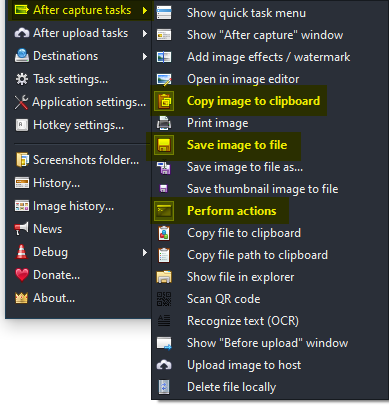
Add an Action with Name: Edit with ShareX File path: C:\Program Files\ShareX\ShareX.exe Arguments: -ImageEditor %input

Kobus-Smit
on 11 Dec 2019
This sounds like an issue of a conflict of user expectations.
One camp will expect cancelling the editor will abandon an operation, the other, that it continues with no changes made.
Personally I'd be a fan of explicit cancel/halt, and implicit continue.
 ryantheleach
on 5 Feb 2020
ryantheleach
on 5 Feb 2020
I would also like some features around this.
I would like the ability to have it in this order
Save the file
Apply Effects
Copy to Clipboard
Open Editor
It would be nice to reorder the list of after capture tasks and also choose if we can skip the task list or not. This could just be a simple settings page.
 andyhoffman12
on 28 Apr 2020
andyhoffman12
on 28 Apr 2020
Found a workaround:
Add the
Perform actionsto theAfter capture tasks
Add an Action with Name:
Edit with ShareXFile path:C:\Program Files\ShareX\ShareX.exeArguments:-ImageEditor %input
Hey @Kobus-Smit - your solution was working for me until I updated to the latest version. Now every time I right-click the Image Editor to close it, it reopens again. I think it's related to the Action. Is this happening for you as well? Any ideas?
frankrende
on 15 Sep 2020
Related issues
 tx-trainwreck
·
46Comments
tx-trainwreck
·
46Comments
 maciozo
·
24Comments
maciozo
·
24Comments
 MoistLemon
·
25Comments
MoistLemon
·
25Comments
 kuyagic
·
21Comments
kuyagic
·
21Comments
 TNTUP
·
34Comments
TNTUP
·
34Comments
Most helpful comment
Found a workaround:
Add the
Perform actionsto theAfter capture tasksAdd an Action with Name:
Edit with ShareXFile path:C:\Program Files\ShareX\ShareX.exeArguments:-ImageEditor %input