Hello,
I just wanted to thank the developers and contributors of ShareX and say that I love it.
However, in the most recent version the change from Greenshot image editor after uploading an image to the Annotation editor has been a significantly worse and jarring experience. The improvement Annotation editor provides over Greenshot image editor is the keybinds that allow you Apply Changes, Accept and Upload, or Cancel.
Aside from those 3 keybinds, everything else was a step back. To start with, the annotation covers your entire screen and blacks it out. If we look at Microsoft and when they first introduced their Metro UI, the start menu took over the entire screen. There is a very specific reason why this was disliked- even hated-
by a huge vast majority of people who used it, and why they brought back the original style start menu in 8.1 and the following Windows 10. It is because taking over your entire screen is immediately displacing the user and making them feel like they had lost control of their environment for a brief moment. Without a doubt the new Annotation editor engenders very much the same feeling; you feel displaced as if you lost control for a brief moment. While in the Greenshot image editor, it was just a window that popped up over your existing workflow/windows.
The second issue with the Annotation editor, is that in the Greenshot image editor, there was keybinds for all the tools. This made quick and easy image edits a breeze. I used to be able to region capture, hit the F key and draw an arrow, then click accept (this is where the new apply changes binds are an improvement).
Now with the Annotation editor taking over my screenspace suddenly, I have to click each tool (with a toolbar located at the very top of the screen) I want to use instead of using a keybind to access it's usage.
So here's a list of improvements - in my opinion - to the Annotation editor that can be done in order keep in parity or an improvement over the original experience of the original Greenshot image editor that was bundled with ShareX.
1) Do not take over the entire screen and black it out. Have the region capture be put into a window that comes up on top of everything else. This is a dramatically better user experience, it has been proven with Windows 8 and the huge backlash of it's original start menu. They removed it in the end. Taking over the entire user's screen as part of the screenshot workflow is not a pleasant experience.
1a) Have the toolbar attached to the window, if anyone is going to click instead of using keybinds, this is much faster than traveling a huge distance from the toolbar to the region capture to edit it.
2) Add keybinds for each of the tools and settings. Not having keybinds combined with the fact the Annotation editor takes over your entire screen, then placing the toolbar at the very top means there's a lot of distance needed to travel just to reach the tools, click, then move all the way back to the image. If the image is small region capture, it's a big distance to cover. It dramatically increases the time it takes just to draw a little arrow to something and send it off for upload, and pasting the link to someone. If you do this a lot in a day (sometimes I do hundreds in a day), it can be a hugely time consuming task going from 2-3 seconds to 5-10 seconds. Eating up almost an hour in a day.
3) Color presets for the changing color options. Being able to edit your color freely is nice, but for the sake of speed, you want to always provide some preset options as well as having the ability to customize your own color.
Thank you for reading this.
 Amarbar
All 9 comments
These are great suggestions!
The blackout is very jarring and keybinds are really important.
Is it possible to use a different app for annotations?
Thanks!
-Donald
 nc3d
on 20 Jun 2017
nc3d
on 20 Jun 2017
I have been using shareX for a few years and loved it until the latest upgrade with the new annotation tool as well.
The full screen mode is really a turn off for me and i have to uninstall shareX and just use greenshot by itself right now.
I like we can zoom in on the new annotation tool, but the full screen mode and lack of key binding really makes it unusable since i usually have to reference some other windows while annotating the screenshot.
I will definitely try the new version when it's released and see if things are better!
Thanks for creating an awesome tool!
 jcky000
on 29 Jun 2017
jcky000
on 29 Jun 2017
The same here; just installed sharex and started using greeshot for the very precise reason mentioned by Amarbar!!!
 awahab01
on 31 Jul 2017
awahab01
on 31 Jul 2017
Have you tried the "multi region mode" for region capture in task settings?
1) It still shows the screens even though frozen, but better than blacked-out screens.
All though I can see it might appeal to some as means to keep the focus on the capture region annotation, it would be nice as a setting to have the ShareX annotation editor opening in a window, especially able to set it to show on the primary monitor.
Multi region mode allows you to still adjust the area to be captured, have multiple selections, even across multiple monitors, awesome!
(You can then save them with transparent background using ENTER, background from all screens SPACE but not sure how to get with background from only the active screen?)
More so in the live capture region with annotation mode you can have a drawing ie, rectangle or effects like blur or highlight, basically snap like a magnet to the window shape or parts within; so easy, fast and accurate it's insane! I love this now the most!
Not sure about 1a) as it shows toolbar for me on the top, in the active monitor you started region capture (in current version)
2) Also it has keybinds which you can see via F1 and you can switch quickly between tools with CTRL+mouse wheel!
3) A color preset would be really useful indeed for faster color selection, desperately miss that as it also ensures consistency across annotation edits!
Please add this functionality either to show a color picker palette with few choices or better even to be able to save a few presets.
 markusd1984
on 22 Aug 2017
markusd1984
on 22 Aug 2017
Just wanted to chime in and agree here, as the original post is very well put.
 Treeefort
on 20 Oct 2017
Treeefort
on 20 Oct 2017
Just found this and now I'm back to the old editor. Phew!
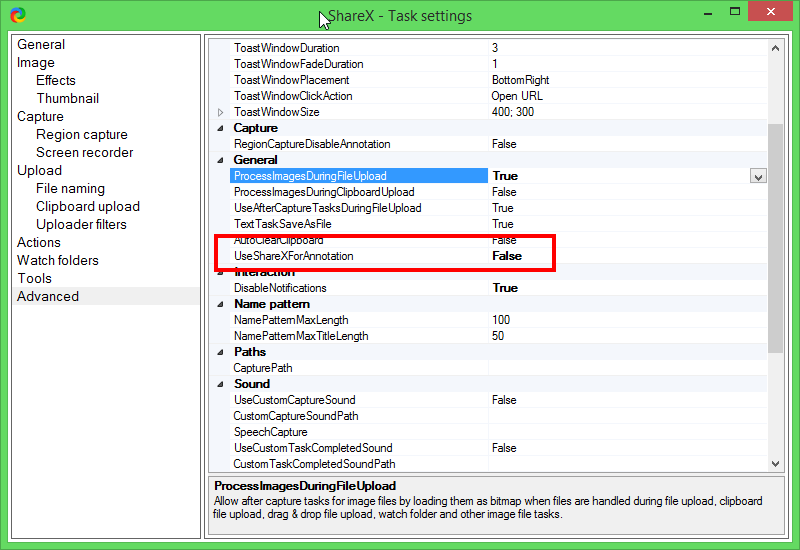
 cbenard
on 23 Oct 2017
cbenard
on 23 Oct 2017
@cbenard Thank you! This is exactly what I wanted! Cheers
Treeefort
on 23 Oct 2017
Duplicate of #2436
Added more info to that issue.
 Jaex
on 24 Oct 2017
Jaex
on 24 Oct 2017
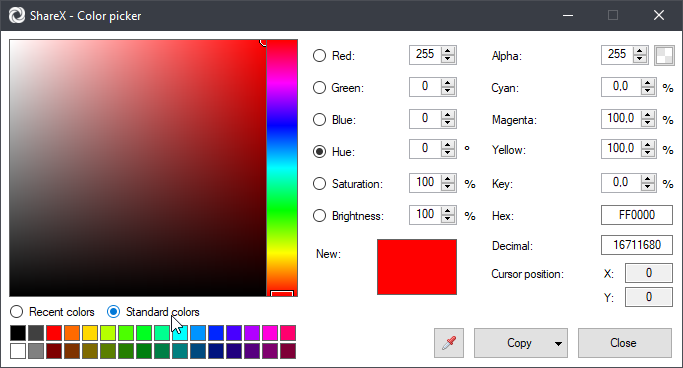
Added color preset:
Jaex
on 13 Feb 2019
Related issues
 aph3rson
·
24Comments
aph3rson
·
24Comments
 coggy9
·
29Comments
coggy9
·
29Comments
 ned-martin
·
112Comments
ned-martin
·
112Comments
 Centzilius
·
39Comments
Centzilius
·
39Comments
 Zaczero
·
74Comments
Zaczero
·
74Comments