Sharex: 11.7 After capture tasks\Annotate image dont open sharex annotate after capture
In this last version when active Annotate image in After capture tasks dont open image in sharex annotate when select Capture Region
Only works with Capture Entire Screen Hotkey and Capture Active Window, with Capture Region hotkey dont work.
 fernandoslemos
All 11 comments
I'm also having this issue, there is no obvious way to change from the greenshot editor.
 ianelletson
on 17 Apr 2017
ianelletson
on 17 Apr 2017
Reason why it not opens with region capture because region capture itself have annotation support (with toolbar). But fullscreen and active window don't have that region capture annotation therefore it opens with them. So on purpose it not opens on region capture so you won't get 2x region capture window. So aim here is to make your work faster.
 Jaex
on 18 Apr 2017
Jaex
on 18 Apr 2017
I have solution to this issue.
What about using this setting:
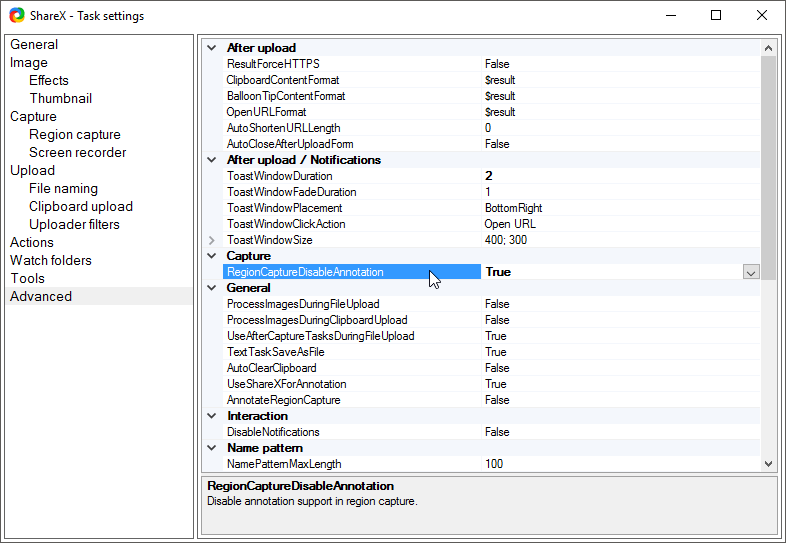
Currently region capture not shows annotation toolbar with this setting and with modification, after capture it will show annotation window. So it can work as how you expected.
Jaex
on 14 May 2017
That sounds perfect. My workaround right now is to open the application
after file save. Thanks for looking into this.
On Sat, May 13, 2017, 17:31 Jaex notifications@github.com wrote:
I have solution to this issue.
What about using this setting:
So region capture not shows annotation toolbar with this setting and after
capture it will show annotation window as what you expected.—
You are receiving this because you commented.
Reply to this email directly, view it on GitHub
https://github.com/ShareX/ShareX/issues/2438#issuecomment-301278742, or mute
the thread
https://github.com/notifications/unsubscribe-auth/ABJrSnPjE7z88SHRySeBTe1s2np_NHm0ks5r5i8ngaJpZM4M_RYr
.
ianelletson
on 14 May 2017
Still this is confusing for people. Because people enable "Annotate image" and then nothing happens. So I'm thinking now another solution. What if annotate window show only when region capture didn't have any annotation added. For example if you annotate while in region capture, it won't open additional annotation window, but if you didn't annotate in region capture then it will open. So intelligently it will decide when to show annotate window that way workflow gonna be fast as before.
Jaex
on 15 May 2017
@Jaex this sounds even better than an option in my opinion. Would be perfect for my use.
 Fredrik-G
on 15 May 2017
Fredrik-G
on 15 May 2017
Am I missing something? Is this supposed to work now? I just did a fresh install on a new computer and I can't get it to work how I'm used to it working at all.
My settings have always been simple. After capture, don't save or copy to clipboard, just open in the annotate window. From there you can either annotate, save as-is or discard. Simple. Except now I can't get it to open an annotate window after capture at all. Flipping that advanced switch doesn't make it so, but further down this thread it says that it should open automatically if it wasn't annotated up front. That would make sense, but it's not happening.
11.7 on Win8.1
 narcolepticinsomniac
on 27 Jun 2017
narcolepticinsomniac
on 27 Jun 2017
I have the same behavior, narco. What I do now is have a save & open in
greenshot action. It's not ideal, but it works.
On Tue, Jun 27, 2017 at 4:31 PM narcolepticinsomniac <
[email protected]> wrote:
Am I missing something? Is this supposed to work now? I just did a fresh
install on a new computer and I can't get it to work how I'm used to it
working at all.My settings have always been simple. After capture, don't save or copy to
clipboard, just open in the annotate window. From there you can either
annotate, save as-is or discard. Simple. Except now I can't get it to open
an annotate window after capture at all. Flipping that advanced switch
doesn't make it so, but further down this thread it says that it should
open automatically if it wasn't annotated up front. That would make sense,
but it's not happening.11.7 on Win8.1
—
You are receiving this because you commented.
Reply to this email directly, view it on GitHub
https://github.com/ShareX/ShareX/issues/2438#issuecomment-311492023, or mute
the thread
https://github.com/notifications/unsubscribe-auth/ABJrSjBombug6q7i6h92lO9aCjemUfspks5sIXSbgaJpZM4M_RYr
.
ianelletson
on 27 Jun 2017
Thanks for confirming. From what I'm reading in this thread, if it's not annotated up front, it should open in an annotate window after, as it always used to. That just isn't happening, which sucks.
narcolepticinsomniac
on 28 Jun 2017
Just created an account to show the fix for this issue.
Go to Task Settings > General > "UseShareXForAnnotation"
Set this value to False

You'll then be able to make annotations once again.
 Beznia
on 2 Jul 2017
Beznia
on 2 Jul 2017
Thanks, that's exactly it!
On Sat, Jul 1, 2017 at 5:49 PM Beznia notifications@github.com wrote:
Just created an account to show the fix for this issue.
Go to Task Settings > General > "UseShareXForAnnotation"
Set this value to False[image: mixvrde]
https://user-images.githubusercontent.com/29825293/27765936-059b26ea-5e8e-11e7-8d99-d8be539ea043.pngYou'll then be able to make annotations once again.
—
You are receiving this because you commented.
Reply to this email directly, view it on GitHub
https://github.com/ShareX/ShareX/issues/2438#issuecomment-312459794, or mute
the thread
https://github.com/notifications/unsubscribe-auth/ABJrSj0uDHTammyS8V8Je9o5OOCyG0Icks5sJs0KgaJpZM4M_RYr
.
ianelletson
on 2 Jul 2017
Related issues
 bbigras
·
18Comments
bbigras
·
18Comments
 aph3rson
·
24Comments
aph3rson
·
24Comments
 ghost
·
27Comments
ghost
·
27Comments
 Freekers
·
68Comments
Freekers
·
68Comments
 DBJDBJ
·
25Comments
DBJDBJ
·
25Comments
Most helpful comment
Still this is confusing for people. Because people enable "Annotate image" and then nothing happens. So I'm thinking now another solution. What if annotate window show only when region capture didn't have any annotation added. For example if you annotate while in region capture, it won't open additional annotation window, but if you didn't annotate in region capture then it will open. So intelligently it will decide when to show annotate window that way workflow gonna be fast as before.