Sharex: Option to remove ShareX from Windows context menu
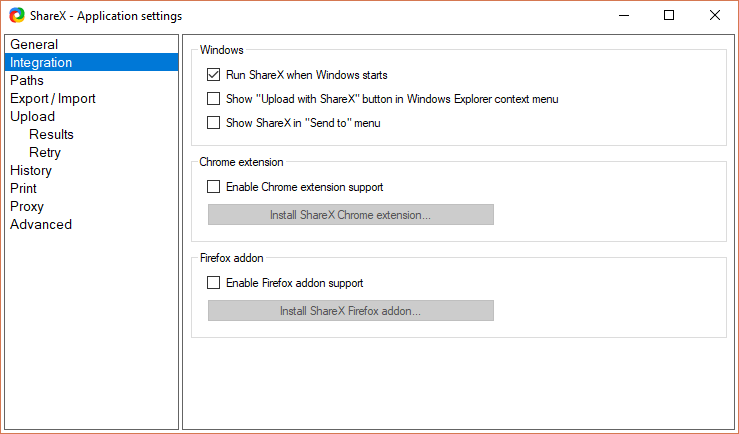
Is there a setting to remove ShareX entries from Windows context menu? Can this be done without registry editing or third-party software?

 07416
07416
All 8 comments
Uncheck this:

 Jaex
on 19 Dec 2016
Jaex
on 19 Dec 2016
I have disabled the setting, it was enabled again. I use Chocolatey repository: https://chocolatey.org/packages/sharex
07416
on 19 Dec 2016
You must have enabled it from setup, which remembers your setting and re enable it when re installing for update. I can't find way to not enable it while reinstalling. So you must uninstall and reinstall with those setup options not checked.
Jaex
on 19 Dec 2016
@Jaex Why can the option not be added in the program itself? You would just need to manage the registry entry, remove/adding relative to option.
 sparcut
on 9 Dec 2017
sparcut
on 9 Dec 2017
Option already in the program.
Jaex
on 9 Dec 2017
@Jaex Your image in the second post appears to have been removed.
07416
on 9 Dec 2017
Because Dropbox removed all public folder urls.
Jaex
on 9 Dec 2017
For anyone finding this in the future, its right in front of you. 
sparcut
on 20 Dec 2017
Related issues
 kuyagic
·
21Comments
kuyagic
·
21Comments
 Zaczero
·
74Comments
Zaczero
·
74Comments
 TNTUP
·
34Comments
TNTUP
·
34Comments
 coggy9
·
29Comments
coggy9
·
29Comments
 MoistLemon
·
25Comments
MoistLemon
·
25Comments
Most helpful comment
For anyone finding this in the future, its right in front of you.