I've been trying to figure out how I enabled this on my own, but haven't found a solution yet.
http://i.imgur.com/JrLyJlx.png
 anders1122
All 8 comments
Right click in region capture and select "Region: Rectangle".

 Jaex
on 11 Aug 2016
Jaex
on 11 Aug 2016
Thank you so much.
anders1122
on 11 Aug 2016
Thanks!
 yolarrydabomb
on 25 Aug 2016
yolarrydabomb
on 25 Aug 2016
Is this accidental region mode changes happening using mouse wheel right?
I'm planning to swap it with ctrl + mouse wheel so that way instead it will just resize magnifier.
Jaex
on 31 Aug 2016
I feel like it was most likely me accidentally using my mouse wheel, because I had not messed with it using right click in the past at all before this happened to me.
anders1122
on 31 Aug 2016
[solved]
Maybe im a lame, or some issue with the traduction of myGUI,. but i cant find:
Right click in region capture and select "Region: Rectangle".
--> this 🙈
And that oval wont go.
 k0-ba
on 6 Oct 2017
k0-ba
on 6 Oct 2017
YAAAAY. After enabling the hotkey tooltips I found that the NUM 0 changes the shape, after I performing the hotkeys for "rectangle" capture!
Problem solved!
BY THE WAY, I love this product, I think I will be your patron.
k0-ba
on 6 Oct 2017
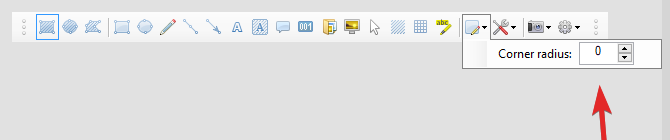
Normally you select it from toolbar:

and if it is rounded rectangle then:
Jaex
on 6 Oct 2017
Related issues
 Dyras
·
4Comments
Dyras
·
4Comments
 Yandols
·
4Comments
Yandols
·
4Comments
 Hakaan256
·
4Comments
Hakaan256
·
4Comments
 Stele77
·
3Comments
Stele77
·
3Comments
 hiltronrex
·
3Comments
hiltronrex
·
3Comments
Most helpful comment
Right click in region capture and select "Region: Rectangle".