Shardingsphere: When using mycli to connect, it is normal, but when using DataGrip to connect to sharding-proxy, the table is not fragmented, and the physical table is displayed
Connect to the same sharding-proxy, but inDataGrip, the physical table is displayed instead of the logical table

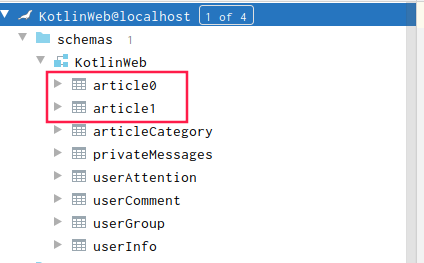
When using DataGrip connection, there is still an error

Error encountered when performing Introspect schema KotlinWeb: 2Unknown exception: [Cannot find table rule and default data source with logic table: 'table_constraints'].
2Unknown exception: [Cannot find table rule and default data source with logic table: 'table_constraints']
 (4 s 654 ms)
But I haven't created the table_constraints table
The following is my configuration, the version of sharding-proxy used is 4.0.1
schemaName: KotlinWeb
dataSources:
  master0slave:
    password: root
    url: jdbc:mysql://mysql-master0-slave:3306/KotlinWeb?autoReconnect=true&useUnicode=true&useSSL=false&characterEncoding=UTF8
    username: root
  master1slave:
    password: root
    url: jdbc:mysql://mysql-master1-slave:3306/KotlinWeb?autoReconnect=true&useUnicode=true&useSSL=false&characterEncoding=UTF8
    username: root
  master0:
    password: root
    url: jdbc:mysql://mysql-master0:3306/KotlinWeb?autoReconnect=true&useUnicode=true&useSSL=false&characterEncoding=UTF8
    username: root
  master1:
    password: root
    url: jdbc:mysql://mysql-master1:3306/KotlinWeb?autoReconnect=true&useUnicode=true&useSSL=false&characterEncoding=UTF8
    username: root
shardingRule:
  tables:
    userInfo:
      keyGenerator:
        column: userId
        type: SNOWFLAKE
      actualDataNodes: ds$->{0..1}.userInfo
      databaseStrategy:
        inline:
          shardingColumn: userId
          algorithmExpression: ds$->{userId % 2}
    userComment:
      keyGenerator:
        column: commentId
        type: SNOWFLAKE
      actualDataNodes: ds$->{0..1}.userComment
      databaseStrategy:
        inline:
          shardingColumn: commentId
          algorithmExpression: ds$->{commentId % 2}
    articleCategory:
      keyGenerator:
        column: articleCategoryId
        type: SNOWFLAKE
    userGroup:
      keyGenerator:
        column: groupId
        type: SNOWFLAKE
    article:
      tableStrategy:
        inline:
          shardingColumn: articleId
          algorithmExpression: article$->{articleId % 2}
      keyGenerator:
        column: articleId
        type: SNOWFLAKE
      actualDataNodes: ds$->{0..1}.article$->{0..1}
      databaseStrategy:
        inline:
          shardingColumn: userId
          algorithmExpression: ds$->{userId % 2}
    privateMessages:
      keyGenerator:
        column: messageId
        type: SNOWFLAKE
      actualDataNodes: ds$->{0..1}.privateMessages
      databaseStrategy:
        inline:
          shardingColumn: messageId
          algorithmExpression: ds$->{messageId % 2}
#    bindingTables:
#    - userInfo,article,userComment
#   - privateMessages
#   - userComment
  defaultDatabaseStrategy:
    inline:
      shardingColumn: userId
      algorithmExpression: ds${userId % 2}
  defaultTableStrategy:
    none:
  masterSlaveRules:
    ds0:
      masterDataSourceName: master0
      slaveDataSourceNames:
      - master0slave
    ds1:
      masterDataSourceName: master1
      slaveDataSourceNames:
      - master1slave
  broadcastTables:
  - articleCategory
  - userGroup
 chen645800876
All 4 comments
English only. plz update your issue.
turn on “introspect using jdbc metadata”(or it will get all real tables info from informations_schema) in idea or datagrip. [1]
1.https://shardingsphere.apache.org/document/current/en/faq/#22-how-to-use-a-suitable-database-tools-connecting-sharding-proxy
 kimmking
on 26 Apr 2020
kimmking
on 26 Apr 2020
English only. plz update your issue.
turn on “introspect using jdbc metadata”(or it will get all real tables info from informations_schema) in idea or datagrip. [1]
1.https://shardingsphere.apache.org/document/current/en/faq/#22-how-to-use-a-suitable-database-tools-connecting-sharding-proxy
Thanks for answering, the problem just now has been solved. But there is a new problem, the table names of the query are all lowercase, but in fact some table names have uppercase letters, which will cause this part of the table to not open on the tool
chen645800876
on 26 Apr 2020
In default, table name is not case-sensitive.
kimmking
on 26 Apr 2020
In default, table name is not case-sensitive.
Thanks for answering,then I modify the configuration of the database
chen645800876
on 26 Apr 2020
Related issues
 terrymanu
·
6Comments
terrymanu
·
6Comments
 An0nymous0
·
4Comments
An0nymous0
·
4Comments
 xydonne
·
4Comments
xydonne
·
4Comments
 xiangtao123
·
7Comments
xiangtao123
·
7Comments
 Beyondeclipse
·
5Comments
Beyondeclipse
·
5Comments
Most helpful comment
English only. plz update your issue.
turn on “introspect using jdbc metadata”(or it will get all real tables info from informations_schema) in idea or datagrip. [1]
1.https://shardingsphere.apache.org/document/current/en/faq/#22-how-to-use-a-suitable-database-tools-connecting-sharding-proxy