Hi,
@slundberg .I can't import shap either on python 3.5 on Ubuntu and 3.6 on Windows. In both cases (after installing with 'pip install shap') I get the following error:
ImportError Traceback (most recent call last)
----> 1 import shap
~/data/dev/lib/python3.5/site-packages/shap/__init__.py in
12 from .plots.image import image_plot
13 from . import datasets
---> 14 from . import benchmark
15 from .explainers import other
ImportError: cannot import name 'benchmark'
 uriel-vinetz-rf
All 14 comments
Thanks! Travis didn't catch that since it does a git clone, but it should be fixed now with 0.22.1
 slundberg
on 8 Aug 2018
slundberg
on 8 Aug 2018
@slundberg We still see an error, this time:
shap/benchmark/scorers.py", line 4, in <module>
    from ..explainers import other
ImportError: cannot import name other
The error is here but it's the same when you pip install it locally on a Mac.
 mrandrewandrade
on 8 Aug 2018
mrandrewandrade
on 8 Aug 2018
Sorry I missed that one. I fixed that now in 0.22.2. (I also uninstalled and reinstalled from pip locally just to make sure).
slundberg
on 8 Aug 2018
It works now, thanks!
uriel-vinetz-rf
on 9 Aug 2018
Hi Scott,
I am getting the same issue too when importing shap in the anaconda console:

It works when I import in Jupyter notebook, but I cannot seem to be able to import shap from command line.
 PrashantSaikia
on 8 Oct 2018
PrashantSaikia
on 8 Oct 2018
@PrashantSaikia Are you also getting a benchmark import error? It could be that something about ipython is unhappy, you could try importing from the ipython command line.
slundberg
on 8 Oct 2018
@slundberg Which benchmark package are you referring to? I tried installing 'benchmark', but I don't think it exists:
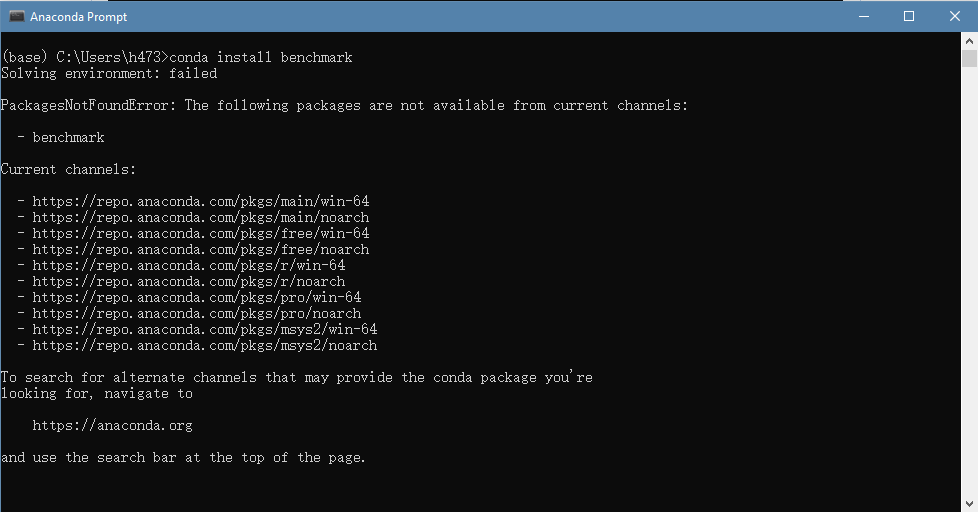
The thing is, I am building a dashboard app where users can select a dataset (from a dropdown, etc), and the SHAP summary plot is displayed as output. The package shap doesn't install with pip on Windows 10, so I cannot run the app from cmd; it installs on anaconda, and I have been using it with iPython (jupyter notebook), but as you can see I am not able to import shap in the anaconda command line. Thus, I am trapped.
I also tried iPython command line, same issue there:

PrashantSaikia
on 9 Oct 2018
Sorry the 'benchmark' issue I was referring to was the problem the OP had, it was not a separate package but an issue with a submodule in shap named benchmark. I think your issue is different.
It looks like you Ctrl-C'd the import because it was hanging for a long time. Is that correct? I don't use Windows so I can only be of so much help in debugging install issues there. I am still not sure why you could run it on a win10 notebook but not from ipython. Jupyter is supposed to just run ipython in the background for you.
slundberg
on 10 Oct 2018
Hi Scott. No, I did not Ctrl+C the process, that pop up saying "Python has stopped working" comes up on its own after about 20 seconds of typing "import shap". I also ran a python scrip that only had the 1 line "import shap"; same result, the pop up shows up after about 20 seconds of running it.
PrashantSaikia
on 10 Oct 2018
I found the problem. In my case, the default backend GUI that matplotlib uses in anaconda to show the plots, called qt5, was either broken or malfunctioning. So, all packages that are built on top of matplotlib couldn't be imported. And the fix was to use another backend. And now it works fine.
Also, the issue of not being able to install shap with pip on Windows 10 is fixed by installing Visual Studio (VS 2010 for Python 2.7, VS 2015 for Python 3.5, and VS 2017 for Python 3.6), and the Windows dev kit which is installed automatically when opening a new C++ project in VS. Then, we need to pip install --upgrade setuptools, and we're good to go.
PrashantSaikia
on 11 Oct 2018
@PrashantSaikia thanks for posting the solution!
slundberg
on 19 Oct 2018
Hello, I'm getting this error. I have tried to install numpy again as well as shap, and it hasn't worked.
I'm using windows 7 and jupyter notebook
cannot import name '_validate_lengths' from 'numpy.lib.arraypad
 Carlos1916
on 31 Mar 2019
Carlos1916
on 31 Mar 2019
@Carlos1916 It could be worth trying to install all of shap's dependencies first (['numpy', 'scipy', 'scikit-learn', 'matplotlib', 'pandas', 'tqdm', 'ipython', 'scikit-image']). That way if one of those breaks you can get closer to the original problem.
slundberg
on 3 Apr 2019
RE: cannot import name '_validate_lengths' from 'numpy.lib.arraypad
Seems as though this stems from a problem with scikit-image
https://github.com/scikit-image/scikit-image/issues/3551
per their issue resolution:
- check if you have scikit-image <0.14.2
- if so, install latest version
 nickwan
on 23 May 2019
nickwan
on 23 May 2019
Related issues
 nickkimer
·
4Comments
nickkimer
·
4Comments
 Nithanaroy
·
4Comments
Nithanaroy
·
4Comments
 yolle103
·
3Comments
yolle103
·
3Comments
 saurabhhjjain
·
3Comments
saurabhhjjain
·
3Comments
 ArpitSisodia
·
3Comments
ArpitSisodia
·
3Comments
Most helpful comment
RE:
cannot import name '_validate_lengths' from 'numpy.lib.arraypadSeems as though this stems from a problem with
scikit-imagehttps://github.com/scikit-image/scikit-image/issues/3551
per their issue resolution: