Shairport-sync: multiple instances of shairport-sync on one machine
Is it possible to run more than one shairport-sync instance on one machine? I'm using a raspberry pi with shairport-sync and a bluetooth speaker but I would also like to run another instance on the same machine which makes use of a usb audio device.
First process:
start-stop-daemon --start --quiet --pidfile $PIDFILE --exec $DAEMON -- -d -a "Shairport (bluetooth)" -- -d bluetooth || return 2
Second process:
start-stop-daemon --start --quiet --pidfile $PIDFILE --exec $DAEMON -- -d -a "Shairport (USB-Audio)" -- -d hw:1 || return 2
Is this possible?
 tristan-k
All 11 comments
I haven't tried this, and I'm not sure about how they would interact with the start-stop stuff.
Two instances of Shairport Sync can run if:
- Neither one uses the -d (--daemon) option. This is because an instance checks to see if another instance is running by checking for the existence of the PID file.
- Both listen on different ports – use the -p option to select a port;
- Both have different service names – use the -a option.
It looks like you're using the -d (daemon) option above and you don't select different ports – both of these would cause problems. I'm afraid you'll have to experiment with the start-stop mechanism to see if you can get it to daemonise.
 mikebrady
on 28 Jan 2015
mikebrady
on 28 Jan 2015
It's actually quite easy although the solution is not really beautiful: Create a symbolic link to shairport-sync named shairport-sync2 or similar. Then, duplicate the startup file in /etc/init.d and replace all references to shairport-sync by shairport-sync2. Don't forget to change the "Provides: shairport-sync" at the beginning.
Finally, run update-rc.d and you're done.
I hope, I haven't forgotten anything, but there was no real problem.
 axel-j
on 1 Feb 2015
axel-j
on 1 Feb 2015
Thanks! I tried this out and it works perfectly and gets around the -d or --daemon problem I identified earlier. I think this closes the issue.
mikebrady
on 3 Feb 2015
Thanks!
tristan-k
on 3 Feb 2015
Hello there,
I tried the solution with symbolic link. The different shairport-sync instances start and i can stream to one of them. As soon as i start the second streaming, my rasperry pi crashes and reboots.
What i did:
/usr/local/bin contains shairport-sync, shairport-sync1, shairport-sync2, shairport-sync3
/etc/ contains shairport-sync.conf, shairport-sync1.conf, shairport-sync2.conf, shairport-sync3.conf (each configuration uses its own Port and UPD Port Range as well as output_device)
/etc/init.d/ contains shairport-sync,shairport-sync1, shairport-sync2, shairport-sync3 (i renamed everything to use the corresponding shairport-sync in /usr/local/bin)
As mentioned, it populates the airports and i can see them on my iPad, iPhone and on PC but as soon as i start to stream to the second one. Buuum...
Can someone help me with this issue?
Thank you very much.
Yves
 rolarga
on 31 Dec 2015
rolarga
on 31 Dec 2015
What I did without multiple copies of /usr/local/bin/shairport-sync dir (assuming using systemd)
make one copy of the /lib/systemd/system/shairport-sync.service and name like:
sudo cp /lib/systemd/system/shairport-sync.service /lib/systemd/system/[email protected]
inside that new .service file:
`
[Unit]
Description=ShairportSync AirTunes receiver %I
After=sound.target
Requires=avahi-daemon.service
After=avahi-daemon.service
[Service]
ExecStart=/usr/local/bin/shairport-sync -c /etc/shairport-sync%I.conf
User=shairport-sync
Group=shairport-sync
SyslogIdentifier=shairport-sync-%I
[Install]
WantedBy=multi-user.target
`
Now make a copy of the /etc/shairport-sync.conf for ever instance/Zone you want:
/etc/shairport-syncZone1.conf
/etc/shairport-syncZone2.conf
/etc/shairport-syncZone3.conf
Modify the zone confs as needs with unique ports, upd port, names, output_device, etc
then start with:
sudo systemctl start shairport-sync@Zone1
sudo systemctl start shairport-sync@Zone2
etc
or enable to auto start with
sudo systemctl enable shairport-sync@Zone1
sudo systemctl enable shairport-sync@Zone2
etc
replace 'Zone1', Zone2' with your Zone names e.g.
sudo systemctl enable shairport-sync@Patio
sudo systemctl enable shairport-sync@Upstairs
with corresponding confs:
/etc/shairport-syncPatio.conf
/etc/shairport-syncUpstairs.conf
Note @ symbol in systemctl command and .service filename/contents BUT NOT in conf file names.
 cre8dojo
on 6 Mar 2016
cre8dojo
on 6 Mar 2016
@cre8dojo:
your solution works perfectly!
 shairportMulti
on 18 Jul 2016
shairportMulti
on 18 Jul 2016
@cre8dojo:
thanks, your solution works well but with one change, port value in conf file must be changed to a unique value for each zone (5000, 5001, etc)
general =
{
port=5000;
}
 dan-cristian
on 26 Nov 2016
dan-cristian
on 26 Nov 2016
Thanks @cre8dojo for your solution and @mikebrady for this project.
At first, my mistake was using %l (lowercase ell) instead of %I (capital eye).
I now have two zones (more to come) up and running!
 samhorne
on 16 Jul 2017
samhorne
on 16 Jul 2017
I've followed the guide above exactly and can see the files in the correct folders. The standard shairport-sync service for raspberrypi is running and works. However when I try the command sudo systemctl start shairport-sync@Zone1 Terminal pauses for a nano second, then goes to a new line. No second zone, I'm relatively new to raspberry pi but have run shairport for windows successfully previously. I'd be grateful if anyone could help me figure out what I am doing wrong. Looking at system monitor I can see the original shairport-sync service running but not the shairport-sync@ service.
 mdsflyer
on 17 Oct 2017
mdsflyer
on 17 Oct 2017
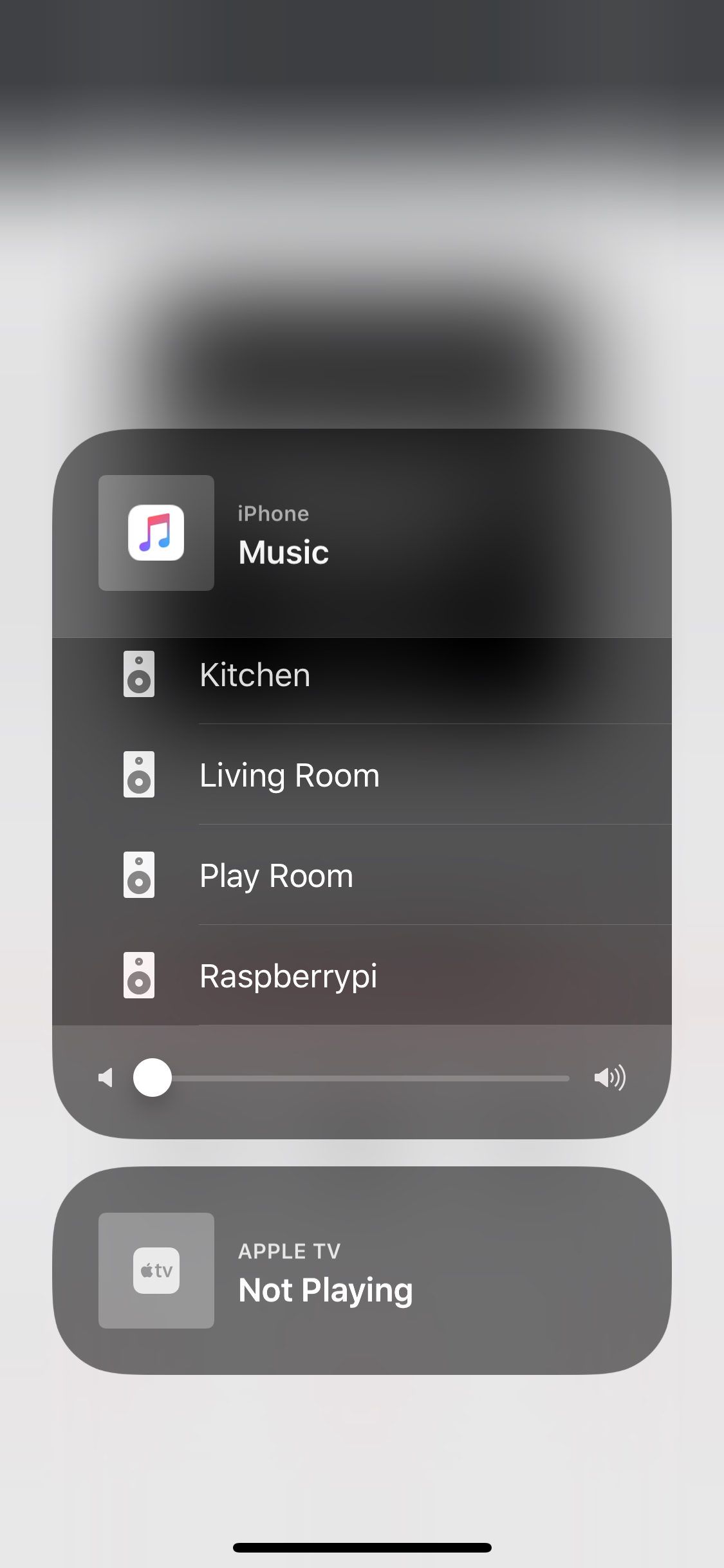
Can someone please tell me how I remove the default "Raspberry Pi" speaker in the AirPlay list as pictured? I'm guessing this is the built in output but I'm using USB sounds cards for my zones as the built in output had a lot of noise on it.
 magichew
on 11 Feb 2018
magichew
on 11 Feb 2018
Related issues
 janlei0524
·
8Comments
janlei0524
·
8Comments
 vasilisvg
·
8Comments
vasilisvg
·
8Comments
 moonwatcher
·
3Comments
moonwatcher
·
3Comments
 PaulWieland
·
8Comments
PaulWieland
·
8Comments
 fundix
·
3Comments
fundix
·
3Comments
Most helpful comment
What I did without multiple copies of /usr/local/bin/shairport-sync dir (assuming using systemd)
make one copy of the /lib/systemd/system/shairport-sync.service and name like:
sudo cp /lib/systemd/system/shairport-sync.service /lib/systemd/system/[email protected]
inside that new .service file:
`
[Unit]
Description=ShairportSync AirTunes receiver %I
After=sound.target
Requires=avahi-daemon.service
After=avahi-daemon.service
[Service]
ExecStart=/usr/local/bin/shairport-sync -c /etc/shairport-sync%I.conf
User=shairport-sync
Group=shairport-sync
SyslogIdentifier=shairport-sync-%I
[Install]
WantedBy=multi-user.target
`
Now make a copy of the /etc/shairport-sync.conf for ever instance/Zone you want:
/etc/shairport-syncZone1.conf
/etc/shairport-syncZone2.conf
/etc/shairport-syncZone3.conf
Modify the zone confs as needs with unique ports, upd port, names, output_device, etc
then start with:
sudo systemctl start shairport-sync@Zone1
sudo systemctl start shairport-sync@Zone2
etc
or enable to auto start with
sudo systemctl enable shairport-sync@Zone1
sudo systemctl enable shairport-sync@Zone2
etc
replace 'Zone1', Zone2' with your Zone names e.g.
sudo systemctl enable shairport-sync@Patio
sudo systemctl enable shairport-sync@Upstairs
with corresponding confs:
/etc/shairport-syncPatio.conf
/etc/shairport-syncUpstairs.conf
Note @ symbol in systemctl command and .service filename/contents BUT NOT in conf file names.