Shadowsocksx-ng: Mac版 使用pac模式无法连接telegram客户端 全局模式可以。
System and Shadowsocksx-NG version:
- macOS 10.??.?? (16E????)
- Shadowsocksx-NG 1.?
Expected behavior:
Actual behavior:
(N/A for feature requests)
Steps to reproduce:
(N/A for feature requests)
How often does this happen?
(N/A for feature requests)
ss-local.log
Please upload the ss-local.log file here the file is in ~/Library/Logs
1) Open 'Advanced Settings -> enable Verbose Mode'
2) Continue run Shadowsocksx-NG for 5 minutes
3) Upload the ~/Library/Logs/ss-local.log here (with or without compress)
Application log
Open the Console.app and search Shadowsocksx-NG
Copy paste the log here
Crash Log
If the app crashes and pop up a crash log, please copy and paste here
 zxfccmm4
All 61 comments
对tg设置代理即可
127.0.0.1
1080
2017-03-25 13:21 GMT+08:00 zxfccmm4 notifications@github.com:
System and Shadowsocksx-NG version:
- macOS 10.??.?? (16E????)
- Shadowsocksx-NG 1.?
Expected behavior:
Actual behavior:
(N/A for feature requests)
Steps to reproduce:
(N/A for feature requests)
How often does this happen?
(N/A for feature requests)
ss-local.log
Please upload the ss-local.log file here the file is in ~/Library/Logs
- Open 'Advanced Settings -> enable Verbose Mode'
- Continue run Shadowsocksx-NG for 5 minutes
- Upload the ~/Library/Logs/ss-local.log here (with or without
compress)Application log
Open the Console.app and search Shadowsocksx-NG
Copy paste the log hereCrash Log
If the app crashes and pop up a crash log, please copy and paste here
—
You are receiving this because you are subscribed to this thread.
Reply to this email directly, view it on GitHub
https://github.com/shadowsocks/ShadowsocksX-NG/issues/290, or mute the
thread
https://github.com/notifications/unsubscribe-auth/ATYE32JLglUfQ4gRqjkcXZ7YL15elsaDks5rpKRSgaJpZM4Mo-I0
.
 hellofx
on 25 Mar 2017
hellofx
on 25 Mar 2017
@hellofx 按照你说的设置并不起作用。版本ss版本 1.5.1
 Spacebody
on 13 May 2017
Spacebody
on 13 May 2017
@Spacebody

 nightire
on 13 May 2017
nightire
on 13 May 2017
port 填你profile里面的port,默认应该是1086
在 2017年5月13日,22:12,Albert Yu notifications@github.com 写道:
@Spacebody https://github.com/spacebody
https://cloud.githubusercontent.com/assets/1104018/26026178/414590bc-3829-11e7-8bab-7a2d90914dfc.png
—
You are receiving this because you are subscribed to this thread.
Reply to this email directly, view it on GitHub https://github.com/shadowsocks/ShadowsocksX-NG/issues/290#issuecomment-301250869, or mute the thread https://github.com/notifications/unsubscribe-auth/AF8zUUXfKEFnTpTG8P1DNSoH3pOHDjCvks5r5bpagaJpZM4Mo-I0.
 qinyuhang
on 13 May 2017
qinyuhang
on 13 May 2017
@nightire 我就是这么设置的啊,依旧无法连接。
@qinyuhang 多谢你的解答,1086是可以的。以前用 shadowsocksX 的时候用的是1080的 port。
Spacebody
on 13 May 2017
@Spacebody 我是一直在用 1080,都不知道什么时候默认 1086 的,如果设置代理的时候不管用,首先应该确认的就是地址和端口号。
nightire
on 13 May 2017
@nightire 我也不清楚,刚换成 NG 没几天。
Spacebody
on 13 May 2017
@nightire @Spacebody 原版的是1080,为了避免2个版本冲突,所以用不一样的默认端口
 qiuyuzhou
on 14 May 2017
qiuyuzhou
on 14 May 2017
@qiuyuzhou 如果文档能够说明一下就好啦。
Spacebody
on 15 May 2017
坑,,,才知道 OO
 tisfeng
on 2 Aug 2017
tisfeng
on 2 Aug 2017
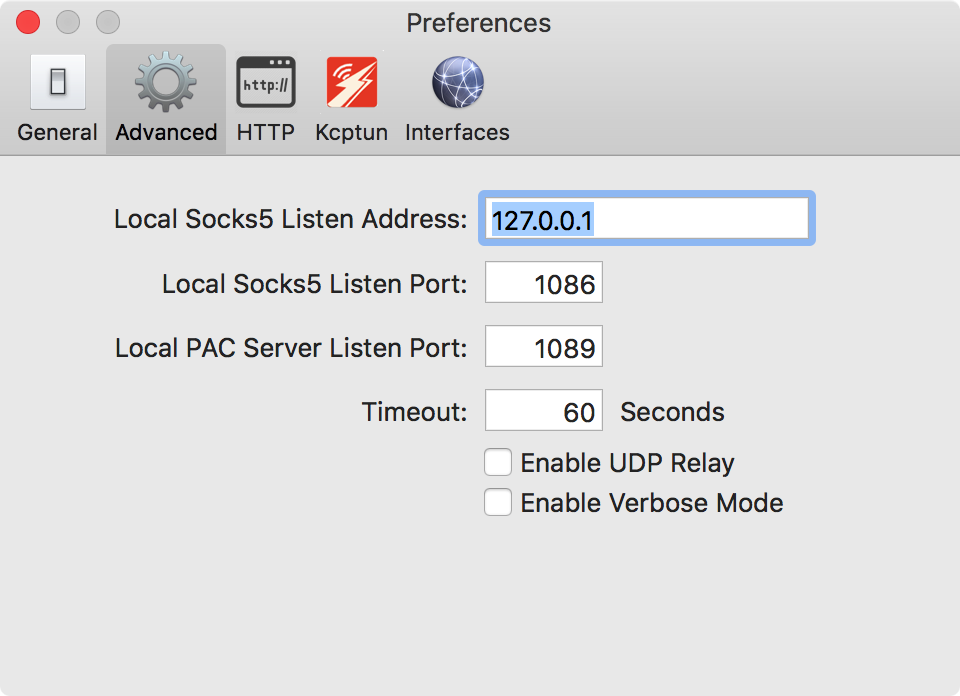
我的本地socks5端口是1086,pac端口是1089。依旧无法连接telegram
 aishuidedabai
on 3 Aug 2017
aishuidedabai
on 3 Aug 2017
在pac模式下。ss-NG版本是1.5.1
aishuidedabai
on 3 Aug 2017
Please try the solution above: In Settings > Connection Type, select socks5-proxy and set the host to 127.0.0.1, port to 1086.
 timothyqiu
on 3 Aug 2017
timothyqiu
on 3 Aug 2017
当我打开设置,我发现了,socks5-proxy and set the host to 127.0.0.1, port to 1086 已经是这样的,但是PAC模式下,依旧telegarm无法连接,奇怪,还有其他办法吗
aishuidedabai
on 3 Aug 2017
So that means even if socks5-proxy is set, Telegram still suffers connection failure?
PAC mode have nothing to do with this. The whole PAC / Global / Manual thing affects just the Network System Preference, i.e. the system proxy. If you set the proxy of your Telegram, every request it makes should go through the Shadowsocks client regardless of your SSX-NG mode.
Try the following command in your terminal:
curl --socks5 localhost:1086 httpbin.org/ip
Is it showing your SS server IP? If not, what's the output?
timothyqiu
on 3 Aug 2017
YES,I use SS lines,But the problem still exits, Can you send me a SS-NG that allows telegarm to connect? My email [email protected]
aishuidedabai
on 3 Aug 2017
我用的是ShadowsocksX-NG 1.4.1,把代理调成127.0.0.1:1086 后就可以连接telegram了
tisfeng
on 3 Aug 2017
我可以很负责的告诉大家,并不起作用,尝试更换其他端口也不行,但是利用meow开启的pac却可以,我不懂ss的pac的原理
aishuidedabai
on 4 Aug 2017
在前面的截图已经回答了 使用 telegram desktop 设置代理即可。
在 2017年8月4日,10:32,aishuidedabai notifications@github.com 写道:
我可以很负责的告诉大家,并不起作用,尝试更换其他端口也不行,但是利用meow开启的pac却可以,我不懂ss的pac的原理
—
You are receiving this because you were mentioned.
Reply to this email directly, view it on GitHub https://github.com/shadowsocks/ShadowsocksX-NG/issues/290#issuecomment-320140289, or mute the thread https://github.com/notifications/unsubscribe-auth/AF8zUda0IFYxQB0sLiqjTXFzntdlRH1iks5sUoKsgaJpZM4Mo-I0.
qinyuhang
on 4 Aug 2017
我明白了,你的意思的修改telegram的代理模式,我的意思是能否不通过修改telegarm,利用ss-ng直接运行
aishuidedabai
on 4 Aug 2017
ss-NG 应该可以在全局模式下进行分流吧,求一个例子
aishuidedabai
on 4 Aug 2017
PAC mode is essentially Global mode plus filtering requests by PAC. And PAC is essentially a blacklist of URL patterns. Requests go through the proxy if its URL matches the pattern.
Possible reasons why PAC mode is not working:
- Telegram's host is neither in GFW List nor in your custom rules
- Telegram is using IP addresses instead of domain names, which is currently not supported by SSX-NG's PAC
I believe that the latter is the reason. So, PAC mode won't help, it'll always let Telegram requests go directly. I'm afraid you have to set the proxy settings in Telegram currently, or use some other apps like SSX-NG-R that supports IP whitelist / blacklist.
timothyqiu
on 4 Aug 2017
我觉得可以尝试写入telegarm的污染ip在proxy代理文件里
aishuidedabai
on 4 Aug 2017
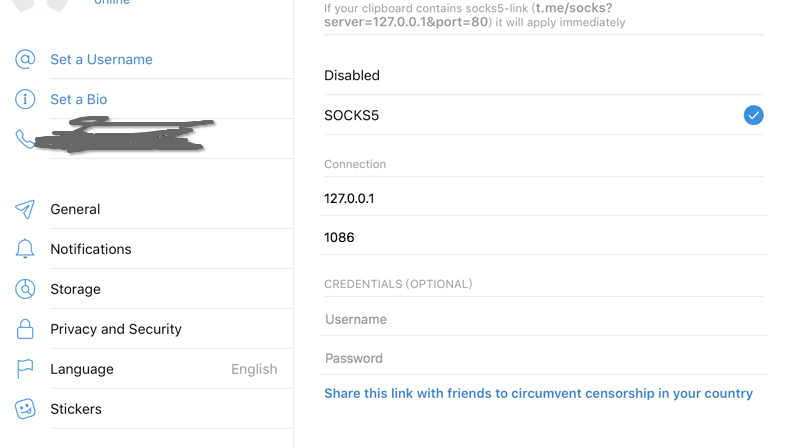
This works.The port is what your SSX-NG's Sock5 port.
 bubblexin
on 7 Dec 2017
bubblexin
on 7 Dec 2017
Environment
- OSX
How to setup proxy for telegram only
Setting Icon --> Privacy and Security --> Choose Sock5 method --> (then you know :smile: )
 weaming
on 30 Dec 2017
weaming
on 30 Dec 2017
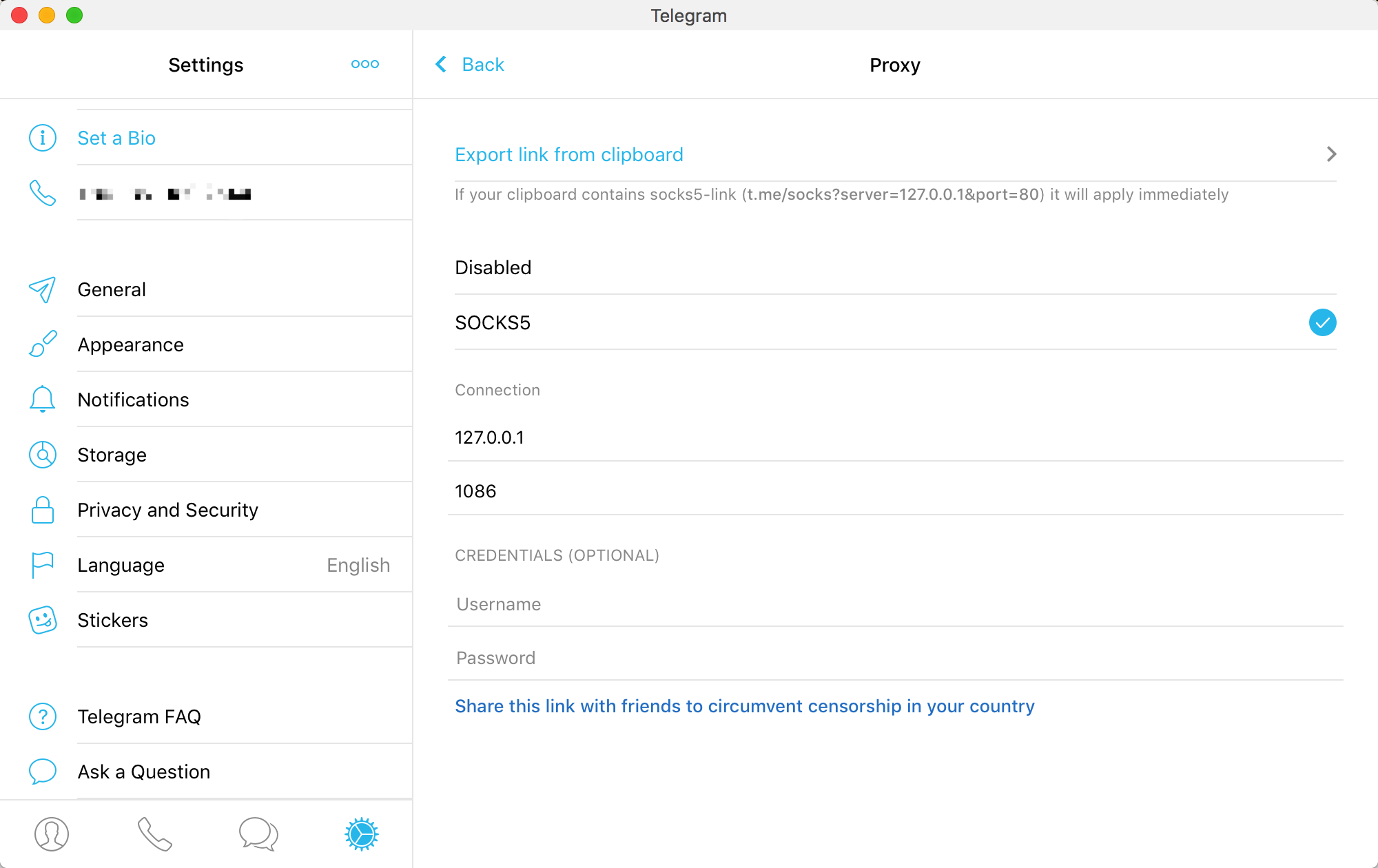
对tg设置代理
127.0.0.1
1086 已解决问题
 macstock
on 9 Jan 2018
macstock
on 9 Jan 2018
 kingzez
on 11 Feb 2018
kingzez
on 11 Feb 2018
@kingzez 我一直不明白1086个1089这两个端口的区别??可以帮忙解释下吗?我本来以为PAC端口是可以自动分流的,然而发现1089端口pac模式并不能使用代理。
 coderbean
on 13 Apr 2018
coderbean
on 13 Apr 2018
@coderbean The PAC port is used to provide the PAC file (try http://127.0.0.1:1089/proxy.pac) for the system wide "Proxy Auto-Config" network configuration.
The PAC file is basically a piece of Javascript file containing a function FindProxyForURL(url, host) for the operating system to call. The function takes the URL / host the operating system is going to visit in, and tell the system whether to connect directly or use the SOCKS5 proxy at port 1086.
- The "Global Mode" sets the system wide SOCKS5 proxy to
127.0.0.1:1086 - The "PAC Auto Mode" sets the system wide Proxy Auto-Config URL to
http://127.0.0.1:1089/proxy.pac, which will tell the system to use SOCKS5 proxy127.0.0.1:1086if the URL / host matches.
timothyqiu
on 13 Apr 2018
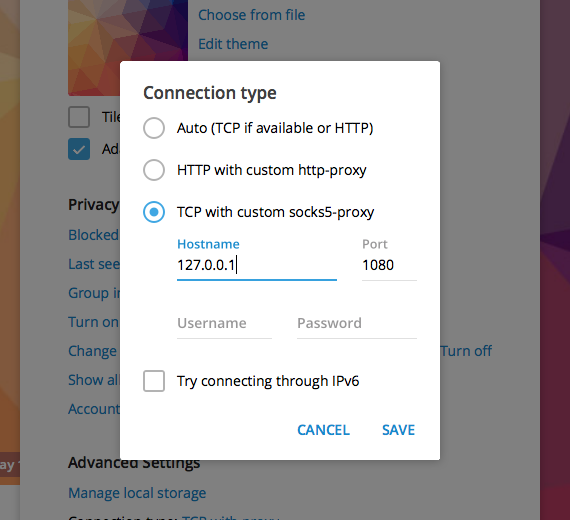
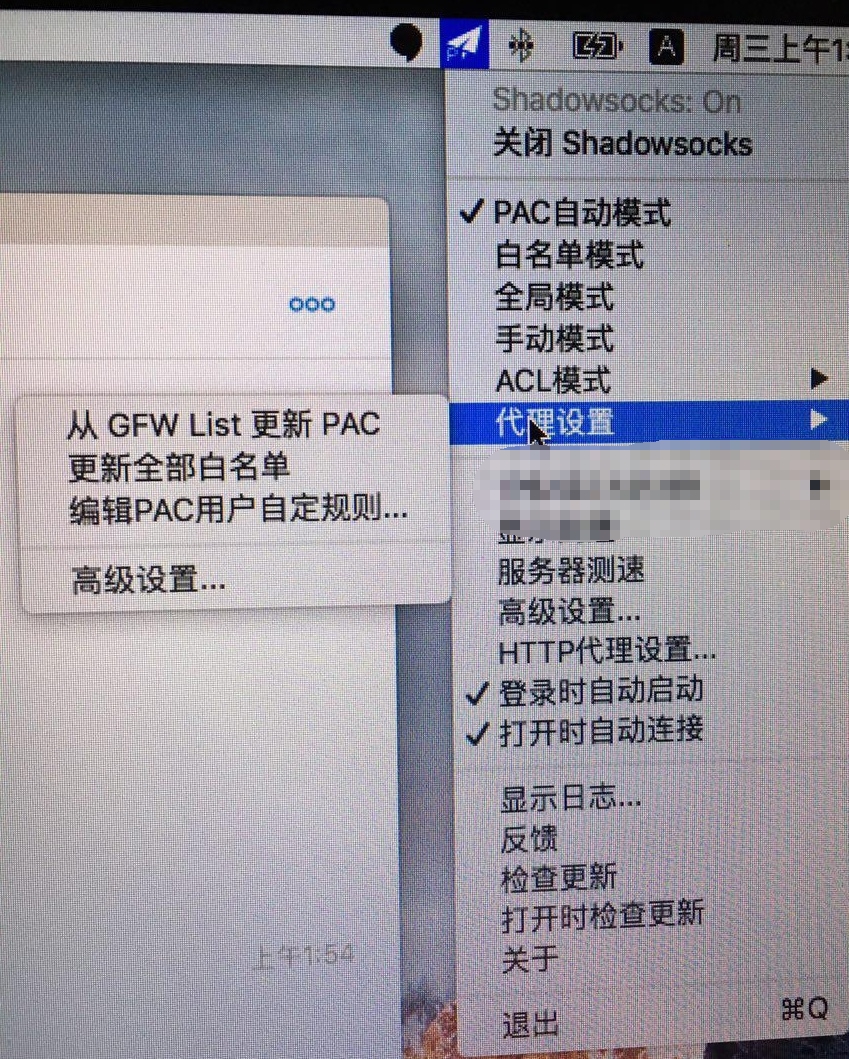
如果你使用的是Shadowsocksx-NG,仅仅这样的设置是不行的。
墙也在不断的进化,
在MAC的顶栏点击Shadowsocksx-NG图标,光标放置在 《代理设置》点击从GFW List更新PAC,当然我的代理模式为 PAC自动模式!
 Newchensheng
on 8 May 2018
Newchensheng
on 8 May 2018
设置代理为127.0.0.1 1086已经解决该问题,不过之前没有设置代理也可以登录,是不是墙发生了变化。
用的是自己搭建的gce,同样的服务器在手机端可以连接tg。
P.S ssr的最新版本可以从哪里下载
 mushanzi1216
on 9 Jun 2018
mushanzi1216
on 9 Jun 2018
IOS最新版无法上网,ss全局,设置soket5代理也没用
解决方案
 shellhub
on 13 Jul 2018
shellhub
on 13 Jul 2018
@Newchensheng 原生的TG for Mac还不行的,必须使用TG Desktop 才可以设置成功。
 ghost
on 18 Jul 2018
ghost
on 18 Jul 2018
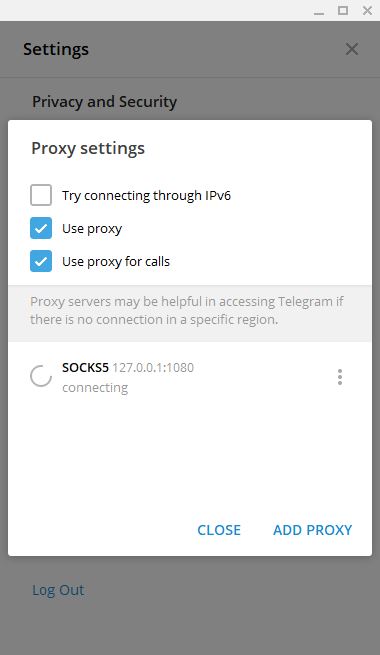
设置两个端口都不行啊!!!
 cooper1x
on 25 Aug 2018
cooper1x
on 25 Aug 2018
移动端的telegram不用设置代理的。只要你把移动端VPN打开即可。我们讨论的是MAC上Telegram,请确认。
linkstar notifications@github.com 于2018年8月25日周六 下午6:35写道:
[image: image]
https://user-images.githubusercontent.com/9080789/44617479-9cdb2080-a895-11e8-97cc-010faf10e2ff.png
设置两个端口都不行啊!!!—
You are receiving this because you commented.
Reply to this email directly, view it on GitHub
https://github.com/shadowsocks/ShadowsocksX-NG/issues/290#issuecomment-415959959,
or mute the thread
https://github.com/notifications/unsubscribe-auth/ARrXMujXy9id9BHXNWqTOBlKsK19JKyvks5uUSh9gaJpZM4Mo-I0
.
ghost
on 29 Aug 2018
port 填你profile里面的port,默认应该是1086
…
在 2017年5月13日,22:12,Albert Yu @.*> 写道: @Spacebody https://github.com/spacebody https://cloud.githubusercontent.com/assets/1104018/26026178/414590bc-3829-11e7-8bab-7a2d90914dfc.png — You are receiving this because you are subscribed to this thread. Reply to this email directly, view it on GitHub <#290 (comment)>, or mute the thread https://github.com/notifications/unsubscribe-auth/AF8zUUXfKEFnTpTG8P1DNSoH3pOHDjCvks5r5bpagaJpZM4Mo-I0.
实测可用!感恩❤️
 Hongoing
on 7 Dec 2018
Hongoing
on 7 Dec 2018
我的是shadow-ng144,我通过将代理设置为acl自动(记得访问下外网试试能不能联网),然后把代理端口改为127.0.0.1:1086,就可以了
 frezoow
on 21 Apr 2019
frezoow
on 21 Apr 2019
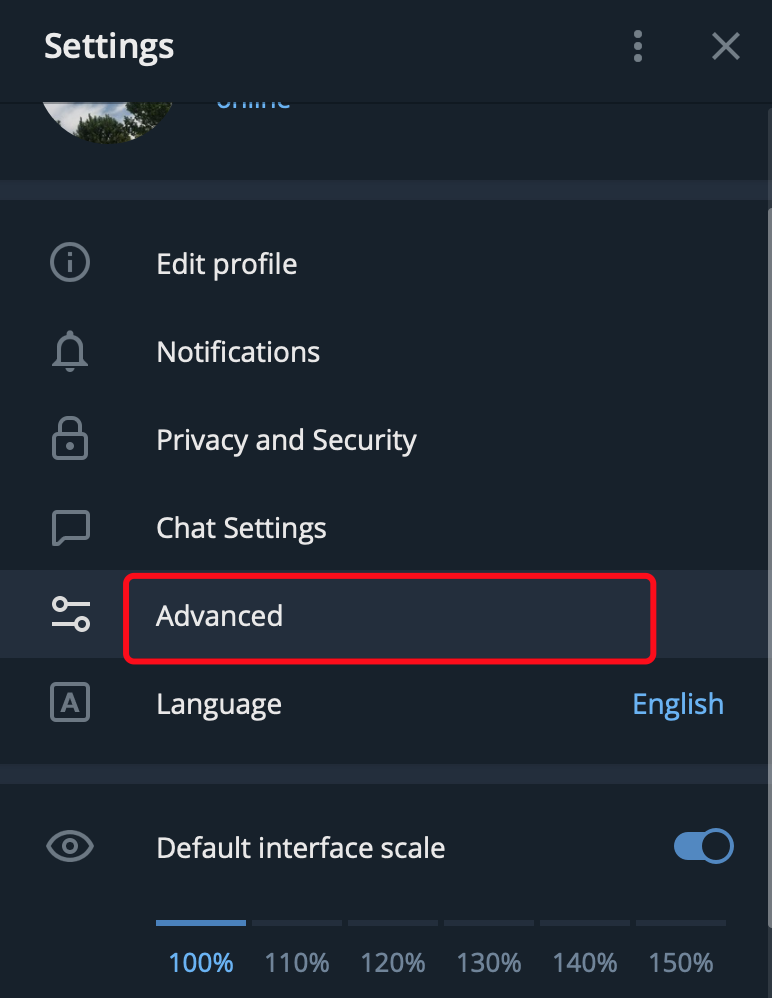
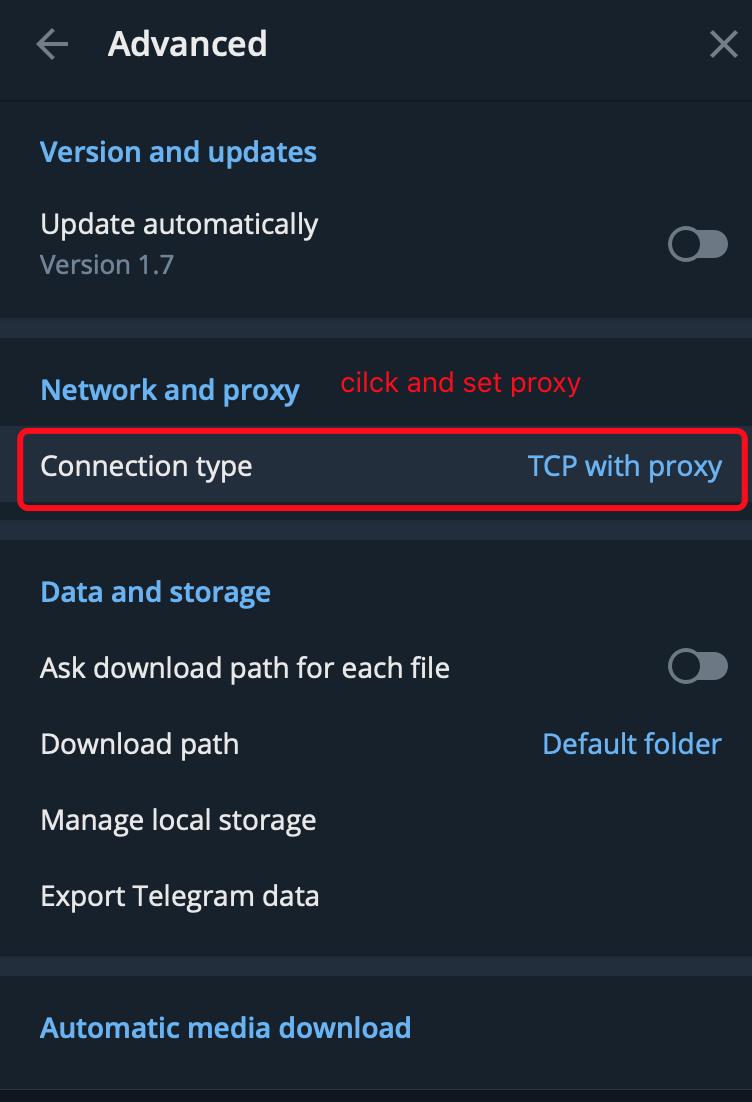
just for mac download desktop version and see image:

 ifgyong
on 29 May 2019
ifgyong
on 29 May 2019
官网下载的telegram,ShadowsocksX-NG 版本 1.4.4-R8 (1),无论如何无法配置成功。
telegram提示更新,更新后使用:
127.0.0.1:1086
连接成功。
 wittyfans
on 10 Jun 2019
wittyfans
on 10 Jun 2019

我从官网下载的最新的telegram,然后设置了socks5,但是一直connecting,,。我ssr的节点测试了是没问题的
 klmyssn
on 24 Jun 2019
klmyssn
on 24 Jun 2019
我从官网下载的最新的telegram,然后设置了socks5,但是一直connecting,,。我ssr的节点测试了是没问题的
我也是同样的问题,你最后解决了吗?
 wuxiao2522
on 26 Jun 2019
wuxiao2522
on 26 Jun 2019
我从官网下载的最新的telegram,然后设置了socks5,但是一直connecting,,。我ssr的节点测试了是没问题的我也是同样的问题,你最后解决了吗?
我解决了。我直接换成从AppStore里面下载的版本然后ssr直接开全局就可以了。之前这个是下载的macOS版本,你试试直接从AppStore里面下载,然后直接ssr全局就可以了。祝你好运
klmyssn
on 27 Jun 2019
我的问题是,在 自动模式 下使用 TG 机器人 自动给我发信息,api 接口 差不多是这样样子 https://api.telegram.org/ 我修改 PAC https://*.telegram.org/ 但是 却报 The server couldn't send a respons,全局模式下接口是 ok的
 beewigs
on 1 Jul 2019
beewigs
on 1 Jul 2019
我从官网下载的最新的telegram,然后设置了socks5,但是一直connecting,,。我ssr的节点测试了是没问题的我也是同样的问题,你最后解决了吗?
我解决了。我直接换成从AppStore里面下载的版本然后ssr直接开全局就可以了。之前这个是下载的macOS版本,你试试直接从AppStore里面下载,然后直接ssr全局就可以了。祝你好运
这个方法有效
 todobugs
on 10 Jul 2019
todobugs
on 10 Jul 2019
我从官网下载的最新的telegram,然后设置了socks5,但是一直connecting,,。我ssr的节点测试了是没问题的我也是同样的问题,你最后解决了吗?
我解决了。我直接换成从AppStore里面下载的版本然后ssr直接开全局就可以了。之前这个是下载的macOS版本,你试试直接从AppStore里面下载,然后直接ssr全局就可以了。祝你好运
这个方法有效
不行
 tiyo
on 11 Jul 2019
tiyo
on 11 Jul 2019
下载telegram desktop,设置proxy
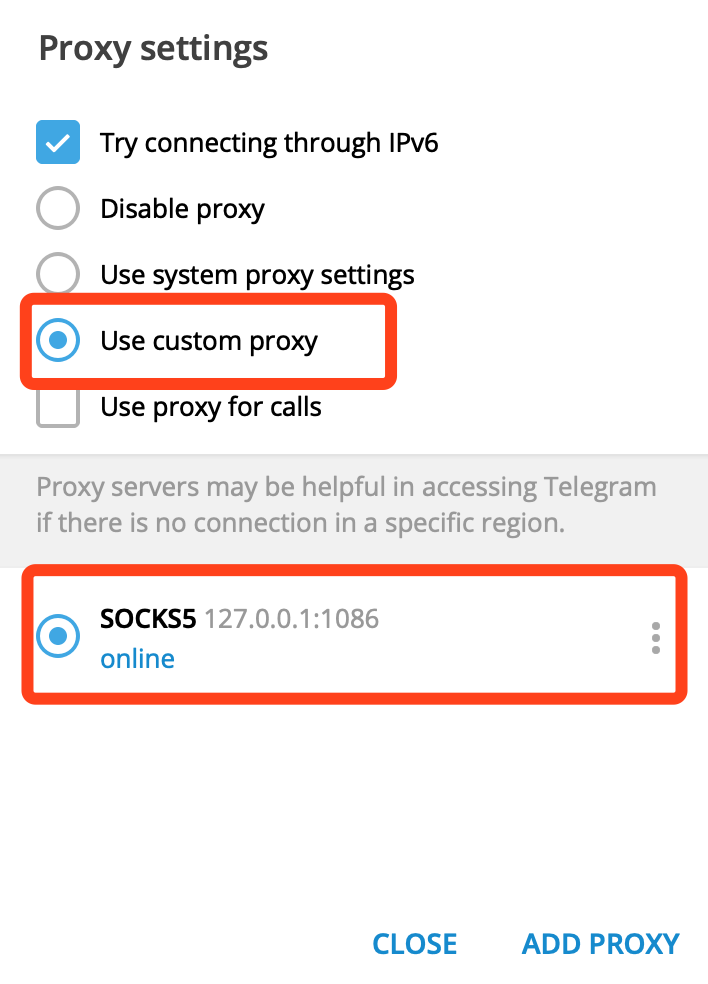
然后ss开全局就可以了。
 super2bai
on 13 Aug 2019
super2bai
on 13 Aug 2019
在appletStore 下载的telegram无论PAC还是全局加设置telegram代理都不行,然后下载另一个telegram desktop竟然好了.
 momorans
on 26 Aug 2019
momorans
on 26 Aug 2019
在appletStore 下载的telegram无论PAC还是全局加设置telegram代理都不行,然后下载另一个telegram desktop竟然好了.
同样的情况,选择https://desktop.telegram.org下载的,就一切OK,但APPSTORE的不行
 StephenLeeUSTC
on 14 Sep 2019
StephenLeeUSTC
on 14 Sep 2019
下载telegram desktop,设置proxy
然后ss开全局就可以了。
这个有用,pac模式也可以了
 zzxCNCZ
on 23 Sep 2019
zzxCNCZ
on 23 Sep 2019
果然如上面说的,不要下官网的那个tg for mac,要去 https://desktop.telegram.org/ 下载desktop版才行
 yunchenran
on 29 Sep 2019
yunchenran
on 29 Sep 2019
下载telegram desktop,设置proxy
然后ss开全局就可以了。
好使
 wanxchao
on 16 Oct 2019
wanxchao
on 16 Oct 2019
中文:
哈哈,上面的全错,我知道怎么弄了,去“系统偏好设置-》网络设置-》代理” 然后设置 socket5 为 127.0.0.1:1086 然后点击好,返回点击应用。然后打开 Telegram 就可以直接使用了。
English:(Google Translate)
Haha, the whole mistake above, I know how to get it, go to "System Preferences -> Network Settings - "Proxy" and then set socket5 to 127.0.0.1:1086 and click OK, then click on Apply. Then open Telegram and you can use it directly.
 niaiwomattt
on 21 Oct 2019
niaiwomattt
on 21 Oct 2019
我试过了 使用ss NG的话,设置proxy为127.0.0.1:1086 重点是,一定要用telegram desktop这个APP,别用telegram ,不然PAC无法生效
 lucifer717
on 6 Nov 2019
lucifer717
on 6 Nov 2019
中文:
哈哈,上面的全错,我知道怎么弄了,去“系统偏好设置-》网络设置-》代理” 然后设置 socket5 为 127.0.0.1:1086 然后点击好,返回点击应用。然后打开 Telegram 就可以直接使用了。
English:(Google Translate)
Haha, the whole mistake above, I know how to get it, go to "System Preferences -> Network Settings - "Proxy" and then set socket5 to 127.0.0.1:1086 and click OK, then click on Apply. Then open Telegram and you can use it directly.
Bingo
 e4587
on 4 Feb 2020
e4587
on 4 Feb 2020
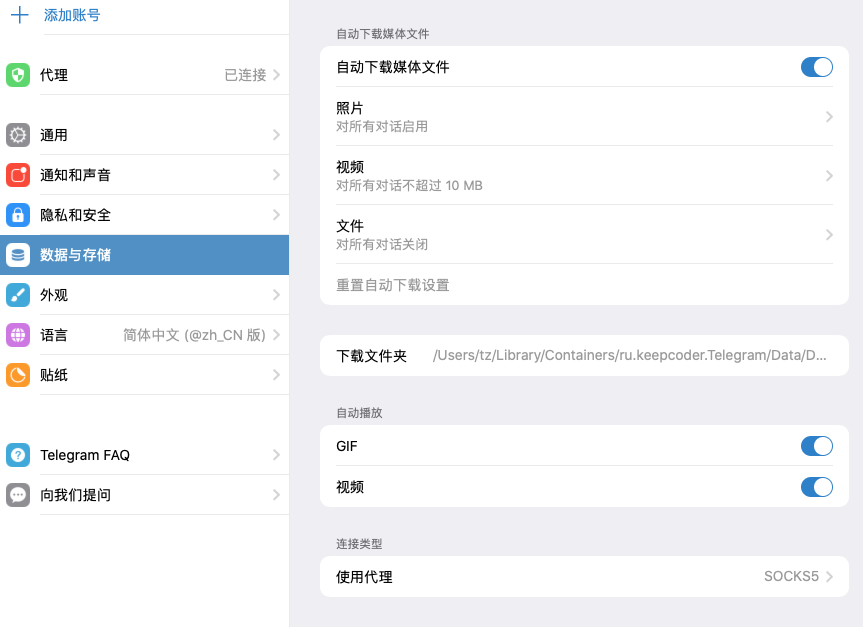
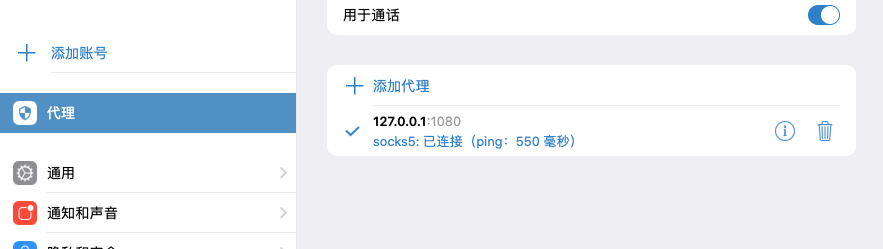
我也是同样的问题,但是一直无法解决,后来发现mac的应用商店中有两个telegram,换了一个下载然后配置sock5就可以了~认准英文版的那个 telegram desktop
 winkerwinker
on 11 Feb 2020
winkerwinker
on 11 Feb 2020
 MacSur
on 21 Feb 2020
MacSur
on 21 Feb 2020
试试看,用了速度还可以。
https://www.v2aky.com/#/register?code=XwSE61yR
MacSur
on 21 Feb 2020
设置Proxy后,重启TG。
 it8090
on 9 Mar 2020
it8090
on 9 Mar 2020
设置Proxy后,重启TG。
It worked to me.
 robin0323
on 24 Mar 2020
robin0323
on 24 Mar 2020
同 Mac 商店里的不能用,直接下 Desktop 版本的就好了
 bcol23
on 18 Apr 2020
bcol23
on 18 Apr 2020
设置Proxy后,重启TG。
It worked to me.
It worked to me.
 lgoodbook
on 2 Jul 2020
lgoodbook
on 2 Jul 2020
Related issues
 ilovebamboo
·
4Comments
ghost
·
5Comments
ilovebamboo
·
4Comments
ghost
·
5Comments
 0u0u0
·
4Comments
0u0u0
·
4Comments
 aofei
·
4Comments
aofei
·
4Comments
 czhu08
·
3Comments
czhu08
·
3Comments
Most helpful comment
port 填你profile里面的port,默认应该是1086