Shadowsocks-windows: Shadowsocks non-UI Error非预期错误在WIN10专业版
简要描述问题
环境
- Shadowsocks客户端版本:Shadowsocks-4.3.1.128
- 操作系统版本:WIN10专业版10.0.16299 Build 16299
- .NET版本:v4.0.30319
操作步骤
期望的结果
实际结果
配置文件和日志文件(请隐去敏感信息)
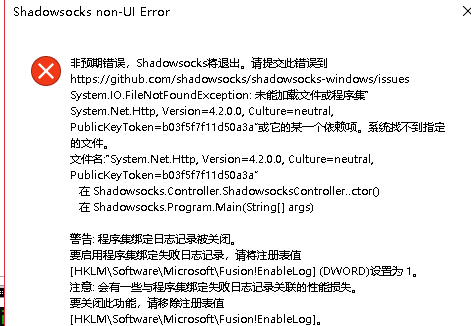
2020-10-27 14:07:50.0450|ERROR|Shadowsocks.Program|System.IO.FileNotFoundException: 未能加载文件或程序集“System.Net.Http, Version=4.2.0.0, Culture=neutral, PublicKeyToken=b03f5f7f11d50a3a”或它的某一个依赖项。系统找不到指定的文件。
文件名:“System.Net.Http, Version=4.2.0.0, Culture=neutral, PublicKeyToken=b03f5f7f11d50a3a”
   在 Shadowsocks.Controller.ShadowsocksController..ctor()
   在 Shadowsocks.Program.Main(String[] args)

警告: 程序集绑定日志记录被关闭。
要启用程序集绑定失败日志记录,请将注册表值 [HKLM\Software\Microsoft\Fusion!EnableLog] (DWORD)设置为 1。
注意: 会有一些与程序集绑定失败日志记录关联的性能损失。
要关闭此功能,请移除注册表值 [HKLM\Software\Microsoft\Fusion!EnableLog]。

2020-10-27 14:07:50.2086|INFO|Shadowsocks.Controller.I18N|Current language is: zh-CN
2020-10-27 14:08:19.7485|ERROR|Shadowsocks.Program|System.IO.FileNotFoundException: 未能加载文件或程序集“System.Net.Http, Version=4.2.0.0, Culture=neutral, PublicKeyToken=b03f5f7f11d50a3a”或它的某一个依赖项。系统找不到指定的文件。
文件名:“System.Net.Http, Version=4.2.0.0, Culture=neutral, PublicKeyToken=b03f5f7f11d50a3a”
   在 Shadowsocks.Controller.ShadowsocksController..ctor()
   在 Shadowsocks.Program.Main(String[] args)

警告: 程序集绑定日志记录被关闭。
要启用程序集绑定失败日志记录,请将注册表值 [HKLM\Software\Microsoft\Fusion!EnableLog] (DWORD)设置为 1。
注意: 会有一些与程序集绑定失败日志记录关联的性能损失。
要关闭此功能,请移除注册表值 [HKLM\Software\Microsoft\Fusion!EnableLog]。

2020-10-27 14:08:19.7805|INFO|Shadowsocks.Controller.I18N|Current language is: zh-CN
2020-10-27 14:12:10.5798|ERROR|Shadowsocks.Program|System.IO.FileNotFoundException: 未能加载文件或程序集“System.Net.Http, Version=4.2.0.0, Culture=neutral, PublicKeyToken=b03f5f7f11d50a3a”或它的某一个依赖项。系统找不到指定的文件。
文件名:“System.Net.Http, Version=4.2.0.0, Culture=neutral, PublicKeyToken=b03f5f7f11d50a3a”
   在 Shadowsocks.Controller.ShadowsocksController..ctor()
   在 Shadowsocks.Program.Main(String[] args)

警告: 程序集绑定日志记录被关闭。
要启用程序集绑定失败日志记录,请将注册表值 [HKLM\Software\Microsoft\Fusion!EnableLog] (DWORD)设置为 1。
注意: 会有一些与程序集绑定失败日志记录关联的性能损失。
要关闭此功能,请移除注册表值 [HKLM\Software\Microsoft\Fusion!EnableLog]。

2020-10-27 14:12:10.6139|INFO|Shadowsocks.Controller.I18N|Current language is: zh-CN
 RussiaVk
👍1
All 4 comments
请尝试安装最新版本的 .Net Framework:https://dotnet.microsoft.com/download/dotnet-framework/thank-you/net48-offline-installer ,若提示已安装最新版本,请在安装的时候选择修复看看。
 chenshaoju
on 27 Oct 2020
chenshaoju
on 27 Oct 2020
😕1
请尝试安装最新版本的.Net框架:https : //dotnet.microsoft.com/download/dotnet-framework/thank-you/net48-offline-installer,若提示已安装最新版本,请在安装的时候选择修复看看。
大佬,.net安装失败!各式报错!
RussiaVk
on 27 Oct 2020
👍1
If you were unable to fix your local .NET Framework runtime, you might be interested to try the framework-independent builds from v5/master: https://ci.appveyor.com/api/buildjobs/quvsi7qe9ctfv0vk/artifacts/shadowsocks-windows-4.2.0.35-portable-x64.zip
 database64128
on 27 Oct 2020
database64128
on 27 Oct 2020
你可以尝试使用这个工具修复看看:https://www.microsoft.com/en-us/download/details.aspx?id=30135 。
chenshaoju
on 27 Oct 2020
Was this page helpful?
0 / 5 - 0 ratings
Related issues
 yhnbgfd
·
65Comments
yhnbgfd
·
65Comments
 CasparLi
·
44Comments
CasparLi
·
44Comments
 HiramYong
·
57Comments
HiramYong
·
57Comments
 TGSAN
·
48Comments
TGSAN
·
48Comments
 l1ken
·
38Comments
l1ken
·
38Comments