Shadowsocks-windows: 4.0.9 Release包Win10报毒trojan:win32/critet.bs
Version(release version or AppVeyor link) / 版本(正式版或基于AppVeyor的链接)
4.0.9
Environment(Operating system, .NET Framework, etc) / 操作环境(操作系统,.NET Framework等)
Win10 x64 .NET4.7
Steps you have tried / 操作步骤
正常使用
What did you expect to see? / 期望的结果
应该不会报毒
What did you see instead? / 实际结果
Win10自带杀毒软件报毒:trojan:win32/critet.bs
通过SS自动更新以及从github release下载的文件都报毒,经检查报毒exe的SHA与release中一致
自己源码编译的不会报毒
Config and error log in detail (with all sensitive info masked) / 配置文件和日志文件(请隐去敏感信息)
 yhnbgfd
All 65 comments
+1
 gotoxu
on 15 Mar 2018
gotoxu
on 15 Mar 2018
+1,文件第一次被删掉了,重新解压了一个,然后允许它在这个设备上
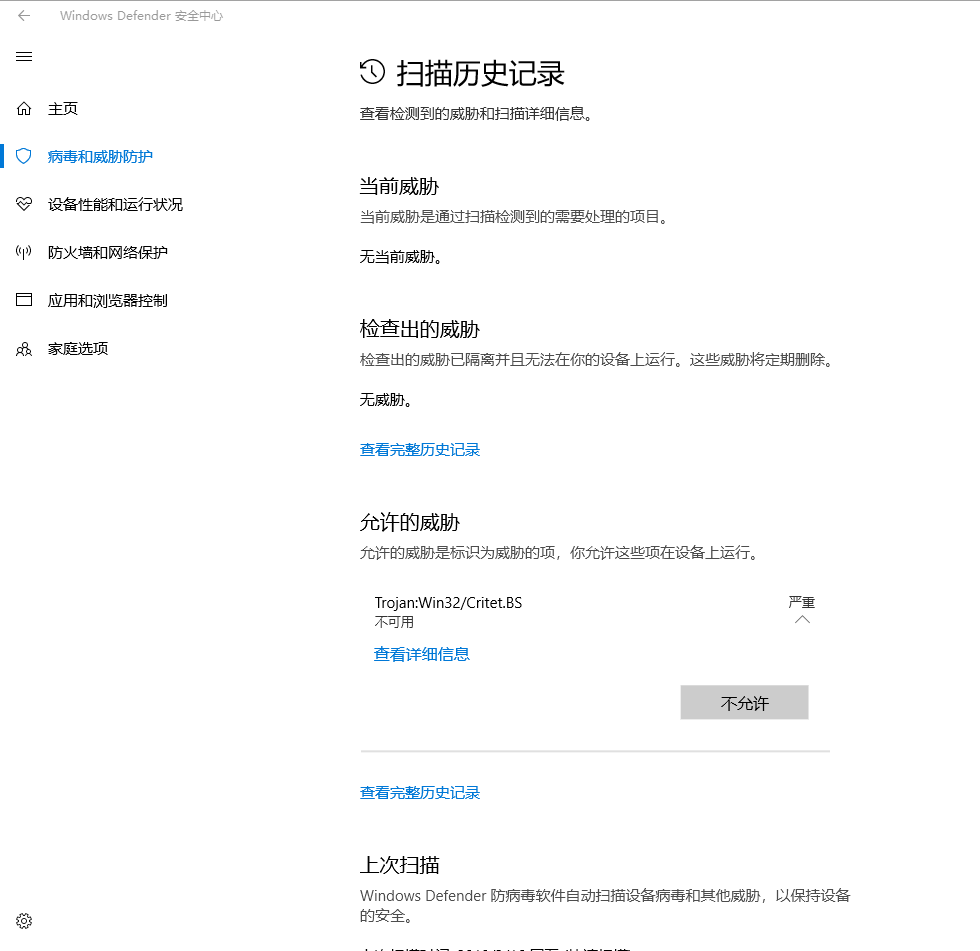
 wangmingph
on 15 Mar 2018
wangmingph
on 15 Mar 2018
Windows规格 OS 内部版本 16299.309
wangmingph
on 15 Mar 2018
I assume, you guys are talking about the fact, that Windows 10 defender is automatically deleting Shadowsocks.exe. If this is indeed the subject of this issue, then I have this problem too. I had to exclude it to work.
 SquirrelCoder
on 15 Mar 2018
SquirrelCoder
on 15 Mar 2018
Do not trust it because my own compiled program does not report viruses
yhnbgfd
on 15 Mar 2018
 TianLi-520
on 15 Mar 2018
TianLi-520
on 15 Mar 2018
Any significant difference in file size between your compiled version and release version? If it really does contain a trojan then the file size is likely to be bigger.
 tobyxdd
on 15 Mar 2018
tobyxdd
on 15 Mar 2018
@tobyxdd The file size is the same between my compiled version and the released version, both are 2.14 MB (2,245,632 byte)
yhnbgfd
on 15 Mar 2018
@yhnbgfd could you compare the SHA384 of the original Shadowsocks.exe with your compiled version?
You can use the following in PowerShell
Get-FileHash Shadowsocks.exe -Algorithm SHA384 | Format-List
@SquirrelCoder SHA changes every time I compile, so it's always different from the original exe.
yhnbgfd
on 15 Mar 2018
@yhnbgfd Really? That's odd! It shouldn't be that way.
SquirrelCoder
on 15 Mar 2018
@SquirrelCoder Yes, I tried it without modifying any code just to recompile
yhnbgfd
on 15 Mar 2018
Seeing the same report with 4.0.9 as well
 Sykue
on 16 Mar 2018
Sykue
on 16 Mar 2018
同样的问题,今天早上一开机 Windows Defender 就报了错。
Release 4.0.9,Hash 值吻合。
Windows 10 Home 16299.309
 CNife
on 16 Mar 2018
CNife
on 16 Mar 2018
我的也同样报毒,已退回4.0.8
 IriKaQ
on 16 Mar 2018
IriKaQ
on 16 Mar 2018
同样的问题,+1,难道是微软配合gov?
 yyysuo
on 16 Mar 2018
yyysuo
on 16 Mar 2018
我觉得可能是GOV上报病毒。M$随便看了眼,嗯这就是毒吧。
 cybmp3
on 16 Mar 2018
cybmp3
on 16 Mar 2018
+1 退回了4.0.8
 ziruizhuang
on 16 Mar 2018
ziruizhuang
on 16 Mar 2018
+1,同样报毒,已退回4.0.8
 gumptie
on 16 Mar 2018
gumptie
on 16 Mar 2018
问题是昨天才更新的时候没有报毒,稳定运行1天了才报的毒。
yyysuo
on 16 Mar 2018
看change log,发现libcrypto_1_1_dll被替换成了libsscrypto_dll,两个文件单扫都不报毒,但是会不会是4.0.9里面用的libsscrypto_dll容易被提取特征。建议改回libcrypto_1_1_dll试试。
ziruizhuang
on 16 Mar 2018
也可能是WD的误报https://forum.kerbalspaceprogram.com/index.php?/topic/172357-trojanwin32critetbs/
ziruizhuang
on 16 Mar 2018
+1
Seeing the same report with 4.0.9 as well
 alex-888
on 16 Mar 2018
alex-888
on 16 Mar 2018
The same issue, it is strange.
 yangyu
on 16 Mar 2018
yangyu
on 16 Mar 2018
@ziruizhuang 不会的,因为我自己编译了一份是不会报毒的,所以跟第三方库肯定没关系,要么被针对了,要么刚好那个release碰撞到某些特征码了。
yhnbgfd
on 16 Mar 2018
Got the same problem.
 91he
on 16 Mar 2018
91he
on 16 Mar 2018
1.263.562.0 版本的病毒定义引入了这个detection Definition available date: Mar 14, 2018 07:57 PM UTC
4.0.9发布时间是Mar 14, 2018, 10:32 PM GMT+8,或者Mar 14, 2018, 02:32 PM UTC
从时间上看的确有前后关系。
ziruizhuang
on 16 Mar 2018
+1, 已退到 4.0.8
 piedgogo
on 16 Mar 2018
piedgogo
on 16 Mar 2018
+1
 chenfd99
on 16 Mar 2018
chenfd99
on 16 Mar 2018
SHA-256 calculation process reports virus too.
 SAmmer0
on 16 Mar 2018
SAmmer0
on 16 Mar 2018
Same problem. Version 4.0.8 was also reported to be trojan:win32/critet.bs. Only version 4.0 worked.
 longbow0
on 16 Mar 2018
longbow0
on 16 Mar 2018
strange, because the size of the release one is the same as my self-compiled one.
so I think there is almost impossible a virus bundled in it. 🤕
 tsanie
on 16 Mar 2018
tsanie
on 16 Mar 2018
4.0.9 virus scan result
https://www.virustotal.com/en/file/b4810eb33bbc3888e66d51db3c76a52abe7b98d8520584daa8d92c03e412be57/analysis/
 celeron533
on 16 Mar 2018
celeron533
on 16 Mar 2018
同样的问题,暂时回到8
 maolibu
on 16 Mar 2018
maolibu
on 16 Mar 2018
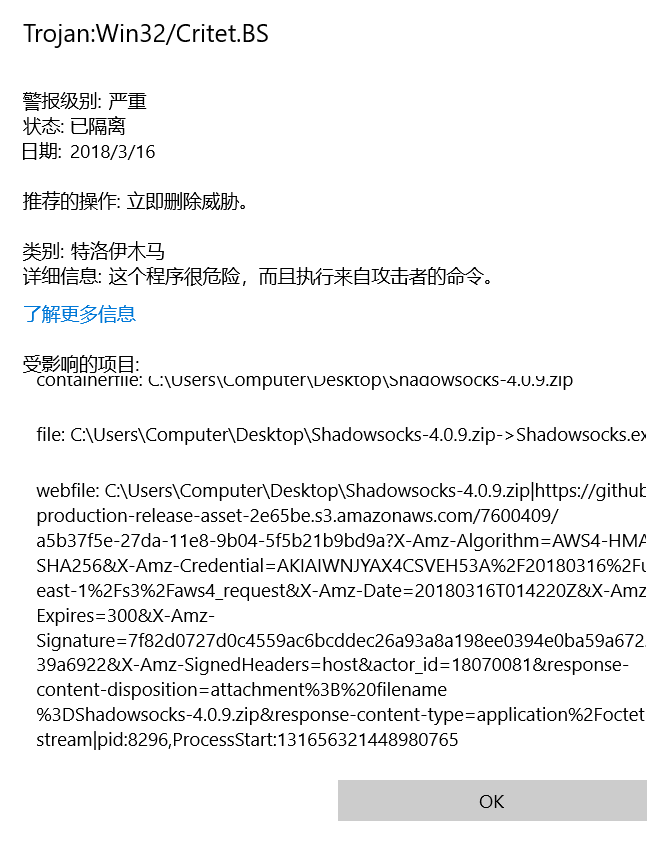
However:

 cbwang2016
on 16 Mar 2018
cbwang2016
on 16 Mar 2018
Same problem. Version 4.0.7 is Ok.
 RazorXu
on 16 Mar 2018
RazorXu
on 16 Mar 2018
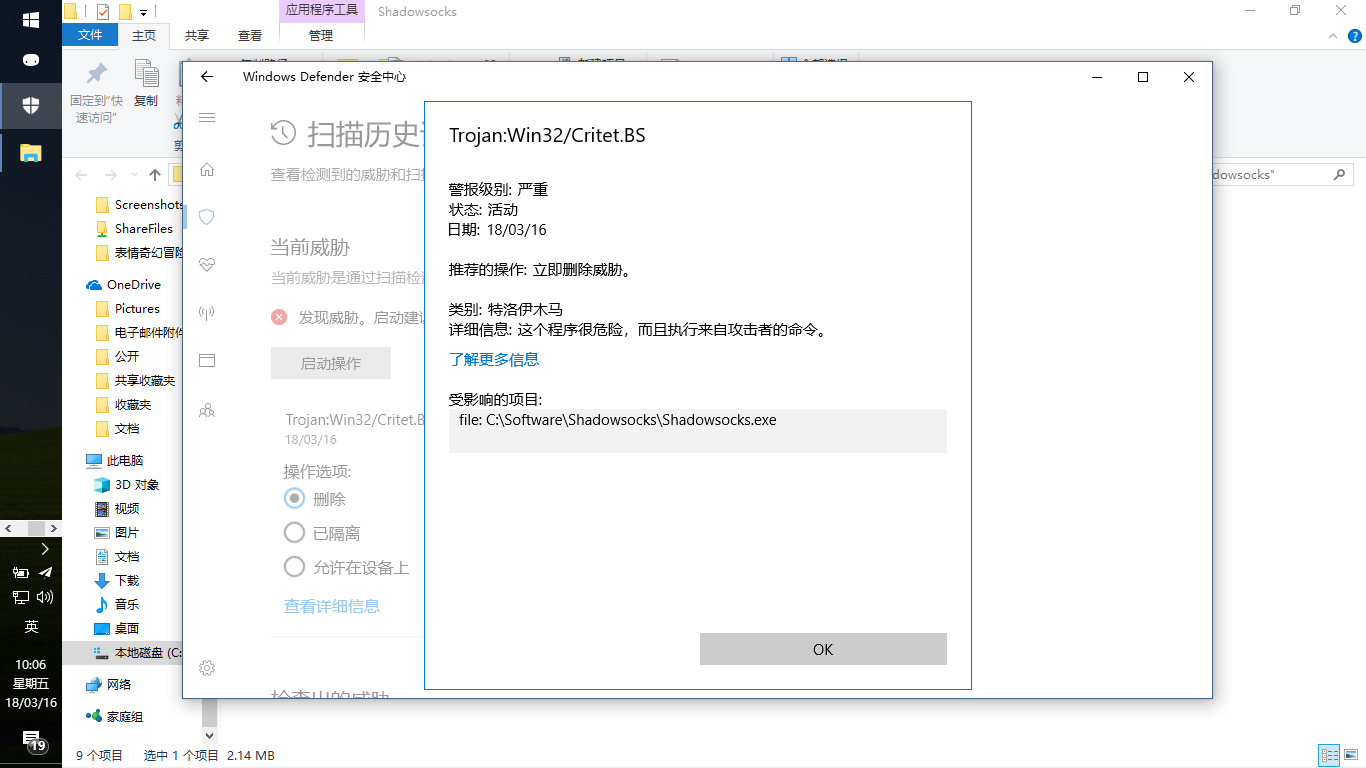
The problem has been revived.
此问题已经在我的Win10上复现:
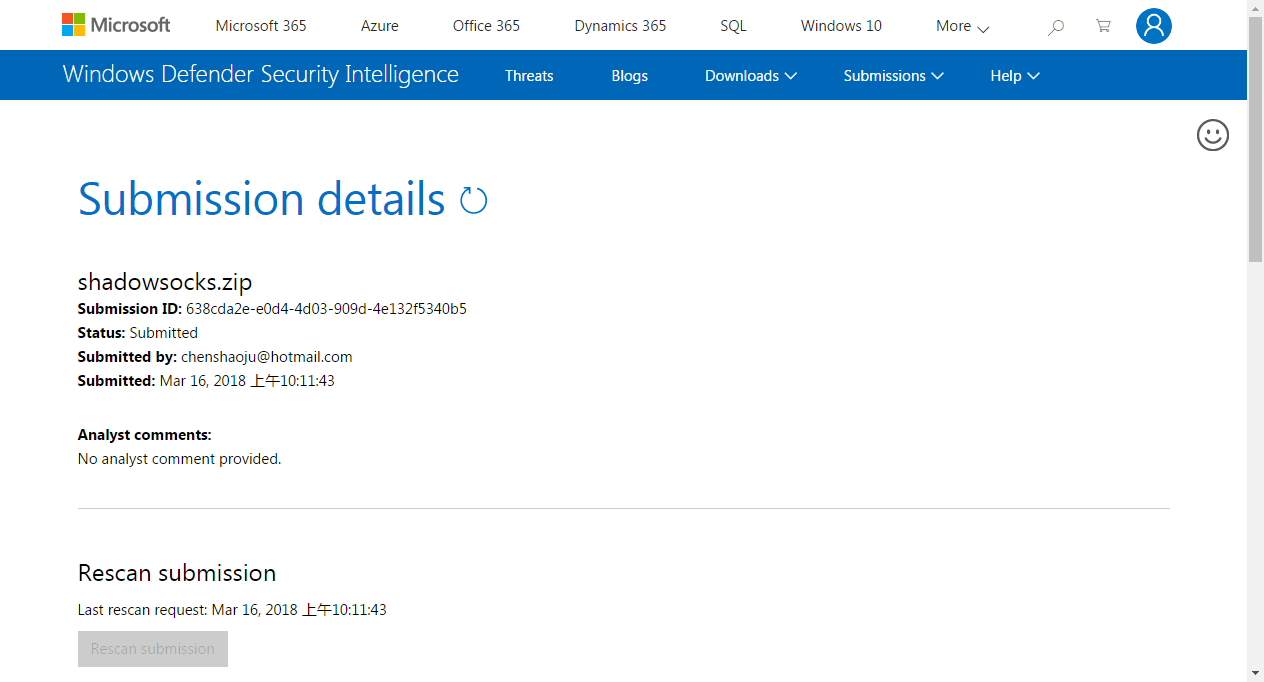
This issue has been reported to Microsoft and is waiting for review.
此问题已经报告给Microsoft等待复查:
 chenshaoju
on 16 Mar 2018
chenshaoju
on 16 Mar 2018
我也有相同的问题,win10自动报毒,允许威胁以后就可以正常使用了,希望作者解决一下
 li2282231
on 16 Mar 2018
li2282231
on 16 Mar 2018
此问题是微软的问题,已经报告给微软等待解决。
EDIT:如果很在意,可以先退回4.0.8或4.0.7,等待微软更新病毒库后再更新,此贴将会更新到微软解决问题为止。
chenshaoju
on 16 Mar 2018
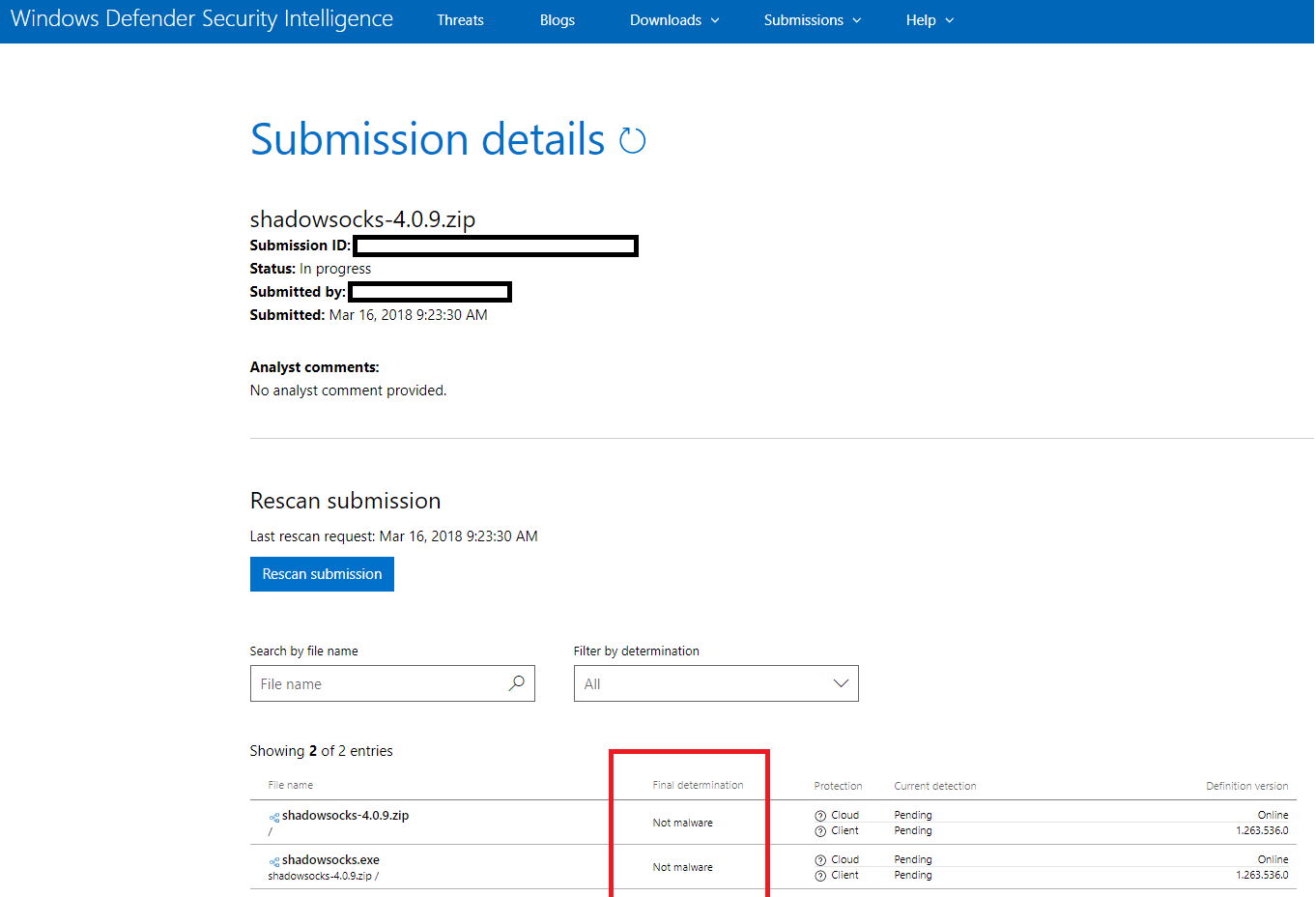
WD的report有结果了,not malware
ziruizhuang
on 16 Mar 2018
@ziruizhuang 请仔细看右边的定义版本号,似乎是大于 1.263.562.0 才会遇到这个问题,我的版本是 1.263.585.0
chenshaoju
on 16 Mar 2018
@yhnbgfd @tobyxdd @SquirrelCoder @tsanie
About compile issue, The Shadowsocks for Windows compile is by third-party services name "appveyor".
关于编译问题, Shadowsocks for Windows 的编译是经由第三方服务 appveyor 进行的。
appveyor get the source code from GitHub directly and compile.
appveyor 直接从Github获取源码进行编译。
The compile process is a non-human operation.
整个编译过程无人为操作。
This is appveyor build version, correspond 4.0.9 release version, you can download and compare the hash. https://ci.appveyor.com/project/celeron533/shadowsocks-windows/build/4.0.9.0/job/6hqoct7lt1jm25m9/artifacts
这是 appveryor 编译的版本,对应释出的 4.0.9 版本,你可以在这里下载到由 appveyor 编译的版本并手动对比文件的散列值(是否和发布页的一致):
https://ci.appveyor.com/project/celeron533/shadowsocks-windows/build/4.0.9.0/job/6hqoct7lt1jm25m9/artifacts
EDIT:
About same code but "difference in file size" and "difference in file hash" when every time compiles, This is C# "feature", Read more:
https://stackoverflow.com/questions/1335427/why-does-c-sharp-generate-different-exes-for-the-same-source-code
关于相同代码,但是每次编译时文件大小不一致或者散列值不同的问题,这是 C# 特点,具体请阅读:
https://stackoverflow.com/questions/1335427/why-does-c-sharp-generate-different-exes-for-the-same-source-code
chenshaoju
on 16 Mar 2018
@chenshaoju 右边的版本号应该是指系统自动的检测引擎的定义版本。自动检测很快就出了No malware detected。这里的final determination是过了差不多2个小时出的。不太了解WD的流程,不清楚这个final determination是否是有安全人员人工介入检测后的结果。
ziruizhuang
on 16 Mar 2018
1.263.598.0,4.0.9,没有误报
 tonyhook
on 16 Mar 2018
tonyhook
on 16 Mar 2018
EDIT: 之前更新后测试确实没有报毒,但是刚才测试又会报毒了
 iKirby
on 16 Mar 2018
iKirby
on 16 Mar 2018
Windows Defender升级到1.263.598.0版本,扫描新下载的Shadowsocks.zip仍然报毒
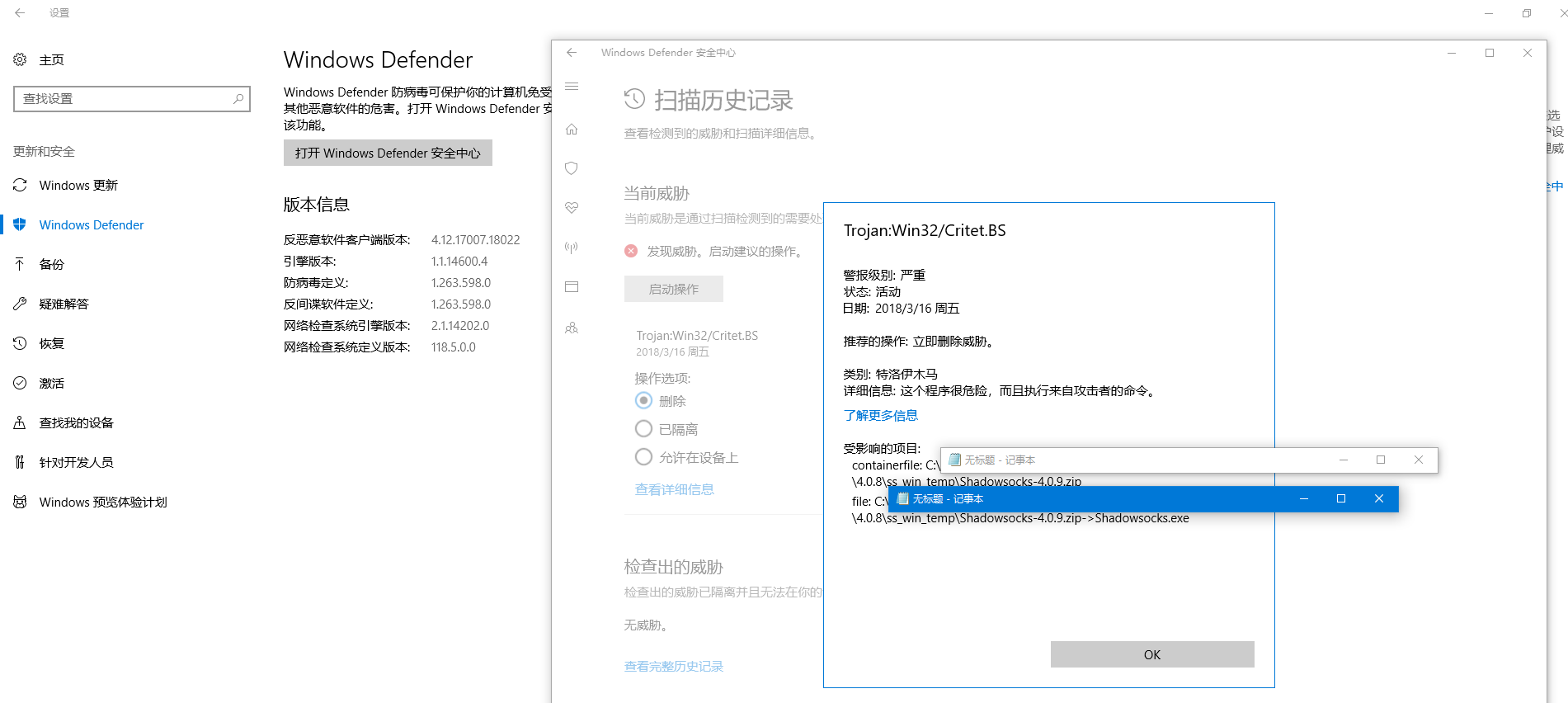
wangmingph
on 16 Mar 2018
Windows 10 企业版 16299.309,是通过SS的全局模式升级的Windows Defender
wangmingph
on 16 Mar 2018
If really care about this issue, Please rollback to 4.0.7 or 4.0.8, And waiting for Microsoft update their virus definition.
如果很在在意的话,请退回4.0.7或4.0.8,等待微软更新病毒库。
If don't care, Please add Shadowsocks.exe to the white list.
如果不在意,请把Shadowsocks.exe加入例外。
The source code is right here, And anyone can review code.
源代码就摆在这里,任何人都可以检查代码。
chenshaoju
on 16 Mar 2018
@chenshaoju 是否可以再编译一份放在这里,给那些没条件编译又想用新版本又不放心的人下载使用。
yhnbgfd
on 16 Mar 2018
@yhnbgfd 包括我自己编译的,都无法保证透明度, appveyor包括获取源码和编译的过程都是公开的。
说穿了,没人能保证编译者会不会加料,甚至可能是无意中被加料(XcodeGhost事件,参见: http://www.jiemian.com/article/385911.html )
这个问题其实是微软误报了,只能等微软解决问题,而不是想办法绕过这个误报,因为没有办法保证另一个版本就不会出问题。
旧版本仍然可以使用,没有冲突或限制。
如果你非常坚持(强迫症等原因),需要一个暂时不会被误报的版本,可前往 https://ci.appveyor.com/project/celeron533/shadowsocks-windows/build/4.0.9.1/job/94tdv6o0h8byh9e3/artifacts 下载,这同样是 appveyor 编译的版本,仅仅是更新了说明和自动更新的版本信息。
但是,未来仍有可能会再次被微软识别成恶意软件。
chenshaoju
on 16 Mar 2018
@chenshaoju 为什么可以确定是误报?
cbwang2016
on 16 Mar 2018
@cbwang2016 这是全球65款杀毒软件的扫描报告: https://www.virustotal.com/en/file/d618d4fde2212052636f91e7efd35ab907317354d76693006177c507cba772c0/analysis/1521187678/
截至目前,没有一款报毒。
chenshaoju
on 16 Mar 2018
今天 4.8 也被 win10 悄悄的删了。早上开机莫名其妙跳出个 cmd 窗口,随手就关掉了,不知道是不是和这个有关系。
piedgogo
on 20 Mar 2018
@piedgogo 无法复现问题
cbwang2016
on 20 Mar 2018
今天仍然出现这个问题,相关的文件是 .Shadowsocks_v4.0.9.exe.~cfc
longbow0
on 20 Mar 2018
这个事情让我很困惑。
微软在线的扫描并没有扫出来任何问题(定义版本:1.263.814.0)
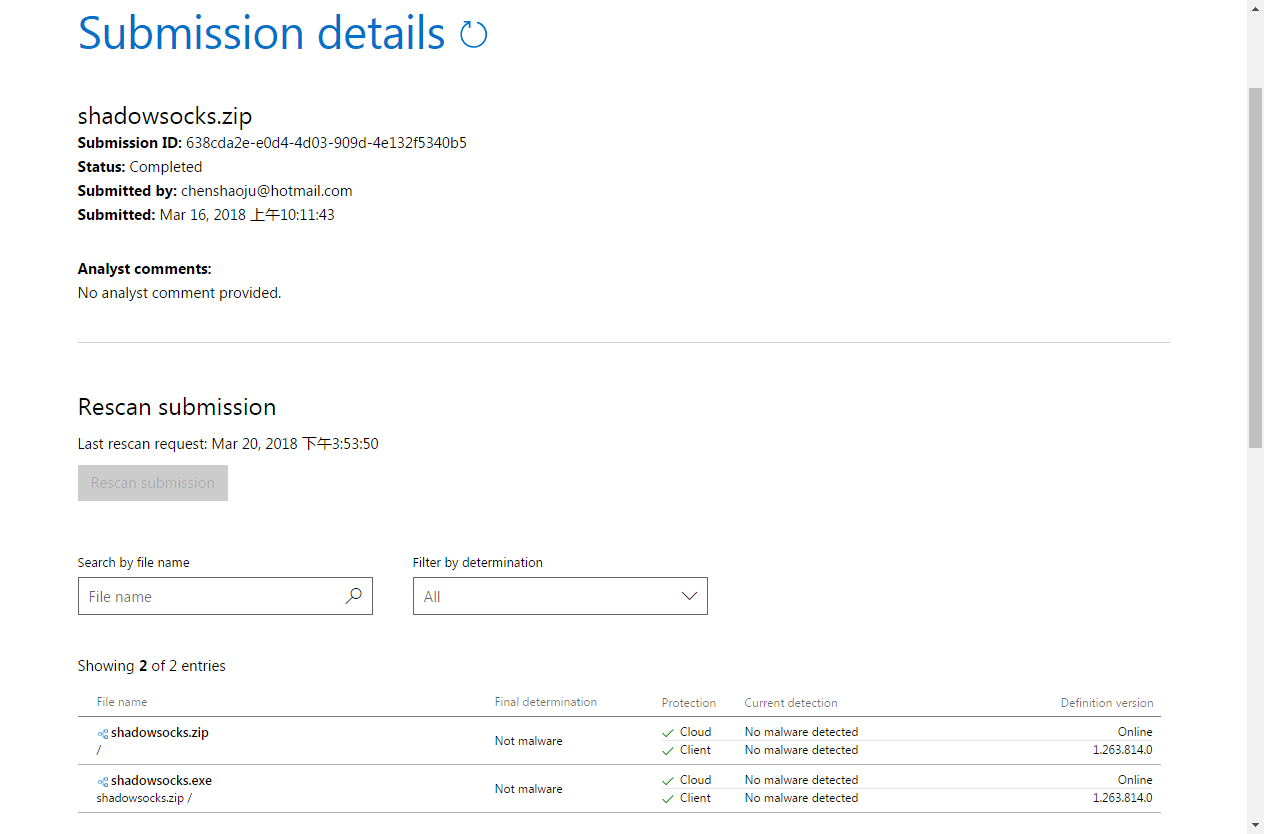
但是Win10上的Windows Defender,相同的定义版本,却扫出来有问题。
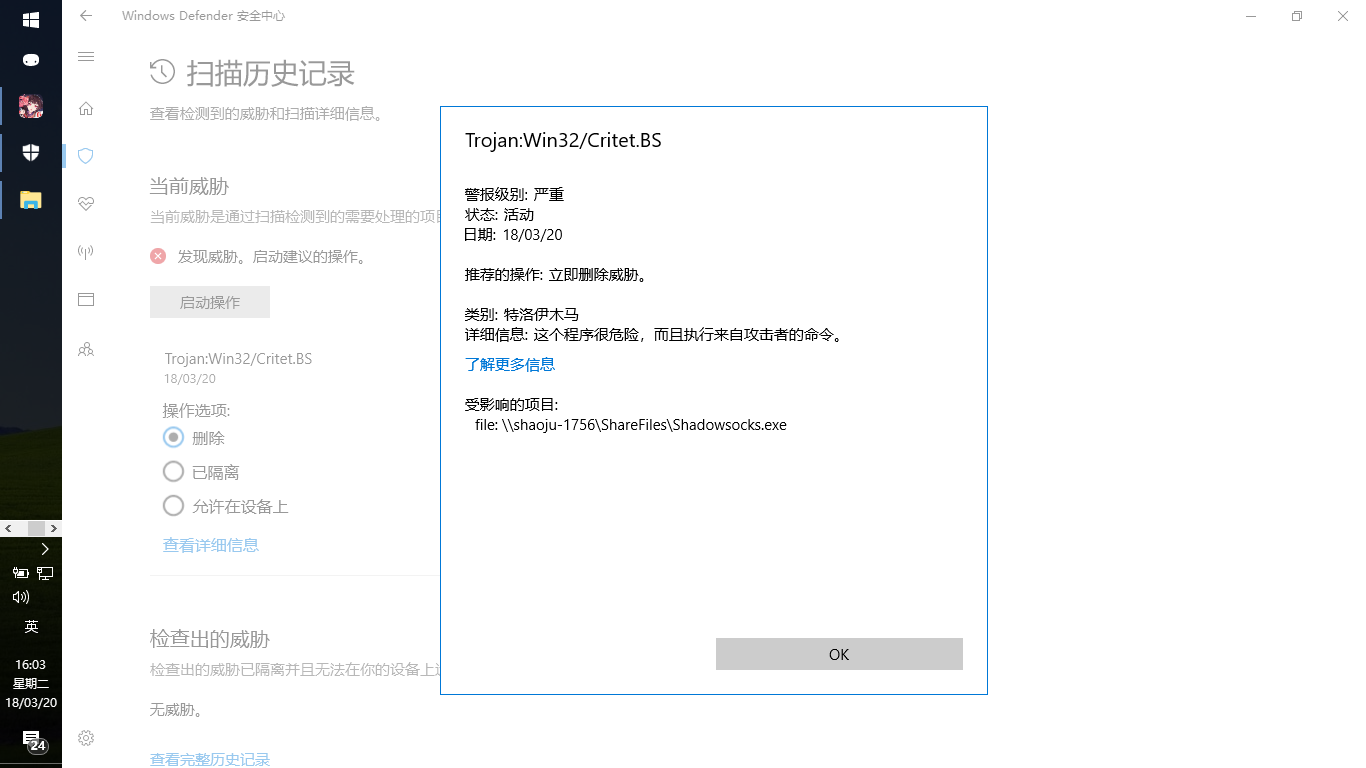
而最新的VirusTotal扫描仍然没有任何一款杀毒软件(包括Microsoft)报告存在问题:
https://www.virustotal.com/en/file/d618d4fde2212052636f91e7efd35ab907317354d76693006177c507cba772c0/analysis/1521533790/
chenshaoju
on 20 Mar 2018
有哪位用的是英文或者其他语言版本的win10,是否会有这样的问题?
longbow0
on 20 Mar 2018
没遇到这个问题,因为我已经把 windows defender 禁用了 :smile:
 pexcn
on 20 Mar 2018
pexcn
on 20 Mar 2018
@chenshaoju
那是微软的启发式扫描, 自动清除威胁, 用户无法控制.
之前发过, Defender Control
https://www.sordum.org/9480/defender-control-v1-3/
 jasonliul
on 20 Mar 2018
jasonliul
on 20 Mar 2018
问题解决
执行如下命令
cd %ProgramFiles%\Windows Defender
MpCmdRun.exe -removedefinitions -dynamicsignatures
MpCmdRun.exe -SignatureUpdate
参考:
https://forum.kerbalspaceprogram.com/index.php?/topic/172357-trojanwin32critetbs/
https://www.microsoft.com/en-us/wdsi/definitions
ziruizhuang
on 21 Mar 2018
@ziruizhuang 你好,我测试了两次,仍然不行,能否看一下你的Windows Defender的病毒和威胁防护、扫描历史记录,会有一个允许的威胁,里面是不是有一个 Trojan:Win32/Critet.BS ?
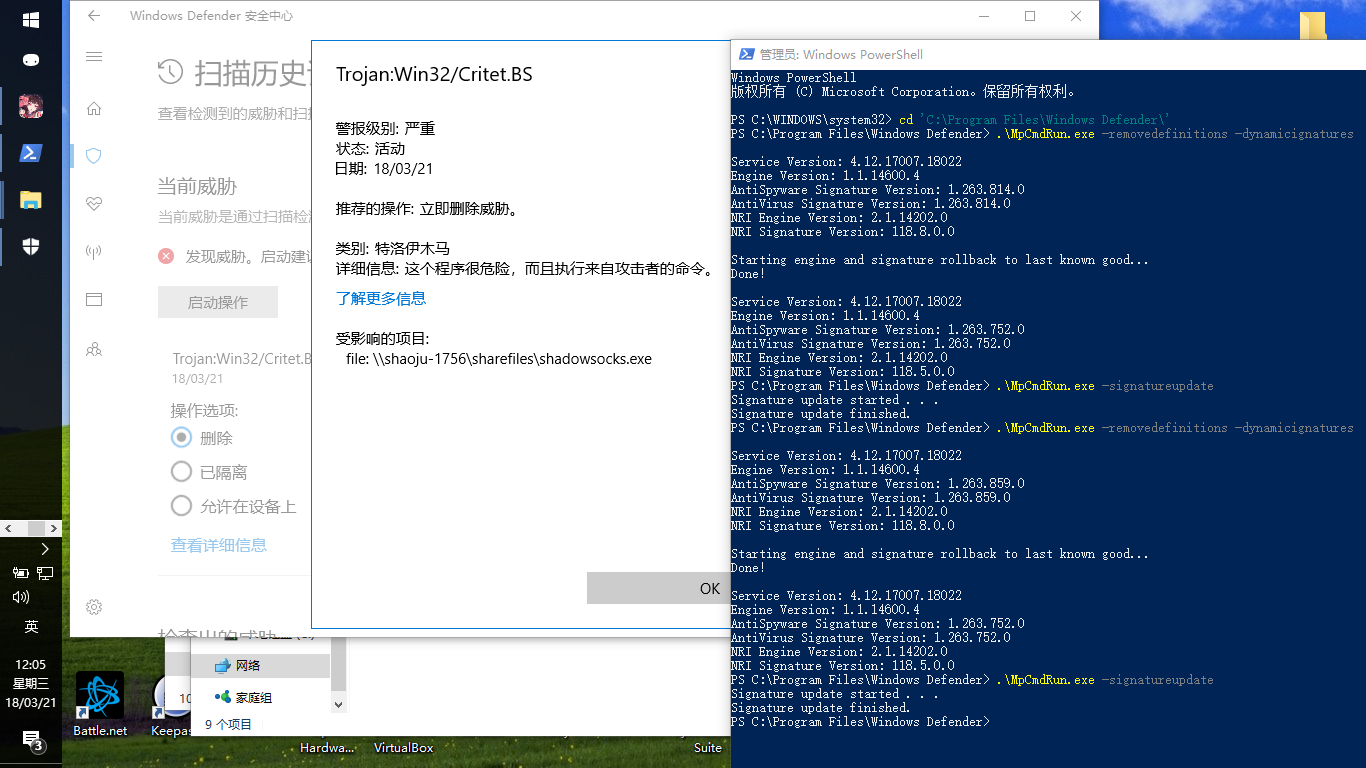
chenshaoju
on 21 Mar 2018
@chenshaoju 没有允许过,进行这个操作前还确认过是查杀的。
但是我的执行结果和你的不太一样。我的是Starting Dynamic Signature removal.,你的是starting rollback。
C:\Program Files\Windows Defender>MpCmdRun.exe -removedefinitions -dynamicsignatures

Service Version: 4.12.17007.18022
Engine Version: 1.1.14600.4
AntiSpyware Signature Version: 1.263.854.0
AntiVirus Signature Version: 1.263.854.0
NRI Engine Version: 2.1.14202.0
NRI Signature Version: 118.8.0.0

Starting Dynamic Signature removal.
Done!

Service Version: 4.12.17007.18022
Engine Version: 1.1.14600.4
AntiSpyware Signature Version: 1.263.854.0
AntiVirus Signature Version: 1.263.854.0
NRI Engine Version: 2.1.14202.0
NRI Signature Version: 118.8.0.0

C:\Program Files\Windows Defender>  MpCmdRun.exe -SignatureUpdate
Signature update started . . .
Signature update finished.
感谢 @ziruizhuang 的点拨,在阅读微软的文档后,该问题可能需要通过以下步骤解决。
1.以管理员身份启动命令提示符(cmd)或PowerShell。
2.进入 C:\Program Files\Windows Defender\ 目录,执行:
cd %ProgramFiles%\Windows Defender\
3.执行下面清空 Windows Defender 病毒定义的命令:
MpCmdRun.exe -RemoveDefinitions -All
4.重新更新完整的 Windows Defender 病毒定义:
MpCmdRun.exe -SignatureUpdate
通过以上操作即可不再被误报,已在Windows 10 x64上测试通过。
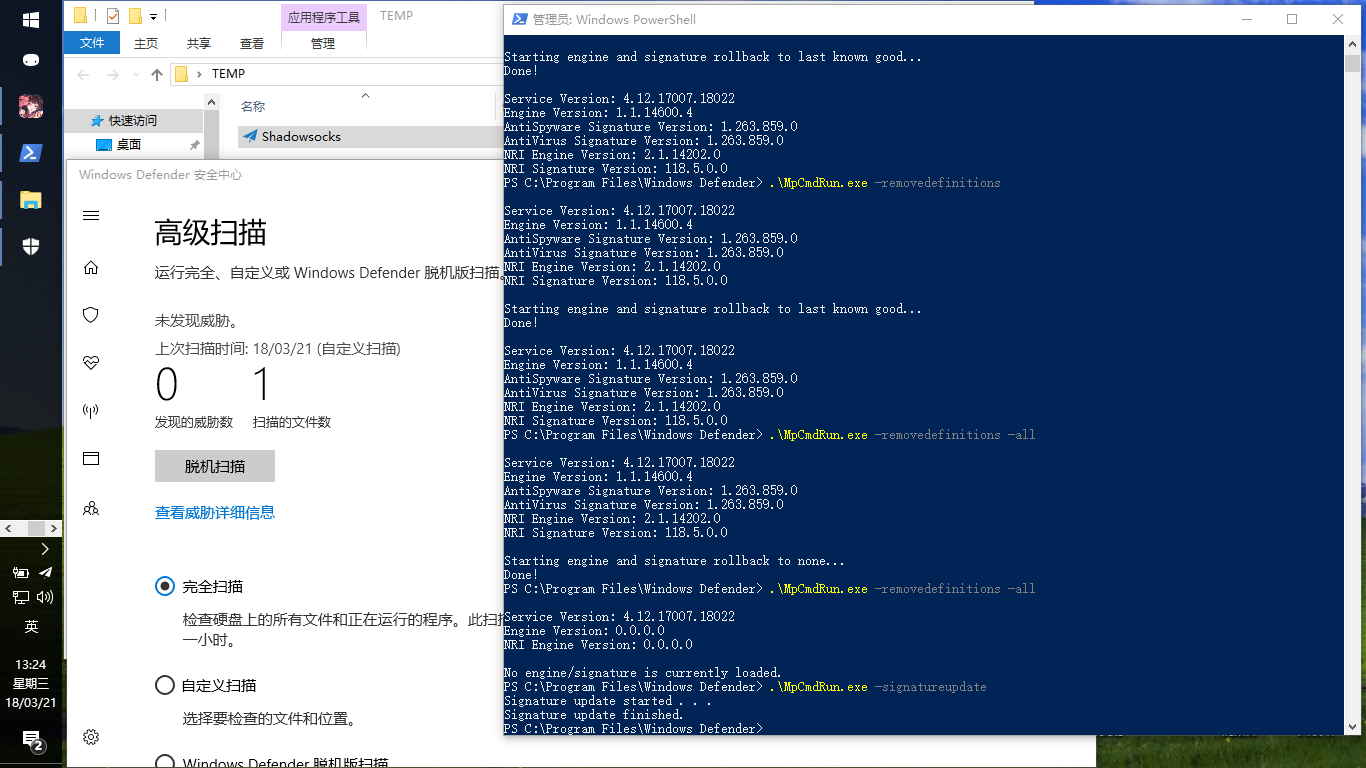
参考阅读:https://technet.microsoft.com/en-us/library/gg131918.aspx
chenshaoju
on 21 Mar 2018
Win10,最近升级4.0.9版本一直报毒,itunes升级报签名无效.今天改用SS全局下载更新,4.0.9升级正常,itunes升级也正常了.单位用的联通网络,家里用的电信网络,都是一样.何解?
 chinarabbit
on 9 Apr 2018
chinarabbit
on 9 Apr 2018
@chinarabbit 不确定,但是如果可能,请使用杀毒软件全盘扫描一次看看,可能是其他因素引起的。
chenshaoju
on 9 Apr 2018
Related issues
 zjylx
·
3Comments
zjylx
·
3Comments
 venusbahar
·
3Comments
venusbahar
·
3Comments
 zxam
·
4Comments
zxam
·
4Comments
 xieyang784
·
3Comments
xieyang784
·
3Comments
 imba-tjd
·
3Comments
imba-tjd
·
3Comments
Most helpful comment
感谢 @ziruizhuang 的点拨,在阅读微软的文档后,该问题可能需要通过以下步骤解决。
1.以管理员身份启动命令提示符(cmd)或PowerShell。
2.进入 C:\Program Files\Windows Defender\ 目录,执行:
3.执行下面清空 Windows Defender 病毒定义的命令:
4.重新更新完整的 Windows Defender 病毒定义:
通过以上操作即可不再被误报,已在Windows 10 x64上测试通过。

参考阅读:https://technet.microsoft.com/en-us/library/gg131918.aspx