Shadowsocks-windows: System.Net.Sockets.SocketException: 由于连接方在一段时间后没有正确答复或连接的主机没有反应,连接尝试失败。 127.0.0.1:1080
Shadowsocks version / 影梭版本
Shadowsocks started (4.1.2)
Environment(Operating system, .NET Framework, etc) / 使用环境(操作系统,.NET Framework等)
.NET Framework4.0
Steps you have tried / 操作步骤
Shadowsocks started (4.1.2)
What did you expect to see? / 期望的结果
前几天好好的,不知道咋回事现在出现这个情况,看下面报错日志。
手机用连接正常,证明服务是没问题的,bwg的vps服务正常。奇怪了,我最近也没干啥。
What did you see instead? / 实际结果
[2018-11-04 13:10:18] Shadowsocks started (4.1.2)
[2018-11-04 13:10:19]
=========================
Registered Encryptor Info
aes-128-cfb=>StreamOpenSSLEncryptor
aes-192-cfb=>StreamOpenSSLEncryptor
aes-256-cfb=>StreamOpenSSLEncryptor
aes-128-ctr=>StreamOpenSSLEncryptor
aes-192-ctr=>StreamOpenSSLEncryptor
aes-256-ctr=>StreamOpenSSLEncryptor
bf-cfb=>StreamOpenSSLEncryptor
camellia-128-cfb=>StreamOpenSSLEncryptor
camellia-192-cfb=>StreamOpenSSLEncryptor
camellia-256-cfb=>StreamOpenSSLEncryptor
rc4-md5=>StreamOpenSSLEncryptor
salsa20=>StreamSodiumEncryptor
chacha20=>StreamSodiumEncryptor
chacha20-ietf=>StreamSodiumEncryptor
aes-128-gcm=>AEADOpenSSLEncryptor
aes-192-gcm=>AEADOpenSSLEncryptor
aes-256-gcm=>AEADOpenSSLEncryptor
chacha20-ietf-poly1305=>AEADOpenSSLEncryptor
xchacha20-ietf-poly1305=>AEADSodiumEncryptor
=========================

[2018-11-04 13:10:42] System.Reflection.TargetInvocationException: 操作过程中出现异常,结果无效。  有关异常的详细信息,请查看 InnerException。 ---> System.Net.WebException: 无法连接到远程服务器 ---> System.Net.Sockets.SocketException: 由于连接方在一段时间后没有正确答复或连接的主机没有反应,连接尝试失败。 127.0.0.1:1080
   在 System.Net.Sockets.Socket.InternalEndConnect(IAsyncResult asyncResult)
   在 System.Net.Sockets.Socket.EndConnect(IAsyncResult asyncResult)
   在 System.Net.ServicePoint.ConnectSocketInternal(Boolean connectFailure, Socket s4, Socket s6, Socket& socket, IPAddress& address, ConnectSocketState state, IAsyncResult asyncResult, Exception& exception)
   --- 内部异常堆栈跟踪的结尾 ---
   在 System.Net.HttpWebRequest.EndGetResponse(IAsyncResult asyncResult)
   在 System.Net.WebClient.GetWebResponse(WebRequest request, IAsyncResult result)
   在 System.Net.WebClient.DownloadBitsResponseCallback(IAsyncResult result)
   --- 内部异常堆栈跟踪的结尾 ---
   在 System.ComponentModel.AsyncCompletedEventArgs.RaiseExceptionIfNecessary()
   在 Shadowsocks.Controller.UpdateChecker.http_DownloadStringCompleted(Object sender, DownloadStringCompletedEventArgs e)
Config and error log in detail (with all sensitive info masked) / 配置文件和日志文件(请隐去敏感信息)
statistics-config.json配置如下:
{
  "Calculations": {
    "AverageLatency": 0.0,
    "MinLatency": 0.0,
    "MaxLatency": 0.0,
    "AverageInboundSpeed": 0.0,
    "MinInboundSpeed": 0.0,
    "MaxInboundSpeed": 0.0,
    "AverageOutboundSpeed": 0.0,
    "MinOutboundSpeed": 0.0,
    "MaxOutboundSpeed": 0.0,
    "AverageResponse": 0.0,
    "MinResponse": 0.0,
    "MaxResponse": 0.0,
    "PackageLoss": 0.0
  },
  "StatisticsEnabled": false,
  "ByHourOfDay": true,
  "Ping": false,
  "ChoiceKeptMinutes": 10,
  "DataCollectionMinutes": 10,
  "RepeatTimesNum": 4
}
gui-config.json配置如下:
{
  "configs": [
    {
      "server": "xxx",
      "server_port": xxxx,
      "password": "xxx",
      "method": "aes-256-cfb",
      "plugin": "",
      "plugin_opts": "",
      "plugin_args": "",
      "remarks": "vps",
      "timeout": 5
    }
  ],
  "strategy": null,
  "index": 0,
  "global": false,
  "enabled": true,
  "shareOverLan": false,
  "isDefault": false,
  "localPort": 1080,
  "portableMode": true,
  "pacUrl": null,
  "useOnlinePac": false,
  "secureLocalPac": true,
  "availabilityStatistics": false,
  "autoCheckUpdate": true,
  "checkPreRelease": false,
  "isVerboseLogging": false,
  "logViewer": {
    "topMost": false,
    "wrapText": false,
    "toolbarShown": false,
    "Font": "Consolas, 8pt",
    "BackgroundColor": "Black",
    "TextColor": "White"
  },
  "proxy": {
    "useProxy": false,
    "proxyType": 0,
    "proxyServer": "",
    "proxyPort": 0,
    "proxyTimeout": 3
  },
  "hotkey": {
    "SwitchSystemProxy": "",
    "SwitchSystemProxyMode": "",
    "SwitchAllowLan": "",
    "ShowLogs": "",
    "ServerMoveUp": "",
    "ServerMoveDown": "",
    "RegHotkeysAtStartup": false
  }
}
 liliexuan
All 18 comments
telent 127.0.0.1 1080 看结果
telent your-vps-ip-addree your-ssserver-listening-port 看结果
Thank you for your email,and hope your all going great.
Best regards.
Min <[email protected]notifications@github.com> 於 2018年11月4日 13:33 寫道:
Shadowsocks version / 影梭版本
Shadowsocks started (4.1.2)
Environment(Operating system, .NET Framework, etc) / 使用环境(操作系统,.NET Framework等)
.NET Framework4.0
Steps you have tried / 操作步骤
Shadowsocks started (4.1.2)
What did you expect to see? / 期望的结果
前几天好好的,不知道咋回事现在出现这个情况,看下面报错日志。
手机用连接正常,证明服务是没问题的,bwg的vps服务正常。奇怪了,我最近也没干啥。
What did you see instead? / 实际结果
[2018-11-04 13:10:18] Shadowsocks started (4.1.2)
[2018-11-04 13:10:19]
Registered Encryptor Info
aes-128-cfb=>StreamOpenSSLEncryptor
aes-192-cfb=>StreamOpenSSLEncryptor
aes-256-cfb=>StreamOpenSSLEncryptor
aes-128-ctr=>StreamOpenSSLEncryptor
aes-192-ctr=>StreamOpenSSLEncryptor
aes-256-ctr=>StreamOpenSSLEncryptor
bf-cfb=>StreamOpenSSLEncryptor
camellia-128-cfb=>StreamOpenSSLEncryptor
camellia-192-cfb=>StreamOpenSSLEncryptor
camellia-256-cfb=>StreamOpenSSLEncryptor
rc4-md5=>StreamOpenSSLEncryptor
salsa20=>StreamSodiumEncryptor
chacha20=>StreamSodiumEncryptor
chacha20-ietf=>StreamSodiumEncryptor
aes-128-gcm=>AEADOpenSSLEncryptor
aes-192-gcm=>AEADOpenSSLEncryptor
aes-256-gcm=>AEADOpenSSLEncryptor
chacha20-ietf-poly1305=>AEADOpenSSLEncryptor
xchacha20-ietf-poly1305=>AEADSodiumEncryptor
[2018-11-04 13:10:42] System.Reflection.TargetInvocationException: 操作过程中出现异常,结果无效。 有关异常的详细信息,请查看 InnerException。 ---> System.Nethttp://System.Net.WebException: 无法连接到远程服务器 ---> System.Nethttp://System.Net.Sockets.SocketException: 由于连接方在一段时间后没有正确答复或连接的主机没有反应,连接尝试失败。 127.0.0.1:1080
在 System.Nethttp://System.Net.Sockets.Socket.InternalEndConnect(IAsyncResult asyncResult)
在 System.Nethttp://System.Net.Sockets.Socket.EndConnect(IAsyncResult asyncResult)
在 System.Nethttp://System.Net.ServicePoint.ConnectSocketInternal(Boolean connectFailure, Socket s4, Socket s6, Socket& socket, IPAddress& address, ConnectSocketState state, IAsyncResult asyncResult, Exception& exception)
--- 内部异常堆栈跟踪的结尾 ---
在 System.Nethttp://System.Net.HttpWebRequest.EndGetResponse(IAsyncResult asyncResult)
在 System.Nethttp://System.Net.WebClient.GetWebResponse(WebRequest request, IAsyncResult result)
在 System.Nethttp://System.Net.WebClient.DownloadBitsResponseCallback(IAsyncResult result)
--- 内部异常堆栈跟踪的结尾 ---
在 System.ComponentModel.AsyncCompletedEventArgs.RaiseExceptionIfNecessary()
在 Shadowsocks.Controller.UpdateChecker.http_DownloadStringCompleted(Object sender, DownloadStringCompletedEventArgs e)
Config and error log in detail (with all sensitive info masked) / 配置文件和日志文件(请隐去敏感信息)
statistics-config.json配置如下:
{
"Calculations": {
"AverageLatency": 0.0,
"MinLatency": 0.0,
"MaxLatency": 0.0,
"AverageInboundSpeed": 0.0,
"MinInboundSpeed": 0.0,
"MaxInboundSpeed": 0.0,
"AverageOutboundSpeed": 0.0,
"MinOutboundSpeed": 0.0,
"MaxOutboundSpeed": 0.0,
"AverageResponse": 0.0,
"MinResponse": 0.0,
"MaxResponse": 0.0,
"PackageLoss": 0.0
},
"StatisticsEnabled": false,
"ByHourOfDay": true,
"Ping": false,
"ChoiceKeptMinutes": 10,
"DataCollectionMinutes": 10,
"RepeatTimesNum": 4
}
gui-config.json配置如下:
{
"configs": [
{
"server": "xxx",
"server_port": xxxx,
"password": "xxx",
"method": "aes-256-cfb",
"plugin": "",
"plugin_opts": "",
"plugin_args": "",
"remarks": "vps",
"timeout": 5
}
],
"strategy": null,
"index": 0,
"global": false,
"enabled": true,
"shareOverLan": false,
"isDefault": false,
"localPort": 1080,
"portableMode": true,
"pacUrl": null,
"useOnlinePac": false,
"secureLocalPac": true,
"availabilityStatistics": false,
"autoCheckUpdate": true,
"checkPreRelease": false,
"isVerboseLogging": false,
"logViewer": {
"topMost": false,
"wrapText": false,
"toolbarShown": false,
"Font": "Consolas, 8pt",
"BackgroundColor": "Black",
"TextColor": "White"
},
"proxy": {
"useProxy": false,
"proxyType": 0,
"proxyServer": "",
"proxyPort": 0,
"proxyTimeout": 3
},
"hotkey": {
"SwitchSystemProxy": "",
"SwitchSystemProxyMode": "",
"SwitchAllowLan": "",
"ShowLogs": "",
"ServerMoveUp": "",
"ServerMoveDown": "",
"RegHotkeysAtStartup": false
}
}
—
You are receiving this because you are subscribed to this thread.
Reply to this email directly, view it on GitHubhttps://github.com/shadowsocks/shadowsocks-windows/issues/2065, or mute the threadhttps://github.com/notifications/unsubscribe-auth/Aqd3LftAJPOH8fHzTQx26oz1jgZcp0PSks5urnw9gaJpZM4YNJqg.
 alxlan
on 4 Nov 2018
alxlan
on 4 Nov 2018
Telnet 127.0.0.1 1080连接失败, vps的可以通,会不会是防火墙的问题。 win10系统。
liliexuan
on 4 Nov 2018
telnet哪个失败?
Thank you for your email,and hope your all going great.
Best regards.
Min <[email protected]notifications@github.com> 於 2018年11月4日 13:59 寫道:
Telnet连接失败,会不会是防火墙的问题。win10系统。
—
You are receiving this because you commented.
Reply to this email directly, view it on GitHubhttps://github.com/shadowsocks/shadowsocks-windows/issues/2065#issuecomment-435644524, or mute the threadhttps://github.com/notifications/unsubscribe-auth/Aqd3LVJBPmwm0fZZlG3KtA1KHvuTJXhmks5uroI1gaJpZM4YNJqg.
alxlan
on 4 Nov 2018
Telnet 本地的失败,服务器的没问题。
liliexuan
on 4 Nov 2018
你是否设置过正向代理?
这个界面:
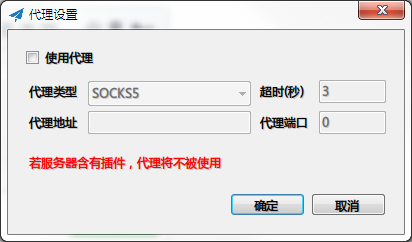
如果你上网不需要通过代理服务器,请取消这里的复选框。
 chenshaoju
on 4 Nov 2018
chenshaoju
on 4 Nov 2018
关掉网络防火墙再telnet试试。如果关掉防火墙之后telnet正常,可以修改防火墙规则手动添加允许程序监听端口。
可能有时候关掉防火墙也没用,win10的网络防火墙就是个迷。
Thank you for your email,and hope your all going great.
Best regards.
Min <[email protected]notifications@github.com> 於 2018年11月4日 14:09 寫道:
Telnet 本地的失败,服务器的没问题。
—
You are receiving this because you commented.
Reply to this email directly, view it on GitHubhttps://github.com/shadowsocks/shadowsocks-windows/issues/2065#issuecomment-435644974, or mute the threadhttps://github.com/notifications/unsubscribe-auth/Aqd3LVJPg4LoZl18zypu1vYOD9jr6wBeks5uroSwgaJpZM4YNJqg.
alxlan
on 4 Nov 2018
这个没有设置过,我倒是怀疑是不是这里的问题,这里好像是影梭自己设置的吧,我没动过。就是这些开关好像动过。现在没有参考,不知道能正常的时候这些开关是咋样的了。
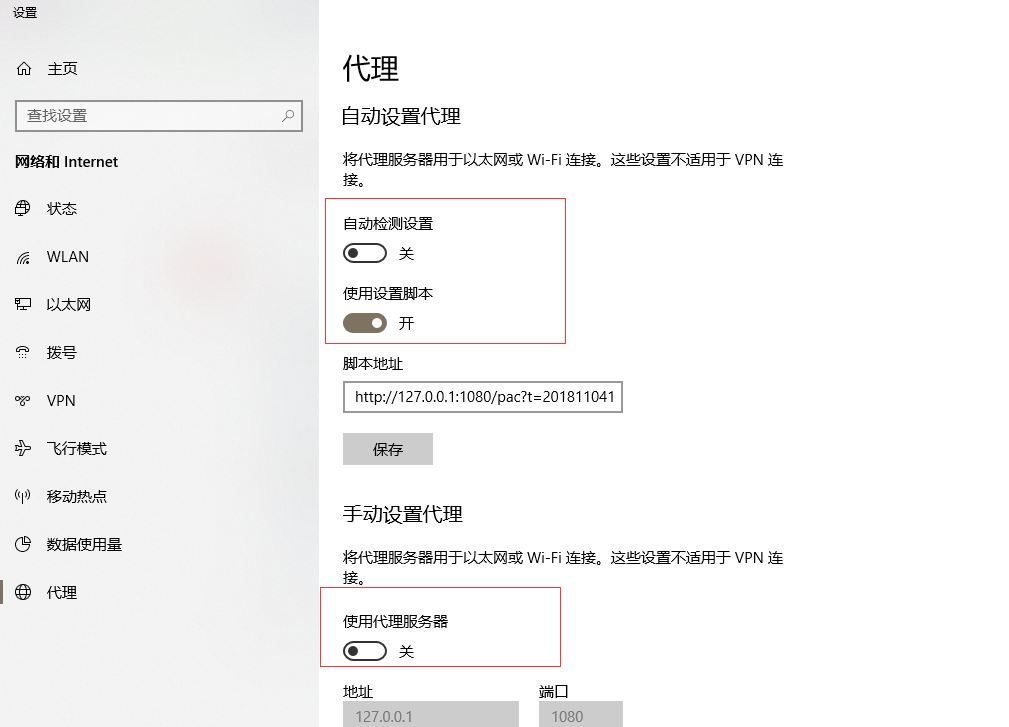
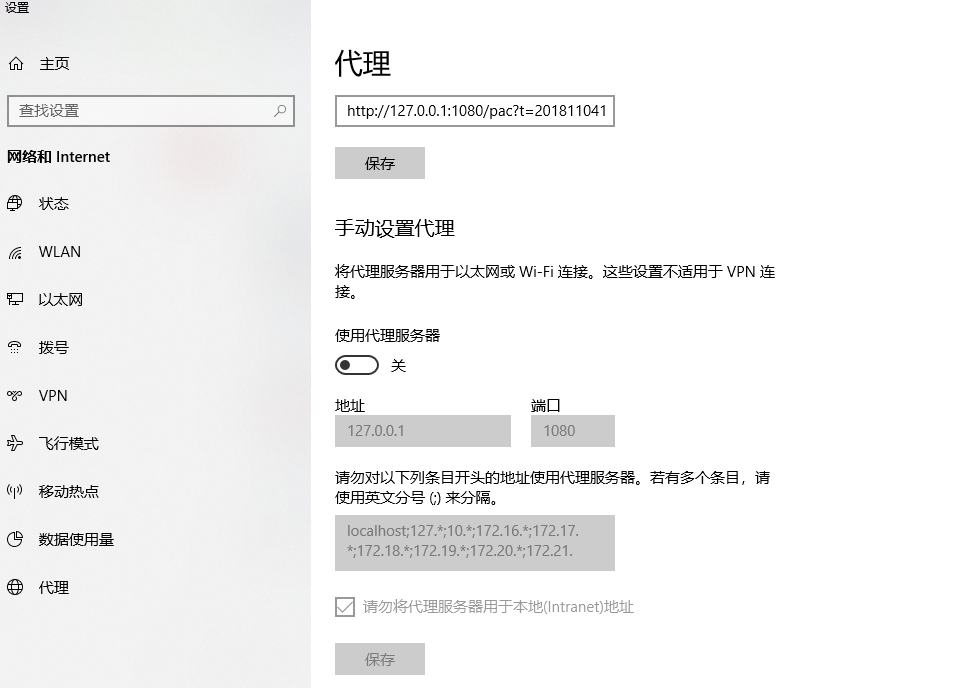
你是否设置过正向代理?
这个界面:
如果你上网不需要通过代理服务器,请取消这里的复选框。
liliexuan
on 4 Nov 2018
关掉网络防火墙再telnet试试。如果关掉防火墙之后telnet正常,可以修改防火墙规则手动添加允许程序监听端口。 可能有时候关掉防火墙也没用,win10的网络防火墙就是个迷。 Thank you for your email,and hope your all going great. Best regards. Min <[email protected]notifications@github.com> 於 2018年11月4日 14:09 寫道: Telnet 本地的失败,服务器的没问题。 — You are receiving this because you commented. Reply to this email directly, view it on GitHub<#2065 (comment)>, or mute the threadhttps://github.com/notifications/unsubscribe-auth/Aqd3LVJPg4LoZl18zypu1vYOD9jr6wBeks5uroSwgaJpZM4YNJqg.
搞好了,真的是防火墙的问题,由于我升级了系统,防火墙跟之前的不太一样了,我一直以为已经关了,结果他还打开着。关掉就好了
liliexuan
on 4 Nov 2018
连不上本地端口这个问题真的就是Win10防火墙的原因。以前没有,在某一次Windows自动更新后防火墙配置发生了变化导致出现了这个问题。于是我们可以通过以下步骤解决:
- 进入
Window Defender安全中心 --> 防火墙和网络保护 --> 允许应用通过防火墙 - 进入
允许应用通过防火墙后,依次点击更改设置-->允许其他应用,在弹出的选项中选择ss客户端,然后在网络类型一栏中勾选上 专有 和 共用 类型 - 最后重启一下ss客户端,发现就可以连接上了。
 zifangsky
on 1 Feb 2019
zifangsky
on 1 Feb 2019
日志有报错:
[Error] System.Net.Sockets.SocketException (0x80004005): 由于连接方在一段时间后没有正确答复或连接的主机没有反应,连接尝试失败。 10.0.0.1:443
在 System.Net.Sockets.Socket.EndConnect(IAsyncResult asyncResult)
但是可以正常访问是什么情况......
 MillionQW
on 24 Feb 2019
MillionQW
on 24 Feb 2019
你是否配置了正向代理?如果是,这意味着你的代理服务器忙或者无法处理你的请求。
chenshaoju
on 24 Feb 2019
我用的是 4.9 版本,找不到上面“代理设置”那个截图的界面。
右键小飞机进入“选项设置”那里有个 “二级(前置)代理” 不知道是不是你说的正向代理,那里并没有被勾选。
MillionQW
on 24 Feb 2019
你用的是SS还是SSR?目前SS的版本是4.1.4。
https://github.com/shadowsocks/shadowsocks-windows/releases
SS和SSR是两个东西。
chenshaoju
on 25 Feb 2019
SSR。
SS 和 SSR 的客户端不是一样的吗。
MillionQW
on 25 Feb 2019
不是……这个过程有点复杂,如果你有兴趣的话可以观看这个第三方编写的内容:
https://github.com/JadaGates/ShadowsocksBio
chenshaoju
on 25 Feb 2019
很棒的资料,一会仔细阅读。感谢回答~
我搭服务器的时候安装的是 SSR,所以我这是用了SS的客户端才引起的日志报错嘛...
MillionQW
on 25 Feb 2019
我没有这么测试过,无法回答。。。
chenshaoju
on 25 Feb 2019
连不上本地端口这个问题真的就是Win10防火墙的原因。以前没有,在某一次Windows自动更新后防火墙配置发生了变化导致出现了这个问题。于是我们可以通过以下步骤解决:
- 进入
Window Defender安全中心 --> 防火墙和网络保护 --> 允许应用通过防火墙- 进入
允许应用通过防火墙后,依次点击更改设置-->允许其他应用,在弹出的选项中选择ss客户端,然后在网络类型一栏中勾选上 专有 和 共用 类型- 最后重启一下ss客户端,发现就可以连接上了。
我也是本地端口问题,用了你的方法解决了,很棒。
 changweijie
on 11 Oct 2019
changweijie
on 11 Oct 2019
Related issues
 zhuhangyu
·
4Comments
zhuhangyu
·
4Comments
 spectereye
·
4Comments
spectereye
·
4Comments
 happybear88
·
3Comments
happybear88
·
3Comments
 Galaxy0419
·
3Comments
Galaxy0419
·
3Comments
 lmshao
·
4Comments
lmshao
·
4Comments