Shadowsocks-windows: 台式机重装Win10无法使用ss
Please read Wiki carefully, especially / 提问前请先阅读wiki https://github.com/shadowsocks/shadowsocks-windows/wiki/Troubleshooting.
Or search from issue board / 或在issue board中搜索 https://github.com/shadowsocks/shadowsocks-windows/issues?utf8=%E2%9C%93&q=is%3Aissue
Please answer these questions before submitting your issue. Thanks! / 请按照以下格式描述你的问题
Version(release version or AppVeyor link) / 版本(正式版或基于AppVeyor的链接)
shadowsocks 4.0.10
Environment(Operating system, .NET Framework, etc) / 操作环境(操作系统,.NET Framework等)
.net framework v4.0.30319 win10专业版
Steps you have tried / 操作步骤
拷贝笔记本上的shadowsocks4.0.10到台式机,启动后无法连google,笔记本上可以
What did you expect to see? / 期望的结果
问题出在哪
What did you see instead? / 实际结果
Config and error log in detail (with all sensitive info masked) / 配置文件和日志文件(请隐去敏感信息)
=========================

[2018-06-17 13:28:22] Shadowsocks started
[2018-06-17 13:28:22]
=========================
Registered Encryptor Info
aes-128-cfb=>StreamOpenSSLEncryptor
aes-192-cfb=>StreamOpenSSLEncryptor
aes-256-cfb=>StreamOpenSSLEncryptor
aes-128-ctr=>StreamOpenSSLEncryptor
aes-192-ctr=>StreamOpenSSLEncryptor
aes-256-ctr=>StreamOpenSSLEncryptor
bf-cfb=>StreamOpenSSLEncryptor
camellia-128-cfb=>StreamOpenSSLEncryptor
camellia-192-cfb=>StreamOpenSSLEncryptor
camellia-256-cfb=>StreamOpenSSLEncryptor
rc4-md5=>StreamOpenSSLEncryptor
salsa20=>StreamSodiumEncryptor
chacha20=>StreamSodiumEncryptor
chacha20-ietf=>StreamSodiumEncryptor
aes-128-gcm=>AEADOpenSSLEncryptor
aes-192-gcm=>AEADOpenSSLEncryptor
aes-256-gcm=>AEADOpenSSLEncryptor
chacha20-ietf-poly1305=>AEADOpenSSLEncryptor
xchacha20-ietf-poly1305=>AEADSodiumEncryptor
=========================

[2018-06-17 13:29:00] Shadowsocks started
[2018-06-17 13:29:00]
=========================
Registered Encryptor Info
aes-128-cfb=>StreamOpenSSLEncryptor
aes-192-cfb=>StreamOpenSSLEncryptor
aes-256-cfb=>StreamOpenSSLEncryptor
aes-128-ctr=>StreamOpenSSLEncryptor
aes-192-ctr=>StreamOpenSSLEncryptor
aes-256-ctr=>StreamOpenSSLEncryptor
bf-cfb=>StreamOpenSSLEncryptor
camellia-128-cfb=>StreamOpenSSLEncryptor
camellia-192-cfb=>StreamOpenSSLEncryptor
camellia-256-cfb=>StreamOpenSSLEncryptor
rc4-md5=>StreamOpenSSLEncryptor
salsa20=>StreamSodiumEncryptor
chacha20=>StreamSodiumEncryptor
chacha20-ietf=>StreamSodiumEncryptor
aes-128-gcm=>AEADOpenSSLEncryptor
aes-192-gcm=>AEADOpenSSLEncryptor
aes-256-gcm=>AEADOpenSSLEncryptor
chacha20-ietf-poly1305=>AEADOpenSSLEncryptor
xchacha20-ietf-poly1305=>AEADSodiumEncryptor
=========================
 daizengjie
All 10 comments
请尝试右击任务栏的纸飞机图标,选中“启用系统代理”。
如果仍然不行,请尝试右击纸飞机图标,选择PAC,再点击“从GFWList更新本地PAC”。
 chenshaoju
on 17 Jun 2018
chenshaoju
on 17 Jun 2018
都试过了,依旧不行,感觉很像是win10系统的问题
daizengjie
on 17 Jun 2018
你有Chrome浏览器吗?如果有,请在Chrome浏览器的地址栏中输入:
chrome://net-internals/#proxy
显示的是什么?
chenshaoju
on 17 Jun 2018
Effective proxy settings
Use DIRECT connections.
daizengjie
on 17 Jun 2018
只有这两行?
这意味着Chrome没有读取到你的系统代理配置,请在确保SS启用系统代理的情况下点击开始菜单,点击设置(齿轮),点击网络和Internet,再点击代理,是否能看到使用设置脚本为开,并且脚本地址为 http://127.0.0.1:1080 开头?
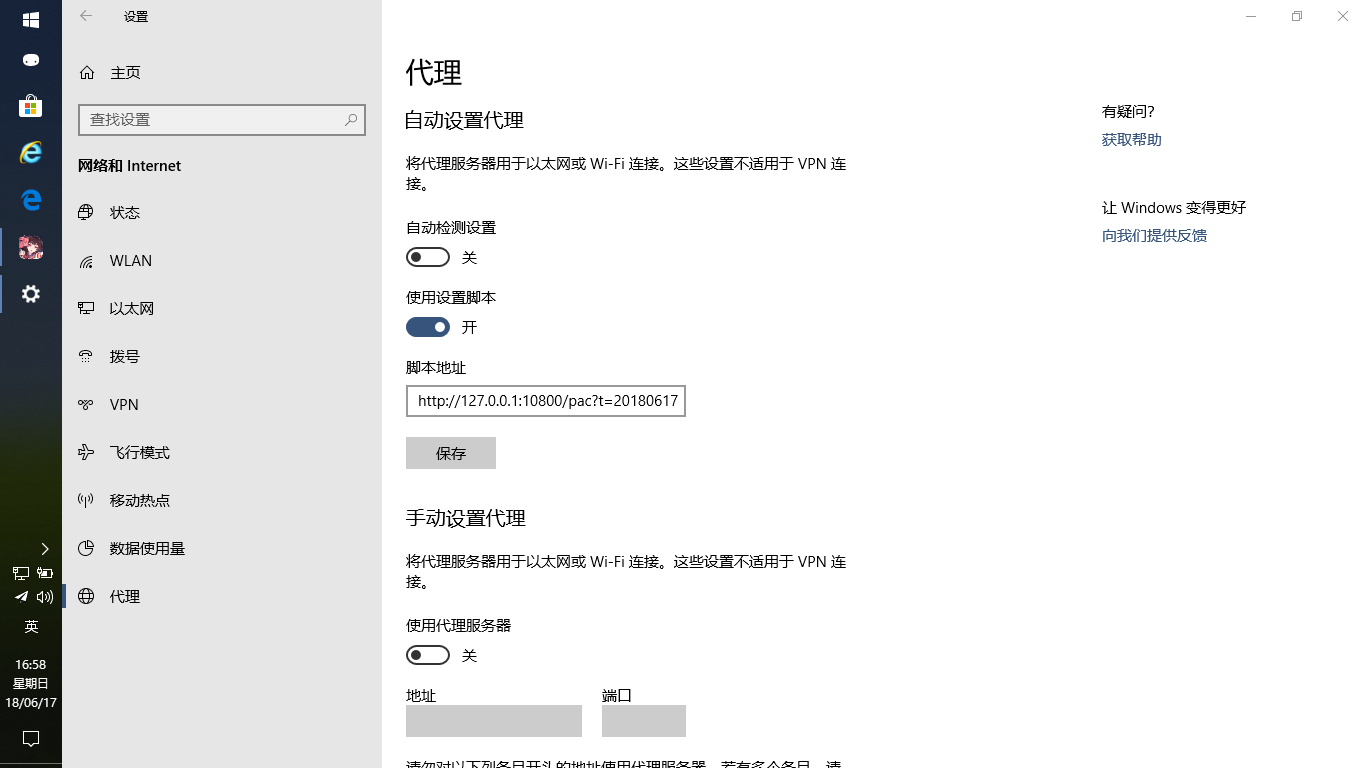
我的端口是 10800 ,请忽略。
chenshaoju
on 17 Jun 2018
@chenshaoju
使用设置脚本确实是打开着的,http://127.0.0.1:1080/pac?t=20180617164913568&secret=uO2tBJNPoRcBoe3WQQcKAAVqEUSsdZZIfGvDlPzGsfs=
另外我发现,在IE中可以打开google..在chrome里还不行
daizengjie
on 17 Jun 2018
我将宽带连接改为英文名后,chorme访问谷歌报了
500 Internal Privoxy Error
Privoxy encountered an error while processing your request:
Could not load template file no-server-data or one of its included components.
Please contact your proxy administrator.
If you are the proxy administrator, please put the required file(s)in the (confdir)/templates directory. The location of the (confdir) directory is specified in the main Privoxy config file. (It's typically the Privoxy install directory).
然后使用chrome://net-internals/#proxy 查看代理 发现是
Effective proxy settings
PAC script: http://127.0.0.1:1080/pac?t=20180617171055074&secret=cQjys7h+9817nSaMNW5+VNKTGB9CwHchvvR9U2FnuL8=
daizengjie
on 17 Jun 2018
@chenshaoju
重启chrome可以成功使用,感谢兄台帮助
问题应该是出在宽带连接的中文名
daizengjie
on 17 Jun 2018
@daizengjie 宽带连接改为英文名后,重启果然好使~谢谢
 JasonNg91
on 1 Jul 2018
JasonNg91
on 1 Jul 2018
同宽带连接不能是中文
 0x6d3f9c
on 31 Aug 2018
0x6d3f9c
on 31 Aug 2018
Related issues
 xmha97
·
3Comments
xmha97
·
3Comments
 wenjiping
·
3Comments
wenjiping
·
3Comments
 DonClaud
·
4Comments
DonClaud
·
4Comments
 happybear88
·
3Comments
happybear88
·
3Comments
 xieyang784
·
3Comments
xieyang784
·
3Comments
Most helpful comment
我将宽带连接改为英文名后,chorme访问谷歌报了
500 Internal Privoxy Error
Privoxy encountered an error while processing your request:
Could not load template file no-server-data or one of its included components.
Please contact your proxy administrator.
If you are the proxy administrator, please put the required file(s)in the (confdir)/templates directory. The location of the (confdir) directory is specified in the main Privoxy config file. (It's typically the Privoxy install directory).
然后使用chrome://net-internals/#proxy 查看代理 发现是
Effective proxy settings
PAC script: http://127.0.0.1:1080/pac?t=20180617171055074&secret=cQjys7h+9817nSaMNW5+VNKTGB9CwHchvvR9U2FnuL8=