Shadowsocks-windows: 插件如何使用
Please read Wiki carefully, especially / 提问前请先阅读wiki https://github.com/shadowsocks/shadowsocks-windows/wiki/Troubleshooting.
Or search from issue board / 或在issue board中搜索 https://github.com/shadowsocks/shadowsocks-windows/issues?utf8=%E2%9C%93&q=is%3Aissue
Please answer these questions before submitting your issue. Thanks! / 请按照以下格式描述你的问题
Version(release version or AppVeyor link) / 版本(正式版或基于AppVeyor的链接)
4.0.10
Environment(Operating system, .NET Framework, etc) / 操作环境(操作系统,.NET Framework等)
WIn10, .NET Framework 4.0
Steps you have tried / 操作步骤
我知道插件有kcptun和obfs,请问这两种插件选择网上的什么程序,选项可以填什么,参数可以填什么?
What did you expect to see? / 期望的结果
学会使用插件,目前我是用的是kcptun客户端配置管理程序来启用kcptun的,可以用ss的插件功能来使用kcptun吗?
What did you see instead? / 实际结果
不会使用ss的插件功能。
Config and error log in detail (with all sensitive info masked) / 配置文件和日志文件(请隐去敏感信息)
 flashbarry
All 8 comments
首先,你需要使用符合SIP003规范的插件,目前项目内的插件只有simple-obfs和kcptun:
https://github.com/shadowsocks/kcptun
https://github.com/shadowsocks/simple-obfs
在SS客户端的编辑服务器界面中,插件程序填写你所下载的插件文件名和路径,通常建议直接放到 shadowsocks.exe 所在目录。
比如,你使用 simple-obfs ,那么"插件程序"选项可以填写你的 simple-obfs 客户端文件名,比如 obfs-local ,kcptun的话,比如 client_windows_amd64 。
“插件选项”为你的插件参数,simple-obfs如:obfs=http;obfs-host=ss1.bdstatic.com,kcptun如:mode=fast2;key=123456;crypt=salsa20。
参考阅读:https://github.com/shadowsocks/shadowsocks-windows/issues/1813
 chenshaoju
on 11 May 2018
chenshaoju
on 11 May 2018
很棒!终于在windows 上的 shadowsocks 上用上kcptun 了,大晚上看youtube 速度提升效果很明显
 albertofwb
on 12 May 2018
albertofwb
on 12 May 2018
@chenshaoju 你好,谢谢!我也看了你的参考阅读:#1813,
对于新版ss,仍有三个不是太清楚的地方:
1.现在的4.0.10版本的ss,除了插件选项,还有个插件参数处可以填写,不知道插件选项和插件参数有什么区别?
2.按照参考阅读1813说的kcptun的客户端client_windows_amd64要在ss中使用的话,需要更名成kcptun吗?还是直接把文件名写入插件程序里就行了?
3.kcptun有个本地侦听端口和kcptun服务器端口,本地侦听端口就是ss服务器的端口,kcptun服务器端口就是加速端口,不知道加了kcptun的ss里,这两个端口如何填写?
以上,希望得到回答,非常感谢!!!!!
flashbarry
on 13 May 2018
@CSharpGit @flashbarry
1.现在的4.0.10版本的ss,除了插件选线,还有个插件参数处可以填写,不知道插件选项和插件参数有什么区别?
插件选项里面填写,插件的全路径,插件参数填写该插件的运行参数
2.按照参考阅读1813说的kcptun的客户端client_windows_amd64要在ss中使用的话,需要更名成kcptun吗?还是直接把文件名写入插件程序里就行了?
不需要改名,只需要在插件选项中输入 client_windows_amd64 的全路径
3.kcptun有个本地侦听端口和kcptun服务器端口,本地侦听端口就是ss服务器的端口,kcptun服务器端口就是加速端口,不知道加了kcptun的ss里,这两个端口如何填写?
服务器端口,填写你服务端 kcptun 的监听端口;代理端口1080 不用改变
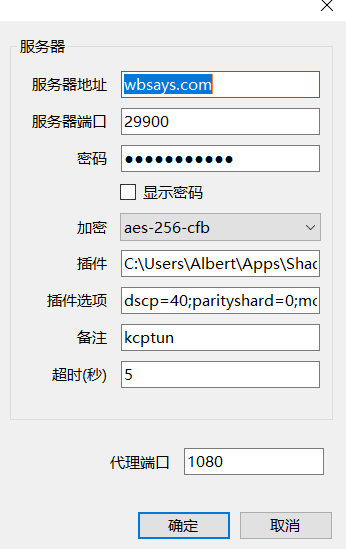
albertofwb
on 13 May 2018
@flashbarry @albertofwb 4.0.10 中的“插件参数”,是提供给不支持SIP003规范的插件使用的,这个参数会直接将你所指定的参数传递给插件程序,并提供对应的变量。
具体的使用格式,可将鼠标悬停在“插件参数”这四个字上,会有提示出现。
参考阅读: https://github.com/shadowsocks/shadowsocks-windows/pull/1818
chenshaoju
on 13 May 2018
You can use either
Plugin Program kcptun (client_windows_amd64.exe renamed to kcptun.exe, and in shadowsocks.exe dir)
or give the full path to the exe, example.
Plugin Program C:client_windows_amd64.exe
Plugin Options is for SIP003 compliant passing of parameters
Plugin Arguments is for CLI (non-SIP003) passing of parameters
Different formats.
For Plugin Arguments you can either make a txt file, and call it using -c
or enter the parameters manually.
Tested and working.
e.g.
Plugin Program  C:\client_windows_amd64.exe
Plugin Arguments --key Herekeyok --crypt salsa20 --mode fast2
or
Plugin Program C:\client_windows_amd64.exe
Plugin Options key=Herekeyok;crypt=salsa20;mode=fast2
or
Plugin Program  C:\client_windows_amd64.exe
Plugin Arguments -c C:\kcptun\kcptun_config.txt
file saved at C:kcptunkcptun_config.txt
{
"key": "Herekeyok",
"crypt": "salsa20",
"mode": "fast2"
}
client_windows_amd64.exe from https://github.com/shadowsocks/kcptun/releases
However does not work with versions from https://github.com/xtaci/kcptun/releases for some reason,
"Plugin Arguments" is non-SIP003 so it should be working, but its not.
EDIT: remember you need to make another instance, connect to kcptun server listening port
not the shadowsocks listening port.
 john564
on 18 May 2018
john564
on 18 May 2018
@john564
However does not work with versions from https://github.com/xtaci/kcptun/releases for some reason,
"Plugin Arguments" is non-SIP003 so it should be working, but its not.
Will check it soon
 celeron533
on 30 May 2018
celeron533
on 18 Sep 2018
celeron533
on 30 May 2018
celeron533
on 18 Sep 2018
Related issues
 hztgz
·
3Comments
hztgz
·
3Comments
 happybear88
·
3Comments
happybear88
·
3Comments
 zjylx
·
3Comments
zjylx
·
3Comments
 imba-tjd
·
3Comments
imba-tjd
·
3Comments
 LisonFan
·
3Comments
LisonFan
·
3Comments
Most helpful comment
首先,你需要使用符合SIP003规范的插件,目前项目内的插件只有simple-obfs和kcptun:
https://github.com/shadowsocks/kcptun
https://github.com/shadowsocks/simple-obfs
在SS客户端的编辑服务器界面中,插件程序填写你所下载的插件文件名和路径,通常建议直接放到 shadowsocks.exe 所在目录。
比如,你使用 simple-obfs ,那么"插件程序"选项可以填写你的 simple-obfs 客户端文件名,比如 obfs-local ,kcptun的话,比如 client_windows_amd64 。
“插件选项”为你的插件参数,simple-obfs如:
obfs=http;obfs-host=ss1.bdstatic.com,kcptun如:mode=fast2;key=123456;crypt=salsa20。参考阅读:https://github.com/shadowsocks/shadowsocks-windows/issues/1813