Session: Express-Session not persisting / Working in production even having a store option in the session options
I saw many post regarding this issue but couldn't get the answer.
In many posts the answers are to have a session storage.
In my project I am having a session - storage but still the problem
persist
I am using connect-session-firebase and Firestore for storing the session but still I am not getting a persistent session.
It's working fine in development but not in Production even having a
sessionstorage
My codes
server.js
const session = require('express-session')
const cors = require('cors')
const helmet = require('helmet')
const { port , sessionSecretKey} = require('./configs/config')
var cookieParser = require('cookie-parser')
var flash = require('connect-flash');

const { store} = require('./configs/sessionStorage/firebaseSessionStorage')
const {dbname,MONGODB_URL,sessionKeys} = require('./configs/config.js')
//database connection
mongoose.connect(MONGODB_URL,{
  useNewUrlParser: true
});
const app = express();

app.use(helmet());

app.use(bodyParser.urlencoded({extended: true, limit: '50mb'}))
app.use(bodyParser.json({limit: '50mb'}))

app.use(cookieParser());

app.use(session({
  store,
  secret: sessionSecretKey,
  resave: true,
  saveUninitialized: true,
  cookie: {
    secure: process.env.NODE_ENV == "production" ? true : false ,
    maxAge: 1000 * 60 * 60 * 24 * 7
  }
}));
Now I have created a middleware with every request just to count the view using session
app.use(function(req,res,next){

  res.locals.user = req.user || null;
  if(req.session.views){
    req.session.views += 1
    req.session.save();
  }else{
    req.session.views = 1
    req.session.save();
  }
  console.log('req.session.views', req.session.views)
  next();
})
Its Giving output req.session.views 1 in production
PM2 script for start
pm2-runtime start ecosystem.config.js --env production
ecosystem.config.js
module.exports = {
  apps : [{
    name: 'server',
    script: 'server.js',
    // Options reference: https://pm2.io/doc/en/runtime/reference/ecosystem-file/
    instances: 2,
    autorestart: true,
    watch: false,
    max_memory_restart: '1G',
    env: {
      NODE_ENV: 'development'
    },
    env_production: {
      NODE_ENV: 'production'
    }
  }],

  deploy : {
    production : {
      user : 'node',
      host : '212.83.163.1',
      ref  : 'origin/master',
      repo : '[email protected]:repo.git',
      path : '/var/www/production',
      'post-deploy' : 'npm install && pm2 reload ecosystem.config.js --env production'
    }
  }
};
And also when authenticating a user it is not able to persist the user.
Even the firestore collection i.e the session database is filling with sessions in production and development both but still the session is not persisting
Thanks For Your Time
UPDATED :
What are the things I tried to make it work after this issue is posted :-
- I also added the same Session secret key to both the
cookieparser()andsession(). But still the same problem.
- Added a
trustproxyby expressapp.set('trustproxy', true)
 anikethsaha
All 80 comments
Yes I'm having the same issue as you with a similar stack.
 hallcyon11
on 20 Feb 2019
hallcyon11
on 20 Feb 2019
I have a similar configuration as well and seem to be experiencing something similar.
Using the latest express-session, connect-mongo store, and mongoose ORM, and a single mongod (for now). I use anywhere from 1-4 backend servers via a pm2 cluster.
I see an issue where I write to req.session.foo in one request/response; but when I read it back in another request, req.session.foo is undefined. (It is quite rare) I noted in the logs that when this happens, the instance of the backend that writes to req.session.foo is always different then the instance that reads it as undefined. I'm suspecting some type of race condition where the reader is reading before the write actually happens at the mongo level.
Config looks like:
var session = require('express-session');
var MongoStore = require('connect-mongo')(session);
.....
app.set('trust proxy', 1);
app.use(session({
name: 'obcured.sid',
secret: 'ObsCuR3d',
resave: false,
saveUninitialized: true,
unset: 'destroy',
cookie: { secure: true,
maxAge: 6*60*60*1000 },
store: new MongoStore({ mongooseConnection: mongoose.connection })
 emarks
on 20 Feb 2019
emarks
on 20 Feb 2019
I'm having the same problem too. Nginx reverse proxy, pm2, helmet. After the session is initialized, on the next request it isn't set and if I reinitialize it again it gives a new session. Everything works in development environment.
 connorwiebe
on 21 Feb 2019
connorwiebe
on 21 Feb 2019
Just fixed this for myself by changing my nginx config file.
before:
  location / {
        proxy_pass http://ip:port;
        proxy_http_version 1.1;
        proxy_set_header Upgrade $http_upgrade;
        proxy_set_header Connection 'upgrade';
        proxy_set_header Host $host;
        proxy_cache_bypass $http_upgrade;
  }
after:
  location / {
        proxy_pass http://ip:port;
        proxy_http_version 1.1;
        proxy_set_header Upgrade $http_upgrade;
        proxy_set_header Connection 'upgrade';
        proxy_set_header Host $host;
        proxy_cache_bypass $http_upgrade;
        proxy_redirect off;
        proxy_set_header X-Real-IP $remote_addr;
        proxy_set_header X-Forwarded-For $proxy_add_x_forwarded_for;
        proxy_set_header X-Forwarded-Proto $scheme;
  }
@connorwiebe I am not using nginx . so is there any work around without that.? i tried with adding trustproxy of express but still no results.
anikethsaha
on 23 Feb 2019
@emarks the sessions are getting stored in the database. Is it in your case? There might be some problem with setting cookie or keeping it alive .
anikethsaha
on 23 Feb 2019
@anikethsaha, Yes, the session storage is mongoDB via the connect-mongo store, for now. The entries are being created in mongo correctly. I'll eventually move it to redis as traffic increases.
The stack is Nginx reverse proxy to two+ copies of the nodeJS app running under pm2. The thing I'm seeing is that in some very rare instances, a property I added to the session on one request is 'undefined' on a subsequent request. In this case the property contains the text string corresponding to the value of a captcha image.
I suspected some type of race condition between different NodeJS app instances where the write done by one instance is still in the pipeline waiting to get written by mongo when the read is executed. Since there is human interaction between the two, they are typically seconds apart. Alternatively, I'm looking to see how the read operation would know that it's in-memory copy of a session is dirty compared to the database.
With close to 250,000 simulations with various loads and intervals I've not been able to get it to happen, so I can't prove any theories yet. Isn't it always the way ... (sigh).
emarks
on 23 Feb 2019
@emarks we can just wait for the express guys to help us out here. lets see
anikethsaha
on 23 Feb 2019
Hi everyone, sorry I've been away for a bit. Just been out and about. I'm of course sorry to hear you folks are having issues, and do want to work with you all to get them resolved. Reading through there, there may be three different things going on, which may make this issue a mess. I'm going to try and focus on the post from @anikethsaha which opened this issue to see if we can resolve that (and it may resolve the others as well -- if not we can work on those next).
@anikethsaha I see in your post you wrote Added a `trustproxy` by express `app.set('trustproxy', true) I'm not sure if you have a typo in making the post, but trust proxy should have a space between the two words, otherwise Express.js will just make a separate setting it doesn't use. In other words, it should be app.set('trust proxy', true) in your example.
Let me know if that change works or not. If not, we can continue troubleshooting from there.
 dougwilson
on 23 Feb 2019
dougwilson
on 23 Feb 2019
@dougwilson I changed that , but still its same. the console.log(req.session.views) is getting changing to 1 , 2 , 4 sometimes but its still showing the same all 1 after attempting to login . Here the login credentials are correct.
Heroku logs
fwd="14.139.187.145" dyno=web.1 connect=0ms service=79ms status=302 bytes=630 protocol=https
2019-02-24T10:37:33.803516+00:00 app[web.1]: req.session.views 1
2019-02-24T10:37:33.806971+00:00 app[web.1]: req.session.views 1
2019-02-24T10:37:33.820411+00:00 app[web.1]: req.session.views 1
2019-02-24T10:37:33.823354+00:00 app[web.1]: req.session.views 1
2019-02-24T10:37:33.826352+00:00 app[web.1]: req.session.views 2
2019-02-24T10:37:34.022682+00:00 app[web.1]: req.session.views 3
It is showing like this too sometimes:
fwd="14.139.187.145" dyno=web.1 connect=1ms service=175ms status=304 bytes=462 protocol=https
2019-02-24T10:37:32.045563+00:00 app[web.1]: req.session.views 1
2019-02-24T10:37:32.116371+00:00 app[web.1]: req.session.views 1
2019-02-24T10:37:32.132425+00:00 app[web.1]: req.session.views 1
The only reason I can think of that happening is if the request didn't have the session cookie in it, which seems odd. We can determine if this may be the case using the built-in debugging messages to see if this helps. To enable this, you'll want to set the environment variable DEBUG to express-session on the server. This module will then output a series of debug messages to STDERR about what it is getting for the cookie and if loading from the underlying store is successful or not.
dougwilson
on 26 Feb 2019
@dougwilson below is the debugged output of express-session
 express-session no SID sent, generating session +0ms
  express-session saving rDma46BQDNHqzfgeDqRkKv8z8yhaPcVJ +9ms
req.session.views 1
  express-session not secured +34ms
  express-session no SID sent, generating session +51ms
  express-session no SID sent, generating session +2ms
  express-session saving VCQ3fvAf29kuMTFJxpHUrlWvGAKD-k9d +3ms
  express-session saving qHjU_y-dqfLmpkcQFhg3zS1nt8ba6P8G +3ms
  express-session no SID sent, generating session +5ms
  express-session saving GZFtVqW_o16LMHc94Iw2JM-BR62gyhhS +1ms
  express-session no SID sent, generating session +6ms
  express-session saving 5lzfBI--AEAPCQ3-S7dtDidqjdZuvgTx +1ms
  express-session no SID sent, generating session +0ms
  express-session saving h4eWQ5g6S71HB0wan4oFZceCXGegznFv +14ms
  express-session no SID sent, generating session +11ms
Though this debugged result is from the PC not from heroku, I have updated the same to heroku But not getting any debugged message in heroku
anikethsaha
on 26 Feb 2019
Anyone got anything for this issue. I am kind of in hurry to get the things rolling. @dougwilson Any work around for this issue?
anikethsaha
on 5 Mar 2019
So from the debug messages, it looks like there is no cookie being sent with the requests (which is the no SID sent message). Is your client sending the cookie along with the request? The cookie by default is named connect.sid unless renamed in the options.
I also see not secured in the logs, which happens with secure: true is set on this module, but trust proxy is either not set up or the reverse proxy is not sending the x-forwarded-proto header (http://expressjs.com/en/guide/behind-proxies.html).
dougwilson
on 5 Mar 2019
@dougwilson the cookie is being set with the name connect.sid . And for that not secure , the site is in https only so is there any way to resolve it or to find where is the error. Should I use external reverse proxy or should I add manully the ip in trustproxy ?
anikethsaha
on 5 Mar 2019
Hi @anikethsaha you can, but the setting is trust proxy, note the space in there. You'll want to make sure your setting in Express has that space or it will not set the proper setting, just as a heads-up. The value true for it will just trust anything, so if that doesn't work, there seems like there is something more going on. Does the reverse proxy that is doing the TLS termination send back a x-forwarded-proto header with the value https?
dougwilson
on 5 Mar 2019
@dougwilson I added a middleware on every request to print the console.log(req.headers["x-forwarded-proto"]) and its showing https as an output .
anikethsaha
on 6 Mar 2019
Can you try console.log(req.protocol) to see if express picked up that value?
dougwilson
on 6 Mar 2019
@dougwilson Its giving https only
2019-03-06T17:48:42.520393+00:00 app[web.1]: schema https
2019-03-06T17:48:42.520777+00:00 app[web.1]: req.protocol : https  // <---- console.log(req.protocol)
2019-03-06T17:48:42.521674+00:00 app[web.1]: req.session.views 7
2019-03-06T17:48:42.623769+00:00 app[web.1]: schema https
2019-03-06T17:48:42.624001+00:00 app[web.1]: req.protocol : https  // <---- console.log(req.protocol)
2019-03-06T17:48:42.624241+00:00 app[web.1]: req.session.views 2
Thanks @anikethsaha . And are the session cookies being sent from the client? console.log(req.headers.cookie)
dougwilson
on 6 Mar 2019
@dougwilson output for req.headers.cookie:
2019-03-07T12:31:49.450081+00:00 app[web.1]: schema https
2019-03-07T12:31:49.450400+00:00 app[web.1]: req.protocol : https
2019-03-07T12:31:49.450701+00:00 app[web.1]: req.headers.cookie __tawkuuid=e::gentle-eyrie-53138.herokuapp.com::Uwi934puMIi64/lrqQCPxer4chYakUWYs09tfkxxeU/uj55JkiUFBmDsgLajqsJc::2; connect.sid=s%3AdMDps3CDY3V498I9HvsZQ6GmhKD8Idip.64yQcSQ7NBTXemxE4JTAEPURWkU7oY6z7Eiukc12HdE
Thanks. That looks right too. Is that the output for a request where the data was lost? I'm not sure what else to check off hand, and would really want to get a debugger attached to dig into what is going on here.
dougwilson
on 7 Mar 2019
@dougwilson yeah the output is from where the data was lost. Where to put the debugger can you guide so that I can implement it ? Should the change the session-storage ? Or should I use another clustering package instead of pm2 ?
anikethsaha
on 8 Mar 2019
Hi @anikethsaha so what I would do is set debug breakpoints at the following lines:
- https://github.com/expressjs/session/blob/v1.15.6/index.js#L180
- https://github.com/expressjs/session/blob/v1.15.6/index.js#L242
- https://github.com/expressjs/session/blob/v1.15.6/index.js#L302
From there, I would enable debugging and make the first request that would set up the new session. What I would look for is that the first request made it to line 216 and cookieId is not set, since there wouldn't be a cookie in the first request. Then I would just hit continue. Then the break on line 242 should trigger and I would walk through to make sure that the set-cookie header was added to the response object. Then I could click continue and line 302 should trigger next. Once there, I would walk through to check that req.session.save is called and then validate that the object has what I would expect and that it's handed off to the store module that is set.
Then I would make whatever the request is next in your app you're saying doesn't retain the session data. From there I would make sure that the first breakpoint walks down to set cookieId variable to the same value that the previous session ended up setting as the session id. I would them walk down to line 460 and set a new breakpoint on line 462 and click continue. This new break point should now hit and I would check to verify that err is not set and sess is set with the data that was set in the first session or not.
dougwilson
on 9 Mar 2019
@dougwilson Okay I will place a debugger and will do the debugging and will get back to you.
anikethsaha
on 9 Mar 2019
@anikethsaha - get rid of these two lines of code...
var cookieParser = require('cookie-parser')
app.use(cookieParser());
Since version 1.5.0, the cookie-parser middleware no longer needs to be used for this module to work. This module now directly reads and writes cookies on req/res. Using cookie-parser may result in issues if the secret is not the same between this module and cookie-parser.
What is your outcome after this modification has been made?
 knoxcard
on 6 May 2019
knoxcard
on 6 May 2019
I don't see a cors options in your config which you might need to whitelist your website.
cors({credentials: true, origin: "frontend address"})
If you are using nginx and express you might have to hide headers from express inside your nginx location config with proxy_hide_header. You may also have to set headers instead of appending them with add_header depending. This is all depending upon what headers are being requested. Would be helpful to see the headers info from your dev console.
 pak11273
on 6 May 2019
pak11273
on 6 May 2019
    proxy_redirect off;
    proxy_set_header X-Real-IP $remote_addr;
    proxy_set_header X-Forwarded-For $proxy_add_x_forwarded_for;
    proxy_set_header X-Forwarded-Proto $scheme;
adding these lines to the nginx config worked for me.
I have this set in app.js:
if (app.get('env') === 'production') {
  app.set('trust proxy', 1); // trust first proxy
  sess.cookie.secure = true; // serve secure cookies
}
I'm wondering, is app.set('trust proxy', 1); the same as app.set('trust proxy', true);?
The language in the docs tells me they _might_ not be, but I'm not 100% sure.
It's working, but I'm going to do a little digging now to try and clarify what happened there.
Other info: Node stack, helmet, express-session, connect-mongodb-session store, reverse proxy nginx on node droplet with Digital Ocean
Update
It's now (also) working with nginx config using these new lines:
            proxy_set_header X-Forwarded-For $proxy_add_x_forwarded_for;
            proxy_set_header X-Real-IP $remote_addr;
            proxy_set_header X-Forwarded-Proto  $scheme;
and
app.set('trust proxy', true);
in app.js
So I omitted proxy_redirect off; in the nginx config, which doesn't seem to affect it.
Still a little unsure of how all the pieces fit since I'm new to nginx, but glad it's working and I think I have the general idea down. Any insight is welcomed, of course!
 nax3t
on 7 May 2019
nax3t
on 7 May 2019
Sorry for the late comment!
@knoxcard I did it, it's still the same
anikethsaha
on 16 May 2019
@pak11273 I did the one you mentioned with cors still no hope man !. I am not using nginx.
anikethsaha
on 16 May 2019
@nax3t I guess both 1 and true are same !...cause in both the cases they are not working. Should I add Nginx
anikethsaha
on 16 May 2019
Additional Info
Before login : req.headers
2019-05-16T08:53:23.383096+00:00 app[web.1]: req.headers : { host: 'gentle-eyrie-53138.herokuapp.com',
2019-05-16T08:53:23.383147+00:00 app[web.1]:   connection: 'close',
2019-05-16T08:53:23.383198+00:00 app[web.1]:   accept: 'text/plain, */*; q=0.01',
2019-05-16T08:53:23.383240+00:00 app[web.1]:   'x-requested-with': 'XMLHttpRequest',
2019-05-16T08:53:23.383320+00:00 app[web.1]:   'user-agent':
2019-05-16T08:53:23.383366+00:00 app[web.1]:    'Mozilla/5.0 (Windows NT 10.0; Win64; x64) AppleWebKit/537.36 (KHTML, like Gecko) Chrome/74.0.3729.131 Safari/537.36',
2019-05-16T08:53:23.383413+00:00 app[web.1]:   referer: 'https://gentle-eyrie-53138.herokuapp.com/auth/login',
2019-05-16T08:53:23.383495+00:00 app[web.1]:   'accept-encoding': 'gzip, deflate, br',
2019-05-16T08:53:23.383540+00:00 app[web.1]:   'accept-language': 'en-US,en;q=0.9',
2019-05-16T08:53:23.383584+00:00 app[web.1]:   cookie:
2019-05-16T08:53:23.383663+00:00 app[web.1]:    '__tawkuuid=e::gentle-eyrie-53138.herokuapp.com::Uwi934puMIi64/lrqQCPxer4chYakUWYs09tfkxxeU/uj55JkiUFBmDsgLajqsJc::2; TawkConnectionTime=0; connect.sid=s%3A7jDvIfG1VizgYJgES0bZM9MQhzRSpcUu.vUtFe7tYW%2FzL4UtvozlwPUPlFZQC%2BsXB6N5YORAN6l8',
2019-05-16T08:53:23.383710+00:00 app[web.1]:   'if-none-match': 'W/"74c4-G96utYe+X2KKM0n8GBMOvqCtwqA"',
2019-05-16T08:53:23.383757+00:00 app[web.1]:   'x-request-id': 'deb25118-f95d-42c9-ae2f-91e5e16e6583',
2019-05-16T08:53:23.383802+00:00 app[web.1]:   'x-forwarded-for': '157.51.108.216',
2019-05-16T08:53:23.383876+00:00 app[web.1]:   'x-forwarded-proto': 'https',
2019-05-16T08:53:23.383931+00:00 app[web.1]:   'x-forwarded-port': '443',
2019-05-16T08:53:23.383980+00:00 app[web.1]:   via: '1.1 vegur',
2019-05-16T08:53:23.384249+00:00 app[web.1]:   'connect-time': '1',
2019-05-16T08:53:23.384295+00:00 app[web.1]:   'x-request-start': '1557996803367',
2019-05-16T08:53:23.384339+00:00 app[web.1]:   'total-route-time': '0' }
2019-05-16T08:53:23.385419+00:00 app[web.1]: schema https
2019-05-16T08:53:23.385895+00:00 app[web.1]: req.protocol : https
2019-05-16T08:53:23.386322+00:00 app[web.1]: req.headers.cookie __tawkuuid=e::gentle-eyrie-53138.herokuapp.com::Uwi934puMIi64/lrqQCPxer4chYakUWYs09tfkxxeU/uj55JkiUFBmDsgLajqsJc::2; TawkConnectionTime=0; connect.sid=s%3A7jDvIfG1VizgYJgES0bZM9MQhzRSpcUu.vUtFe7tYW%2FzL4UtvozlwPUPlFZQC%2BsXB6N5YORAN6l8
2019-05-16T08:53:23.386819+00:00 app[web.1]: req.session.views 2
After Llogin Attempt : req.headers
2019-05-16T08:58:02.631953+00:00 app[web.1]: req.headers : { host: 'gentle-eyrie-53138.herokuapp.com',
2019-05-16T08:58:02.632097+00:00 app[web.1]:   connection: 'close',
2019-05-16T08:58:02.632187+00:00 app[web.1]:   accept: 'text/plain, */*; q=0.01',
2019-05-16T08:58:02.632244+00:00 app[web.1]:   'x-requested-with': 'XMLHttpRequest',
2019-05-16T08:58:02.632296+00:00 app[web.1]:   'user-agent':
2019-05-16T08:58:02.632352+00:00 app[web.1]:    'Mozilla/5.0 (Windows NT 10.0; Win64; x64) AppleWebKit/537.36 (KHTML, like Gecko) Chrome/74.0.3729.131 Safari/537.36',
2019-05-16T08:58:02.632404+00:00 app[web.1]:   referer: 'https://gentle-eyrie-53138.herokuapp.com/',
2019-05-16T08:58:02.632480+00:00 app[web.1]:   'accept-encoding': 'gzip, deflate, br',
2019-05-16T08:58:02.632570+00:00 app[web.1]:   'accept-language': 'en-US,en;q=0.9',
2019-05-16T08:58:02.632622+00:00 app[web.1]:   cookie:
2019-05-16T08:58:02.632674+00:00 app[web.1]:    '__tawkuuid=e::gentle-eyrie-53138.herokuapp.com::Uwi934puMIi64/lrqQCPxer4chYakUWYs09tfkxxeU/uj55JkiUFBmDsgLajqsJc::2; TawkConnectionTime=0; connect.sid=s%3Ax4lneLgZRjCpdO7O-AkMTkYlWqrX6d7r.iwVB0Kwsk%2B2o1ZuyzM4MyVRK4VoMh7Tr7iN32D9iDHg',
2019-05-16T08:58:02.632728+00:00 app[web.1]:   'x-request-id': '58318d91-e21d-4ce0-8e5f-845d5ced083f',
2019-05-16T08:58:02.632780+00:00 app[web.1]:   'x-forwarded-for': '157.51.108.216',
2019-05-16T08:58:02.632835+00:00 app[web.1]:   'x-forwarded-proto': 'https',
2019-05-16T08:58:02.632891+00:00 app[web.1]:   'x-forwarded-port': '443',
2019-05-16T08:58:02.632951+00:00 app[web.1]:   via: '1.1 vegur',
2019-05-16T08:58:02.633005+00:00 app[web.1]:   'connect-time': '1',
2019-05-16T08:58:02.633058+00:00 app[web.1]:   'x-request-start': '1557997082618',
2019-05-16T08:58:02.633112+00:00 app[web.1]:   'total-route-time': '0' }
2019-05-16T08:58:02.633441+00:00 app[web.1]: schema https
2019-05-16T08:58:02.633764+00:00 app[web.1]: req.protocol : https
2019-05-16T08:58:02.634085+00:00 app[web.1]: req.headers.cookie __tawkuuid=e::gentle-eyrie-53138.herokuapp.com::Uwi934puMIi64/lrqQCPxer4chYakUWYs09tfkxxeU/uj55JkiUFBmDsgLajqsJc::2; TawkConnectionTime=0; connect.sid=s%3Ax4lneLgZRjCpdO7O-AkMTkYlWqrX6d7r.iwVB0Kwsk%2B2o1ZuyzM4MyVRK4VoMh7Tr7iN32D9iDHg
2019-05-16T08:58:02.634410+00:00 app[web.1]: req.session.views 4
We can see req.session.views is getting increased to 4 from 1 but whenever the page is refreshing its again back to 1
anikethsaha
on 16 May 2019
Yeah I'm not sure what's going on. I don't think you should add nginx to your stack. Looks like you use heroku which I am not familiar with. Does heroku logs give any clues?
pak11273
on 16 May 2019
@pak11273 The logs seem fine and there also the req.session.view is getting decremented to 1. I guess maybe it has to something with the free tier of Heroku.
anikethsaha
on 16 May 2019
@anikethsaha apparently there's an nginx buildpack for heroku (maybe more than one), but I've not used it/them. There's also this
nax3t
on 21 May 2019
Are you in a dev or production environment? If dev, setup a localhost domain.
Either way, you need to define the domain and path inside the attribute cookie.
process.env.app_domain = 'yourdomain.io'
app.use(session({
  store,
  secret: sessionSecretKey,
  resave: true,
  saveUninitialized: true,
  cookie: {
     path: '/',
      domain: '.' + process.env.app_domain,
      httpOnly: true,
      secure: process.env.protocol === 'https',
      maxAge: (60 * 60 * 1000) // 60 mins
  }
})
@nax3t So I need to add nginx?
@knoxcard Will try that and get back to you
anikethsaha
on 26 May 2019
@knoxcard No luck man!!! still the same
anikethsaha
on 12 Jun 2019
I thought this was an issue with the free tier of Heroku but getting the same behavior in Google Cloud Platform 's App Engine too
anikethsaha
on 12 Jun 2019
@anikethsaha I see you're using firebase session storage and MongoDB as database have you tried with connect-mongo for session store by any chance? This currently works for me. I have a similar stack with reverse proxy, deployed using https://github.com/apex/up
 kang-chen
on 8 Jul 2019
kang-chen
on 8 Jul 2019
@anikethsaha removing secure: true should resolve your issue. Whether you'd like to remove it in production, it's up to you.
 shovelend
on 7 Aug 2019
shovelend
on 7 Aug 2019
@kang-chen i am using it already.
anikethsaha
on 7 Aug 2019
@nax3t I have a very similar stack to you and am having the same issue. It seems that headers are not being forwarded correctly.
Stack info: Node stack, helmet, express-session, connect-redis, dokku droplet on Digital Ocean (nginx).
At first I thought it was an issue with my session set up as the cookies were not being sent properly but then I realised that app.use(helmet()) was also not working in production as the x-powered-by header still displayed Express. Cors also was not setting properly in production as access-control-allow-origin was setting to a value that i was not setting using the cors package.
additional info: Everything to do with headers/sessions/cookies works as expected in development, the issue only seems to occur in a production environment
I wonder if you could share your full nginx config here? I added the lines you mentioned along with the app.set('trust proxy', true) but still having no luck
 malimccalla
on 19 Aug 2019
malimccalla
on 19 Aug 2019
is this somehow relevant to same problem?
https://stackoverflow.com/questions/57559813/passport-js-express-apollo-server-req-user-is-undefined
 eugene-matvejev
on 19 Aug 2019
eugene-matvejev
on 19 Aug 2019
My issue turned out to be related to my deployment script. I turns out my docker image was not rebuilding correctly so updates I made to my code were not taking affect.
malimccalla
on 19 Aug 2019
@malimccalla I am not using nginx for deployment. Also did you remove the helmet ?
i tried with proxy true, but no luck too
anikethsaha
on 26 Aug 2019
@anikethsaha I'm using helmet and its working fine for me now.
but whenever the page is refreshing its again back to 1
Is the cookies saving correctly in the browser?
malimccalla
on 26 Aug 2019
Same happening for me. I am using nginx, nodejs LTS, helmet, secure: true, set the domain... nothing is fixing the issue.
 pittersnider
on 26 Aug 2019
pittersnider
on 26 Aug 2019
I'm using cors. the solution is in express.
var cors = require('cors');
app.use(cors({credentials: true, origin: 'http://site:port'}));
and in the request need to specify credentials: true like this in axios
yield call(axios, {
    method: "POST",
    url: server + url,
    data: dataToPost,
    headers,
    withCredentials:true
});
 seksitha
on 15 Sep 2019
seksitha
on 15 Sep 2019
Hello there!
I've faced the same issue.
Here is my express-session configuration:
app.use(session({
  secret: SESSION_SECRET,
  name: SESSION_NAME,
  resave: false,
  saveUninitialized: false,
  cookie: {
    maxAge: SESSION_MAX_AGE,
    sameSite: true,
    httpOnly: true,
    secure: process.env.NODE_ENV === 'production',
  },
  store: new MongoStore({
    mongooseConnection: mongoose.connection,
  }),
}));
cors configuration:
const allowedOrigins = [
  // Client development origin
  'http://localhost:3000',
  // Server development origin
  'http://localhost:9001',
  PRODUCTION_URL,
];

const getCORSOrigin = (origin, callback) => {
  if (isUndefined(origin) || allowedOrigins.indexOf(origin) !== -1) {
    callback(null, true);
  } else {
    callback(new Error(`Origin "${origin}" is not allowed by CORS`));
  }
};

module.exports = cors({
  origin: getCORSOrigin,
  credentials: true,
});
and axios configuration:
axios.create({
  withCredentials: true,
  baseURL: BASE_URL,
  headers: {
    'Content-Type': 'application/json',
  },
});
I deploy my app that uses the configs on Heroku. Locally it works perfect: I can see a session id is set to cookies, but in Heroku app a session id is not set.
I've re-read express-session documentation, that says the following:
Specifies the boolean value for the Secure Set-Cookie attribute. When truthy, the Secure attribute is set, otherwise it is not. By default, the Secure attribute is not set.
I've re-read "Security Best Practices for Express in Production" secure cookie section:
secure - Ensures the browser only sends the cookie over HTTPS.
So, it seems the flag should allow the site to save a session id cookie... right?
I've also read about "Set-Cookie" on MDN (in particular, "Secure" attribute). It says the following:
A secure cookie will only be sent to the server when a request is made __using SSL and the HTTPS protocol__. However, confidential or sensitive information should never be stored or transmitted in HTTP Cookies as the entire mechanism is inherently insecure and this doesn't mean that any information is encrypted, for example.
It turns out that __it is not enough__ to provide HTTPS connection __only__, but the site should also have a SSL/TLS certificate to make secure: true work, right?
I have no any SSL/TLS certificates, so I've set the "secure" flag to "false" (both for prod and dev environments) and it works fine now, but it would be better to know __the reason__ why "true" doesn't work.
Actually I'm not good enough in security and I can confuse security terms, so maybe Heroku already uses SSL/TLS. But is seems that it is allowed for paid dynos only:
The Heroku SSL feature is included for free on any app __that uses paid dynos__: Hobby, Standard-1X, Standard-2X, Performance-M and Performance-L. Apps using free dynos can use the *.herokuapp.com certificate if they need SSL.
__Update__: also the problem can be related to connection between Node.js and Heroku itself, since Heroku is a proxy, and connection between them is not secure (HTTP). Maybe it is necessary to create the certificate and set HTTPS protocol for Node.js.
 vasilii-kovalev
on 11 Oct 2019
vasilii-kovalev
on 11 Oct 2019
Is there a defined solution here that allows for secure cookies?
Does adding an SSL to your heroku instance solve this?
 sethgoodluck
on 8 Nov 2019
sethgoodluck
on 8 Nov 2019
@sethgoodluck, I've tried app.set('trust proxy', 1) and it works fine for Heroku.
So the result configuration now looks like this:
const isDevMode = process.env.NODE_ENV === 'development';

// 1st change.
if (!isDevMode) {
  app.set('trust proxy', 1);
}

app.use(session({
  secret: SESSION_SECRET,
  name: SESSION_NAME,
  resave: false,
  saveUninitialized: false,
  cookie: {
    maxAge: SESSION_MAX_AGE,
    sameSite: true,
    httpOnly: true,
    // 2nd change.
    secure: !isDevMode,
  },
  store: new MongoStore({
    mongooseConnection: mongoose.connection,
  }),
}));
You can find the solution here in docs (2nd code snippet).
vasilii-kovalev
on 10 Nov 2019
@vasilii-kovalev -- this worked for me.
Thank you for sharing your knowledge :)
sethgoodluck
on 10 Nov 2019
With nginx I had to set proxy: true in express-session, in addition to app.set("trust proxy", 1) in express.
 robfr77
on 31 Jan 2020
robfr77
on 31 Jan 2020
I run into this problem. And in addition to @robfr77's fix, I also disabled cloudflares proxy and I had some CORS set for local development in storybook - even though it's not a single page application. Once deleted it worked.
 pA1nD
on 16 Apr 2020
pA1nD
on 16 Apr 2020
For those of you ending up here using cookie-session for Heroku, @vasilii-kovalev 's answer works for that too. My setup was cookie-session with passport.js and couldn't get the cookies to be set on heroku.
 raulrene
on 27 Apr 2020
raulrene
on 27 Apr 2020
Can confirm @vasilii-kovalev 's solution finally made it work.
 olivier-b-be
on 15 May 2020
olivier-b-be
on 15 May 2020
I got my express-sessions to persist. I used firebase db for session store. The sessions used to persist. I don't have most of the things - check this . It's a somewhat new app and doesn't use most security procedures (because I wasn't aware of it and was planning to implement them soon enough). In my recent commit, I added the "trust proxy" = true part and the sessions stopped persisting... So, I think that's where the problem comes from. I'm hosting on heroku with SSL from cloudflare.
EDIT - File permalink since I made new commits.
 ridays2001
on 14 Jul 2020
ridays2001
on 14 Jul 2020
Interestingly, it looks like app.set('trust proxy', true); was the solution for me. We're running behind Cloudflare and NGINX.
 joshverd
on 21 Oct 2020
joshverd
on 21 Oct 2020
@anikethsaha, did the solutions above help you to solve the original issue? If so, maybe it would be fair enough to close it?
vasilii-kovalev
on 8 Nov 2020
For anyone using ApolloClient on the frontend side, make sure you pass credentials: "include" option to ApolloClient constructor. And on backend side, in server.applyMiddleware pass option cors: { credentials: true, origin: "<frontend_address>" }.
So frontend side, your ApolloClient could look like this
const client = new ApolloClient({
  uri: "http://localhost:4000/graphql",
  cache: new InMemoryCache(),
  credentials: "include",
});
On backend side,
server.applyMiddleware({
  app,
  cors: {
    credentials: true,
    origin: "http://localhost:9000"
    }
});
 joshiprashanthd
on 12 Nov 2020
joshiprashanthd
on 12 Nov 2020
I have the same configuration that @vasilii-kovalev mentioned:
if(process.env.NODE_ENV == 'production') {
        app.set('trust proxy', 1)
    }
    app.use(session({
        secret: 'potion_secret',
        resave: false,
        saveUninitialized: false,
        cookie: {
            httpOnly: true,
            secure: (process.env.NODE_ENV == 'production')? true : false   //so it works for http
        },
        store: new MongoStore({ mongooseConnection: mongoose.connection })
    }))
    app.use(passport.initialize())
    app.use(passport.session())
Haveing the same situation where deserializing the cookies and everything works on local but not on production.
I'm on Heroku and I updated to a paid dyno just to make sure that wasn't an issue. Also made sure that I have environment variables for 'production'.
Can't see why this wouldn't be working.
The stored sessions from express-session stored in MongoDB seem correct too.

They have the passport user there.
Anyone seeing other issues with this?
Update:
My production setup is working through Postman. On login it gets the cookie and can make more requests. But in the browser I noticed that the cookie is not saved. So I'm not seeing a cookie with default name connect.sid in the browser. This would make me think that something on my client side is not correct. Like not sending the cookie. but my localhost version works so there is nothing really different there. Must be something with the proxy on Heroku? But I am trusting it. Not sure whats going on yet.
Update:
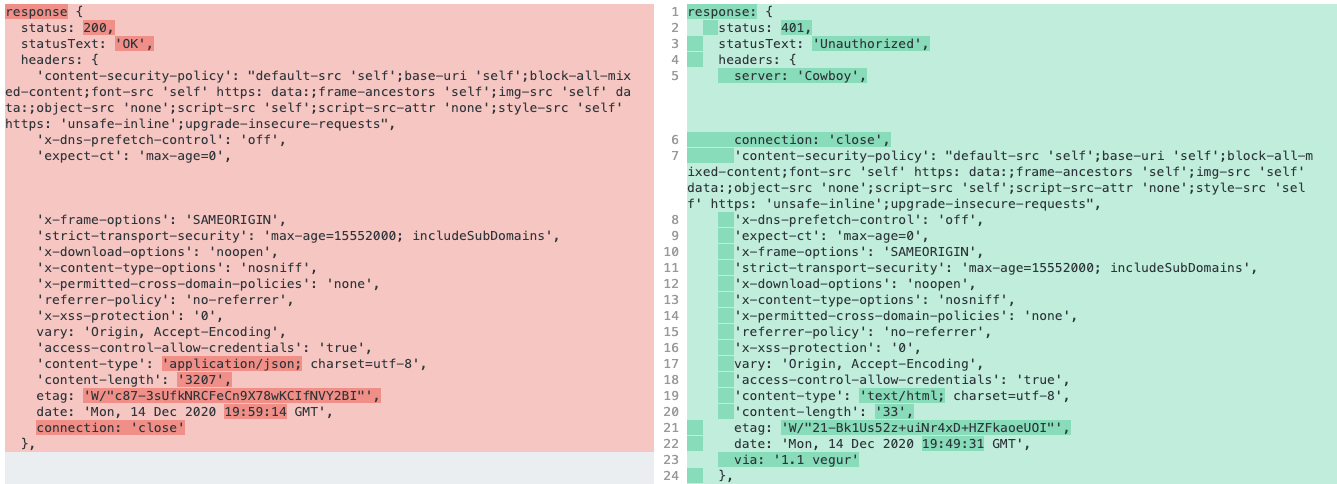
Looking at the headers that the successful request returns on the left (localhost) and the unsuccessful request (heroku production) returns on the right. There isn't really a difference. I was expecting something not to be set. But then the production version doesn't set the Cookie for the request while local does.
 normdoow
on 13 Dec 2020
normdoow
on 13 Dec 2020
Tried all kinds of combinations of the session setup. Still not seeing the cookie on the browser client side.
if(process.env.NODE_ENV == 'production') {
        app.set('trust proxy', 4)
    }
    app.use(session({
        secret: 'potion_secret',
        name: 'prod_session',
        resave: false,
        saveUninitialized: false,
        cookie: {
            maxAge: 60 * 1000 * 60,
            sameSite: true,
            httpOnly: (process.env.NODE_ENV == 'production')? true : false,
            secure: (process.env.NODE_ENV == 'production')? true : false   //so it works for http
        },
        store: new MongoStore({ mongooseConnection: mongoose.connection })
    }))
    app.use(passport.initialize())
    app.use(passport.session())
Tried all kinds of combinations of the session setup. Still not seeing the cookie on the browser client side.
if(process.env.NODE_ENV == 'production') {
        app.set('trust proxy', 4)
    }
    app.use(session({
        secret: 'potion_secret',
        name: 'prod_session',
        resave: false,
        saveUninitialized: false,
        cookie: {
            maxAge: 60 * 1000 * 60,
            sameSite: true,
            httpOnly: (process.env.NODE_ENV == 'production')? true : false,
            secure: (process.env.NODE_ENV == 'production')? true : false   //so it works for http
        },
        store: new MongoStore({ mongooseConnection: mongoose.connection })
    }))
    app.use(passport.initialize())
    app.use(passport.session())
Hello! I have several questions:
- Are you sure that
4is a correct number of proxies between your server and Heroku?
app.set('trust proxy', 4)
It seems that there is only 1 proxy between them
- Are you sure that
passportis setup correctly withexpress-session? I haven't used it, so I can't help with it much, but please check how they are connected to each other. Also, it seems that they have the same purpose - manage authentication. Maybe they disrupt each other's work...
Try to setup server with express-session only first with my config (precisely), make sure, that it works, and then change it and add other middleware.
Looking forward to hearing your results :)
vasilii-kovalev
on 15 Dec 2020
@vasilii-kovalev, thanks for the reply.
Are you sure that 4 is a correct number of proxies between your server and Heroku?
I'm not. From what I saw in the docs on trust proxy, the number is the number of proxy hops that you're willing to trust. I was trying a different option. Already tried setting it to 1 and true which didn't work.
Also, it seems that they have the same purpose - manage authentication. Maybe they disrupt each other's work...
They actually work together. and I saw some other guides of others using them together. This talks about this pretty well. https://stackoverflow.com/questions/27010013/express-session-vs-passportjs-session
The other reason I feel like this can't be the issues is everything is working perfectly on my local. It seems like the issue would have to be something to do with the proxies or difference between http and https when setting up express-session. Because those are the differences when it comes to local and production.
I'll play around with only express-session to see if there is anything that is messed up with Passport.
normdoow
on 15 Dec 2020
Ok, so I did some more tests.
I tried using express-session without passport and still wasn't able to save anything on the session. You can see the session data from req here:
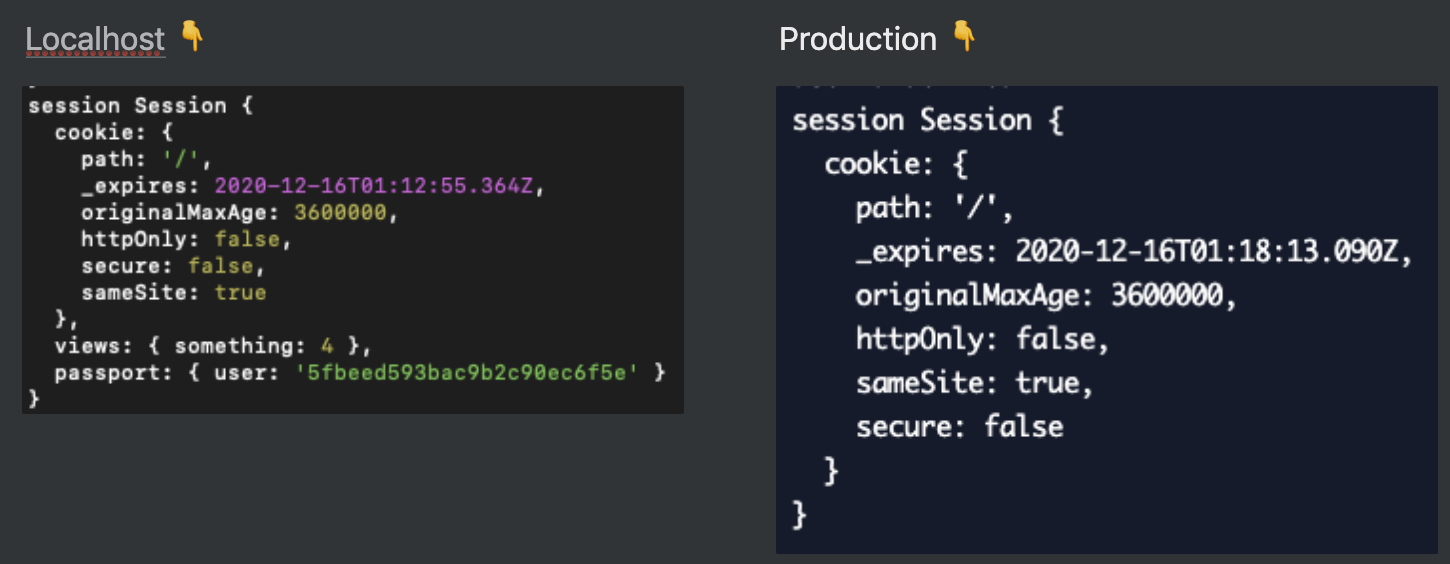
You can see that localhost has a random value 'views' that I added but production doesn't. The user is from testing with passport. Passport should saved the userId on the session. That is how passport and express-session should work together.
I also tried using Digital Ocean apps instead of Heroku to see if I could get it working that way but same result. Wondering if my cors setup could somehow be messing things up? this is the middleware that I setup before express-session:
app.use(helmet())
app.use(cors({ origin: ["http://localhost:3000", "https://dashboard.addpotion.so"], credentials: true }))
app.options('*', cors())
app.use(compression())
app.use(bodyParser.json());
app.use(bodyParser.urlencoded({ extended: true }))
app.use(cookieParser('potion_secret')) // read cookies (needed for auth)
if(process.env.NODE_ENV == 'production') {
    app.set('trust proxy', 1)
}
app.use(session({....
This is using the cors library. I'm not getting any cors errors but wondering if it's possibly not letting some headers through that are needed for express-sessions.
normdoow
on 16 Dec 2020
I used this setup for cors:
export const allowedOrigins = [
  // Client development origin.
  'http://localhost:3000',
  'http://localhost:3000/',
  // Server development origin.
  'http://localhost:9001',
  'http://localhost:9001/',
  PRODUCTION_URL,
];

export const getCORSOrigin: CustomOrigin = (origin, callback) => {
  // origin === undefined when there are no "cross"-origin requests.
  if (origin === undefined || allowedOrigins.indexOf(origin) !== -1) {
    callback(null, true);
  } else {
    callback(new Error(`Origin "${origin}" is not allowed by CORS`));
  }
};

app.use(cors({
  origin: getCORSOrigin,
  credentials: true,
}))
Actually, for localhost ones should be checks that process.env.NODE_ENV === 'development'.
Please, try it.
Also, please take a look at my repository, maybe it will help you.
vasilii-kovalev
on 16 Dec 2020
Tried that and tried changing the order of some of my middleware. Tried some different combinations based on your project. Thanks for sharing that. Still nothing worked. Getting the same result. Thanks for all your help!
espress sessions is not working. I think I may just look at some non-session options.
normdoow
on 16 Dec 2020
I also encountered cookie persistency issues when creating a new session, in case nothing changed in the session.
The following "optimization" prevents a cookie with the new session id to be persisted:
https://github.com/expressjs/session/blob/master/index.js#L365
Any special reason for that?
 tidhar-ziv
on 6 Jan 2021
tidhar-ziv
on 6 Jan 2021
Like many of you, app.set('trust proxy', 1); solved my problem (cookies on heroku), but why? Does it have something to with Heroku forwarding the headers to your app?
 92Eli
on 16 Jan 2021
92Eli
on 16 Jan 2021
OMG. We had problems with React Native -> Cloudflare domain (adding __cfduid) -> Express with Express Session.
Because in ReactNative adding in axios settings withCredentials not working (cookie not sending). We need to store cookie and then pass them manually to axios.
But between API and ReactActive we have domain in cloudflare which adding __cfduid to the cookies. Here is result:
cookie: '__cfduid=d7b7ec00a5d864656715f6bffaad5dad21611058461,connect.sid=s%3A7p2x-7d4HvBej8biPXGzqrD6BdK9KWvn.%2F0oNT4sG93XKsnlxEO2L0Geuvf93EpaHfTg5aQgOG2I',
Express session cannot parse such cookies because of "," (comma) between.
This is our fix in ReactNative
axios.headers.cookie = ';' + cookie;
We don't know why cloudflare cannot just add ";" as in normal web browsing (where settings withCredentials are working).
 rafal-ksiazek-rmtcfm-com
on 19 Jan 2021
rafal-ksiazek-rmtcfm-com
on 19 Jan 2021
My temporary work-around is to set cookie secure property to false, as follow:
cookie: {
      // secure: process.env.NODE_ENV === 'production' ? true : false
      secure: false //work-around
},
 khle
on 13 Feb 2021
khle
on 13 Feb 2021
I guess all the issue with express-session and the way how you work with cookies around is next when you assign _cookie: {secure : false}_ it thinks that requests would be received in _http_ instead what you guys want it to receive in _https_ so i tried to play around with my app too it worked in that way but still there is something to mention.... I saved sessions into _mongoose.connection_ and _resave: false_ because mongoose won't assign expiry date automatically i hope it was useful
 Archyn-Obasovet
on 14 Feb 2021
Archyn-Obasovet
on 14 Feb 2021
I had the issue while ago even though I had another server with same setup working just fine...
after hours of debugging, I found out that It was a nasty special character (in my case it was ";" ) in my cookie-name which was imported from .env file.
 DaddyMonster
on 6 Mar 2021
DaddyMonster
on 6 Mar 2021
Hello everyone.
I have faced the same issue with express-session and I looked and read at all discussions on the page.
After tried to use 👉 app.set('trust proxy', 1) 👈 but it still doesn't work for me.
When I run a server on my local machine everything works fine and I see the cookie on the browser.
But I have no idea why after deploying to the Heroku platform the cookie option doesn’t work.
_Configuration_
app.set('trust proxy', 1)

app.use(routesArray,
    session({
        secret: SESSION,
        resave: false,
        saveUninitialized: false,
        store: sessionStore,
        cookie: {
            sameSite: false,
            maxAge: MAX_AGE,
            secure: false,
            httpOnly: true
        }
    })
)
 Almazatun
on 12 Mar 2021
Almazatun
on 12 Mar 2021
With most of my time spent on this issue, trying to make it work in my node server on a production environment, I finally got it working after going through debugging and the source code (express-session).
I came to the realization that the session middleware from express-session requires a response (res) as a second parameter. With this, the middleware is able to set a cookie in the response object.
Moreover, I also found out that the proxy setting can be set in the session options, by assigning a true value to proxy property.
 Ritchid
on 27 Mar 2021
Ritchid
on 27 Mar 2021
```Typescript
const session = require('express-session');
const MongoStore = require('connect-mongo')(session);
export const session_store: sessionType.MemoryStore = new MongoStore({
url: db_uri,
collection: 'session_table',
ttl: session_expiration, //Expiration time
touchAfter: session_expiration,
});
let session_options = {
cookie: {maxAge: session_expiration.getTime(), expires: session_expiration, httpOnly: true, secure: ""},
name: session_id,
secret: process.env.SESSION_SECRET,
saveUninitialized: false,
resave: false,
proxy: false
}
if (app.get('env') === 'production') {
   //  app.set('trust proxy', true); // trust first proxy
    session_options.cookie.secure = "auto" // serve secure cookies
    session_options.proxy = true;
}

app.use(session({
    ...session_options,
    store: session_store
}));
````
Ritchid
on 27 Mar 2021
create_user_session: (req: Request, res: Response, callback: any) => {
        req.session.regenerate((err) =>{
            session_store.set(req.sessionID, req.session, (err: any) =>{
                if(err)
                    console.log("Session saving error: ", err)
            });

            callback(err, req.session)
        });
    }
 create_user_session(req, res, (err: any, created_session: Session | any) =>{
                if(err) throw new Error("Server Error: " +err);

                return res.sendStatu(200);
            });
if your server is running on a subdomain, the cookie is set on the subdomain.
 AbrahamGeorge8547
on 15 Apr 2021
AbrahamGeorge8547
on 15 Apr 2021
Related issues
 G-Adams
·
16Comments
G-Adams
·
16Comments
 neutron92
·
20Comments
neutron92
·
20Comments
 renehauck
·
16Comments
renehauck
·
16Comments
 nhitchins
·
20Comments
nhitchins
·
20Comments
 Jpunt
·
17Comments
Jpunt
·
17Comments
Most helpful comment
Just fixed this for myself by changing my nginx config file.
before:
after: