Serving: GPU utilization with TF serving
Hi, I have trained a model (EfficientNet) on a machine with 4xRTX 2080Ti. The the problem is when I served the model with TF serving, it didn't use 100% GPU utilization ( it got stuck at 40%-50%), but when I serve it on another machine (RTX 2070) it used 100%. Can you tell me what the problem is ? Thank you so much
 blakenguyen97
All 24 comments
@blakenguyen97 ,
Can you please provide below details:
- What is the size of the Model
- When you said you have Served it on another machine (RTX 2070), how many GPUs were you using in that Machine
- Is the process of Serving same in both the Machines, like batching, etc..
- Can you please monitor GPU usage, as described in #1407 , and share us the details.
Thanks!
 rmothukuru
on 17 Sep 2019
rmothukuru
on 17 Sep 2019
@blakenguyen97 ,
Can you please provide below details:
- What is the size of the Model
- When you said you have Served it on another machine (RTX 2070), how many GPUs were you using in that Machine
- Is the process of Serving same in both the Machines, like batching, etc..
- Can you please monitor GPU usage, as described in #1407 , and share us the details.
Thanks!
Hi @rmothukuru, I think may be problem we have is the CPU cores. Because when we run the docker tensorflow serving with NVIDIA docker https://hub.docker.com/layers/tensorflow/serving/latest-gpu/images/sha256-fd54edb56a7bc72ea0606ed03b7de7d3cfb8a2143e797187555a78b37ff7c49a on the 6 Cores Intel CPU the usage of GPU is max 100%, But when tried to perform the same method for Intel Xeon 28 Physical Cores / 56 visual Cores, 4 2080Ti cards, but we turned on visible the only one RTX for that docker, we got this issue. Do you think some config below can solve this problem ?
-e OMP_NUM_THREADS=
-e TENSORFLOW_INTER_OP_PARALLELISM=
-e TENSORFLOW_INTRA_OP_PARALLELISM=
I found many issue happen with the tensorflow on docker when using the CPU within many cores like:
- https://www.freecodecamp.org/news/how-a-badly-configured-tensorflow-in-docker-can-be-10x-slower-than-expected-3ac89f33d625/
- http://blog.tabanpour.info/projects/2018/09/07/tf-docker-kube.html
- https://arxiv.org/pdf/1812.01665.pdf
So, When Initializing docker, Did It take all cores of CPU and conflicted with this config? This code below in Dockerfile:
#Based on our observations during experiments,
#setting tensorflow_session_parallelism=<1/4th of physical cores> and
#setting OMP_NUM_THREADS=<Total physical cores>
#gave optimal performance results with MKL
KMP_BLOCKTIME=<Varies based on your model>
#NOTE: We don't guarantee same settings to give optimal performance across all hardware
#please tune variables as required.
ENV OMP_NUM_THREADS=2
ENV TENSORFLOW_INTRA_OP_PARALLELISM=2
ENV TENSORFLOW_INTER_OP_PARALLELISM=2
Would you like to give us the advice ? Many thanks !!!
 Khang-9966
on 18 Sep 2019
Khang-9966
on 18 Sep 2019
@blakenguyen97 ,
Can you please provide below details:
- What is the size of the Model
- When you said you have Served it on another machine (RTX 2070), how many GPUs were you using in that Machine
- Is the process of Serving same in both the Machines, like batching, etc..
- Can you please monitor GPU usage, as described in #1407 , and share us the details.
Thanks!
Hi @rmothukuru,
- The size of the model is 'bout 80Mb.
- There was only 1 RTX 2070 on my second machine ( with 6 physical cores Intel CPU ). But on my first machine ( 4xRTX 2080Ti ), there was a 28 cores Intel Xeon CPU. Can this difference cause the problem ?
- Yes, the process is same in both machines.
- I just have an image of GPU utilization on my RTX 2070 (using nvtop tool)

Thank you.
blakenguyen97
on 19 Sep 2019
@aaroey,
Do you have any idea regarding this issue. Thanks!
rmothukuru
on 19 Sep 2019
@aaroey,
Do you have any idea regarding this issue. Thanks!
Hi @rmothukuru, one more thing is I used TensorRT for optimizing the model (FP16). Thanks
blakenguyen97
on 20 Sep 2019
@blakenguyen97 could you try running the model with pure TF (not TF Serving), and see what the GPU utilization is?
 aaroey
on 20 Sep 2019
aaroey
on 20 Sep 2019
@blakenguyen97,
Can you please respond to @aaroey's comments so that we can help you. Thanks!
rmothukuru
on 3 Oct 2019
@blakenguyen97,
In order to expedite the trouble-shooting process, please provide a code snippet to reproduce the issue using both, Tensorflow and Tensorflow Serving. Thanks!
rmothukuru
on 7 Oct 2019
@blakenguyen97,
Can you please respond to @aaroey's comments so that we can help you. Thanks
I'm really sorry for this :(
@blakenguyen97 could you try running the model with pure TF (not TF Serving), and see what the GPU utilization is?
Hi @aaroey, I tried to run the model with the model with pure TF, but the utilization didn't increase.
I used these lines of code to convert the model with TRT...
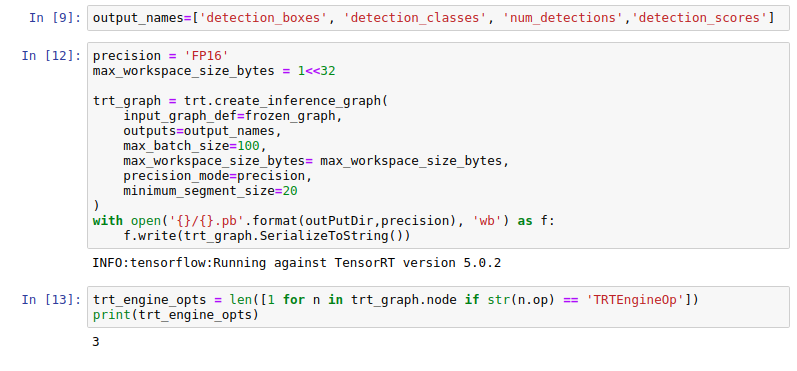
...and these for TF Serving

I think the problem is from the hardware. Do you have any suggestion for this?
I will test again on another machine with less CPU core and share with you as soon as possible.
Thank you @aaroey @rmothukuru
blakenguyen97
on 7 Oct 2019
@blakenguyen97 could you try running the model with pure TF (not TF Serving), and see what the GPU utilization is?
I have the some problem that gpu-utils only can reach 7% in tensorflow-serving, but when i use prune tensorflow. it is 100%.
 leo-XUKANG
on 14 Oct 2019
leo-XUKANG
on 14 Oct 2019
@blakenguyen97 try to run the container with these parameters:
--grpc_channel_arguments=grpc.max_concurrent_streams=1000
--per_process_gpu_memory_fraction=0.7
--enable_batching=true
--batching_parameters_file=/models/flow2_batching.config
--tensorflow_session_parallelism=2
 philongnghoang
on 14 Oct 2019
philongnghoang
on 14 Oct 2019
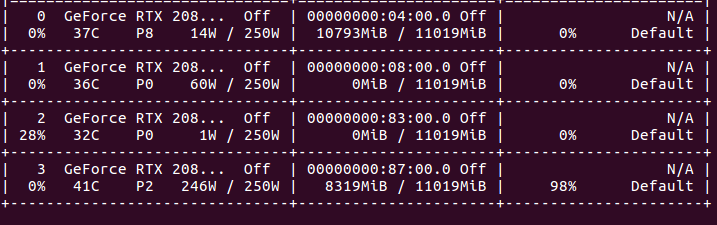
@philongnghoang It works. I use multi-threading to create several requests and the utilization reached 98%. But when there was only 1 request, the utilization only reached 50-60%, I will try to fix it later. Thank you very much.
blakenguyen97
on 15 Oct 2019
@philongnghoang Does your server inference request in batch?
 jusonn
on 15 Oct 2019
jusonn
on 15 Oct 2019
@blakenguyen97,
Can you please confirm if we can close this issue. Thanks!
rmothukuru
on 15 Oct 2019
@philongnghoang Does your server inference request in batch?
Yes. I set up my server to inference in batching. You can try to run the container with these parameters:
--enable_batching=true
--max_batch_size=10
--batch_timeout_micros=1000
--max_enqueued_batches=1000
--num_batch_threads=6
philongnghoang
on 15 Oct 2019
@philongnghoang if i use a big batch, it will use a lot of GPU-MEM,
leo-XUKANG
on 17 Oct 2019
@philongnghoang if i use a big batch, it will use a lot of GPU-MEM,
I have a lot of GPU
philongnghoang
on 17 Oct 2019
@philongnghoang if i use a big batch, it will use a lot of GPU-MEM,
I have a lot of GPU
dude, you won

leo-XUKANG
on 17 Oct 2019
hi,
@philongnghoang @blakenguyen97 could you please post your /models/flow2_batching.config file your per_process_gpu_memory_fraction setting? could you also post what p99 latency and throughput you get? how are your client settings, connections, threads per connection?
 Arnold1
on 25 Feb 2020
Arnold1
on 25 Feb 2020
@blakenguyen97 are you still available?
Arnold1
on 10 Mar 2020
@blakenguyen97 are you still available?
Sorry for being late. I didn't notice the notifications. This is my batching.config files:
max_batch_size { value: 1000 }
batch_timeout_micros { value: 100000 }
max_enqueued_batches { value: 1000000 }
num_batch_threads { value: 48 }
If you need any help just comment below. Regards
blakenguyen97
on 12 Mar 2020
@blakenguyen97 thank u
batch_timeout_micros is 100ms, which seems quite big (depends what you do)... can gpu also do batches in < 1-5ms in general?
can you provide infos to:
- how you start the tf serving docker image? (gpu memory fraction, etc)
- which TensorFlow Serving image you use?
- ubuntu version
- cuda version
- what gpu card you use
also, is there a "hello world" I can run I tf serving on the gpu the very first time? are you hanging out on slack or irc by chance?
also is the following gpu/os/cuda supported for TensorFlow Serving? do you have the same versions?
os:
lsb_release -a
No LSB modules are available.
Distributor ID: Ubuntu
Description:    Ubuntu 16.04.6 LTS
Release:    16.04
Codename:   xenial
gpu:
GeForce GTX 1080 Ti
cuda:
$ /usr/local/cuda/bin/nvcc --version
nvcc: NVIDIA (R) Cuda compiler driver
Copyright (c) 2005-2019 NVIDIA Corporation
Built on Sun_Jul_28_19:07:16_PDT_2019
Cuda compilation tools, release 10.1, V10.1.243

$ cat /usr/local/cuda/version.txt
CUDA Version 10.1.243
docker:
$ docker --version
Docker version 19.03.8, build afacb8b7f0
$ sudo apt-get install -y nvidia-container-toolkit
...
nvidia-container-toolkit is already the newest version (1.0.5-1).
The following packages were automatically installed and are no longer required:
  bridge-utils ubuntu-fan
Use 'sudo apt autoremove' to remove them.
0 upgraded, 0 newly installed, 0 to remove and 30 not upgraded.
Hi there,
- how you start the tf serving docker image? (gpu memory fraction, etc)
It depends on how much memory you need, for me I set it to 0.9
--per_process_gpu_memory_fraction=0.9
- which TensorFlow Serving image you use?
I built my image based on this official image "nvcr.io/nvidia/tensorflow:19.02-py3" , you can directly use this image to serve your model. It's totally fine. I built my own image because I need to install more packages.
- ubuntu version
- cuda version
You don't have to worry about the CUDA, it is included in the image, just start the docker container and you have all you need. Are you new to container technology? Maybe you should know about docker container first before jumping into TF Serving.
- what gpu card you use
It's NVIDIA RTX 2070.
also, is there a "hello world" I can run I tf serving on the gpu the very first time?
There's a lot of tutorials, you can search for them on medium blog, google, youtube,..Maybe it's a little bit confusing when you first try tf serving,... but trust me, you will love it like I do LOL. Good luck.
Regards,
blakenguyen97
on 16 Mar 2020
why close
 junneyang
on 11 Nov 2020
junneyang
on 11 Nov 2020
Related issues
 dylanrandle
·
3Comments
dylanrandle
·
3Comments
 demiladef
·
4Comments
demiladef
·
4Comments
 akkiagrawal94
·
3Comments
akkiagrawal94
·
3Comments
 daikankan
·
4Comments
daikankan
·
4Comments
 johnsrude
·
4Comments
johnsrude
·
4Comments
Most helpful comment
I have a lot of GPU