Serverless-stack-com: Comments: Deploy the APIs
Link to chapter - http://serverless-stack.com/chapters/deploy-the-apis.html
 jayair
All 122 comments
I got {"message":"Unauthorized"} error.
I changed the OUR_COGNITO_USER_POOL_ID and YOUR_COGNITO_APP_CLIENT_ID and got the IdToken. I replaced the IdToken with mine. I also changed the endpoint to my own API gateway endpoint.
Any ideas?
 liu-cong
on 12 Apr 2017
liu-cong
on 12 Apr 2017
Could you post the functions section in your serverless.yml of the endpoint you are trying to invoke?
 fwang
on 12 Apr 2017
fwang
on 12 Apr 2017
I think it has the problem with your keys..Check whether u copied whole
keys...
On 12-Apr-2017 7:36 AM, "Cong Liu" notifications@github.com wrote:
I got {"message":"Unauthorized"} error.
I changed the OUR_COGNITO_USER_POOL_ID and YOUR_COGNITO_APP_CLIENT_ID and
got the IdToken. I replaced the IdToken with mine. I also changed the
endpoint to my own API gateway endpoint.Any ideas?
—
You are receiving this because you are subscribed to this thread.
Reply to this email directly, view it on GitHub
https://github.com/AnomalyInnovations/serverless-stack-com/issues/28#issuecomment-293451509,
or mute the thread
https://github.com/notifications/unsubscribe-auth/AMRdwdflSnmW6BX0YLcqNs9lX500b4kHks5rvDGmgaJpZM4M4OEX
.
 JUSTPERFECT
on 12 Apr 2017
JUSTPERFECT
on 12 Apr 2017
Below is the functions section in my serverless.yml. I doubled checked my keys and I don't think I made any copy/paste mistakes.
BTW, I can use the UI to create/update notes.
functions:
# Defines an HTTP API endpoint that calls the main function in create.js
# - path: url path is /notes
# - method: POST request
# - cors: enabled CORS (Cross-Origin Resource Sharing) for browser cross
# domain api call
# - authorizer: authenticate the api via Cognito User Pool. Update the 'arn'
# with your own User Pool ARN
create:
handler: create.main
events:
- http:
path: notes
method: post
cors: true
authorizer:
arn: arn:aws:cognito-idp:us-east-1:099521359077:userpool/us-east-1_CuWTSHcJb
get:
# Defines an HTTP API endpoint that calls the main function in get.js
# - path: url path is /notes/{id}
# - method: GET request
handler: get.main
events:
- http:
path: notes/{id}
method: get
cors: true
authorizer:
arn: arn:aws:cognito-idp:us-east-1:099521359077:userpool/us-east-1_CuWTSHcJb
list:
# Defines an HTTP API endpoint that calls the main function in list.js
# - path: url path is /notes
# - method: GET request
handler: list.main
events:
- http:
path: notes
method: get
cors: true
authorizer:
arn: arn:aws:cognito-idp:us-east-1:099521359077:userpool/us-east-1_CuWTSHcJb
update:
# Defines an HTTP API endpoint that calls the main function in update.js
# - path: url path is /notes/{id}
# - method: PUT request
handler: update.main
events:
- http:
path: notes/{id}
method: put
cors: true
authorizer:
arn: arn:aws:cognito-idp:us-east-1:099521359077:userpool/us-east-1_CuWTSHcJb
delete:
# Defines an HTTP API endpoint that calls the main function in delete.js
# - path: url path is /notes/{id}
# - method: DELETE request
handler: delete.main
events:
- http:
path: notes/{id}
method: delete
cors: true
authorizer:
arn: arn:aws:cognito-idp:us-east-1:099521359077:userpool/us-east-1_CuWTSHcJb
The React app (UI) calls the APIs the exact same way as the bash curl. If you inspect the HTTP request in the browser, you should see the IdToken used in the Authorization header and the JSON request body. Try curling with them.
fwang
on 13 Apr 2017
After running 'serverless deploy -v' I received the response below. (Unable to parse HTTP response content.) All API's passed their tests and now I'm suddenly stuck on this error. Any ideas?
david@DESKTOP-U1APQB8 MINGW64 /d/Projects/Serverless/notes-app-api
$ serverless deploy -v
Serverless: Bundling with Webpack...
Time: 3501ms
Asset Size Chunks Chunk Names
create.js 5.8 kB 0 [emitted] create
delete.js 5.66 kB 1 [emitted] delete
get.js 5.88 kB 2 [emitted] get
handler.js 2.28 kB 3 [emitted] handler
list.js 5.9 kB 4 [emitted] list
update.js 6.2 kB 5 [emitted] update
Serverless: Packing external modules: babel-runtime@^6.23.0, uuid@^3.0.1
Serverless: Packaging service...
Serverless: Uploading CloudFormation file to S3...
Serverless: Uploading function .zip files to S3...
Serverless: Uploading service .zip file to S3 (1.03 MB)...
Serverless: Updating Stack...
Serverless: Checking Stack update progress...
CloudFormation - UPDATE_IN_PROGRESS - AWS::CloudFormation::Stack - notes-app-api-prod
CloudFormation - CREATE_IN_PROGRESS - AWS::IAM::Role - IamRoleLambdaExecution
CloudFormation - CREATE_IN_PROGRESS - AWS::Logs::LogGroup - ListLogGroup
CloudFormation - CREATE_IN_PROGRESS - AWS::ApiGateway::RestApi - ApiGatewayRestApi
CloudFormation - CREATE_IN_PROGRESS - AWS::Lambda::Permission - 2UnderscoreJLN0gaaY4LambdaPermissionApiGateway
CloudFormation - CREATE_IN_PROGRESS - AWS::Logs::LogGroup - UpdateLogGroup
CloudFormation - CREATE_IN_PROGRESS - AWS::Logs::LogGroup - CreateLogGroup
CloudFormation - CREATE_IN_PROGRESS - AWS::Logs::LogGroup - GetLogGroup
CloudFormation - CREATE_FAILED - AWS::Lambda::Permission - 2UnderscoreJLN0gaaY4LambdaPermissionApiGateway
CloudFormation - CREATE_IN_PROGRESS - AWS::Logs::LogGroup - ListLogGroup
CloudFormation - CREATE_IN_PROGRESS - AWS::ApiGateway::RestApi - ApiGatewayRestApi
CloudFormation - CREATE_IN_PROGRESS - AWS::IAM::Role - IamRoleLambdaExecution
CloudFormation - CREATE_IN_PROGRESS - AWS::Logs::LogGroup - CreateLogGroup
CloudFormation - CREATE_COMPLETE - AWS::ApiGateway::RestApi - ApiGatewayRestApi
CloudFormation - CREATE_IN_PROGRESS - AWS::Logs::LogGroup - UpdateLogGroup
CloudFormation - CREATE_COMPLETE - AWS::Logs::LogGroup - CreateLogGroup
CloudFormation - CREATE_IN_PROGRESS - AWS::Logs::LogGroup - DeleteLogGroup
CloudFormation - CREATE_COMPLETE - AWS::Logs::LogGroup - ListLogGroup
CloudFormation - CREATE_IN_PROGRESS - AWS::Logs::LogGroup - GetLogGroup
CloudFormation - CREATE_COMPLETE - AWS::Logs::LogGroup - UpdateLogGroup
CloudFormation - CREATE_COMPLETE - AWS::Logs::LogGroup - GetLogGroup
CloudFormation - CREATE_FAILED - AWS::Logs::LogGroup - DeleteLogGroup
CloudFormation - CREATE_FAILED - AWS::IAM::Role - IamRoleLambdaExecution
CloudFormation - UPDATE_ROLLBACK_IN_PROGRESS - AWS::CloudFormation::Stack - notes-app-api-prod
CloudFormation - UPDATE_ROLLBACK_COMPLETE_CLEANUP_IN_PROGRESS - AWS::CloudFormation::Stack - notes-app-api-prod
CloudFormation - DELETE_IN_PROGRESS - AWS::Logs::LogGroup - GetLogGroup
CloudFormation - DELETE_IN_PROGRESS - AWS::Logs::LogGroup - CreateLogGroup
CloudFormation - DELETE_IN_PROGRESS - AWS::IAM::Role - IamRoleLambdaExecution
CloudFormation - DELETE_IN_PROGRESS - AWS::Logs::LogGroup - UpdateLogGroup
CloudFormation - DELETE_IN_PROGRESS - AWS::ApiGateway::RestApi - ApiGatewayRestApi
CloudFormation - DELETE_IN_PROGRESS - AWS::Logs::LogGroup - ListLogGroup
CloudFormation - DELETE_COMPLETE - AWS::Lambda::Permission - 2UnderscoreJLN0gaaY4LambdaPermissionApiGateway
CloudFormation - DELETE_COMPLETE - AWS::Logs::LogGroup - GetLogGroup
CloudFormation - DELETE_COMPLETE - AWS::Logs::LogGroup - DeleteLogGroup
CloudFormation - DELETE_COMPLETE - AWS::Logs::LogGroup - CreateLogGroup
CloudFormation - DELETE_COMPLETE - AWS::ApiGateway::RestApi - ApiGatewayRestApi
CloudFormation - DELETE_COMPLETE - AWS::Logs::LogGroup - UpdateLogGroup
CloudFormation - DELETE_COMPLETE - AWS::Logs::LogGroup - ListLogGroup
CloudFormation - DELETE_COMPLETE - AWS::IAM::Role - IamRoleLambdaExecution
CloudFormation - UPDATE_ROLLBACK_COMPLETE - AWS::CloudFormation::Stack - notes-app-api-prod
Serverless: Deployment failed!
Serverless Error ---------------------------------------
An error occurred while provisioning your stack: 2UnderscoreJLN0gaaY4LambdaPermissionApiGateway
- Unable to parse HTTP response content.
Get Support --------------------------------------------
Docs: docs.serverless.com
Bugs: github.com/serverless/serverless/issues
Forums: forum.serverless.com
Chat: gitter.im/serverless/serverless
Your Environment Information -----------------------------
OS: win32
Node Version: 7.2.0
Serverless Version: 1.11.0
 dmurraykauai
on 18 Apr 2017
dmurraykauai
on 18 Apr 2017
I did receive the same Error as above once deployed.
On Stack they saying we must provide statusCode along with response...as we did in tutorial..but perhaps we must add it on API Gateway level also...i dont know at the moment...trying to fix it
http://stackoverflow.com/questions/37137601/unable-to-parse-http-response-content-when-creating-apigatewayresource
 PatrykTies
on 18 Apr 2017
PatrykTies
on 18 Apr 2017
@dmurraykauai @PatrykTies A couple of things could cause the "Unable to parse HTTP response content" error.
Let's do a quick sanity check. Could you share your serverless.yml file?
fwang
on 18 Apr 2017
service: notes-app
plugins:
- serverless-webpack
custom:
webpackIncludeModules: true
provider:
name: aws
runtime: nodejs6.10
stage: prod
region: eu-west-1
iamRoleStatements:
- Effect: Allow
Action:
- dynamodb:DescribeTable
- dynamodb:Query
- dynamodb:Scan
- dynamodb:GetItem
- dynamodb:PutItem
- dynamodb:UpdateItem
- dynamodb:DeleteItem
Resource: "arn:aws:dynamodb:eu-west-1:*:*"
functions:
create:
handler: create.main
events:
- http:
path: notes
method: post
cors: true
authorizer:
arn: arn:aws:cognito-idp:eu-west-1:421235352293:userpool/eu-west-1_xxxxxxx
get:
handler: get.main
events:
- http:
path: notes/{id}
method: get
cors: true
authorizer:
arn: arn:aws:cognito-idp:eu-west-1:421235352293:userpool/eu-west-1_xxxxxxx
list:
handler: list.main
events:
- http:
path: notes
method: get
cors: true
authorizer:
arn: arn:aws:cognito-idp:eu-west-1:421235352293:userpool/eu-west-1_xxxxxxxx
update:
handler: update.main
events:
- http:
path: notes/{id}
method: put
cors: true
authorizer:
arn: arn:aws:cognito-idp:eu-west-1:421235352293:userpool/eu-west-1_xxxxxxxx
delete:
handler: delete.main
events:
- http:
path: notes/{id}
method: delete
cors: true
authorizer:
arn: arn:aws:cognito-idp:eu-west-1:421235352293:userpool/eu-west-1_xxxxxxxx
Pasting the code in between the back ticks doesn't render too good. I've attached serverless.yml.txt to this post. Thanks for the assist!
service: notes-app-api
plugins:
- serverless-webpack
custom:
webpackIncludeModules: true
[serverless.yml.txt](https://github.com/AnomalyInnovations/serverless-stack-com/files/930746/serverless.yml.txt)
provider:
name: aws
runtime: nodejs6.10
stage: prod
region: us-west-2
# 'iamRoleStatement' defines the permission policy for the Lambda function.
# In this case Lambda functions are granted with permissions to access DynamoDB.
iamRoleStatements:
- Effect: Allow
Action:
- dynamodb:DescribeTable
- dynamodb:Query
- dynamodb:Scan
- dynamodb:GetItem
- dynamodb:PutItem
- dynamodb:UpdateItem
- dynamodb:DeleteItem
Resource: "arn:aws:dynamodb:us-west-2:*:*"
functions:
# Defines an HTTP API endpoint that calls the main function in create.js
# - path: url path is /notes
# - method: POST request
# - cors: enabled CORS (Cross-Origin Resource Sharing) for browser cross
# domain api call
# - authorizer: authenticate the api via Cognito User Pool. Update the 'arn'
# with your own User Pool ARN
create:
handler: create.main
events:
- http:
path: notes
method: post
cors: true
authorizer:
arn: aws:cognito-idp:us-west-2:939466294100:userpool/us-west-2_JLN0gaaY4
get:
# Defines an HTTP API endpoint that calls the main function in get.js
# - path: url path is /notes/{id}
# - method: GET request
handler: get.main
events:
- http:
path: notes/{id}
method: get
cors: true
authorizer:
arn: aws:cognito-idp:us-west-2:939466294100:userpool/us-west-2_JLN0gaaY4
list:
# Defines an HTTP API endpoint that calls the main function in list.js
# - path: url path is /notes
# - method: GET request
handler: list.main
events:
- http:
path: notes
method: get
cors: true
authorizer:
arn: aws:cognito-idp:us-west-2:939466294100:userpool/us-west-2_JLN0gaaY4
update:
# Defines an HTTP API endpoint that calls the main function in update.js
# - path: url path is /notes/{id}
# - method: PUT request
handler: update.main
events:
- http:
path: notes/{id}
method: put
cors: true
authorizer:
arn: aws:cognito-idp:us-west-2:939466294100:userpool/us-west-2_JLN0gaaY4
delete:
# Defines an HTTP API endpoint that calls the main function in delete.js
# - path: url path is /notes/{id}
# - method: DELETE request
handler: delete.main
events:
- http:
path: notes/{id}
method: delete
cors: true
authorizer:
arn: aws:cognito-idp:us-west-2:939466294100:userpool/us-west-2_JLN0gaaY4
@dmurraykauai the authorizer arn should start with arn: and the authorizer line should look something like
authorizer:
arn: arn:aws:cognito-idp:us-east-1:xxxxxxxxxxxx:userpool/us-east-1_XXXXXxxxx
ok, that was a bit confusing... arn: arn:aws: .... thought I tried w/ the double arn: already but let me try again. Thank you!
dmurraykauai
on 18 Apr 2017
Beautiful, works fine now. Thanks again @fwang ! Much appreciated.
dmurraykauai
on 18 Apr 2017
@PatrykTies hmmm.. it looks fine. Could you double check a few things:
- both Identity pool and User pool are created inside eu-west-1 region;
- userpool id is usually 9 characters long, ensure the authorizer arn is not missing any character at the end
arn: arn:aws:cognito-idp:eu-west-1:421235352293:userpool/eu-west-1_xxxxxxx
fwang
on 18 Apr 2017
Hi,
Thanks for your super guide :sparkles:
I'm struggling with cognito and serverless, I'm having the same problem as @dmurraykauai I guess.
I'm declaring my function as follows:
searchname:
handler: handler.searchname
events:
- http:
path: search/name/{value}
method: get
private: true
cors: true
authorizer:
arn: ${self:custom.poolArn}
- stream: ${self:custom.dynamoArn}
All my services are running on ap-northeast-2 and my poolArn variable is equal to arn:aws:cognito-idp:ap-northeast-2:XXXXXXXXXXXX:userpool/ap-northeast-2_xxxxxxx.
When I try to deploy my service, I get the following logs:
CloudFormation - CREATE_FAILED - AWS::Lambda::Permission - 2UnderscorexxxxxxxLambdaPermissionApiGateway
CloudFormation - CREATE_FAILED - AWS::ApiGateway::Authorizer - 2UnderscorexxxxxxxApiGatewayAuthorizer
Depending on AWS settings (e.g., switching Authorization to AWS_IAM), the process ends with one of these error messages:
- Unable to parse HTTP response content.
- Invalid lambda function.
Everything works fine if I comment the authorizer lines.
I've set manually IAM permissions for lambda:
{
"Action": [
"lambda:*"
],
"Resource": "*",
"Effect": "Allow"
},
I also had a look at many related issues, I saw you answered one on serverless forums. However, their official doc is really light regarding cognito as an authorizer... Note that I'm just using Cognito user pool, without Cognito identity pool.
How did you get your example working? Are there extra settings to deal with on the dashboard?
Thanks
Edit 1: I found a solution that solves the following alert:
CloudFormation - CREATE_FAILED - AWS::ApiGateway::Authorizer - 2UnderscorexxxxxxxApiGatewayAuthorizer
 jtrollia
on 19 Apr 2017
jtrollia
on 19 Apr 2017
Yo,
Never mind, I was using Serverless 1.4.0, I had a look at changelogs and figured out I should update to the latest version.
jtrollia
on 20 Apr 2017
@Malivuk thanks for reporting back. It'll help anybody else that might run into this.
jayair
on 20 Apr 2017
Yes I can confirm, my issue above was also caused by using 1.4 , now once updated to 1.11 all works fine.
Cheers.
PatrykTies
on 20 Apr 2017
@Malivuk couldn't have timed your response any more perfectly 😉
Or maybe @PatrykTies had it figured out before he saw your message.
jayair
on 21 Apr 2017
Hello,
I couldn't get to the actual deploying. I followed the tutorial by the book. Got this error:
Serverless: Bundling with Webpack...
Time: 771ms
Asset Size Chunks Chunk Names
create.js 5.75 kB 0 [emitted] create
delete.js 5.41 kB 1 [emitted] delete
get.js 5.5 kB 2 [emitted] get
list.js 5.44 kB 3 [emitted] list
update.js 5.78 kB 4 [emitted] update
Serverless: Packing external modules: babel-runtime@^6.23.0, uuid@^3.0.1
Serverless: Packaging service...
Stack Trace --------------------------------------------
TypeError: Cannot read property 'path' of null
at AwsCompileApigEvents.getHttpPath (/usr/local/lib/node_modules/serverless/lib/plugins/aws/deploy/compile/events/apiGateway/lib/validate.js:145:20)
at _.forEach (/usr/local/lib/node_modules/serverless/lib/plugins/aws/deploy/compile/events/apiGateway/lib/validate.js:46:28)
at arrayEach (/usr/local/lib/node_modules/serverless/node_modules/lodash/lodash.js:537:11)
at Function.forEach (/usr/local/lib/node_modules/serverless/node_modules/lodash/lodash.js:9344:14)
at _.forEach (/usr/local/lib/node_modules/serverless/lib/plugins/aws/deploy/compile/events/apiGateway/lib/validate.js:42:9)
at /usr/local/lib/node_modules/serverless/node_modules/lodash/lodash.js:4970:15
at baseForOwn (/usr/local/lib/node_modules/serverless/node_modules/lodash/lodash.js:3020:24)
at /usr/local/lib/node_modules/serverless/node_modules/lodash/lodash.js:4939:18
at Function.forEach (/usr/local/lib/node_modules/serverless/node_modules/lodash/lodash.js:9344:14)
at AwsCompileApigEvents.validate (/usr/local/lib/node_modules/serverless/lib/plugins/aws/deploy/compile/events/apiGateway/lib/validate.js:41:7)
at Object.deploy:compileEvents [as fn] (/usr/local/lib/node_modules/serverless/lib/plugins/aws/deploy/compile/events/apiGateway/index.js:42:31)
at BbPromise.reduce (/usr/local/lib/node_modules/serverless/lib/classes/PluginManager.js:210:55)
From previous event:
at PluginManager.invoke (/usr/local/lib/node_modules/serverless/lib/classes/PluginManager.js:210:22)
at PluginManager.run (/usr/local/lib/node_modules/serverless/lib/classes/PluginManager.js:225:17)
at Serverless.run (/usr/local/lib/node_modules/serverless/lib/Serverless.js:97:31)
at serverless.init.then (/usr/local/lib/node_modules/serverless/bin/serverless:23:50)
Your Environment Information -----------------------------
OS: darwin
Node Version: 7.9.0
Serverless Version: 1.11.0
I tried using older versions of aws-sdk and serverless and got the same error. I compared my codebase to the one of the examples and it's exactly the same.
Anyone been through this?
 ericorruption
on 21 Apr 2017
ericorruption
on 21 Apr 2017
Solved it. Plain stupidity: i had path one level shallower on serverless.yml
list:
handler: list.main
events:
- http:
path: notes
should be:
list:
handler: list.main
events:
- http:
path: notes
I am currently experiencing this as a response {"status":false}
Could use any help from here?
 riogaj89
on 24 Apr 2017
riogaj89
on 24 Apr 2017
@riogaj89 can you show me which command is giving you that response?
jayair
on 24 Apr 2017
Sure.
curl https://5456icd6za.execute-api.us-east-1.amazonaws.com/dev/notes \
-H "Authorization:eyJraWQiOiJPNXVpQTJQQVBEaTYxUlBqc2huN3hLZGN5ZlE1SndiellWR0VkcURBQXBZPSIsImFsZyI6IlJTMjU2In0.eyJzdWIiOiI2OTFlMWEzOC01NWIzLTRmMTItYWQ0YS1jYzU2ZDViZTc4MjUiLCJhdWQiOiIzM2Y0aWV1aWF2amZ0MWZucms0NWowZWNnOCIsImVtYWlsX3ZlcmlmaWVkIjpmYWxzZSwidG9rZW5fdXNlIjoiaWQiLCJhdXRoX3RpbWUiOjE0OTMwNjQzNjksImlzcyI6Imh0dHBzOlwvXC9jb2duaXRvLWlkcC51cy1lYXN0LTEuYW1hem9uYXdzLmNvbVwvdXMtZWFzdC0xX2ZxUXZGTnJkWCIsImNvZ25pdG86dXNlcm5hbWUiOiJyaW9nYWpAZ21haWwuY29tIiwiZXhwIjoxNDkzMDY3OTY5LCJpYXQiOjE0OTMwNjQzNjksImVtYWlsIjoicmlvZ2FqQGdtYWlsLmNvbSJ9.a_P1IrjgT4iKUK7CIK1l2az3nQQb4c7uRfITYz8icdwzCtbCTk-nfuk_54aMmL0s2IoJ-UwEHsAEyCz_abxwF2pi7HW6pZ5GGktWAOH8U8-3jedwReyQOIBxYvW0YPadAUuPsLNtTlXNIM2TMFKIiqig7IHrlPW2CCqSt7y-760p4egIF8IIYM5EFveLYd4GSBuecWhDr2atFf9Dvn6ixjPHVfFQ9aATt4goPEtihwrgXH_7poi7N2QmGrP0o4T3Wgjl98c7oSmjxk7qBu2ivx7ihE_GYFgOFIxW4RGt4cGLwBabvdRPvBbXCrVB0lf8eBNIRgfRca7XOxbIAFqbYQ" \
-d "{\"content\":\"hello world\",\"attachment\":\"hello.jpg\"}"
Just to double-check, did the serverless webpack invoke --function create --path event.json command in the Create Note chapter - http://serverless-stack.com/chapters/add-a-create-note-api.html work for you?
jayair
on 24 Apr 2017
Yes it did work for me just fine.
riogaj89
on 24 Apr 2017
@riogaj89 the status: false is generated by our code, so we should be able to debug this. Above this line - https://github.com/AnomalyInnovations/serverless-stack-demo-api/blob/master/create.js#L23, can you try to console.log the error? Make sure you serverless deploy after changing it.
To see the output for this, head over to your AWS Console > CloudWatch > Logs > The Lambda we created > The most recent log stream. And see what it shows there. If you are having problems finding where to look, let me know.
jayair
on 25 Apr 2017
It says: AccessDeniedException: User: arn:aws:sts::435241600237:assumed-role/gajen-notes-app-dev-us-east-1-lambdaRole/gajen-notes-app-dev-create is not authorized to perform: dynamodb:PutItem on resource: arn:aws:dynamodb:us-east-1:435241600237:table/notes
riogaj89
on 25 Apr 2017
@riogaj89 looks like the Lambda function does not have permission to write to the DynamoDB table. May I take a look at your serverless.yml file (iamRoleStatements section)?
fwang
on 26 Apr 2017
Ah... Yes that was right. Managed to resolve the issue. Thank you very much fwang and jayair for the help!
riogaj89
on 26 Apr 2017
I was getting the status:fasle response, so consoled the error and i got the error response as follows {"status":{"message":"One or more parameter values were invalid: Missing the key userid in the item","code":"ValidationException","time":"2017-05-03T10:24:54.551Z","requestId":"5GA3CQH984DC39OPREJIF8MVORVV4KQNSO5AEMVJF66Q9ASUAAJG","statusCode":400,"retryable":false,"retryDelay":24.05818543697169}}
 ShaklinSyed
on 3 May 2017
ShaklinSyed
on 3 May 2017
@ShaklinSyed At which step did you run into this error?
It sounds look like there is a mismatch between the key name defined in DynamoDB table and that used in the Lambda code. Double check the key name is consistent. (ie. key names in the tutorial are in camel case - userId with capital 'I')
fwang
on 3 May 2017
@fwang Fixed it. works now. Thanks.
ShaklinSyed
on 4 May 2017
Hi, great guide! I can't deploy on AWS:
Serverless: Bundling with Webpack...
Time: 761ms
Asset Size Chunks Chunk Names
create.js 6.35 kB 0 [emitted] create
delete.js 5.46 kB 1 [emitted] delete
get.js 5.62 kB 2 [emitted] get
handler.js 2.28 kB 3 [emitted] handler
list.js 5.83 kB 4 [emitted] list
update.js 6.2 kB 5 [emitted] update
webpack.config.js 3.19 kB 6 [emitted] webpack.config
Serverless: Packing external modules: babel-runtime@^6.23.0, uuid@^3.0.1
Serverless: Packaging service...
Serverless: Uploading CloudFormation file to S3...
Serverless: Uploading artifacts...
Serverless: Uploading service .zip file to S3 (1.03 MB)...
Serverless: Updating Stack...
Serverless: Checking Stack update progress...
CloudFormation - UPDATE_IN_PROGRESS - AWS::CloudFormation::Stack - scratch-app-api-prod
CloudFormation - CREATE_IN_PROGRESS - AWS::Logs::LogGroup - CreateLogGroup
CloudFormation - CREATE_IN_PROGRESS - AWS::ApiGateway::RestApi - ApiGatewayRestApi
CloudFormation - CREATE_IN_PROGRESS - AWS::Lambda::Permission - 1UnderscorevTBvqUZ8BLambdaPermissionApiGateway
CloudFormation - CREATE_IN_PROGRESS - AWS::Logs::LogGroup - UpdateLogGroup
CloudFormation - CREATE_IN_PROGRESS - AWS::IAM::Role - IamRoleLambdaExecution
CloudFormation - CREATE_IN_PROGRESS - AWS::Logs::LogGroup - CreateLogGroup
CloudFormation - CREATE_IN_PROGRESS - AWS::ApiGateway::RestApi - ApiGatewayRestApi
CloudFormation - CREATE_COMPLETE - AWS::Logs::LogGroup - CreateLogGroup
CloudFormation - CREATE_COMPLETE - AWS::ApiGateway::RestApi - ApiGatewayRestApi
CloudFormation - CREATE_IN_PROGRESS - AWS::Logs::LogGroup - ListLogGroup
CloudFormation - CREATE_IN_PROGRESS - AWS::Logs::LogGroup - UpdateLogGroup
CloudFormation - CREATE_COMPLETE - AWS::Logs::LogGroup - UpdateLogGroup
CloudFormation - CREATE_IN_PROGRESS - AWS::Logs::LogGroup - DeleteLogGroup
CloudFormation - CREATE_FAILED - AWS::Lambda::Permission - 1UnderscorevTBvqUZ8BLambdaPermissionApiGateway
CloudFormation - CREATE_IN_PROGRESS - AWS::Logs::LogGroup - GetLogGroup
CloudFormation - CREATE_IN_PROGRESS - AWS::Logs::LogGroup - ListLogGroup
CloudFormation - CREATE_IN_PROGRESS - AWS::IAM::Role - IamRoleLambdaExecution
CloudFormation - CREATE_IN_PROGRESS - AWS::Logs::LogGroup - DeleteLogGroup
CloudFormation - CREATE_COMPLETE - AWS::Logs::LogGroup - ListLogGroup
CloudFormation - CREATE_IN_PROGRESS - AWS::Logs::LogGroup - GetLogGroup
CloudFormation - CREATE_FAILED - AWS::Logs::LogGroup - GetLogGroup
CloudFormation - CREATE_FAILED - AWS::Logs::LogGroup - DeleteLogGroup
CloudFormation - CREATE_FAILED - AWS::IAM::Role - IamRoleLambdaExecution
CloudFormation - UPDATE_ROLLBACK_IN_PROGRESS - AWS::CloudFormation::Stack - scratch-app-api-prod
CloudFormation - UPDATE_ROLLBACK_COMPLETE_CLEANUP_IN_PROGRESS - AWS::CloudFormation::Stack - scratch-app-api-prod
CloudFormation - DELETE_IN_PROGRESS - AWS::ApiGateway::RestApi - ApiGatewayRestApi
CloudFormation - DELETE_COMPLETE - AWS::Lambda::Permission - 1UnderscorevTBvqUZ8BLambdaPermissionApiGateway
CloudFormation - DELETE_IN_PROGRESS - AWS::IAM::Role - IamRoleLambdaExecution
CloudFormation - DELETE_IN_PROGRESS - AWS::Logs::LogGroup - CreateLogGroup
CloudFormation - DELETE_IN_PROGRESS - AWS::Logs::LogGroup - ListLogGroup
CloudFormation - DELETE_IN_PROGRESS - AWS::Logs::LogGroup - UpdateLogGroup
CloudFormation - DELETE_IN_PROGRESS - AWS::Logs::LogGroup - DeleteLogGroup
CloudFormation - DELETE_IN_PROGRESS - AWS::Logs::LogGroup - GetLogGroup
CloudFormation - DELETE_COMPLETE - AWS::ApiGateway::RestApi - ApiGatewayRestApi
CloudFormation - DELETE_COMPLETE - AWS::Logs::LogGroup - CreateLogGroup
CloudFormation - DELETE_COMPLETE - AWS::Logs::LogGroup - DeleteLogGroup
CloudFormation - DELETE_COMPLETE - AWS::Logs::LogGroup - GetLogGroup
CloudFormation - DELETE_COMPLETE - AWS::Logs::LogGroup - ListLogGroup
CloudFormation - DELETE_COMPLETE - AWS::IAM::Role - IamRoleLambdaExecution
CloudFormation - DELETE_COMPLETE - AWS::Logs::LogGroup - UpdateLogGroup
CloudFormation - UPDATE_ROLLBACK_COMPLETE - AWS::CloudFormation::Stack - scratch-app-api-prod
Serverless: Deployment failed!
Serverless Error ---------------------------------------
An error occurred while provisioning your stack: 1UnderscorevTBvqUZ8BLambdaPermissionApiGateway
- Unable to parse HTTP response content.
Get Support --------------------------------------------
Docs: docs.serverless.com
Bugs: github.com/serverless/serverless/issues
Forums: forum.serverless.com
Chat: gitter.im/serverless/serverless
Your Environment Information -----------------------------
OS: darwin
Node Version: 7.10.0
Serverless Version: 1.12.1
This is my serverless.yml file:
service: scratch-app-api
# Use serverless-webpack plugin to transpile ES6/ES7
plugins:
- serverless-webpack
# Enable auto-packing of external modules
custom:
webpackIncludeModules: true
provider:
name: aws
runtime: nodejs6.10
stage: prod
region: eu-west-1
# 'iamRoleStatement' defines the permission policy for the Lambda function.
# In this case Lambda functions are granted with permissions to access DynamoDB.
iamRoleStatements:
- Effect: Allow
Action:
- dynamodb:DescribeTable
- dynamodb:Query
- dynamodb:Scan
- dynamodb:GetItem
- dynamodb:PutItem
- dynamodb:UpdateItem
- dynamodb:DeleteItem
Resource: "arn:aws:dynamodb:eu-west-1:*:*"
functions:
# Defines an HTTP API endpoint that calls the main function in create.js
# - path: url path is /notes
# - method: POST request
# - cors: enabled CORS (Cross-Origin Resource Sharing) for browser cross
# domain api call
# - authorizer: authenticate the api via Cognito User Pool. Update the 'arn'
# with your own User Pool ARN
create:
handler: create.main
events:
- http:
path: notes
method: post
cors: true
authorizer:
arn: arn:aws:cognito-idp:eu-west-1:277846935261:userpool/eu-west-1_vTBvqUZ8B
get:
handler: get.main
events:
- http:
path: notes/{id}
method: get
cors: true
authorizer:
arn: aws:cognito-idp:eu-west-1:277846935261:userpool/eu-west-1_vTBvqUZ8B
list:
handler: list.main
events:
- http:
path: notes
method: get
cors: true
authorizer:
arn: arn:aws:cognito-idp:eu-west-1:277846935261:userpool/eu-west-1_vTBvqUZ8B
update:
handler: update.main
events:
- http:
path: notes/{id}
method: put
cors: true
authorizer:
arn: arn:aws:cognito-idp:eu-west-1:277846935261:userpool/eu-west-1_vTBvqUZ8B
delete:
handler: delete.main
events:
- http:
path: notes/{id}
method: delete
cors: true,
authorizer:
arn: arn:aws:cognito-idp:eu-west-1:277846935261:userpool/eu-west-1_vTBvqUZ8B
 eloquentbit
on 6 May 2017
eloquentbit
on 6 May 2017
Is the comma ',' at the end of the last cors:true in your serverless.yml?
fwang
on 7 May 2017
Thanks @fwang, I fixed the code but unfortunately the problem persists
eloquentbit
on 8 May 2017
Most of the example files refer to "us-east-1". I happen to be on "us-west-2". I cut/pasted the original serverless.yml files somewhere thru the tutorial and didn't catch the differences. After changing it to "us-west-2" in the iamRoleStatements:Resources section, my test of the deployed system succeeds. (So I am inferring that was my problem).
My suggestion is to update the tutorials to illustrate the need to change these fields. Please don't change it to something like USE_YOUR_REGION. The actual region string format is useful. Just need to know that they need to change.
Thanks Jay for the quick Chat response.
 alpiepho
on 8 May 2017
alpiepho
on 8 May 2017
@alpiepho yeah the region thing can be a gotcha for people. I'll try and find the places that need the heads up.
jayair
on 10 May 2017
$ aws --version
aws-cli/1.10.24 Python/2.7.10 Darwin/15.6.0 botocore/1.4.15
When I try to run the aws cognito-idp admin-initiate-auth command I get back an error with a list of commands that don't include _admin-initiate-auth_.
If I run:
$ aws cognito-idp help
It isn't included as a listed option:
o add-custom-attributes
o admin-confirm-sign-up
o admin-delete-user
o admin-delete-user-attributes
o admin-disable-user
o admin-enable-user
o admin-get-user
o admin-reset-user-password
o admin-set-user-settings
o admin-update-user-attributes
 mitchallen
on 11 May 2017
mitchallen
on 11 May 2017
@mitchallen It might be because you have an older version of the cli. Here is mine:
$ aws --version
aws-cli/1.11.40 Python/2.7.10 Darwin/15.6.0 botocore/1.5.3
This upgrade command didn't do what I thought it would:
$ pip install --upgrade --user awscli
So I went with the nuclear option:
$ curl "https://s3.amazonaws.com/aws-cli/awscli-bundle.zip" -o "awscli-bundle.zip"
$ unzip awscli-bundle.zip
$ sudo ./awscli-bundle/install -i /usr/local/aws -b /usr/local/bin/aws
$ aws --version
aws-cli/1.11.85 Python/2.7.11 Darwin/15.6.0 botocore/1.5.48
Now the command works.
Thanks.
mitchallen
on 11 May 2017
HI!, me again.
Well, when I run serverless deploy the following occurs:
Serverless: Packing external modules: babel-runtime@^6.23.0, uuid@^3.0.1
Serverless: Packaging service...
Serverless: Uploading CloudFormation file to S3...
Serverless: Uploading artifacts...
Serverless: Uploading service .zip file to S3 (1.03 MB)...
Serverless: Updating Stack...
Serverless: Checking Stack update progress...
........................Serverless: Deployment failed!
Serverless Error ---------------------------------------
An error occurred while provisioning your stack: 2Underscorewk567VfjNLambdaPermissionApiGateway
- Unable to parse HTTP response content.
Get Support --------------------------------------------
Docs: docs.serverless.com
Bugs: github.com/serverless/serverless/issues
Forums: forum.serverless.com
Chat: gitter.im/serverless/serverless
Your Environment Information -----------------------------
OS: darwin
Node Version: 6.9.4
Serverless Version: 1.13.2
Someone can help me? I don't have idea why happen this.
Thank you very much.
 martinsaporiti
on 24 May 2017
martinsaporiti
on 24 May 2017
Trying to get through the code...
My curl gives back an Internal Server Error. I'm quite confident that the lambda function is correct, because on the AWS web interface I can see the deployed code and can also see the changes in the DynamoDB that the API calls are making, so those are working now.
The same problem comes back later when making the API request from React.
curl https://y41nezzjc9.execute-api.us-west-2.amazonaws.com/prod/notes -H "Authorization:(longlongauthcodehere)" -d "{\"content\":\"hello world\",\"attachment\":\"hello.jpg\"}" -v
* Trying 13.32.14.205...
* TCP_NODELAY set
* Connected to y41nezzjc9.execute-api.us-west-2.amazonaws.com (13.32.14.205) port 443 (#0)
* TLS 1.2 connection using TLS_ECDHE_RSA_WITH_AES_128_GCM_SHA256
* Server certificate: *.execute-api.us-west-2.amazonaws.com
* Server certificate: Symantec Class 3 Secure Server CA - G4
* Server certificate: VeriSign Class 3 Public Primary Certification Authority - G5
> POST /prod/notes HTTP/1.1
> Host: y41nezzjc9.execute-api.us-west-2.amazonaws.com
> User-Agent: curl/7.51.0
> Accept: */*
> Authorization:(longlongauthcodehere)
> Content-Length: 50
> Content-Type: application/x-www-form-urlencoded
>
* upload completely sent off: 50 out of 50 bytes
< HTTP/1.1 502 Bad Gateway
< Content-Type: application/json
< Content-Length: 36
< Connection: keep-alive
< Date: Thu, 25 May 2017 10:25:55 GMT
< x-amzn-RequestId: 89464d15-4134-11e7-bb74-31c7498049ed
< X-Cache: Error from cloudfront
< Via: 1.1 e8b2113c9dc1cb4ee1d94126e9412be2.cloudfront.net (CloudFront)
< X-Amz-Cf-Id: 7KoH1dZQkDaT5syNWnECefRYjem_22uMsmNDsL-yxUcozprOLpV_kQ==
<
* Curl_http_done: called premature == 0
* Connection #0 to host y41nezzjc9.execute-api.us-west-2.amazonaws.com left intact
{"message": "Internal server error"}
 frittate
on 25 May 2017
frittate
on 25 May 2017
The deploy is successful. But the curl test gives men the same {"message": "Internal server error"}. The CloudWatch log reports, "Unable to import module 'create': Error". When I test the function in Lambda, the execution fails with the message, "errorMessage": "Cannot find module 'babel-runtime/regenerator'"
Not sure what to do next.
 cwa821
on 28 May 2017
cwa821
on 28 May 2017
@cwa821 Thanks for finding the error. Let me take a look and see what's going on.
@frittate It sounds like you have the same issue as well.
jayair
on 29 May 2017
@frittate @cwa821 I'm unable to replicate your issues. Can you post your package.json and .babelrc to see what you are using?
jayair
on 29 May 2017
Here you go.
Thanks,
Wes
package.json
{
"name": "rfd-notes-app-api",
"version": "1.0.0",
"description": "",
"main": "handler.js",
"scripts": {
"test": "echo \"Error: no test specified\" && exit 1"
},
"keywords": [],
"author": "",
"license": "ISC",
"devDependencies": {
"aws-sdk": "^2.58.0",
"babel-core": "^6.24.1",
"babel-loader": "^7.0.0",
"babel-plugin-transform-runtime": "^6.23.0",
"babel-preset-es2015": "^6.24.1",
"babel-preset-stage-3": "^6.24.1",
"glob": "^7.1.2",
"serverless-webpack": "^1.0.0-rc.4",
"webpack": "^2.6.1",
"webpack-node-externals": "^1.6.0"
},
"dependencies": {
"uuid": "^3.0.1"
}
}
.babelrc
{
"plugins": ["transform-runtime"],
"presets": ["es2015", "stage-3"]
}
@cwa821 Hmm you are missing babel-runtime. You might have missed this step in the tutorial - https://github.com/AnomalyInnovations/serverless-stack-com/blame/master/_chapters/add-support-for-es6-es7-javascript.md#L31
jayair
on 29 May 2017
@jayair Here are my files, I added the babel runtime dependency and deployed again, but curl still gives back a server error. Could this be a configuration in AWS services? I did update all CORS statements on the buckets and the deploy works (I can see the files in my AWS web interface no problem). Maybe it's all a bit over my head ^^
https://github.com/frittate/awstutorial/tree/master/notes-app-api
frittate
on 29 May 2017
That fixed the problem. Just one more data point that multitasking is a myth.
Thanks for the help.
Wes
cwa821
on 29 May 2017
@frittate I got a chance to try out your repository. Deploy was successful, and the curl fails with {"message": "Internal server error"}. I see the following error in CloudWatch:
Unable to import module 'list': Error
at Function.Module._resolveFilename (module.js:469:15)
at Function.Module._load (module.js:417:25)
at Module.require (module.js:497:17)
at require (internal/module.js:20:19)
at Object.<anonymous> (/var/task/list.js:122:19)
at __webpack_require__ (/var/task/list.js:20:30)
at Object.<anonymous> (/var/task/list.js:54:21)
at __webpack_require__ (/var/task/list.js:20:30)
at Object.defineProperty.value (/var/task/list.js:40:18)
at Object.<anonymous> (/var/task/list.js:43:10)
Do you see this? I was able to resolve this issue by updating the serverless.yml from
...
"custom": null,
"webpackIncludeModules": true,
...
to
...
"custom": {
"webpackIncludeModules": true
},
...
@jayair Hey, it's awesome that you check all messages and look through the code. The curl was successful, but then the answer was an 'unauthorized' message. I was able to fix this by going to the IAM policies and add a DynamoDBFullAccess policy in addition to the Administrator Access policy.
Now the apis are deployed! Very happy user :D
Edit: spotting a mis-indented configuration is really awesome.
frittate
on 31 May 2017
@frittate No problem! Though @fwang did the hard work :wink:
PS: Star our repo && subscribe to our mailing list!
jayair
on 31 May 2017
Hi there,
I faced an issue when the CLI output format was set to text. The response for the authentication was given in text and it was difficult to see what the IdToken is.
After running below command
export AWS_DEFAULT_OUTPUT="json"
Format of the cli out put changed to JSON and it was easy to see the IdToken value.
Thanks.
 alexofob
on 4 Jun 2017
alexofob
on 4 Jun 2017
@alexofob Nice tip. Thanks for sharing!
jayair
on 5 Jun 2017
EDIT: Nevermind, I solved the issue. Simply redeployed the app and it seemed to work, huzzah!
I'm getting {"message": "Internal server error"} on the curl command as well, although the deploy went well. Would genuinely appreciate assistance, not sure exactly what's going wrong.
serverless.yml
service: notes-app-api
plugins:
- serverless-webpack
custom:
webpackIncludeModules: true
provider:
name: aws
runtime: nodejs6.10
stage: prod
region: us-east-1
iamRoleStatements:
- Effect: Allow
Action:
- dynamodb:DescribeTable
- dynamodb:Query
- dynamodb:Scan
- dynamodb:GetItem
- dynamodb:PutItem
- dynamodb:UpdateItem
- dynamodb:DeleteItem
Resource: "arn:aws:dynamodb:us-east-1:*:*"
functions:
create:
handler: create.main
events:
- http:
path: notes
method: post
cors: true
authorizer:
arn: arn:aws:cognito-idp:us-east-1:869126366080:userpool/us-east-1_xxxxxx
get:
handler: get.main
events:
- http:
path: notes/{id}
method: get
cors: true
authorizer:
arn: arn:aws:cognito-idp:us-east-1:869126366080:userpool/us-east-1_xxxxxx
list:
handler: list.main
events:
- http:
path: notes
method: get
cors: true
authorizer:
arn: arn:aws:cognito-idp:us-east-1:869126366080:userpool/us-east-1_xxxxxx
update:
handler: update.main
events:
- http:
path: notes/{id}
method: put
cors: true
authorizer:
arn: arn:aws:cognito-idp:us-east-1:869126366080:userpool/us-east-1_xxxxxx
delete:
handler: delete.main
events:
- http:
path: notes/{id}
method: delete
cors: true
authorizer:
arn: arn:aws:cognito-idp:us-east-1:869126366080:userpool/us-east-1_xxxxxx
package.json
{
"name": "notes-app-api",
"version": "1.0.0",
"description": "",
"main": "handler.js",
"scripts": {
"test": "echo \"Error: no test specified\" && exit 1"
},
"keywords": [],
"author": "",
"license": "ISC",
"devDependencies": {
"aws-sdk": "^2.65.0",
"babel-core": "^6.24.1",
"babel-loader": "^7.0.0",
"babel-plugin-transform-runtime": "^6.23.0",
"babel-preset-es2015": "^6.24.1",
"babel-preset-stage-3": "^6.24.1",
"babel-runtime": "^6.23.0",
"glob": "^7.1.2",
"serverless-webpack": "^1.0.0-rc.4",
"webpack": "^2.6.1",
"webpack-node-externals": "^1.6.0"
},
"dependencies": {
"babel-runtime": "^6.23.0",
"uuid": "^3.0.1"
}
}
.babelrc
{
"plugins": ["transform-runtime"],
"presets": ["es2015", "stage-3"]
}
 alexung
on 8 Jun 2017
alexung
on 8 Jun 2017
Looking for a bit of help here as I'm stuck at the last step. I'm able to deploy successfully, and all the earlier tests work fine but the curl fails with:
{"message": "Internal server error"}
I'm running from Windows 10 if that matters. When I check the CloudWatch logs I find:
Unable to import module 'create': Error
at Function.Module._resolveFilename (module.js:469:15)
at Function.Module._load (module.js:417:25)
at Module.require (module.js:497:17)
at require (internal/module.js:20:19)
at Object.(/var/task/create.js:131:19)
at __webpack_require__ (/var/task/create.js:20:30)
at Object.(/var/task/create.js:54:21)
at __webpack_require__ (/var/task/create.js:20:30)
at Object.defineProperty.value (/var/task/create.js:40:18)
at Object.(/var/task/create.js:43:10)
When I run
serverless deploy
Everything works fine, including creating all the functions.
I've checked in S3 and a bucket was created in region US East (Ohio):
notes-app-api-prod-serverlessdeploymentbucket-xxxxxxxxxxxxx
Its worth noting that I'm using US-east-2 not 1, and I think I'm doing that consistently everywhere that's required (including Cognito). If I click through a few levels into that bucket I find a zip that contains the node_modules folder as well as all the API js files, plus handler.js and the package.json. So the "create" file is definitely being uploaded.
I've seen many similar comments (some here, some SO, some elsewhere) but haven't been able to solve my problem. A lot of the similar posts I found talk about ensuring that the files (rather than the folder containing them) are zipped before uploading, but from what I can tell that isn't the problem here. I'm new to AWS and Serverless (hence the tutorial), but I'm also new to javascript so perhaps that doesn't help. My background is mostly in Python (and java a few years ago) but really in a totally different domain to this.
I've also successfully removed the serverless stack and then deployed it again but that didn't help either.
One of the problems I'm having is that I don't really know how (or more accurately where) to debug the problem myself. When I run curl, I'm sending a POST request to ultimately trigger the create.js code and insert a new record in the database, but I'm a bit lost on the mechanics. Where is the import module 'create' being called? If I could work this out then perhaps I could solve it myself. My code is below:
curl
curl https://uubnc4p8pf.execute-api.us-east-2.amazonaws.com/prod/notes -H "Authorization:eyJraWQiOiJoeXhMN0s5OEhsaXUzQ0JEaXpIM1wvR0prdkxMTkFMQlpGZlwvUWdiRXhKUnM9IiwiYWxnIjoiUlMyNTYifQ.eyJzdWIiOiIzYjBlZDU3OC1hNDUwLTQ0OGItOTgxNS1kZGI3ZGNmNDk4MjciLCJhdWQiOiIxbGs4bmRwZW0wdXU3YTBqOW91N29kOWJuNCIsImVtYWlsX3ZlcmlmaWVkIjpmYWxzZSwidG9rZW5fdXNlIjoiaWQiLCJhdXRoX3RpbWUiOjE0OTcwMTkwMjYsImlzcyI6Imh0dHBzOlwvXC9jb2duaXRvLWlkcC51cy1lYXN0LTIuYW1hem9uYXdzLmNvbVwvdXMtZWFzdC0yXzZEYjFKVVFkbiIsImNvZ25pdG86dXNlcm5hbWUiOiJhZG1pbkBleGFtcGxlLmNvbSIsImV4cCI6MTQ5NzAyMjYyNiwiaWF0IjoxNDk3MDE5MDI2LCJlbWFpbCI6ImFkbWluQGV4YW1wbGUuY29tIn0.Olh9ecWHphrxFwiCeMjOJFO2XC6cWKbLqk7hsGJSmueL95y4JCnLWdomTyLn4pb-0mv-Vd7h1vGSn5WR04EaryDhpq1ayXymah5JR8IU7PbvOYFsXuu0br5vxLO3ZRFzEfGCoCOmUC4Pe2Rs3VeBo7UWOpMvZYncUHHwqqt06IJJzolG9O5QMdT7cNgMOG_mzPCfpczdhmSXmrH7_6qXVLhx5cZMJv-a5MDUhOZPd6HSWPCl8zcxLxvQuBFeW152-mF6gfwzNYkHqfF4J3ZWZ0aW_cNp-f8Rkg_eOXmuEXRVKk4N_ZmiLVnBfPJbFrj6Fzpjsxm2pZ9DGuso1eC7iw" -d "{\"content\":\"hello world\",\"attachment\":\"hello.jpg\"}"
{"message": "Internal server error"}
serverless.yml
service: notes-app-api
plugins:
- serverless-webpack
custom:
webpackIncludeModules: true
provider:
name: aws
runtime: nodejs6.10
stage: prod
region: us-east-2
iamRoleStatements:
- Effect: Allow
Action:
- dynamodb:DescribeTable
- dynamodb:Query
- dynamodb:Scan
- dynamodb:GetItem
- dynamodb:PutItem
- dynamodb:UpdateItem
- dynamodb:DeleteItem
Resource: "arn:aws:dynamodb:us-east-2:*:*"
functions:
create:
handler: create.main
events:
- http:
path: notes
method: post
cors: true
authorizer:
arn: arn:aws:cognito-idp:us-east-2:571611499065:userpool/us-east-2_xxxxxxxxx
get:
handler: get.main
events:
- http:
path: notes/{id}
method: get
cors: true
authorizer:
arn: arn:aws:cognito-idp:us-east-2:571611499065:userpool/us-east-2_xxxxxxxxx
list:
handler: list.main
events:
- http:
path: notes
method: get
cors: true
authorizer:
arn: arn:aws:cognito-idp:us-east-2:571611499065:userpool/us-east-2_xxxxxxxxx
update:
handler: update.main
events:
- http:
path: notes/{id}
method: put
cors: true
authorizer:
arn: arn:aws:cognito-idp:us-east-2:571611499065:userpool/us-east-2_xxxxxxxxx
delete:
handler: delete.main
events:
- http:
path: notes/{id}
method: delete
cors: true
authorizer:
arn: arn:aws:cognito-idp:us-east-2:571611499065:userpool/us-east-2_xxxxxxxxx
package.js
{
"name": "notes-app-api",
"version": "1.0.0",
"main": "handler.js",
"scripts": {
"test": "echo \"Error: no test specified\" && exit 1"
},
"keywords": [],
"author": "",
"license": "ISC",
"devDependencies": {
"aws-sdk": "^2.65.0",
"babel-core": "^6.24.1",
"babel-loader": "^7.0.0",
"babel-plugin-transform-runtime": "^6.23.0",
"babel-preset-es2015": "^6.24.1",
"babel-preset-stage-3": "^6.24.1",
"glob": "^7.1.2",
"serverless-webpack": "^1.0.0-rc.4",
"webpack": "^2.6.1",
"webpack-node-externals": "^1.6.0"
},
"dependencies": {
"uuid": "^3.0.1"
},
"description": ""
}
 bennairn
on 9 Jun 2017
bennairn
on 9 Jun 2017
Try to copy (fork) my serverless.yml (it's formatted in json-style) which makes it easier to read imho. If the problem persists, do the same with create.js. Also, your package.js is missing babel-runtime from the dependencies, so add this line: "babel-runtime": "^6.23.0",
frittate
on 10 Jun 2017
Adding "babel-runtime": "^6.23.0" to the package.json dependencies fixed it. Thanks so much @frittate !!
bennairn
on 10 Jun 2017
I'm trying to run "curl POST_URL -H "MY_ID_TOKEN" -d "{\"content\":\"hello world\",\"attachment\":\"hello.jpg\"}" and I'm getting "{"message":"Unauthorized"}".
Everything seemed to work fine so far. Here's my serverless.yml:
service: notes-app-api
plugins:
- serverless-webpack
custom:
webpackIncludeModules: true
provider:
name: aws
runtime: nodejs6.10
stage: prod
region: us-west-2
# 'iamRoleStatement' defines the permission policy for the Lambda function.
# In this case Lambda functions are granted with permissions to access DynamoDB.
iamRoleStatements:
- Effect: Allow
Action:
- dynamodb:DescribeTable
- dynamodb:Query
- dynamodb:Scan
- dynamodb:GetItem
- dynamodb:PutItem
- dynamodb:UpdateItem
- dynamodb:DeleteItem
Resource: "arn:aws:dynamodb:us-west-2:*:*"
functions:
# Defines an HTTP API endpoint that calls the main function in create.js
# - path: url path is /notes
# - method: POST request
# - cors: enabled CORS (Cross-Origin Resource Sharing) for browser cross
# domain api call
# - authorizer: authenticate the api via Cognito User Pool. Update the 'arn'
# with your own User Pool ARN
create:
handler: create.main
events:
- http:
path: notes
method: post
cors: true
authorizer:
arn: arn:aws:cognito-idp:us-west-2:368610984030:userpool/us-west-2_JU9iTpT9P
get:
# Defines an HTTP API endpoint that calls the main function in get.js
# - path: url path is /notes/{id}
# - method: GET request
handler: get.main
events:
- http:
path: notes/{id}
method: get
cors: true
authorizer:
arn: arn:aws:cognito-idp:us-west-2:368610984030:userpool/us-west-2_JU9iTpT9P
list:
# Defines an HTTP API endpoint that calls the main function in list.js
# - path: url path is /notes
# - method: GET request
handler: list.main
events:
- http:
path: notes
method: get
cors: true
authorizer:
arn: arn:aws:cognito-idp:us-west-2:368610984030:userpool/us-west-2_JU9iTpT9P
update:
# Defines an HTTP API endpoint that calls the main function in update.js
# - path: url path is /notes/{id}
# - method: PUT request
handler: update.main
events:
- http:
path: notes/{id}
method: put
cors: true
authorizer:
arn: arn:aws:cognito-idp:us-west-2:368610984030:userpool/us-west-2_JU9iTpT9P
delete:
# Defines an HTTP API endpoint that calls the main function in delete.js
# - path: url path is /notes/{id}
# - method: DELETE request
handler: delete.main
events:
- http:
path: notes/{id}
method: delete
cors: true
authorizer:
arn: arn:aws:cognito-idp:us-west-2:368610984030:userpool/us-west-2_JU9iTpT9P
 idowolf
on 12 Jun 2017
idowolf
on 12 Jun 2017
@idowolf Tried this?
The curl was successful, but then the answer was an 'unauthorized' message. I was able to fix this by going to the IAM policies and add a DynamoDBFullAccess policy in addition to the Administrator Access policy.
frittate
on 12 Jun 2017
@frittate let me make sure I understand - the process described in this quote is going to the IAM user created earlier ("admin"), and attaching the "Amazon DynamoDBFullAccess" policy to it, right?
If so, I've tried it - but no cigar unfortunately.
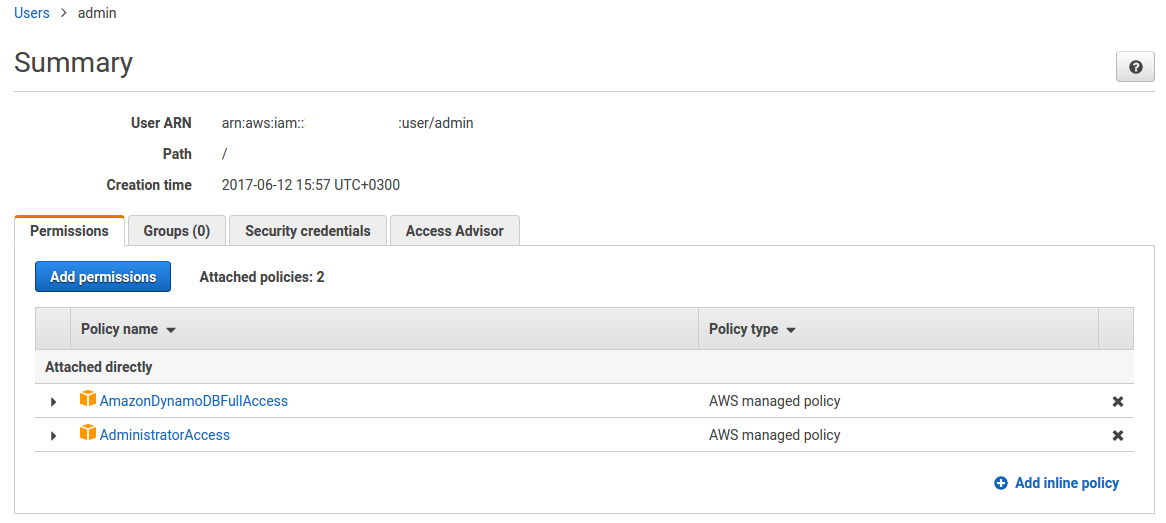
idowolf
on 12 Jun 2017
@idowolf Hm, yes that's what I did and it did fix my issue with the "unauthorized" message. :/
Did you deploy again? Other than that, I'm out of ideas. There is a way to access error logs in AWS from Cloudwatch, maybe you find more info in there?
frittate
on 12 Jun 2017
Sadly I couldn't find anything about this issue in the logs.
@jayair , any chance you could pitch in?
idowolf
on 12 Jun 2017
@idowolf Can I quickly see what the CloudWatch logs are giving you?
jayair
on 12 Jun 2017
@idowolf Could you show me your curl command? Ensure your header starts with Authorization ie.
curl POST_URL -H "Authorization:MY_ID_TOKEN" -d "..."
@idowolf @waterwoodsthu In the AWS console, go to IAM > Roles and make sure the AmazonDynamoDBFullAccess and AdministratorAccess policies are attached to the role itself.
 jbergandino
on 13 Jun 2017
jbergandino
on 13 Jun 2017
Can someone explain the command:
curl POST_URL \
-H "Authorization:xxxxxxxx" \
-d "{\"content\":\"hello world\",\"attachment\":\"hello.jpg\"}"
It works for me and creates a new entry in the table, but what is the "-d" specify? I imagine that it is calling the "create.js" function but I see no link to it being abbreviated as "-d". I want to learn how to call the other functions we created.
 millergd
on 14 Jun 2017
millergd
on 14 Jun 2017
The -d flag for the curl command is to send POST data the given url. You can read about the docs here https://curl.haxx.se/docs/manpage.html#-d
jayair
on 14 Jun 2017
Will someone be able to give me some ideas of what could've gone wrong here? When i deploy I got the following error:
Serverless: Checking Stack update progress...
......................Serverless: Deployment failed!
Serverless Error ---------------------------------------
An error occurred while provisioning your stack: IamRoleLambdaExecution
- API: iam:CreateRole User: arn:aws:iam::002682819933:user/olivia.zhang
is not authorized to perform: iam:CreateRole on resource:
arn:aws:iam::002682819933:role/notes-app-api-prod-us-west-2-lambdaRole.
Get Support --------------------------------------------
Docs: docs.serverless.com
Bugs: github.com/serverless/serverless/issues
Forums: forum.serverless.com
Chat: gitter.im/serverless/serverless
Your Environment Information -----------------------------
OS: darwin
Node Version: 6.7.0
Serverless Version: 1.12.1
I don't believe we have touched lambda at this point
 oliv9286
on 16 Jun 2017
oliv9286
on 16 Jun 2017
@oliv9286 it seems the IAM user olivia.zhang you set up in CLI do not have enough permission to deploy the project.
fwang
on 16 Jun 2017
after calling curl I got "notes-app-api-prod-create is not authorized to perform: dynamodb:PutItem on resource: arn:aws:dynamodb:eu-west-1" this is from cloudwatch log
My serverless.ymal
iamRoleStatements:
Effect: Allow
Action:
- dynamodb:DescribeTable
- dynamodb:Query
- dynamodb:Scan
- dynamodb:GetItem
- dynamodb:PutItem
- dynamodb:UpdateItem
- dynamodb:DeleteItem
Resource: "arn:aws:dynamodb:eu-west-1:*:*"
 mhdhaj
on 28 Jun 2017
mhdhaj
on 28 Jun 2017
@riogaj89 how do you solve the "authorized" problem
mhdhaj
on 28 Jun 2017
@mhdhaj For the iamRoleStatements, try changing the last line to
Resource: "arn:aws:dynamodb:eu-west-1:*:*"
This matches all the DynamoDB resources in your eu-west-1 region. Without the match all star keys *, arn:aws:dynamodb:eu-west-1:: is an invalid arn.
fwang
on 28 Jun 2017
@fwang it is the same like my Resource Resource: "arn:aws:dynamodb:eu-west-1:*:*"
mhdhaj
on 29 Jun 2017
@mhdhaj Ah now I see it after formatting the serverless.yml. iamRoleStatements expects an array. In yaml, array elements start with a hyphen. Try adding a hyphen before Effects and indent the lines below it up to Resource. ie.
iamRoleStatements:
- Effect: Allow
Action:
- dynamodb:DescribeTable
- dynamodb:Query
- dynamodb:Scan
- dynamodb:GetItem
- dynamodb:PutItem
- dynamodb:UpdateItem
- dynamodb:DeleteItem
Resource: "arn:aws:dynamodb:eu-west-1:*:*"
I got issue and I have been stucked for few hrs, can anyone help to cross-check
I got {"message":"Unauthorized"} error.
Fetch API cannot load https://ggxl75ium9.execute-api.us-east-2.amazonaws.com/prod/notes. No 'Access-Control-Allow-Origin' header is present on the requested resource. Origin 'http://localhost:3000' is therefore not allowed access. The response had HTTP status code 401. If an opaque response serves your needs, set the request's mode to 'no-cors' to fetch the resource with CORS disabled.
service: aws-nodejs # NOTE: update this with your service name
provider:
name: aws
runtime: nodejs6.10
stage: prod
region: us-east-2
# Use serverless-webpack plugin to transpile ES6/ES7
plugins:
- serverless-webpack
# Enable auto-packing of external modules
custom:
webpackIncludeModules: true
iamRoleStatements:
- Effect: Allow
Action:
- dynamodb:DescribeTable
- dynamodb:Query
- dynamodb:Scan
- dynamodb:GetItem
- dynamodb:PutItem
- dynamodb:UpdateItem
- dynamodb:DeleteItem
Resource: "arn:aws:dynamodb:us-east-2:*:*"
functions:
# hello:
# handler: handler.hello
create:
handler: create.main
events:
- http:
path: notes
method: post
cors: true
authorizer:
arn: arn:aws:cognito-idp:us-east-2:223608226763:userpool/us-east-2_rLK8UoYEt
list:
# Defines an HTTP API endpoint that calls the main function in list.js
# - path: url path is /notes
# - method: GET request
handler: list.main
events:
- http:
path: notes
method: get
cors: true
authorizer:
arn: arn:aws:cognito-idp:us-east-2:223608226763:userpool/us-east-2_rLK8UoYEt
get:
# Defines an HTTP API endpoint that calls the main function in get.js
# - path: url path is /notes/{id}
# - method: GET request
handler: get.main
events:
- http:
path: notes/{id}
method: get
cors: true
authorizer:
arn: arn:aws:cognito-idp:us-east-2:223608226763:userpool/us-east-2_rLK8UoYEt
update:
# Defines an HTTP API endpoint that calls the main function in update.js
# - path: url path is /notes/{id}
# - method: PUT request
# indention error
handler: update.main
events:
- http:
path: notes/{id}
method: put
cors: true
authorizer:
arn: arn:aws:cognito-idp:us-east-2:223608226763:userpool/us-east-2_rLK8UoYEt
delete:
# Defines an HTTP API endpoint that calls the main function in delete.js
# - path: url path is /notes/{id}
# - method: DELETE request
handler: delete.main
events:
- http:
path: notes/{id}
method: delete
cors: true
authorizer:
arn: arn:aws:cognito-idp:us-east-2:223608226763:userpool/us-east-2_rLK8UoYEt
 CaiYiLiang
on 2 Jul 2017
CaiYiLiang
on 2 Jul 2017
@CaiYiLiang Can you check that you are setting the Access-Control headers like so - https://github.com/AnomalyInnovations/serverless-stack-demo-api/blob/master/libs/response-lib.js#L13?
jayair
on 3 Jul 2017
@CaiYiLiang Before we jump into the error, a couple issues with your serverless.yml. The plugins and custom sections are not indented properly. The iamRoleStatements definition should go under the provider section.
Please use the demo project as the reference - https://github.com/AnomalyInnovations/serverless-stack-demo-api/blob/master/serverless.yml
fwang
on 3 Jul 2017
@fwang I think you are right with yml setting.
Then when I integrate with FrontEnd and BackEnd side,
from the client side, I am able to login/logout , and I can create notes record and display.
But when I click the note(trigger NoteClick func), get the error as the highlight:
TypeError: Cannot read property 'content' of null
While the record works fine when I use JSON-mock with the backend side. Lost..
CaiYiLiang
on 5 Jul 2017
@CaiYiLiang Can you point out the chapter where you are running into this issue?
jayair
on 5 Jul 2017
I also hit the {"status":false} issue. In my case the issue turned out to be that I missed that the "iamRoleStatements:" section was indented (I had left aligned originally). Instructions were correct - I just did not notice it as I entered the statements. Anyway just passing this on in case someone else runs into it.
 clemler
on 6 Jul 2017
clemler
on 6 Jul 2017
@clemler Thanks for letting us know. Quite a few folks run into YAML indenting related issues. I'll add a note to the chapter.
Just added it - https://github.com/AnomalyInnovations/serverless-stack-com/commit/8fa956ddf2ccd1fba74f1c2c2378fd6f07e215dd.
jayair
on 6 Jul 2017
@jayair @fwang
Here is the issue:
Able to create a note, but when clicking the note for details (jump to /note/:id), hit the error:
TypeError: Cannot read property 'content' of null
While the record works fine when I use JSON-mock with the backend side. Lost..
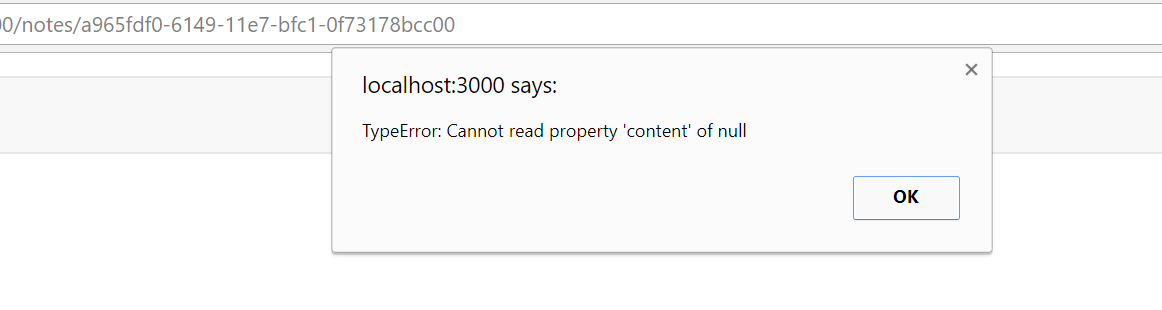
CaiYiLiang
on 9 Jul 2017
@CaiYiLiang Thanks for the screenshot. Can you tell me chapter of the tutorial you are on? So I can tell you what to look for.
jayair
on 9 Jul 2017
@jayair I believe it is the chapter: Render the Note Form
And I have located the issue:
Notes.js
async componentDidMount() {
try {
const results = await this.getNote();
this.setState({
note: results,
content: results.content,
});
}
catch(e) {
alert(e);
console.log("getRuslt:"+e);
}
}
getRuslt:TypeError: Cannot read property 'content' of null
The response is null.
CaiYiLiang
on 9 Jul 2017
@CaiYiLiang Thanks for the info.
You can try testing the backend directly to see what is going on. In this chapter - http://serverless-stack.com/chapters/deploy-the-apis.html, we do a curl command to test our backend.
Can you try doing a curl to try and get the note? Here is what the command would look like
$ curl https://YOUR_API.execute-api.us-east-1.amazonaws.com/prod/notes/YOUR_NOTE_ID \
-H "Authorization:YOUR_AUTHORIZATION_HEADER"
Just a quick note to say I had the same issue as @cwa821 - I missed a step here http://serverless-stack.com/chapters/add-support-for-es6-es7-javascript.html to run the babel-runtime.
Symptoms were everything was working fine locally, but once I'd deployed and started testing the API, I was getting an "Internal Server Error" returned when calling the create API. The Lamba / CloudWatch logs were showing me:
Unable to import module 'create': Error
at Function.Module._resolveFilename (module.js:469:15)
at Function.Module._load (module.js:417:25)
at Module.require (module.js:497:17)
at require (internal/module.js:20:19)
at Object.<anonymous> (/var/task/create.js:76:18)
at __webpack_require__ (/var/task/create.js:20:30)
at Object.<anonymous> (/var/task/create.js:167:20)
at __webpack_require__ (/var/task/create.js:20:30)
at /var/task/create.js:63:18
at Object.<anonymous> (/var/task/create.js:66:10)
I ran through the chapter on http://serverless-stack.com/chapters/add-support-for-es6-es7-javascript.html again, made sure I did the babel-runtime step.
Re ran this command:
$ serverless deploy
And then when testing the create, everything worked perfectly! So just wanted to add this note to let others know what that problem looked like and confirm the solution. Excellent tutorial so far, very useful and enjoying it. Thank you!
 timbull
on 12 Jul 2017
timbull
on 12 Jul 2017
@timbull Thanks for reporting back!
jayair
on 12 Jul 2017
@jayair
Sorry for my late response.
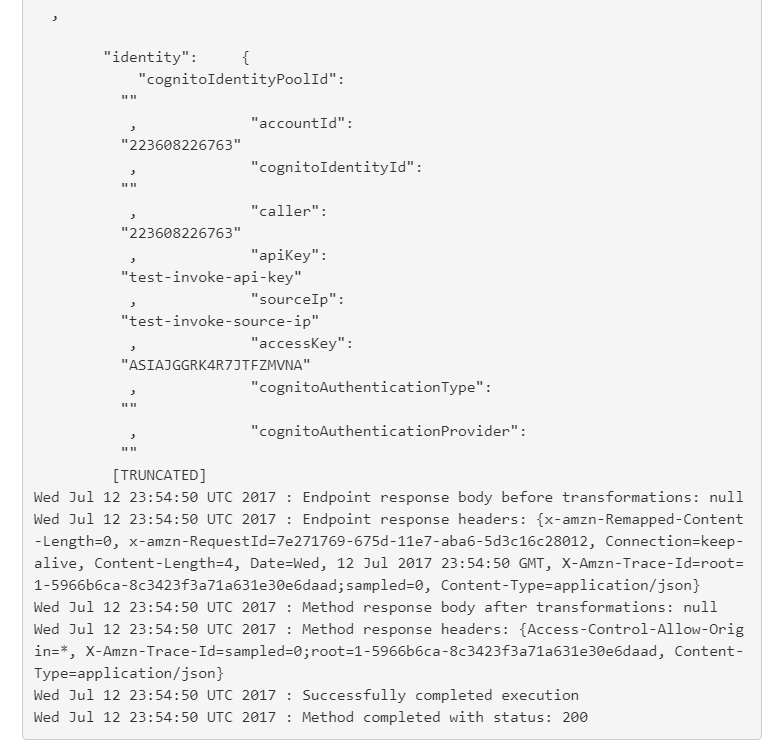
Here is my test:
curl: (92) HTTP/2 stream 1 was not closed cleanly: PROTOCOL_ERROR (err 1)

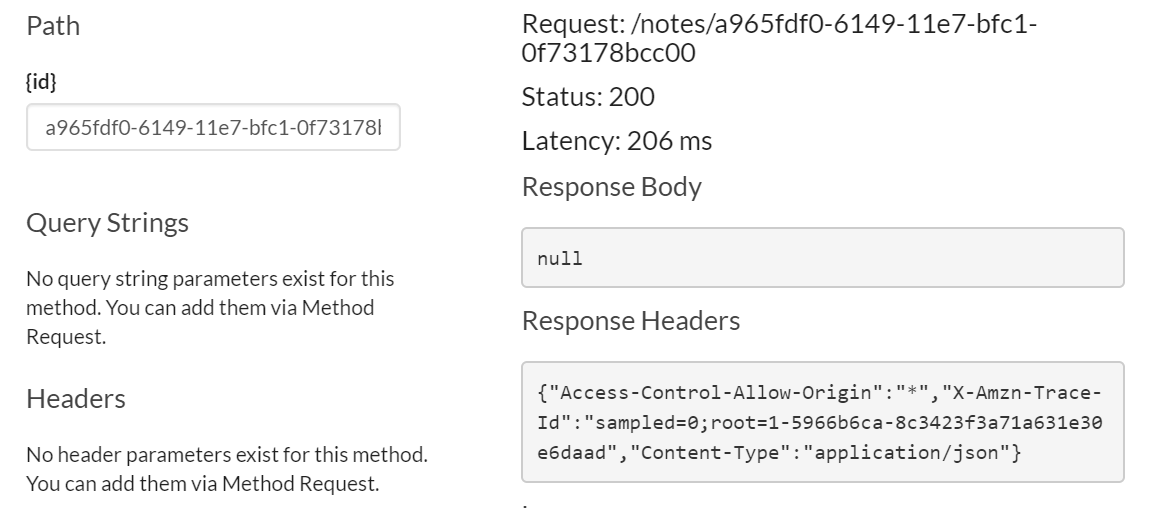
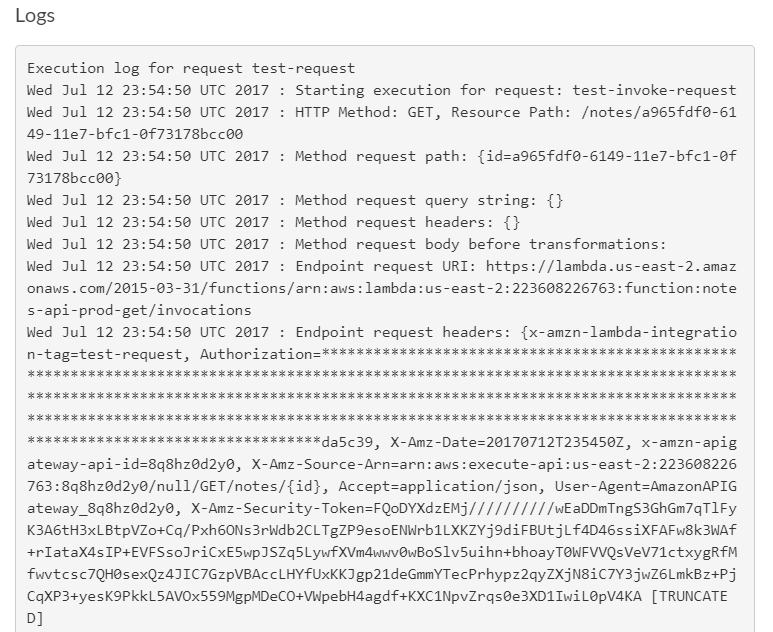
CaiYiLiang
on 13 Jul 2017
@CaiYiLiang Thanks for all the details. To debug this API further we need to check the logs. You can this by heading over to your AWS Console > CloudWatch > click Logs in the sidebar > select the Log Group named /aws/lambda/notes-app-api-prod-create > and expand the events. This should give you some info on the error. Let me know if that makes sense.
jayair
on 13 Jul 2017
git clone https://github.com/AnomalyInnovations/serverless-stack-demo-api.git notes-demo
npm install
serverless deploy
Go to Lamba functions at AWS console and 'test' the 'list' method.
"errorMessage": "Cannot find module 'babel-runtime/regenerator'",
I've read through this thread (though didn't study it) and I'm pretty sure this is something wonky with your stuff. I made zero edits to anything.
 victor-stone
on 23 Jul 2017
victor-stone
on 23 Jul 2017
@victor-stone This might explain your issue as well - https://github.com/AnomalyInnovations/serverless-stack-com/issues/112#issuecomment-317217381.
The tutorial was recently (earlier today) updated to use the stable version of Serverless Framework for now - https://github.com/AnomalyInnovations/serverless-stack-com/commit/232febe155178ed86a45e7a122e0f530d84b16cb.
jayair
on 23 Jul 2017
brava! thanks! now it's on to my bugs...
victor-stone
on 23 Jul 2017
how can I change the invoke URL to my custom URL? the domain part.
 yashg5
on 8 Aug 2017
yashg5
on 8 Aug 2017
@yashg5 Here is some info on it - http://docs.aws.amazon.com/apigateway/latest/developerguide/how-to-custom-domains.html
jayair
on 8 Aug 2017
I have resolved this issue by going over to Windows: I have tried to deploy on WSL first.
 akolybelnikov
on 23 Oct 2017
akolybelnikov
on 23 Oct 2017
iamRoleStatements should be an array of objects, where each object has Effect, Action, Resource fields. Specifically, statement 0 is missing the following properties: Resource
Error being thrown when calling serverless deploy
Below is my serverless.yml
https://gist.github.com/stefaanja/5136a9d08f3aae36c37eb39db4cb9768
 stefangiapantzakis
on 11 Nov 2017
stefangiapantzakis
on 11 Nov 2017
@stefaanja In this line here - https://github.com/AnomalyInnovations/serverless-stack-demo-api/blob/master/serverless.yml#L22; notice that it is dynamodb:DescribeTable and not dynamodb: DescribeTable. There shouldn't be a space in between.
jayair
on 11 Nov 2017
When I want to redeploy my functions using serverless deploy, I get this error:
ENOTEMPTY: directory not empty, rmdir 'C:\xxxxxxxnotes-app-api\.webpack\dependenciesnode_modules\.bin'
I have tried to deploy a single function, but was given this error:
The function "update" you want to update is not yet deployed. Please run "serverless deploy" to deploy your service. After that you can redeploy your services functions with the "serverless deploy function" command.
All functions are working fine through API gateway, except update (when saving changes to an existing note), which I am trying to troubleshoot by redeploying all functions again.
 spiraltrip
on 21 Dec 2017
spiraltrip
on 21 Dec 2017
@spiraltrip So it works fine when you deployed the first time? But not when you make a change and deploy again?
jayair
on 21 Dec 2017
I have encountered the same issue twice! With various error messages. I have re-deployed the functions without any changes with a new service name, i.e. completely fresh Lambda functions, and deleted the previous ones. After third “new” deployment all sebsequent redeployments started to work seamlessly. But it is true, that you cannot just create a completely new function and deploy it separately. In this case yoo have to redeploy all again.
akolybelnikov
on 21 Dec 2017
Hi @jayair it worked fine deploying it for the first time. I intentionally left Update API out when I first deployed them. Then I tried to deploy Update API much later as a standalone function, which failed. So I tried to deploy them all together but got this ENOTEMPTY error instead.
@akolybelnikov , I have re-deployed everything from scratch again and it worked this time. I did it by starting all over with serverless -g install and creating the templates all over again. But it was a copy and paste of my previous codes. I initialised nodejs with package.json and reinstallation of all node modules / plugins.
spiraltrip
on 22 Dec 2017
Hello @jayair I've encountered the "Cannot find module 'babel-runtime/regenerator'" and I saw the same error message that some people above met:
Unable to import module 'create': Error
at Function.Module._resolveFilename (module.js:469:15)
at Function.Module._load (module.js:417:25)
at Module.require (module.js:497:17)
at require (internal/module.js:20:19)
at Object.<anonymous> (/var/task/create.js:76:18)
at __webpack_require__ (/var/task/create.js:20:30)
at Object.<anonymous> (/var/task/create.js:166:20)
at __webpack_require__ (/var/task/create.js:20:30)
at /var/task/create.js:63:18
at Object.<anonymous> (/var/task/create.js:66:10)
The deploy is ok but when trying to test using apig, I keep getting this error. I've tried to use serverless 1.17 and sls remove then sls deploy too. Would you please help on this?
npm: 5.6.0
sls: 1.17.0
repo: https://github.com/ivyliolia/notes-app-api
Many thanks~~
 ivyliolia
on 27 Dec 2017
ivyliolia
on 27 Dec 2017
@ivyliolia Ah there is a typo on this line - https://github.com/ivyliolia/notes-app-api/blob/master/serverless.yml#L20
Change - webpackIncludeModules: true to webpackIncludeModules: true.
jayair
on 27 Dec 2017
each time I use serverless to deploy my service it seems to give a new prefix to the api gateways.. thus screwing up oauth callback urls I have configured elsewhere
e.g GET - https://c1d3sunyxx.execute-api.us-east-1.amazonaws.com/prod/bc/oauth
after a new deploy it might be something like
https://yyyyyyyyy.execute-api.us-east-1.amazonaws.com/prod/bc/oauth
is there a simple way to get around this ?
 walshe
on 20 Jan 2018
walshe
on 20 Jan 2018
@walshe These remain constant as long as the service name remains the same in your serverless.yml - https://github.com/AnomalyInnovations/serverless-stack-demo-api/blob/master/serverless.yml#L1 and as long as you don't do a serverless remove in between.
jayair
on 23 Jan 2018
@jayair ah, thanks :)
walshe
on 23 Jan 2018
Just a heads up, I was also getting "Internal Server Error", and after checking the logs saw "Unable to import module 'create'". Going back through the code and files noticed my package.json file got wiped out some how. Put that back and all on track now.
Moral of the story, CloudWatch logs is where its at!
 shawnnolanjr
on 3 Feb 2018
shawnnolanjr
on 3 Feb 2018
Hello everyone, my deploy was successful but I got three endpoints instead of 5 like in the example code.
I got the first
POST ...
GET ....
GET ....
but no PUT and DELETE, is this an issue? how can I go about it?
I got all the functions by the way.
 ivanms1
on 4 Feb 2018
ivanms1
on 4 Feb 2018
@ivanms1 Can I see your serverless.yml?
jayair
on 5 Feb 2018
@jayair sure, here it is.
service: notes-app-api # NOTE: update this with your service name
plugins:
- serverless-webpack
custom:
webpackIncludeModules: true
provider:
name: aws
runtime: nodejs6.10
stage: prod
region: us-east-2
iamRoleStatements:
- Effect: Allow
Action:
- dynamodb:DescribeTable
- dynamodb:Query
- dynamodb:State-change
- dynamodb:GetItem
- dynamodb:PutItem
- dynamodb:UpdateItem
- dynamodb:DeleteItem
Resource: "arn:aws:dynamodb:us-east-2:*:*"
functions:
create:
handler: create.main
events:
- http:
path: notes
method: post
cors: true
authorizer: aws_iam
get:
handler: get.main
events:
- http:
path: notes/{id}
method: get
cors: true
authorizer: aws_iam
  list:
    handler: list.main
    events:
      - http:
        path: notes
method: get
cors: true
authorizer: aws_iam
update:
handler: update.main
event:
- http:
path: notes/{id}
method: put
cors: true
authorizer: aws_iam
delete:
handler: delete.main
event:
- http:
path: notes/{id}
method: delete
cors: true
authorizer: aws_iam
@ivanms1 Your PUT and DELETE handlers use the keyword event instead of events.
jayair
on 9 Feb 2018
@jayair oh silly me, thank you so much!
ivanms1
on 10 Feb 2018
Hi,
I am developing a web application using this tutorial. I was wondering if anyone could help/give advice on how to approach this issue. I am trying to use 2 different dynamodb tables. So I want the users to access things from both. Is there anyway to set up the apis to make calls to both tables?
Thank you
 mjbf0748
on 26 Mar 2018
mjbf0748
on 26 Mar 2018
@mjbf0748 Answered you in the other thread.
jayair
on 26 Mar 2018
@jayair
Hi,
I want to know why dynamodb access policy wasn't applied into lambda's role after deployment.
Here I did.
- I followed all procedures of serverless stack to build backed APIs and added role in
serverless.ymlas well and deployed it.
iamRoleStatements:
  - Effect: Allow
    Action:
      - dynamodb:DescribeTable
      - dynamodb:Query
      - dynamodb:Scan
      - dynamodb:GetItem
      - dynamodb:PutItem
      - dynamodb:UpdateItem
      - dynamodb:DeleteItem
    Resource: "arn:aws:dynamodb:us-east-1:*:*"
- I ran
apig-testand an error responded.
{ status: 500,
  statusText: 'Internal Server Error',
  data: { status: false } }
And in the CouldWatch
AccessDeniedException: User: arn:aws:sts:: ... lambdaRole ... create is not authorized to perform: dynamodb:PutItem on resource: arn:aws:dynamodb:us-east-1: ... :table/notes
- So I checked out lambda's role but there was no dynamodb access policy. I don't know why.
I added a policy setting.
{
    "Effect": "Allow",
    "Action": [
      "dynamodb:DescribeTable",
      "dynamodb:Query",
      "dynamodb:Scan",
      "dynamodb:GetItem",
      "dynamodb:PutItem",
      "dynamodb:UpdateItem",
      "dynamodb:DeleteItem"
    ],
    "Resource": "arn:aws:dynamodb:us-east-1:*:*"
}
It worked!
Thank you.
 daenamkim
on 10 Apr 2018
daenamkim
on 10 Apr 2018
@daenamkim Can you check to make sure the iamRoleStatements section is formatted correctly? Compare it to the file in the tutorial - https://github.com/AnomalyInnovations/serverless-stack-demo-api/blob/master/serverless.yml. That can usually cause the problem.
jayair
on 10 Apr 2018
@jayair
It was an indent issue.
Thank you so much!!!!
daenamkim
on 11 Apr 2018
This issue was moved to https://discourse.serverless-stack.com/t/comments-deploy-the-apis/121
jayair
on 9 May 2018
I am getting a Network Error after creating a note. I am stuck here and can't progress until this error is solved. Please help.
 TheKippo
on 29 Oct 2018
TheKippo
on 29 Oct 2018
Can you post your issue here -
https://discourse.serverless-stack.com/t/comments-deploy-the-apis/121?
Thanks.
jayair
on 30 Oct 2018
Related issues
 TinCharMan
·
12Comments
jayair
·
20Comments
jayair
·
9Comments
jayair
·
11Comments
jayair
·
11Comments
TinCharMan
·
12Comments
jayair
·
20Comments
jayair
·
9Comments
jayair
·
11Comments
jayair
·
11Comments
Most helpful comment
Just a quick note to say I had the same issue as @cwa821 - I missed a step here http://serverless-stack.com/chapters/add-support-for-es6-es7-javascript.html to run the babel-runtime.
Symptoms were everything was working fine locally, but once I'd deployed and started testing the API, I was getting an "Internal Server Error" returned when calling the create API. The Lamba / CloudWatch logs were showing me:
I ran through the chapter on http://serverless-stack.com/chapters/add-support-for-es6-es7-javascript.html again, made sure I did the babel-runtime step.
Re ran this command:
$ serverless deploy
And then when testing the create, everything worked perfectly! So just wanted to add this note to let others know what that problem looked like and confirm the solution. Excellent tutorial so far, very useful and enjoying it. Thank you!