Serverless-stack-com: Serverless plugin "serverless-offline" not found.
The latest serverless.yml in chapters add-a-create-note-api.md and add-support-for-es6-es7-javascript.md includes the serverless-offline plugin.
executing $ serverless invoke local --function create --path mocks/create-event.json
generates the following error:
  Serverless Error ---------------------------------------

  Serverless plugin "serverless-offline" not found. Make sure it's installed and listed in the "plugins" section of your serverless config file.
Executing $ npm install serverless-offline -g will install the plug in and resolve the issue.
Suggesting to add the following (line 46)
<img class="code-marker" src="/assets/s.png" />Install Serverless Offline globally.

bash $ npm install serverless-offline -g in setup-the-framework.md


The serverless-offline plugin emulates AWS Lambda and API Gateway on your local machine to speed up your development cycles. It starts an HTTP server that handles the request's lifecycle like APIG does and invokes your handlers.
 TinCharMan
All 12 comments
@TinCharMan In this page if you run a command as below, serverless-offline
is already included in serverless.yml.
$ serverless install --url https://github.com/AnomalyInnovations/serverless-nodejs-starter --name notes-app-api
And I think you don't need to run npm install -g but npm install --save-dev or yarn add --save-dev because it's needed for the development(in devDependencies of package.json).
Happy serverless!
 daenamkim
on 19 Apr 2018
daenamkim
on 19 Apr 2018
@TinCharMan This might be because the latest change we made - https://github.com/AnomalyInnovations/serverless-stack-com/issues/223. Just make sure your project is up to date with the repo - https://github.com/AnomalyInnovations/serverless-stack-demo-api
 jayair
on 20 Apr 2018
jayair
on 20 Apr 2018
Thank you both. All good with latest repo.
TinCharMan
on 8 May 2018
To resolve this error while running an automated CI pipeline or locally, try the following:
- npm config set prefix /usr/local
- npm install -g serverless
- npm install serverless-offline -g
- npm install --save-dev
- serverless deploy --stage production --verbose
Also, check your package.json and ensure the serverless-offline package is included in devDependencies.
This fixed the issue for me.
_Happy Serverless!_
 kmanojkumar
on 18 Oct 2019
kmanojkumar
on 18 Oct 2019
From a new serverless project, if everything is well installed (serverless-offline package...), check your serverless.yml.
You should have those lines :
plugins:
      - serverless-offline
Otherwise, this is why it does not work...
Regards.
 aluzed
on 18 May 2020
aluzed
on 18 May 2020
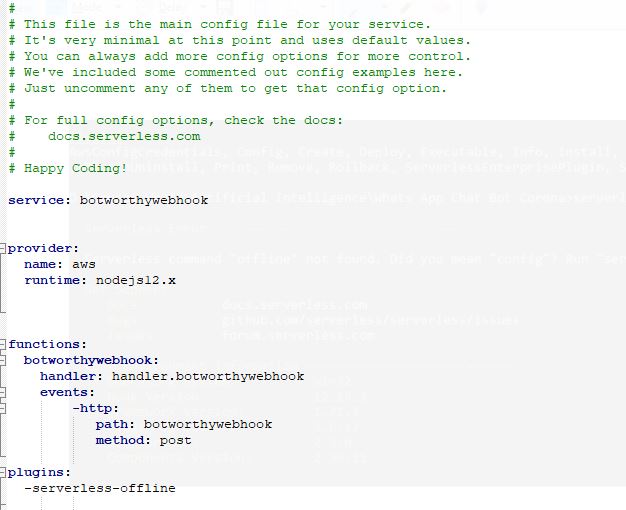
I have followed all instructions given in the site https://www.npmjs.com/package/serverless-offline and when I run sls offline i get below error --->
Serverless command "offline" not found. Did you mean "config"? Run "serverless help" for a list of all available commands.
Get Support --------------------------------------------
Docs: docs.serverless.com
Bugs: github.com/serverless/serverless/issues
Issues: forum.serverless.com
 gouravbeyondBGCM
on 28 May 2020
gouravbeyondBGCM
on 28 May 2020
Does your package.json mention "serverless-offline" ? (At least as devDependencies)
aluzed
on 28 May 2020
no my package.json file doesnt have "serverless-offline" but yes package-lock.json file has it
and I already did this command "npm install serverless-offline --save-dev"
and I get below warning after running above command -->
npm WARN [email protected] requires a peer of serverless@>=1.60.0 but none is installed. You must install peer dependencies yourself.
gouravbeyondBGCM
on 28 May 2020
Ok, so you juste have to type into a terminal : npm install serverless-offline --save-dev
aluzed
on 28 May 2020
Ok, so you juste have to type into a terminal : npm install serverless-offline --save-dev
I think below warning message after running above commands creating problem , please comment
npm WARN [email protected] requires a peer of serverless@>=1.60.0 but none is installed. You must install peer dependencies yourself.
gouravbeyondBGCM
on 28 May 2020
I'm getting this error as well but I have installed it correctly and I have serverless-offline in my yml file. I even restarted my terminal session. Not sure what is going on.
 chuckthepiranha
on 1 Mar 2021
chuckthepiranha
on 1 Mar 2021
Same here actually, and i do have it under my plugins in my serverless.yml
 mbast100
on 3 Mar 2021
mbast100
on 3 Mar 2021
Related issues
jayair
·
11Comments
jayair
·
4Comments
 willybeans
·
3Comments
jayair
·
14Comments
jayair
·
20Comments
willybeans
·
3Comments
jayair
·
14Comments
jayair
·
20Comments
Most helpful comment
From a new serverless project, if everything is well installed (serverless-offline package...), check your serverless.yml.
You should have those lines :
Otherwise, this is why it does not work...
Regards.