Serverless-stack-com: Comments: Create a DynamoDB Table
Link to chapter - http://serverless-stack.com/chapters/create-a-dynamodb-table.html
 jayair
All 20 comments
Should the partition and sort id's be of type "number" rather than "string"?
 grantgarland
on 3 Jun 2017
grantgarland
on 3 Jun 2017
@SlovaDev Both the user id and note id are uuid strings in our case.
jayair
on 5 Jun 2017
Ok, thanks for the clarification. I'm new to the world of AWAS but really enjoying the serverless stack tutorial.
grantgarland
on 5 Jun 2017
Since serverless-stack.com updated to AWS_IAM auth, a row in a DynamoDB table contains a HASHKEY of the _cognitoIdentityId_ to link a user to a specific table entry now. I think before migrating to AWS_IAM, the HASHKEY for a table row was context.authorizer.claims.sub, right?
The point is that I don't see a chance now to use AWS specific fine-grained access control to restrict access to a table row only to a user who has a specific _cognitoIdentityId_, e.g.:
With context.authorizer.claims.sub it was possible to securely restrict access to a DynamoDB table for a user with a condition on the DynamoDB resource with dynamodb:LeadingKeys. Now, without storing the context.authorizer.claims.sub as HASHKEY I think it is not possible anymore to restrict access to DynamoDB tables for a specific AWS_IAM authenticated user only, is that correct? At least I did not find a substituation variable for _cognitoIdentityId_. It would be good to restrict access as mentioned before from a security point of view.
(Btw I want to thank you for this comprehensive serverless tutorial!)
 tschmidleithner
on 22 Sep 2017
tschmidleithner
on 22 Sep 2017
@tschmidleithner We do one level of this access control when we assign an IAM role to a federated identity as shown in this chapter - https://serverless-stack.com/chapters/create-a-cognito-identity-pool.html. We use the cognito-identity.amazonaws.com:sub as the substitution variable for the user id.
For DynamoDB it is a bit different because the role that we use there is defined by the one we assign to the Lambda function. Out of curiosity do you have an example using the context.authorizer.claims.sub to control access to a DynamoDB table in the serverless.yml?
jayair
on 22 Sep 2017
@jayair Thanks for your fast response.
Yes, that is correct with S3 but cognito-identity.amazonaws.com:sub is stated in the role which is generated by Cognito Federated-Identities. But the DynamoDB table resources are invoked from lambda functions and therefore the DynamoDB policy would be stated in the lambda role. You could simply change the existing IAM lambda role with the DynamoDB table definitions which is created by the Serverless framework (or more precisely by CloudFormation) to something like this (the important part is the condition):
...
{
  "Action": [
    "dynamodb:*"
  ],
  "Resource": "arn:aws:dynamodb:eu-west-1:*:table/apiName-stage-table",
  "Condition": {
    "ForAllValues:StringEquals": {
        "dynamodb:LeadingKeys": ${cognito-identity.amazonaws.com:sub}
    },
  "Effect": "Allow"
}
...
This policy should restrict access to DynamoDB table rows only to users with a sub that is equal to the HASHKEY afaik (official AWS blog post entry).
But I think that the lambda function does not invoke DynamoDB with cognitoIdentityId. At least I didn't get it to work with this policy since I always get a 403 error.
I hope I could clarify my question now, if not please do not hesitate to ask for more details. Or am I trying to misuse something here?
tschmidleithner
on 22 Sep 2017
@tschmidleithner Maybe you already know this but the reason why the S3 bucket in our case and the blog post that you linked to for DynamoDB need that level of security is because the clients are talking directly to those AWS resources. In the case of Lambda for the tutorial we authenticate and secure our resources before it gets there. This is why we are comfortable in giving the level access (after authenticating the user) to DynamoDB.
That's not to say that you should not do it your way. But I'd need to research further on why the IAM Role cannot access the cognitoIdentityId (though intuitively it makes sense since we are past the authentication step already).
jayair
on 24 Sep 2017
@jayair Yes, I know that. But beside from directly invoking the AWS resources, it made sense to me to use this built in security feature from IAM to better secure my application.
tschmidleithner
on 26 Sep 2017
@tschmidleithner Yeah we'd need to test it out. I'm not exactly sure why one is supported and the other isn't.
jayair
on 27 Sep 2017
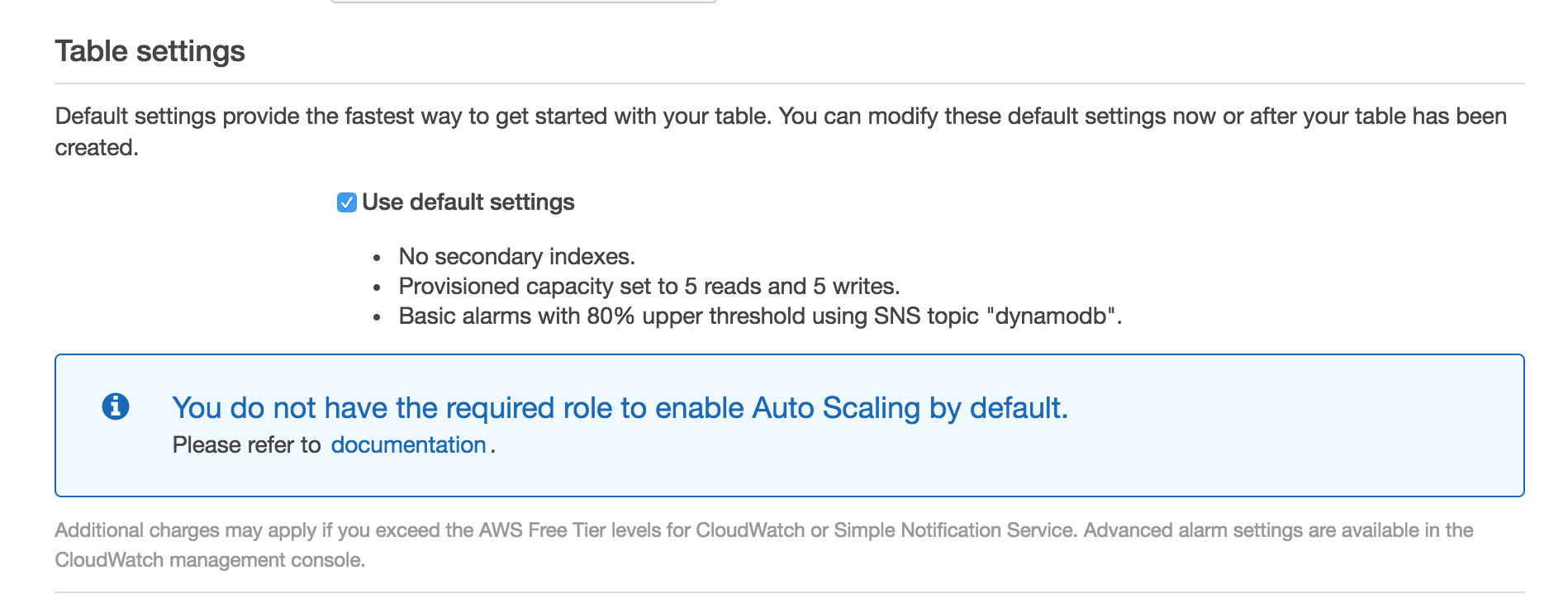
When I try to create the DynamoDB instance, it warns that I don't have privileges for auto-scaling. This does not appear to be the case in the guide.
Strange thing is, I believe I am logged in as the root user. So how can I not have permissions?
 tommedema
on 28 Sep 2017
tommedema
on 28 Sep 2017
@tommedema The auto-scaling update is recent. So I wonder if things have changed. We'll need to try it and get back to you. Thanks for letting us know.
jayair
on 28 Sep 2017
@tommedema Yeah we just tested it. If you are doing this for the first time you would need to use a different option and not the Use default settings one. You can read more about it here - http://docs.aws.amazon.com/amazondynamodb/latest/developerguide/AutoScaling.Console.html#AutoScaling.Console.NewTable.
We'll be updating the tutorial soon.
jayair
on 29 Sep 2017
@tommedema Updated with the new instructions - https://github.com/AnomalyInnovations/serverless-stack-com/pull/144.
jayair
on 29 Sep 2017
Hi,
I really like this tutorial and I think you've done an excellent job putting everything together.
I have a comment regarding the permissions granted in serverless.yml. Using the "*" operator for the resource part of DynamoDB is really not good practice, security wise.
I would suggest using: arn:aws:dynamodb:us-east-1:*:table/notes instead.
Also, serverless supports defining Cloud Formation resources in the yml file. You might want to consider using the option of defining the DynamoDB table as part of the serverless.yml file. I've created a branch with the DynamoDB table defined in serverless.yml, so during the deploy stage the table will be created instead of doing this via the UI. You can view this branch here: https://github.com/glicht/serverless-stack-demo-api/tree/add-dynamodb . If you find this useful, I can open a PR.
Best,
Guy
 glicht
on 20 Jan 2018
glicht
on 20 Jan 2018
@glicht Thanks for this. For the early chapters in the tutorial we would prefer it is done through the UI. But we are looking into creating a CloudFormation stack for the entire tutorial setup. And there is an open issue for this since certain parts of the Cognito setup are not supported in CloudFormation yet.
For the permissions, it is good practice to be as specific as possible for the IAM role. But in this case it is not as bad because the role that is specified in the serverless.yml is not what your users have access to. Instead it is the role your Lambda assumes. And we restrict access to our Lambdas via the Identity Pool.
jayair
on 23 Jan 2018
Sure. Just to add, I am using your demo app in a recent walk through I've written on how to achieve least privilege permissions via X-Ray. You can read it here: https://medium.com/@glicht/using-aws-x-ray-to-achieve-least-privilege-permissions-93dfd6701318 . As part of this process, I've also created a branch which enables X-Ray if you are interested: https://github.com/glicht/serverless-stack-demo-api/tree/add-xray .
glicht
on 23 Jan 2018
@glicht The blog post looks great. I'll make a note of it and add it in an advanced chapter. Thanks!
jayair
on 23 Jan 2018
what are the thoughts on defining dynamodb tables (an even cognito pools etc) in serverless.yml ? can it even be done without having to have absolute arns referenced etc?
 walshe
on 20 Feb 2018
walshe
on 20 Feb 2018
@walshe Yeah there are a few people that have done so. We are going to be writing a chapter on it some time soon.
jayair
on 23 Feb 2018
This issue was moved to https://discourse.serverless-stack.com/t/comments-create-a-dynamodb-table/139
jayair
on 9 May 2018
Related issues
 TinCharMan
·
12Comments
TinCharMan
·
12Comments
 enBonnet
·
9Comments
jayair
·
4Comments
enBonnet
·
9Comments
jayair
·
4Comments
 quantuminformation
·
12Comments
quantuminformation
·
12Comments
 hollygirouard
·
5Comments
hollygirouard
·
5Comments