Server: SMTP not working, where are the logs?
Hi
i have bitwarden running within docker, it has been deployed by the nextcloud vm by Daniel Hansson @enoch85.
SMTP doesn't work, I have configured the settings like this:
globalSettings__baseServiceUri__vault=https://pw.my.domain.net
globalSettings__baseServiceUri__api=https://pw.my.domain.net/api
globalSettings__baseServiceUri__identity=https://pw.my.domain.net/identity
globalSettings__baseServiceUri__admin=https://pw.my.domain.net/admin
globalSettings__baseServiceUri__notifications=https://pw.my.domain.net/notifications
globalSettings__baseServiceUri__sso=https://pw.my.domain.net/sso
globalSettings__sqlServer__connectionString="Data Source=tcp:mssql,1433;Initial Catalog=vault;Persist Security Info=False;User ID=sa;Password=secret;MultipleActiveResultSets=False;Connect Timeout=30;Encrypt=True;TrustServerCertificate=True"
globalSettings__identityServer__certificatePassword=secret
globalSettings__attachment__baseDirectory=/etc/bitwarden/core/attachments
globalSettings__attachment__baseUrl=https://pw.my.domain.net/attachments
globalSettings__dataProtection__directory=/etc/bitwarden/core/aspnet-dataprotection
globalSettings__logDirectory=/etc/bitwarden/logs
globalSettings__logRollBySizeLimit=
globalSettings__syslog__destination=
globalSettings__licenseDirectory=/etc/bitwarden/core/licenses
globalSettings__internalIdentityKey=secret
globalSettings__oidcIdentityClientKey=secret
globalSettings__duo__aKey=secret
globalSettings__installation__id=secret
globalSettings__installation__key=secret
globalSettings__yubico__clientId=REPLACE
globalSettings__yubico__key=REPLACE
[email protected]
globalSettings__mail__smtp__host=my.smarthost.net
globalSettings__mail__smtp__port=26
globalSettings__mail__smtp__ssl=false
globalSettings__mail__smtp__username=
globalSettings__mail__smtp__password=
globalSettings__disableUserRegistration=true
globalSettings__hibpApiKey=REPLACE
adminSettings__admins=
I use proxmox as smarthost which accepts mails on port 26 by default as "trusted" and thus unfiltered by the antispam engine.
nextcloud which runs on the same server (not in the same docker container of course) runs fine, can send mails totally fine.
i can also telnet from the server to the smarthost and send mails.
where can I find the logs to get any clue why sending mails is not working from bitwarden? i can't find any /etc/bitwarden/logs directory, if it is redirected to ~/bwdata/logs, then there is no clue about the mailing error, as I have digged through every single log file which is saved there.
according to the proxmox logs, no mail arrives at the mail gateway so no mail seems to leave the bitwarden installation.
could there be some docker rule prohibiting communications on port 26?
how can i debug this?
thanks!
 mamama1
All 38 comments
Link to the script:
https://github.com/nextcloud/vm/blob/master/apps/tmbitwarden.sh
 enoch85
on 11 Aug 2020
enoch85
on 11 Aug 2020
hi
according to tcpdump and according to the logs, bitwarden is not even trying to send mails.
not even on port 25 instead of port 26 like in the config above.
where to start? there is absolutely no error logged in none of the bitwarden log files.
thanks
mamama1
on 11 Aug 2020
i am debugging and tcpdumping the sh*t out of it but up until now i have no clue. currently it looks like bitwarden doesn't even try to connect to the smtp server or to resolve its dns name. i have modified the iptables rules to allow outgoing traffic from the containers no matter what but still no luck. maybe i have to change the NAT rules as well? like i said, iptables and me never were friends. big corporate firewalls like ASA, Checkpoint, Fortinet, no problem. but iptables? nope.
mamama1
on 11 Aug 2020
currently installing visual studio to get a better view at the source code, maybe i can track down there what it should be doing.
mamama1
on 11 Aug 2020
i installed telnet into the bitwarden-nginx container and was able to send mails to my smtp server so iptables can't be the issue here.
imo this code part is total BS (from MailKitSmtpMailDeliveryService.cs):
                if (!_globalSettings.Mail.Smtp.StartTls && !_globalSettings.Mail.Smtp.Ssl &&
                    _globalSettings.Mail.Smtp.Port == 25)
                {
                    await client.ConnectAsync(_globalSettings.Mail.Smtp.Host, _globalSettings.Mail.Smtp.Port,
                        MailKit.Security.SecureSocketOptions.None);
                }
                else
                {
                    var useSsl = _globalSettings.Mail.Smtp.Port == 587 && !_globalSettings.Mail.Smtp.SslOverride ?
                        false : _globalSettings.Mail.Smtp.Ssl;
                    await client.ConnectAsync(_globalSettings.Mail.Smtp.Host, _globalSettings.Mail.Smtp.Port, useSsl);
                }

                if (CoreHelpers.SettingHasValue(_globalSettings.Mail.Smtp.Username) &&
                    CoreHelpers.SettingHasValue(_globalSettings.Mail.Smtp.Password))
                {
                    await client.AuthenticateAsync(_globalSettings.Mail.Smtp.Username,
                        _globalSettings.Mail.Smtp.Password);
                }

                await client.SendAsync(mimeMessage);
                await client.DisconnectAsync(true);
how is port 26 supposed to work with this? who on earth says that 587 always has to be encrypted? also port 25 is perfectly suitable for starttls. jeeez.
anyway, changed to port 25 but still no luck, bitwarden is simply not sending any mails and according to the logs and tcpdump it isn't even trying. I'm kind of out of ideas, this is total BS...
mamama1
on 11 Aug 2020
Hi @mamama1 , I'll try to address each of your concerns and see where we can help.
i installed telnet into the bitwarden-nginx container and was able to send mails to my smtp server so iptables can't be the issue here.
Great, at this point we'll probably need to drill down into what actions you're taking where you expect emails to be sent and with some steps to reproduce (very helpful outside of the general technical information/background). Since there are no error messages being logged, I can only assume there's no error, and if no mail is being sent, and there is no error, perhaps there's no attempt to send mail (assuming here).
how is port 26 supposed to work with this?
As you can see from the code here, line 81 clearly has the SMTP client connecting to the relay server with the configured host and port, and from your configuration and port used, w/o SSL specified, i.e.:
c#
// Based on your configuration
await client.ConnectAsync("my.smarthost.net", 26, false);
who on earth says that 587 always has to be encrypted?
Nobody, although port 587 was designated in the SMTP world to handle an implicit STARTTLS upgrade to an encrypted connection, you can send on 587 w/o encryption if that's what the receiving mail server wants to do; although with MailKit itself, if you were to say, for example, use port 587 and pass MailKit.Security.SecureSocketOptions.None, generally you would get a different exception because port 587 is almost always reserved for STARTTLS connections.
also port 25 is perfectly suitable for starttls.
Yes, any port is valid for anything if the server and client can agree on it. Secondly, nothing in the code that you've pasted above indicates that we're preventing STARTTLS on port 25 as long as you have globalSettings__mail__smtp__startTls=true in your settings. What that code is doing is setting a "smart default" to handle the more common scenario that someone is running a local SMTP host or intra-network relay that connects w/o SSL or TLS on port 25 and is purely used to pass in the explicit MailKit.Security.SecureSocketOptions.None flag (vs. the useSsl value which still may allow STARTTLS or SSL negotiation to occur if the SMTP relay advertises it, which MailKit handles under-the-covers).
changed to port 25 but still no luck, bitwarden is simply not sending any mails and according to the logs and tcpdump it isn't even trying.
Another great reason to get some steps to reproduce! What actions are you taking to try to get Bitwarden to send mail?
 cscharf
on 11 Aug 2020
cscharf
on 11 Aug 2020
Hi
you actually definitely got me there, sorry for getting a bit rude but i was spending hours on this already and got a bit upset.
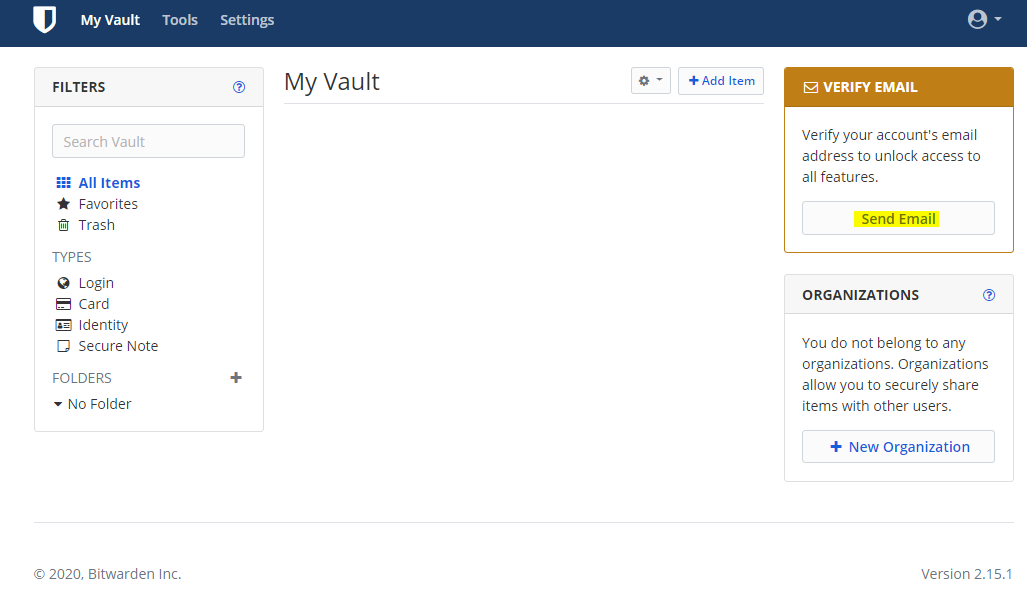
This all is related to me trying to get the verfication mail which bitwarden advertises as "needs to be done to unlock all features" right after login on the main page.
Regarding line 81, I totaly misread that line, you are correct - sorry once again.
I read it in a way that the code requires either the port to be 25 and ssl/tls stuff disabled or the port to be 587 with enabled ssl/tls stuff.
implicit tls afaik is on port 465. 587 is just "authenticated client smtp" which most of the times is used with STARTTLS but certainly doesn't have to.
mamama1
on 11 Aug 2020
for your reference, this is where I had my big clicky time without receiving any mails and without seeing any errors or traffic via tcpdump on all the various internal and external docker and vm network interfaces:
mamama1
on 11 Aug 2020
Thanks for the additional information (and the correction on 587 vs. 465). I completely understand frustration + troubleshooting rabbit holes, for sure, no worries.
Are you are seeing a success toast stating, "Check your email inbox for a verification link."?
cscharf
on 11 Aug 2020
Yes, that message is popping up, which made me very confident about that there should have been a mail somewhere...
mamama1
on 11 Aug 2020
Ahh, okay, so I'm testing locally with a simple SMTP docker container acting as my relay, and what I'm seeing is the SMTP interaction from MailKit is indeed getting a 250 Success response back from the relay, and then the relay's logs are then continuing to attempt delivery, which is failing later in the process. You may have already stated this, but did you check the relay's logs or with your SMTP host to determine if the message is being lost or failing delivery on their end with the final destination server? I do see a bit in the wild, especially trying to deliver to Gmail or other email services where the responding relay will get far enough in the handoff to get a success back to the sending client, but then fail in the final submission phase of sending the message from the initial relay. Just want to rule that out, since you are seeing the success message, MailKit is assuming everything is fine (any errors, and believe me we've seen plenty of them from various scenarios) would cause an exception to be thrown (like a blocked port, invalid hostname, etc.) and you've already verified those aren't the cause (by using telnet, etc.)
cscharf
on 11 Aug 2020
fortunate in this case is, that my smtp system is 100% mine and self-hosted.
i've got a proxmox smtp cluster for in- and outbound mail and outbound mail is routed through a smarthost (which is mine as well).
because proxmox logging is annoying at times, I have even tried to deliver through my smarthost (which then would have forwarded it to proxmox again and then the mail would have eventually gotten delivered to my mailserver) but that didn't work out either, there was absolutely no trace of a connection attempt on the smarthost, nor on the proxmox cluster (when I tried to deliver to the proxmox cluster, which would be the preferred way).
but as i said, i already traced using tcpdump directly on the vm where bitwarden runs and there wasn't any trace of a connection attempt on ANY of the interfaces either. so either i missed something somewhere or there may really be no connection attempt to the outside world...
just for your reference, this is my usual mail flow:
incoming mail from the interwebs:
internet -> proxmox-cluster:25 -> internal mailserver:25
incoming mail from dmz networks like the one where bitwarden sits with nextcloud:
dmz -> proxmox-cluster:26 -> internal mailserver:25
(port 26 is being seen as "trusted" source by proxmox and thus bypasses all filter mechanisms)
outgoing mail from local systems (if the system does not have a user account on the mailserver) to the interwebs:
local system/dmz system -> proxmox-cluster:26 -> smarthost:25
outgoing mail from local users which have accounts on the mailserver:
local user -> mailserver -> proxmox-cluster -> smarthost
whereas outgoing means that the recipient domain is not being handled by my system and incoming means that the recipients ARE handled by my system. thus we are looking at and debugging the second example here.
it may look complicated but actually this is a very common and still rather simple corporate mailing setup. while this is not a corporate network, I still maintain it like it would be one to have something to practice and gather new knowledge on as I am a sysadmin myself.
mamama1
on 11 Aug 2020
That all makes sense and thank you for the additional information. Will need to think through this and get back to you. Ultimately I have to assume there's a failure somewhere in the chain before connecting to the SMTP client which is not throwing an exception OR the exception is not finding its way back up to the client/API (hence the success message).
cscharf
on 11 Aug 2020
Thanks for debugging this!(!)
I had numerous reports from users that said the same thing. I also had issues setting up SMTP as well using an Relay (SMTP2GO) and I'm a professional sysadmin since a few years back.
enoch85
on 11 Aug 2020
Thanks, any other detail or info you guys can provide would be much appreciated. I, unfortunately, am not a system admin (haven't even played one on TV yet), but I do a pretty good job of pretending I know what I'm doing 😉 . I'll dig into this a little bit and perhaps pull in some of our more seasoned self-hosting vets to see if we can't figure out what's going on.
cscharf
on 11 Aug 2020
we can do a zoom session or whatever and try to debug this on my system as it is non productive and we have snapshots and everything. and the problem is already there so no need to try to reproduce anything.
regarding docker i unfortunately do not have much of a clue so i will need help there on how everything is exactly setup. so probably it would need the three of us to track this down?
mamama1
on 11 Aug 2020
or if someone tells me where to look or what to try, I can do anything that may help... maybe increase logging somewhere and stuff?
mamama1
on 11 Aug 2020
Do you have the ability to compile and update binaries in your docker container for the API? If so, I am curious if you could add 2 lines for troubleshooting purposes,
one in https://github.com/bitwarden/server/blob/master/src/Core/Services/NoopImplementations/NoopMailDeliveryService.cs#L10, basically changing the return Task.FromResult(0); instead to something like, throw new System.Exception("Using Noop Mail Delivery Service!");
The other in https://github.com/bitwarden/server/blob/master/src/Core/Services/Implementations/MailKitSmtpMailDeliveryService.cs#L91, changing await client.SendAsync(mimeMessage); to client.Send(mimeMessage); and see how that does.
If you need me to provide a test build I can do that as well, just let me know.
cscharf
on 11 Aug 2020
Hi
i'd prefer the option where you compile the binary for me :-) that would be really appreciated.
is there a way to log the actual response of the peer smtp server which is set in the configuration file? or respectively the result of that action, as appearently there isn't any connection ever made to the peer smtp...
mamama1
on 12 Aug 2020
Yes, I'll get you a binaries package likely tomorrow, just need to validate a few things so it works for you. Also, I don't see an obvious way to log the server response on send although there may be some callbacks to hook into that in MailKit, will need to investigate... My assumption is, for whatever reason, the docker container is missing the configuration for smtp__host and since it's not seeing that, it's loading the Noop mail delivery provider (which silently does nothing but returns success). That's my hunch, 'cause MailKit will throw 1 of many, many different exceptions when things like connection errors occur, ports are closed, etc. I would absolutely expect one of the following to occur if the proper MailKit provider were being called:
- An exception is raised
- It's successful (and the smtp server would have tcpdump logs, etc.)
Neither of those are happening, which is why I would like to just test/check to see which provider is actually being loaded by the dependency injection (DI) in your container during runtime.
cscharf
on 12 Aug 2020
Thanks, I'll try to do the tests asap after I get the binaries and instructions.
This now got a bit more unfunny as I just purchased a 2 user enterprise plan (although it is 7 days free trial), and i cant install the license to my on-prem installation because it requires me to validate my e-mail address first, which does not work because of the issue here ;-)
i'd be glad if we could sort this out soon and I'll do anything I can to help.
mamama1
on 12 Aug 2020
@mamama1 , here are the release binaries with the test updates, please let me know if you run into any difficulty getting those unpacked and replaced in your docker container (and yeah, I know docker containers are supposed to be atomic, but you know, it's whatever 😉 , I'm not sure how to get you a new test container at the moment). https://drive.google.com/file/d/1dUCtsnMlQSQWSmqiyHbwwFDVMfo7pGkN/view?usp=sharing (we'll take care of your trial if necessary as well)
cscharf
on 12 Aug 2020
thanks! @enoch85 any idea on how i can get those files into the docker container?
can i overwrite the files while the container is running? if not, how can i exec commands within the container or access the filesystem while the container is stopped? sorry, I'm really a docker noob.
thanks
mamama1
on 12 Aug 2020
managed to docker cp them into the image and chown the stuff, then restarted the container. after that, when trying to send the confirmation mail a toast appears which tells me that it failed and the api log says the following
2020-08-12 07:14:35.332 +00:00 [Error] Using Noop Mail Delivery Service
System.Exception: Using Noop Mail Delivery Service
at Bit.Core.Services.NoopMailDeliveryService.SendEmailAsync(MailMessage message) in /Users/chadscharf/source/bitwarden/server/src/Core/Services/NoopImplementations/NoopMailDeliveryService.cs:line 10
at Bit.Core.Services.HandlebarsMailService.SendVerifyEmailEmailAsync(String email, Guid userId, String token) in /Users/chadscharf/source/bitwarden/server/src/Core/Services/Implementations/HandlebarsMailService.cs:line 47
at Bit.Core.Services.UserService.SendEmailVerificationAsync(User user) in /Users/chadscharf/source/bitwarden/server/src/Core/Services/Implementations/UserService.cs:line 483
at Bit.Api.Controllers.AccountsController.PostVerifyEmail() in /Users/chadscharf/source/bitwarden/server/src/Api/Controllers/AccountsController.cs:line 146
at lambda_method(Closure , Object )
at Microsoft.Extensions.Internal.ObjectMethodExecutorAwaitable.Awaiter.GetResult()
at Microsoft.AspNetCore.Mvc.Infrastructure.ActionMethodExecutor.AwaitableResultExecutor.Execute(IActionResultTypeMapper mapper, ObjectMethodExecutor executor, Object controller, Object[] arguments)
at Microsoft.AspNetCore.Mvc.Infrastructure.ControllerActionInvoker.g__Awaited|12_0(ControllerActionInvoker invoker, ValueTask`1 actionResultValueTask)
at Microsoft.AspNetCore.Mvc.Infrastructure.ControllerActionInvoker.g__Awaited|10_0(ControllerActionInvoker invoker, Task lastTask, State next, Scope scope, Object state, Boolean isCompleted)
at Microsoft.AspNetCore.Mvc.Infrastructure.ControllerActionInvoker.Rethrow(ActionExecutedContextSealed context)
at Microsoft.AspNetCore.Mvc.Infrastructure.ControllerActionInvoker.Next(State& next, Scope& scope, Object& state, Boolean& isCompleted)
at Microsoft.AspNetCore.Mvc.Infrastructure.ControllerActionInvoker.g__Awaited|13_0(ControllerActionInvoker invoker, Task lastTask, State next, Scope scope, Object state, Boolean isCompleted)
at Microsoft.AspNetCore.Mvc.Infrastructure.ResourceInvoker.g__Awaited|25_0(ResourceInvoker invoker, Task lastTask, State next, Scope scope, Object state, Boolean isCompleted)
looks like we are on the right track :)
mamama1
on 12 Aug 2020
@mamama1 Sorry I saw this just now. Glad you managed to solve it!
enoch85
on 12 Aug 2020
@mamama1 Sorry I saw this just now. Glad you managed to solve it!
no problem! given that mailing usually seems to work with bitwarden and given that i have absolutely no knowledge when it comes to docker: could it be possible that something is wrong with the container configuration in the nextcloud vm? typically, the ignorant blames the stuff he doesn't understand :-D. to me it really looks like one or more of the containers don't have access to the global.override.env file (does it even work that way?) and thus the mailing service doesn't have any settings, like Chad assumed.
the bwdata/docker/global.env for example, doesn't have any smtp settings at all.
i'm digging through the bitwarden source but I can't manage to understand how and where the config file is loaded and interpreted, i guess there's some weird docker magic going on, which i know nothing about.. or maybe I just missed the part, browsing the code with notepad++ isn't that much fun ;-)
mamama1
on 12 Aug 2020
@mamama1 The only thing that we haven't done is this: https://github.com/nextcloud/vm/pull/1361#issuecomment-671996520
But, I run my own Bitwarden with bwdata in root on Alpine Linux and it works - SMTP and everything. I do remember I had a hard time get it working though as mentioned earlier, and I'm afraid I don't remember what the fix was.
enoch85
on 12 Aug 2020
@mamama1 The only thing that we haven't done is this: nextcloud/vm#1361 (comment)
can't quite imagine what that could change.. but of course I could be missing something obvious...?
But, I run my own Bitwarden with bwdata in root on Alpine Linux and it works - SMTP and everything. I do remember I had a hard time get it working though as mentioned earlier, and I'm afraid I don't remember what the fix was.
is this also on docker/is bitwarden always in docker containers?
mamama1
on 12 Aug 2020
is this also on docker/is bitwarden always in docker containers?
Yes, it's the script that you used as well - more or less.
enoch85
on 12 Aug 2020
@mamama1 FYI, we updated the script now. Please try the latest one.
enoch85
on 12 Aug 2020
how can i rerun the script, is there a way to uninstall bitwarden? ~/bwdata/scripts is empty...
if i start menu.sh to reinstall bitwarden, it tells me that I can't rerun this script because I'd lose all my passwords :)
mamama1
on 12 Aug 2020
Yeah, you use menu.sh but before you can do that you have to remove Bitwarden.
/root/bitwarden.sh stop && docker system prune -af && rm -rf /root/bwdata
Please remember that all your passwords and data will be lost.
enoch85
on 12 Aug 2020
thanks, unfortunately that didn't work, the script failed at the certbot stage:
/etc/apache2/sites-available/pw.mysubdomain.mydomain.tld.conf was successfully created.
Installing certbot (Let's Encrypt)...
snap "certbot" is already installed, see 'snap help refresh'
Site 000-default already disabled
Trying to generate certs and validate them with standalone method.
/dev/fd/63: line 547: certbot: command not found
It seems like no certs were generated when trying to validate them with the standalone method. We will do more tries.
Press any key to continue...
Trying to generate certs and validate them with dns method.
/dev/fd/63: line 547: certbot: command not found
It seems like no certs were generated when trying to validate them with the dns method. We have tried all the methods. Please check your DNS and try again.
Press any key to continue...
/var/scripts/tmbitwarden.sh: line 211: ./bitwarden: No such file or directory
mamama1
on 12 Aug 2020
Hmm... Try hash -r and run it again.
Thanks!
enoch85
on 12 Aug 2020
hmm nope, new error. i have a snapshot of the machine from the time before i tried to reinstall bitwarden the first time so this try had the exact same conditions and the exact same environment like the last shot, where certbot failed.
i can revert again and do it again anytime... the snapshot contains a state where everything but mailing works.
_ _ _ _
| |__ (_) |___ ____ _ _ __ __| | ___ _ __
| '_ \| | __\ \ /\ / / _| '__/ _|/ _ \ '_ \
| |_) | | |_ \ V V / (_| | | | (_| | __/ | | |
|_.__/|_|__| _/_/ __,_|_| __,_|___|_| |_|Open source password management solutions
Copyright 2015-2020, 8bit Solutions LLC
https://bitwarden.com, https://github.com/bitwarden===================================================
Docker version 19.03.12, build 48a66213fe
docker-compose version 1.25.0, build unknown1.36.1: Pulling from bitwarden/setup
Digest: sha256:5b2c43b46c03da54aecc6d19098b0574b5fb205f0cd3046019725925cadfdf29
Status: Image is up to date for bitwarden/setup:1.36.1
docker.io/bitwarden/setup:1.36.1Migrating database.
Unhandled exception. System.Data.SqlClient.SqlException (0x80131904): A connection was successfully established with the server, but then an error occurred during the pre-login handshake. (provider: TCP Provider, error: 35 - An internal exception was caught)
---> System.IO.IOException: Unable to read data from the transport connection: Connection reset by peer.
---> System.Net.Sockets.SocketException (104): Connection reset by peer
at System.Net.Sockets.NetworkStream.Read(Byte[] buffer, Int32 offset, Int32 size)
--- End of inner exception stack trace ---
at System.Net.Sockets.NetworkStream.Read(Byte[] buffer, Int32 offset, Int32 size)
at System.Data.SqlClient.SNI.SNIPacket.ReadFromStream(Stream stream)
at System.Data.SqlClient.SNI.SNITCPHandle.Receive(SNIPacket& packet, Int32 timeoutInMilliseconds)
at Bit.Setup.Program.MigrateDatabase(Int32 attempt) in /home/runner/work/server/server/util/Setup/Program.cs:line 193
at Bit.Setup.Program.Update() in /home/runner/work/server/server/util/Setup/Program.cs:line 140
at Bit.Setup.Program.Main(String[] args) in /home/runner/work/server/server/util/Setup/Program.cs:line 65
ClientConnectionId:f822d224-d600-444e-8cd3-52a60bdd3269
Sorry but something went wrong. Please report this issue to https://github.com/nextcloud/vm/issues and include the output of the error message. Thank you!
./bitwarden.sh updatedb failed
Posting notification to users that are admins, this might take a while...
Posting 'Sorry but something went wrong. Please report this issue to https://github.com/nextcloud/vm/issues and include the output of the error message. Thank you!'
mamama1
on 13 Aug 2020
Please open another issue in the VM repo. Thanks!
enoch85
on 13 Aug 2020
Hi
I have deployed a new VM (using the ova i have downloaded on Sunday, just for reference, I know that the scripts are being pulled from github) and mailing seems to work now, hurray!
May I ask what changes are suspected to have fixed this?
Side note:
At first, Bitwarden was not installed although it was selected in the initial setup. I briefly saw something like "/home/bitwarden does not exist" (in red) just after the Docker installation. I have not been asked about LE, domain name or TLS or anything like that, so the BW setup seemingly didn't start at all.
When the first setup was finished, I did run menu.sh and selected Bitwarden again and after that it got installed.
I will raise a new issue regarding this in the VM repo.
Thanks for fixing this!
mamama1
on 14 Aug 2020
Thanks and glad to hear you got it working! I'll close this issue for now and I appreciate the follow up.
cscharf
on 14 Aug 2020
Related issues
 Zamana
·
6Comments
Zamana
·
6Comments
 Sx3
·
4Comments
Sx3
·
4Comments
 Palf994
·
3Comments
Palf994
·
3Comments
 Wadera
·
3Comments
Wadera
·
3Comments
 theontho
·
4Comments
theontho
·
4Comments