I can see that new version is released, so as usually - I've tried to get update:
root@host:~# cd /opt/docker/docker-volumes/bitwarden
root@host:/opt/docker/docker-volumes/bitwarden# ./bitwarden.sh updateself
 _     _ _                         _
| |__ (_) |___      ____ _ _ __ __| | ___ _ __
| '_ \| | __\ \ /\ / / _` | '__/ _` |/ _ \ '_ \
| |_) | | |_ \ V  V / (_| | | | (_| |  __/ | | |
|_.__/|_|\__| \_/\_/ \__,_|_|  \__,_|\___|_| |_|

Open source password management solutions
Copyright 2015-2020, 8bit Solutions LLC
https://bitwarden.com, https://github.com/bitwarden

===================================================

Docker version 20.10.1, build 831ebea
docker-compose version 1.27.4, build 40524192

Updated self.
root@host:/opt/docker/docker-volumes/bitwarden# ./bitwarden.sh update
 _     _ _                         _
| |__ (_) |___      ____ _ _ __ __| | ___ _ __
| '_ \| | __\ \ /\ / / _` | '__/ _` |/ _ \ '_ \
| |_) | | |_ \ V  V / (_| | | | (_| |  __/ | | |
|_.__/|_|\__| \_/\_/ \__,_|_|  \__,_|\___|_| |_|

Open source password management solutions
Copyright 2015-2020, 8bit Solutions LLC
https://bitwarden.com, https://github.com/bitwarden

===================================================

Docker version 20.10.1, build 831ebea
docker-compose version 1.27.4, build 40524192

Update not needed
root@host:/opt/docker/docker-volumes/bitwarden#
And on admin panel:
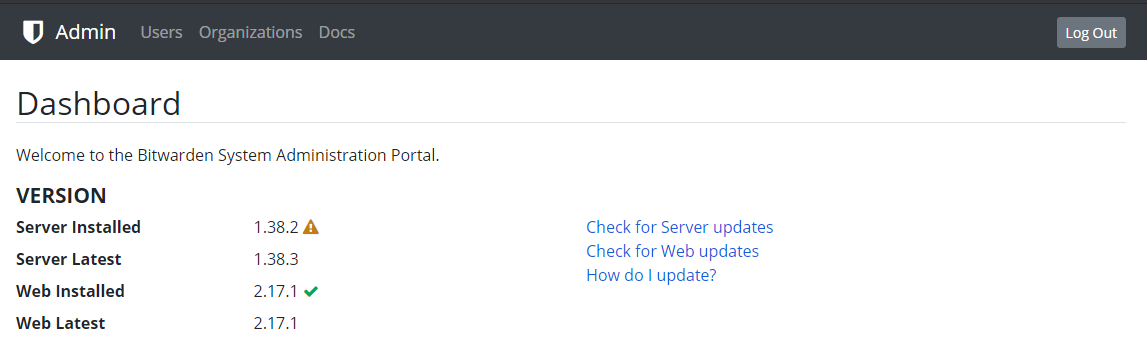
Any idea why?
 Wadera
All 3 comments
Hi @Wadera, an update for self-host instance will be released later today. I suggest that you try again tomorrow.
 Greenderella
on 17 Dec 2020
Greenderella
on 17 Dec 2020
The scripts/bitwarden.sh hasn't been updated to reflect the new available docker version, that is the underlying problem.
 GieltjE
on 17 Dec 2020
GieltjE
on 17 Dec 2020
We generally cut new server releases, setup the release tag, update build versions, etc.; then deploy to our own Cloud for testing the official release, let that bake in for a day or 2 to ensure there're no issues, and _then_ we update the update script version to point to the new release.
Theory: let's break our own cloud environment first, which we can respond to and fix quickly vs. breaking all of our self-hosted customers right out of the gate and have a giant mess to clean up 😁
 cscharf
on 17 Dec 2020
cscharf
on 17 Dec 2020
Related issues
 jasonkuehl
·
3Comments
jasonkuehl
·
3Comments
 FoxBJK
·
3Comments
FoxBJK
·
3Comments
 theontho
·
4Comments
theontho
·
4Comments
 shartge
·
3Comments
shartge
·
3Comments
 ohthehugemanatee
·
3Comments
ohthehugemanatee
·
3Comments
Most helpful comment
We generally cut new server releases, setup the release tag, update build versions, etc.; then deploy to our own Cloud for testing the official release, let that bake in for a day or 2 to ensure there're no issues, and _then_ we update the update script version to point to the new release.
Theory: let's break our own cloud environment first, which we can respond to and fix quickly vs. breaking all of our self-hosted customers right out of the gate and have a giant mess to clean up 😁