Server: Cannot save change of background jobs from Cron to Ajax
Steps to reproduce
- Change background-jobs to Ajax in webinterface or with OCC-command
- Wait for Cron-job to run
- The setting has now reverted to Cron again in the web interface
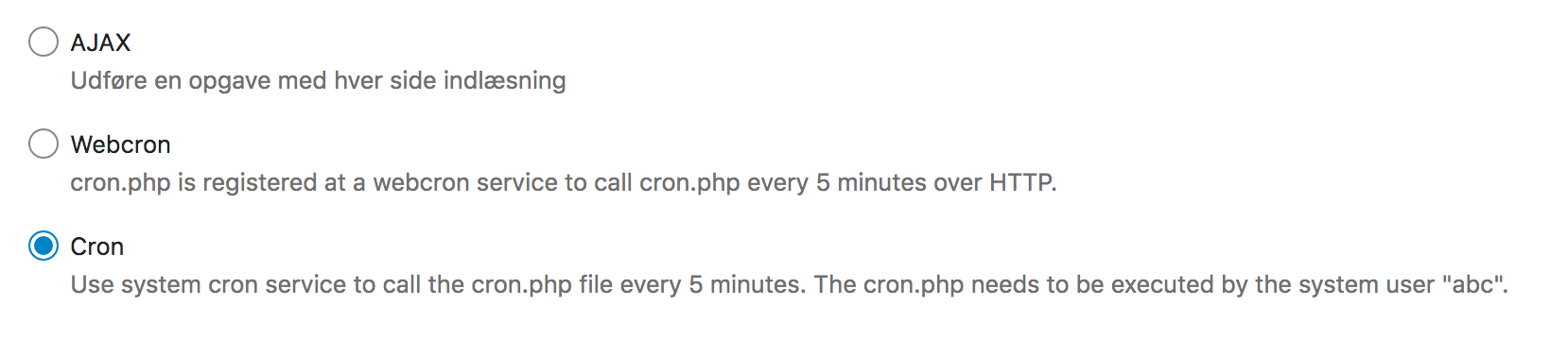
Expected behaviour
- That Nextcloud alter the Cronjob
- That cron.php should _ignore_ calls from crond, if the setting is Ajax in the database.
- That Nextcloud should not automatically revert the database-setting from Ajax to Cron, if cron.php is called by crond.
Actual behaviour
- Opposite of above. The problem is almost impossible to solve if you're using a docker-file with the cron-job imbedded. Even if the cronjob is deleted in the container it will reappear when the docker container is restarted. It's a mayor problem when trying to keep low power consumption on a singleboard computer paired with regular HDD since the cron will cause spinups every 5 minutes (or whatever schedule is used by the docker-file).
Server configuration
Operating system:
Linux odroidxu4 4.14.150-odroidxu4 #2 SMP PREEMPT Mon Oct 28 08:07:45 CET 2019 armv7l GNU/Linux
Web server:
Nginx
Database:
MySQL
PHP version:
PHP 7.3.11 (cli) (built: Oct 26 2019 06:24:00) ( NTS )
Nextcloud version: (see Nextcloud admin page)
Nextcloud 17.0.1
Updated from an older Nextcloud/ownCloud or fresh install:
Fresh
Where did you install Nextcloud from:
Docker from https://github.com/linuxserver/docker-nextcloud.
I think i found the files creating the cron-job:
https://github.com/linuxserver/docker-nextcloud/blob/master/root/etc/cont-init.d/50-install
https://github.com/linuxserver/docker-nextcloud/blob/master/root/defaults/root
Signing status:
Signing status
No errors have been found.
Login as admin user into your Nextcloud and access
http://example.com/index.php/settings/integrity/failed
paste the results here.
List of activated apps:
App list
Enabled:
- accessibility: 1.3.0
- activity: 2.10.1
- bruteforcesettings: 1.4.0
- cloud_federation_api: 1.0.0
- comments: 1.7.0
- dav: 1.13.0
- federatedfilesharing: 1.7.0
- federation: 1.7.0
- files: 1.12.0
- files_external: 1.8.0
- files_pdfviewer: 1.6.0
- files_rightclick: 0.14.2
- files_sharing: 1.9.0
- files_trashbin: 1.7.0
- files_versions: 1.10.0
- files_videoplayer: 1.6.0
- firstrunwizard: 2.6.0
- gallery: 18.4.0
- logreader: 2.2.0
- lookup_server_connector: 1.5.0
- nextcloud_announcements: 1.6.0
- notifications: 2.5.0
- oauth2: 1.5.0
- password_policy: 1.7.0
- previewgenerator: 2.2.0
- privacy: 1.1.0
- provisioning_api: 1.7.0
- recommendations: 0.5.0
- serverinfo: 1.7.0
- sharebymail: 1.7.0
- support: 1.0.1
- survey_client: 1.5.0
- systemtags: 1.7.0
- text: 1.1.1
- theming: 1.8.0
- twofactor_backupcodes: 1.6.0
- updatenotification: 1.7.0
- viewer: 1.2.0
- workflowengine: 1.7.0
Disabled: - admin_audit
- encryption
- user_ldap
If you have access to your command line run e.g.:
sudo -u www-data php occ app:list
from within your Nextcloud installation folder
Nextcloud configuration:
Config report
    "memcache.local": "\\OC\\Memcache\\APCu",
    "datadirectory": "***REMOVED SENSITIVE VALUE***",
    "trusted_proxies": "***REMOVED SENSITIVE VALUE***",
    "overwritewebroot": "\/nextcloud",
    "overwrite.cli.url": "***REMOVED SENSITIVE VALUE***",
    "trusted_domains": [
        "***REMOVED SENSITIVE VALUE***"
    ],
    "instanceid": "***REMOVED SENSITIVE VALUE***",
    "passwordsalt": "***REMOVED SENSITIVE VALUE***",
    "secret": "***REMOVED SENSITIVE VALUE***",
    "dbtype": "mysql",
    "version": "17.0.1.1",
    "dbname": "***REMOVED SENSITIVE VALUE***",
    "dbhost": "***REMOVED SENSITIVE VALUE***",
    "dbport": "",
    "dbtableprefix": "oc_",
    "dbuser": "***REMOVED SENSITIVE VALUE***",
    "dbpassword": "***REMOVED SENSITIVE VALUE***",
    "installed": true,
    "log_type": "file",
    "logfile": "\/var\/log\/nextcloud.log",
    "logfilemode": 416,
    "loglevel": "0",
    "logdateformat": "F d, Y H:i:s"
Are you using external storage, if yes which one: Local "external storage" mounted to the docker container.
Are you using encryption: No
Logs
MySQL log (log/mysql/mysql.log) :
When setting Cron -> Ajax either through webUI or OCC:
9 Query UPDATE `oc_appconfig` SET `configvalue` = 'ajax' WHERE (`appid` = 'core') AND (`configkey` = 'backgroundjobs_mode') AND (`configvalue` <> 'ajax’)
MySQL log (log/mysql/mysql.log):
When the cron-job is running (notice the timestamp)
200329 21:15:01 16 Query UPDATE `oc_appconfig` SET `configvalue` = 'cron' WHERE (`appid` = 'core') AND (`configkey` = 'backgroundjobs_mode') AND (`configvalue` <> 'cron’)”
 wiegell
All 21 comments
It's been suggested to remove/rename the cron.php as a temporary solution:
https://github.com/nextcloud/nextcloudpi/issues/1117
This however seems to prevent the Ajax background jobs as well (must also use cron.php), so not a viable solution.
wiegell
on 30 Mar 2020
I think, it is quite convenient that a cronjob automatically changes the setting from ajax to cron and I am sure it is intended behavior.
The default is ajax, if you want to change to cron, you can configure a cronjob. If you don't, it stays with ajax, so I see no problem here.
 Nils160988
on 30 Mar 2020
Nils160988
on 30 Mar 2020
I've seen several dockerfiles for different architectures that implements a cronjob in the docker-image automatically. That means that all the non-technical users following a tutorial setting up Nextcloud in a docker-container won't have the opportunity to select Ajax and the default will de facto be Cron. That is a problem IMO.
It's not even configurable with the docker-compose.yml when building the image, which i guess would be as far as even the technical user would come.
wiegell
on 30 Mar 2020
Hmm, I understand your problem. Maybe it would be better to discuss this topic at the place, where the docker-container are built because I still think this is no server issue.
Nils160988
on 30 Mar 2020
Well it could be solved across all the docker builds if the cron.php just checks with the database and is not "convinced" by the cron-job. And what really is the downside? If you're smart enough to create a cronjob surely you're able to just switch the setting to cron in the webUI as well.
wiegell
on 30 Mar 2020
A possible downside might be install scripts for some people relying on this behavior (or just people not aware of the change). If this was a new piece of software, probably both choices are sensible and have their downsides.
Nextcloud maintainers should decide if they want to change the behavior or not. @nextcloud/server-triage
Nils160988
on 30 Mar 2020
Yea ok, i see.
In that light, keeping the current state would favor sysadmins rather than the regular user. Doesn't really sound like the spirit of Nextcloud to me.
The installscripts you mention should simply add the already documented command:
sudo -u www-data php occ background:cron
I guess the reason why several dockerfiles choose to create the cron-job automatically is in fact to give the regular user the (then sole) option of using cron - based on the idea, that the regular user will have a hard time creating the cronjob themselves. If Nextcloud could create the cronjob as well (when choosing the option in the webUI) it wouldn't be necessary to make the cronjob when doing the docker-compose. But i guess that's somehow more complicated.
wiegell
on 30 Mar 2020
I have patched cron.php to behave as i expect it to.
It's my first contribution to a project of this size, and i'm not very skilled in PHP.
Maybe someone could help me with unit testing, of which i know basically nothing?
wiegell
on 22 Apr 2020
What's the motivation to retreat from cron and favor ajax?
 blizzz
on 22 Apr 2020
blizzz
on 22 Apr 2020
Yeah sorry to say, but we should not actively support reducing cron. More and more features depend on it. Actually we did the opposite and warn people now when cron is not executed often enough.
 nickvergessen
on 23 Apr 2020
nickvergessen
on 23 Apr 2020
What's the motivation to retreat from cron and favor ajax?
I feel like i've already pretty thoroughly explained the situation above. In summery: I disagree that this patch is favoring ajax. It just ensures, that newcomers actually _have_ the option of selecting ajax, which i couldn't do before this edit because of the default cronjob in my docker image. Cron.php will still respond to calls from cronjob (or CLI as the if-statement is using in the code), but only if the setting is cron in the database.
Yeah sorry to say, but we should not actively support reducing cron. More and more features depend on it. Actually we did the opposite and warn people now when cron is not executed often enough.
Am i not correct, when i say that exactly the same background jobs will be executed when cron.php is called via Ajax? Could you elaborate on the problems that comes with cron.php not being executed from cronjob?
wiegell
on 23 Apr 2020
So the problem with ajax cron is it runs 1 job every time you load a page. So when e.g. you only use your sync client, you never load a UI page and therefore never run any background job. This means the instance will never notify you about outstanding updates, can not clean up versions or the thrashbin, no writing back of files from the document server when connection was lost, etc.
To achieve what you want (and I still recommend to not do it) just first remove the system cron entry (maybe even from your docker file), then make sure there is currently no cron running and then change the selection to ajax.
nickvergessen
on 23 Apr 2020
And it's totally fine to run a modified version (at own risk) and share a patch here with everyone, but we are not going to merge that code into our codebase.
nickvergessen
on 23 Apr 2020
So the problem with ajax cron is it runs 1 job every time you load a page. So when e.g. you only use your sync client, you never load a UI page and therefore never run any background job. This means the instance will never notify you about outstanding updates, can not clean up versions or the thrashbin, no writing back of files from the document server when connection was lost, etc.
To achieve what you want (and I still recommend to not do it) just first remove the system cron entry (maybe even from your docker file), then make sure there is currently no cron running and then change the selection to ajax.
Thank you for explaining, i didn’t consider these factors.
Do you have any suggestions as to how distributors of docker files can help giving both options to their audience?
Maybe a solution could be to advice for making the docker cron folder a mount, and therefore editable.
wiegell
on 23 Apr 2020
I like the suggestion. If ajax or webcron is configured php cron.php should exit with error code 1 and print a message and probably the occ command to change that value.
quite convenient that a cronjob automatically changes
Yes it's convenient. I have a problem with such convenients in general. Right now the mode is changed without any notice. I would expect a warning if the mode is not configured.
 kesselb
on 26 Apr 2020
kesselb
on 26 Apr 2020
Yes it's convenient. I have a problem with such convenients in general. Right now the mode is changed without any notice. I would expect a warning if the mode is not configured.
I also thought about this already in the past. The change is done here: https://github.com/nextcloud/server/blob/caff1023ea72bb2ea94130e18a2a6e2ccf819e5f/cron.php#L109
Any preference if we should drop it? Also running the AJAX version together with the CLI version does not interfere anymore as we have locking on a per job base. On the other side: it doesn't make sense to let cron run through the Webserver if it is already periodically run on the CLI. The CLI is always more robust due to not being vulnerable to webserver timeouts.
 MorrisJobke
on 27 Apr 2020
MorrisJobke
on 27 Apr 2020
Yes it's convenient. I have a problem with such convenients in general. Right now the mode is changed without any notice. I would expect a warning if the mode is not configured.
I also thought about this already in the past. The change is done here:
https://github.com/nextcloud/server/blob/caff1023ea72bb2ea94130e18a2a6e2ccf819e5f/cron.php#L109
Any preference if we should drop it? Also running the AJAX version together with the CLI version does not interfere anymore as we have locking on a per job base. On the other side: it doesn't make sense to let cron run through the Webserver if it is already periodically run on the CLI. The CLI is always more robust due to not being vulnerable to webserver timeouts.
Only editing this line would not solve my problem though, since the jobs would be run by cron anyway, even if the setting stayed as ajax. I think your suggestion could serve a purpose, if one actually wants to trigger from both a cronjob and ajax at the same time. But is that even a thing? :) If so the radio-switcher in the UI maybe would have to become checkboxes for each of the three options? From what i’ve sensed from the other commenters, i don’t think that’s going to be popular :)
wiegell
on 27 Apr 2020
Your problem is caused by your setup. The nextcloud/docker image does not run the cron by default.
kesselb
on 27 Apr 2020
I still don't get why one would only allow cron jobs from AJAX. What is the problem from having the cron jobs run also from CLI?
MorrisJobke
on 27 Apr 2020
It's a mayor problem when trying to keep low power consumption on a singleboard computer paired with regular HDD since the cron will cause spinups every 5 minutes (or whatever schedule is used by the docker-file).
@MorrisJobke but that's a very special case. nextcloud/docker does not run cron by default. I would open a feature request at https://github.com/linuxserver/docker-nextcloud and ask for a environment variable to turn cron off.
Also running the AJAX version together with the CLI version does not interfere anymore as we have locking on a per job base.
Hmm. I'm not a fan ;) A hybrid mode sounds good at first but try to reproduce a issue with such a configuration :see_no_evil:
What is the problem from having the cron jobs run also from CLI?
That's not my point ;) I think cron.php should respect the backgroundjobs_mode configuration. If one configured ajax and runs cron.php from cli we should exit with error code 1.
kesselb
on 27 Apr 2020
I think cron.php should respect the
backgroundjobs_modeconfiguration. If one configured ajax and runs cron.php from cli we should exit with error code 1.
I guess there is nothing wrong with this change in NC 20 cycle. 👍
MorrisJobke
on 28 Apr 2020
Related issues
 georgehrke
·
3Comments
georgehrke
·
3Comments
 rullzer
·
3Comments
rullzer
·
3Comments
 juliushaertl
·
3Comments
juliushaertl
·
3Comments
 j-ed
·
3Comments
j-ed
·
3Comments
 mfechner
·
3Comments
mfechner
·
3Comments
Most helpful comment
Yeah sorry to say, but we should not actively support reducing cron. More and more features depend on it. Actually we did the opposite and warn people now when cron is not executed often enough.