Server: Error when accepting a calendar invite on Thunderbird
Steps to reproduce
- Receive a calendar invitation
- Click on accept
- Error happens: "Processing message failed. Status: 80004005."
Expected behaviour
The event should be added to the calendar and the answer sent to the organizer
Actual behaviour
I’m experiencing this on Mozilla Thunderbird 68.2.2. This problem happens when I receive an invitation. Sometimes, I see the HTML message (with the Nextcloud logo…). In this case, the error message 80004005 appears.
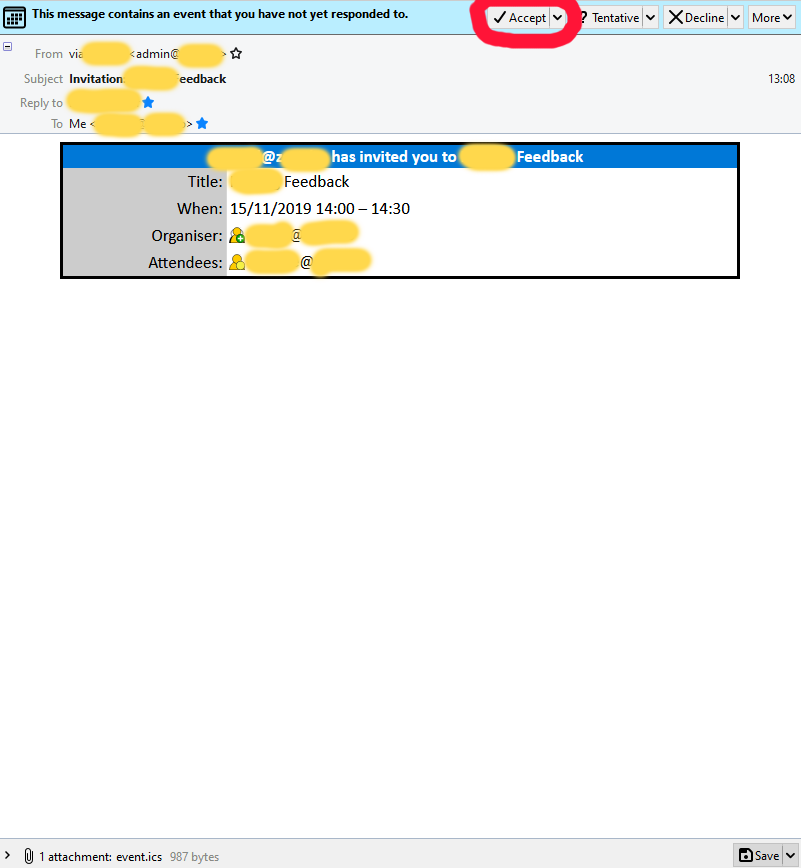
At some point, I don’t know why, the email looks different, with only one single table, with a blue row on top with the title of the event: when the email turns into this format, I can accept an invitation without any problem.
It happens if the person sending the invite is using Thunderbird, and is using a calendar on the same Nextcloud server. And it can also happen if the sender is not in my organisation. (using Outlook or Thunderbird, I don't know)
It might be related to the server managed scheduling mode: (on thunderbird, I have calendar.caldav.sched.enabled = false
In my config.php, I see:
  'app_install_overwrite' =>

  array (

    0 => 'calendar',

  ),
Should I remove that?
I see related issues here:
- https://help.nextcloud.com/t/accepting-invitation-with-thunderbird-lightning-and-nextcloud-12-0-5/26791
- https://help.nextcloud.com/t/accepting-meeting-invite-fails-due-to-bad-outlook-formatting/55170 and the corresponding Github issue: https://github.com/nextcloud/server/issues/16679
- https://github.com/nextcloud/server/issues/8423
- https://bugzilla.mozilla.org/show_bug.cgi?id=1406402
Server configuration
- PHP 7.3.11-1+0~20191026.48+debian10~1.gbpf71ca0 (cli) (built: Oct 26 2019 14:20:37) ( NTS )
- mariadb Ver 15.1 Distrib 10.3.17-MariaDB, for debian-linux-gnu (x86_64) using readline 5.2
- Nextcloud 16.0.6
 biva
biva
All 21 comments
I think this log could be related:
Sabre\DAV\Exception\BadRequest: Calendar object with uid already exists in this calendar collection.
/var/www/html/nextcloud/3rdparty/sabre/dav/lib/CalDAV/Calendar.php - line 201:

OCA\DAV\CalDAV\CalDavBackend->createCalendarObject("27", "d8hifi2s08t ... s", "BEGIN:VCALE ... n")

/var/www/html/nextcloud/3rdparty/sabre/dav/lib/DAV/Server.php - line 1096:

Sabre\CalDAV\Calendar->createFile("d8hifi2s08t ... s", "BEGIN:VCALE ... n")

/var/www/html/nextcloud/3rdparty/sabre/dav/lib/DAV/CorePlugin.php - line 525:

Sabre\DAV\Server->createFile("calendars/e ... s", "BEGIN:VCALE ... n", null)

<<closure>>

Sabre\DAV\CorePlugin->httpPut(Sabre\HTTP\R ... "}, Sabre\HTTP\Response {})

/var/www/html/nextcloud/3rdparty/sabre/event/lib/EventEmitterTrait.php - line 105:

call_user_func_array([ Sabre\DAV\ ... "], [ Sabre\HTTP ... }])

/var/www/html/nextcloud/3rdparty/sabre/dav/lib/DAV/Server.php - line 479:

Sabre\Event\EventEmitter->emit("method:PUT", [ Sabre\HTTP ... }])

/var/www/html/nextcloud/3rdparty/sabre/dav/lib/DAV/Server.php - line 254:

Sabre\DAV\Server->invokeMethod(Sabre\HTTP\R ... "}, Sabre\HTTP\Response {})

/var/www/html/nextcloud/apps/dav/lib/Server.php - line 316:

Sabre\DAV\Server->exec()

/var/www/html/nextcloud/apps/dav/appinfo/v2/remote.php - line 35:

OCA\DAV\Server->exec()

/var/www/html/nextcloud/remote.php - line 163:

require_once("/var/www/ht ... p")
After more investigation, it looks like the event can be accepted only if I manually sync the calendar.
Step to reproduce:
- Receive the email: it is shown as an HTML page, with the Nextcloud button "Accept" in the middle
- Click on "Accept" (not the Nextcloud button in the middle, but the Thunderbird button, top right)
- Error message 80004005 appears
- Sync Calendars in Thunderbird
- Go back to the message: it is shown as the table mentioned above
- Click on the "Accept" Thunderbird button → it works
It should work in step 2 above, I shouldn't be required to go up to step 6
biva
on 13 Nov 2019
No idea? To give you more detail:
- Here is what I call the "HTML page": clicking on the Accept button (circled red) doesn't work (error message 80004005):

- And this is how it looks like after a manual sync (here, clicking on the Accept button (circled red) works).
biva
on 19 Nov 2019
Does nobody meet the same issue? Any support?
biva
on 27 Nov 2019
Does nobody meet the same issue? Any support?
That's exactly the point, this is the bug tracker for the development and NOT the Nextcloud help forum. Yo should search the forum first for any related issues, and if you cannot find an answer, you should raise your question there 😉
 j-ed
on 27 Nov 2019
j-ed
on 27 Nov 2019
@j-ed I already did, no answer there either https://help.nextcloud.com/t/accepting-invitation-with-thunderbird-lightning-and-nextcloud-12-0-5/26791/2?u=sisim
I created a new topic if it can bring it up: https://help.nextcloud.com/t/error-when-accepting-a-calendar-invite-on-thunderbird/65117
biva
on 27 Nov 2019
Does nobody meet the same issue? I don't see any answer neither here nor on https://help.nextcloud.com/t/error-when-accepting-a-calendar-invite-on-thunderbird/65117 :cry:
biva
on 5 Dec 2019
For the record, the workaround is to let Thunderbird manage the invitations:
- Go to your calendar on Thunderbird
- Right-click on your calendar name (on the left of the window)
- Choose Properties
- Check the box Prefer client-side email scheduling
- Click OK
I don't close the issue because I still think it's a bug: there should not be such issues between Nextcloud and Thunderbird, which is one of the most important open-source email/calendar software
biva
on 13 Dec 2019
Same issue here, but your workaround doesn't seem to work for me.
Double clicking the event in the calendar and selecting Accept does seem to work however.
Thunderbird 68.3.1
Lightning 68.3.1.1
I found other applications struggling with the same thing, i.e. DavMail to Exchange:
https://sourceforge.net/p/davmail/bugs/651/
"The cause of the error is Microsoft Exchange's Calendar attendant. It automatically processes the invitation and adds it to the calendar on the server-side. On the client side (Thunderbird), this change is not known because the calendar is not yet synchronized. As a result, the client tries to add an event that has already been added, hence the error."
It looks like exchange does the same thing as Nextcloud: it processs the event. If you then try to accept in Thunderbird before syncing it will fail. Sync first and the message will show the event has already been processed.
 TooManyUsers63920
on 3 Jan 2020
TooManyUsers63920
on 3 Jan 2020
Thanks @Biva, the workaround in Thunderbird works for us.
Does anybody know if there is a similar option to set in Evolution Mail to get Invites accepted through mailclient?
 0xphk
on 29 Jan 2020
0xphk
on 29 Jan 2020
Today I had the same issue.
Invitation from a Outlook Client via Microsoft Exchange Server.
Tried to accept/decline it with Thunderbird and various Nextcloud Calendars enabled.
Above fixes did not work. But I noticed all my calendars are connected to the same mail adress inside Thunderbird. Removed mail adress from all but one calendar, now it works.
In Thunderbird:
Right click on calendar -> properties -> Email: none (german: "keine").
Seems to me like a Thunderbird issue.
 bobbolous
on 27 Apr 2020
bobbolous
on 27 Apr 2020
Same issue for me too.
 Fuzl
on 28 May 2020
Fuzl
on 28 May 2020
Hi all, I also had the same error meesage. After some further searching I came across a thread in this google group mozilla.support.calendar (https://groups.google.com/forum/#!topic/mozilla.support.calendar/dGxYnEwdOBo).
I only then realized that the invite causing the issue was an edited invite I had previously already accepted. Deleting the old event and then clicking again on the new "accept invite" as suggested in the linked discussion solved the issue for me. I hope this helps at least some of you.
 SHilser
on 2 Jun 2020
SHilser
on 2 Jun 2020
Having the same issue. I'm receiving the invitations from Outlook 365 and Outlook client via Exchange. I'm going to try the workarounds.
 jlorquin
on 16 Jun 2020
jlorquin
on 16 Jun 2020
I just had the same issue with an invitation from Exchange. Version: 68.9.0 (64-Bit) on linux.
Setting the calendar option "Prefer client-side email scheduling" (as @biva suggested) didnt't help either.
 frankbe
on 1 Jul 2020
frankbe
on 1 Jul 2020
As @TooManyUsers63920 stated this is a clash of an out-of-sync TB client with the server.
"The cause of the error is Microsoft Exchange's Calendar attendant. It automatically processes the invitation and adds it to the calendar on the server-side. On the client side (Thunderbird), this change is not known because the calendar is not yet synchronized. As a result, the client tries to add an event that has already been added, hence the error."
It looks like exchange does the same thing as Nextcloud: it processs the event. If you then try to accept in Thunderbird before syncing it will fail. Sync first and the message will show the event has already been processed.
The same happened for us (in my company) reproducibly and by simply asking TB to sync the invite showed up. Accepting it after that worked.
So unless this can be fixed on the server side, e.g. by treating the additional event as a user's accept/reject feedback, I'd say this is a client issue: TB should re-sync when it encounters this error and restart its _accept process_.
EDIT: As @marcelstoer pointed out 3 comments down, the server actually refuses an update that should be idempotent. Hence it's a server issue or at least should be fixable on the server side.
 bjoernmartin
on 14 Aug 2020
bjoernmartin
on 14 Aug 2020
The same happened for us (in my company) reproducibly and by simply asking TB to sync the invite showed up. Accepting it after that worked.
This was my experience as well: It looked like a huge arcane problem, and then it fixed itself by auto-syncing while I was off making coffee.
 metafarion
on 1 Sep 2020
metafarion
on 1 Sep 2020
I have same problem with caldav on kopano. Using tbsync connector instead works ok. So i'd say it's indeed a client issue.
 tuxick
on 18 Sep 2020
tuxick
on 18 Sep 2020
I have the exactly same issue with Thunderbird 68.10.0 on Ubuntu 20.04.
 cyrilfr
on 2 Nov 2020
cyrilfr
on 2 Nov 2020
Also experiencing this and from what _I_ understand this not a Thunderbird bug.
Thunderbird request
PUT https://example.com/nextcloud/remote.php/dav/calendars/marcel/personal/1cpcu4agj0b5mjdu56gaaq2h2g%2540google.com.ics
Nextcloud/SabreDAV log
[webdav] Fatal: Sabre\DAV\Exception\BadRequest: Calendar object with uid already exists in this calendar collection. at <<closure>>

0. /..../nextcloud/3rdparty/sabre/dav/lib/CalDAV/Calendar.php line 201
   OCA\DAV\CalDAV\CalDavBackend->createCalendarObject("2", "1cpcu4agj0b5mjd ... s", "BEGIN:VCALENDAR ... n")
1. /..../nextcloud/3rdparty/sabre/dav/lib/DAV/Server.php line 1096
   Sabre\CalDAV\Calendar->createFile("1cpcu4agj0b5mjd ... s", "BEGIN:VCALENDAR ... n")
...
=> a PUT operation on an existing resource should be idempotent i.e. "ok to update an existing item with the _same_ uid"
 marcelstoer
on 10 Nov 2020
marcelstoer
on 10 Nov 2020
We are struggling with it in our company too.
This is a Thunderbird issue, change my mind.
Thunderbird needs to sync calendar before sending invitation acceptance. This is because the file has changed on a server side.
Imagine this scenario:
- _Organizer_ sends an invitation for two attendants.
- _Attendant 1_ accepts - thunderbird sends an ics file with a change reflecting his acceptance.
- _Attendant 2_ accepts - thunderbird sends an ics file with a change reflecting his acceptance.
Now:
- If _attendant 2_ refreshes calendar and clicks 'accept', thunderbird sends an ics having both attendants accepted an invitation.
- If _attendant 2_ clicks 'accept' without refreshing calendar, his ics file doesn't reflect server changes. If NextCloud would allow it, this file would overwrite the file sent by attentand 1 and you would finish with an event where only second attendant accepted invitation.
This is why I think, thunderbird needs to sync calendars when you click 'accept', before it sends ics, or simply when you open the message containing ics file.
Summary: Thunderbird needs to synchronize in order to have the same ics as the one on the server so it does not overwrite any changes.
 maluhub
on 25 Nov 2020
maluhub
on 25 Nov 2020
Related issues
 jancborchardt
·
3Comments
jancborchardt
·
3Comments
 mama21mama
·
3Comments
mama21mama
·
3Comments
 georgehrke
·
3Comments
georgehrke
·
3Comments
 juliushaertl
·
3Comments
juliushaertl
·
3Comments
 ghost
·
3Comments
ghost
·
3Comments
Most helpful comment
For the record, the workaround is to let Thunderbird manage the invitations:
I don't close the issue because I still think it's a bug: there should not be such issues between Nextcloud and Thunderbird, which is one of the most important open-source email/calendar software