Server: identity container in a restart loop
Hi,
_This issue is similar to the #157 but I can't resolve it yet._
I'm working on :
- Synology RS815+ with 16 Go RAM memory.
- DSM 6.2.2-24922 Update 3
- Docker
The issue is about the identity container that is restarting every minutes approximatively.
When I go to Docker/Container/bitwarden-identity/Journal I got this :
Unhandled Exception: System.ArgumentNullException: Value cannot be null.

Parameter name: certificate
   at Microsoft.Extensions.DependencyInjection.IdentityServerBuilderExtensionsCrypto.AddSigningCredential(IIdentityServerBuilder builder, X509Certificate2 certificate)
   at Bit.Core.Utilities.ServiceCollectionExtensions.AddCustomIdentityServerServices(IServiceCollection services, IHostingEnvironment env, GlobalSettings globalSettings) in /home/appveyor/projects/server/src/Core/Utilities/ServiceCollectionExtensions.cs:line 340
   at Bit.Identity.Startup.ConfigureServices(IServiceCollection services) in /home/appveyor/projects/server/src/Identity/Startup.cs:line 61
--- End of stack trace from previous location where exception was thrown ---
   at Microsoft.AspNetCore.Hosting.ConventionBasedStartup.ConfigureServices(IServiceCollection services)
   at Microsoft.AspNetCore.Hosting.Internal.WebHost.EnsureApplicationServices()
   at Microsoft.AspNetCore.Hosting.Internal.WebHost.Initialize()
   at Microsoft.AspNetCore.Hosting.WebHostBuilder.Build()
   at Bit.Identity.Program.Main(String[] args) in /home/appveyor/projects/server/src/Identity/Program.cs:line 13
I'm using Let's Encrypt certificate created from the Synology and use by the reverse proxy :

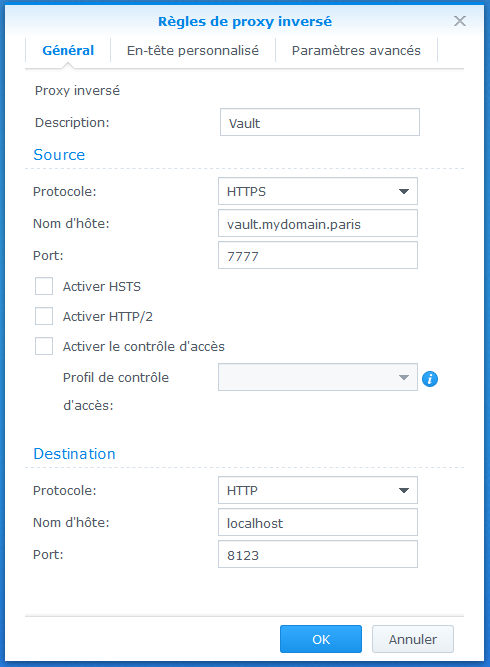
Could you help me please to find out where the issue is?
Thanks for your help ! :)
Regards
 BigZas
All 9 comments
Whitch Docker Package version do you use?
I have the same problem after the downgrade to Docker package 17.05.0-0401. I go via SSH on the shell an run bitwarden.sh selfupdate and bitwarden.sh update, after this commands bitwarden runs.
 Gitsko
on 29 Aug 2019
Gitsko
on 29 Aug 2019
Exactly the same here. but using my own ssl-certificate without reverse proxy
Synolgy DSM 6.2.2-24922 Update 3 (since yesterday)
Docker 18.09.0-0505
bitwarden.sh updateself or bitwarden.sh update
do not solve the problem
Unhandled Exception: System.ArgumentNullException: Value cannot be null.
Parameter name: certificate
   at Microsoft.Extensions.DependencyInjection.IdentityServerBuilderExtensionsCrypto.AddSigningCredential(IIdentityServerBuilder builder, X509Certificate2 certificate)
   at Bit.Core.Utilities.ServiceCollectionExtensions.AddCustomIdentityServerServices(IServiceCollection services, IHostingEnvironment env, GlobalSettings globalSettings) in /home/appveyor/projects/server/src/Core/Utilities/ServiceCollectionExtensions.cs:line 340
   at Bit.Identity.Startup.ConfigureServices(IServiceCollection services) in /home/appveyor/projects/server/src/Identity/Startup.cs:line 61
--- End of stack trace from previous location where exception was thrown ---
   at Microsoft.AspNetCore.Hosting.ConventionBasedStartup.ConfigureServices(IServiceCollection services)
   at Microsoft.AspNetCore.Hosting.Internal.WebHost.EnsureApplicationServices()
   at Microsoft.AspNetCore.Hosting.Internal.WebHost.Initialize()
   at Microsoft.AspNetCore.Hosting.WebHostBuilder.Build()
   at Bit.Identity.Program.Main(String[] args) in /home/appveyor/projects/server/src/Identity/Program.cs:line 13
Updating certificates in /etc/ssl/certs...
0 added, 0 removed; done.
Running hooks in /etc/ca-certificates/update.d...
done.
 Snowrisk
on 29 Aug 2019
Snowrisk
on 29 Aug 2019
I did resolved the issue with the solution given on the issue #555 .
Exactly the same here. but using my own ssl-certificate without reverse proxy
Synolgy DSM 6.2.2-24922 Update 3 (since yesterday)
Docker 18.09.0-0505bitwarden.sh updateself or bitwarden.sh update
do not solve the problem
You need to roll back to the Docker version. To do this, you need to follow this instructions :
1) Go by ssh terminal (using putty on Windows) to stop bitwarden
./bitwarden.sh stop
2) Delete the Docker application WITHOUT deleting the files.
3) You go to [https://archive.synology.com/download/Package/spk/Docker/17.05.0-0401/]
4) You download the SPK file.
5) You install it manually on the Synology
6) You start Docker
7) Go back to the terminal and do :
./bitwarden.sh rebuild
./bitwarden.sh start
Please close the ticket if the issue is resolved ;)
BigZas
on 29 Aug 2019
Thanks. It worked perfectly.
Snowrisk
on 29 Aug 2019
+1 to the above fix; that worked beautifully. Thanks OP!
Seems the latest Synology Docker image has its own problems (not just bitwarden related), as when it installed for me, the docker didn't want to restart without forcing a hard-start using the synoservice command. :\
 evakq8r
on 1 Sep 2019
evakq8r
on 1 Sep 2019
+1, had the same issue! Would be great to communicte such known issues somehow :)
 ThoSt81
on 8 Sep 2019
ThoSt81
on 8 Sep 2019
- Delete the Docker application WITHOUT deleting the files.
- You go to [https://archive.synology.com/download/Package/spk/Docker/17.05.0-0401/]
- You download the SPK file.
- You install it manually on the Synology
- You start Docker
- Go back to the terminal and do :
How can I revert to the "official" pkg from the synology archive repo as soon as this bug has been fixed?
 L4rS6
on 13 Sep 2019
L4rS6
on 13 Sep 2019
That (to my understanding anyway) IS the official pkg. It also looks like they've pulled 18.09.0-0506 docker update from the Package Centre, as my DSM only indicates 17.05.0-0401 as the latest version available (is still available in the archive repo though).
evakq8r
on 13 Sep 2019
see: https://community.synology.com/enu/forum/1/post/128313
I can confirm, that it is working again with version 18.09.0-0506 (restart with docker-compose down && up)
 marcelloceschia
on 13 Sep 2019
marcelloceschia
on 13 Sep 2019
Related issues
 timdvail
·
4Comments
timdvail
·
4Comments
 Wadera
·
3Comments
Wadera
·
3Comments
 marcrib
·
5Comments
marcrib
·
5Comments
 FoxBJK
·
3Comments
FoxBJK
·
3Comments
 Sx3
·
4Comments
Sx3
·
4Comments
Most helpful comment
I did resolved the issue with the solution given on the issue #555 .
You need to roll back to the Docker version. To do this, you need to follow this instructions :
1) Go by ssh terminal (using putty on Windows) to stop bitwarden
Please close the ticket if the issue is resolved ;)