Actual behaviour
I just discovered that the sort order is somehow unexpected, i.e. it is somewhat ascendingly but not strict.
To me this is important because I sort my photos in folders which are intentionally named with this f ormat: YYYYMMDD_nameofevent. If the day is unknown I leave it away or choose e.g. XX. That's actually how I discoverd this.
Expected behaviour
The sort order should be strictly alphabetical (if chosen to be so in the app's settings).
Steps to reproduce
- Create a set of files (or folders) with the following names: "2020", "20180721", "20190720".
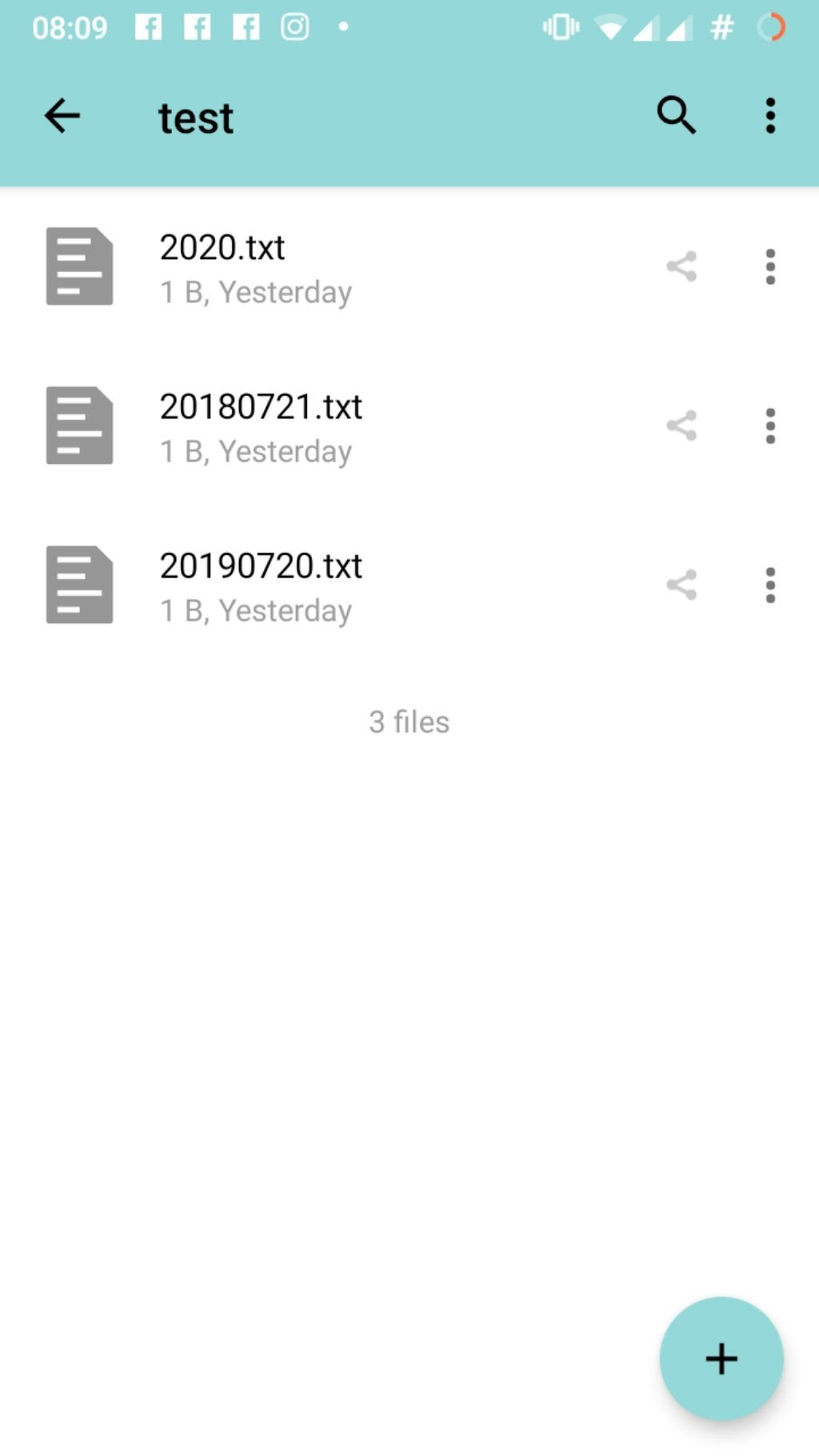
- Immediately "2020" will be listed at the beginning although the 3rd character of the string '2' definitely is greater than '1' (see screenshot).

In contrast if you login to the server (using e.g. ssh) and ls -l the same directory the sort order will be as expected:
# ls -l
total 12
-rw-r--r-- 1 www-data www-data 1 Jul 22 19:57 20180721.txt
-rw-r--r-- 1 www-data www-data 1 Jul 22 19:57 20190720.txt
-rw-r--r-- 1 www-data www-data 1 Jul 22 19:57 2020.txt
Environment data
Android version: 9.0
Device model: Samsung Galaxy A3 2017
Stock or customized system: Lineageos 16.0
Nextcloud app version: 3.7.0
Nextcloud server version: 15.0.10
 rahra
rahra
All 12 comments
@raha just to make sure to understand this. The screenshot you posted is actually the webUI not the Android app.
If so please open an issue on the server repository.
 AndyScherzinger
on 22 Jul 2019
AndyScherzinger
on 22 Jul 2019
Hi! Yes you are right, but it is actually the same within the app, see screenshot:
rahra
on 23 Jul 2019
Android is doing it the same way as server.
In fact we also use the same test scenarios.
I'll move this into server repo and if this needs to be changed, I'll then create an isssue (again) on Android.
 tobiasKaminsky
on 23 Jul 2019
tobiasKaminsky
on 23 Jul 2019
My guess: it is an alphanumeric sorting and the 2020 < 20180721 < 20190720 (these are numbers not dates!)
AndyScherzinger
on 23 Jul 2019
From this point of view the sort order is correct but these are neither numbers nor dates, these are filenames of a filesystem. And IMHO the 3rd character '2' of 2020 is clearly behind '1' in any character table.
However, I'm still not sure if this is intended as it is now. At least to me this totally disturbing and I think most other people won't expect that.
rahra
on 23 Jul 2019
Yeah, We should sort them as string
@tobiasKaminsky don't forget the labels please :pray: :wink:
 skjnldsv
on 15 Aug 2019
skjnldsv
on 15 Aug 2019
We should sort them as string
But how do we know the difference? When do we sort them as strings and when do we sort them as numbers?
tobiasKaminsky
on 15 Aug 2019
But how do we know the difference? When do we sort them as strings and when do we sort them as numbers?
I meant, always sort them as string. 1, 123, 2018, 354896516, 40, 9 instead of 1, 9, 40, 123, 2018, 354896516
EDIT: hum, my file browsers does not sort them like that actually.
We should maybe be consistent across what already exists. (thunar, pcmanfm...)
skjnldsv
on 15 Aug 2019
I think it is not a good idea to revert everything back to plain string sorting.
We have this alphanumeric compare system which works for most cases quite good.
Mixing different "date" formats/schemes will always result in a weird scenario.
Imagine:
2019-08-10.jpg
20190810.jpg
which is for a human exactly the same date representation, but computer cannot sort them next to each other…
So for the first example:
2020.txt
20180721.txt
20190720.txt
change 2020 to be 2020101.txt or "unknown file in 2020.txt"…
tobiasKaminsky
on 15 Aug 2019
Yes, I agree.
I think we should close then :)
skjnldsv
on 15 Aug 2019
So why not simple add an option that the user can choose?
I don't want to be a troll but am I really the only one who every complained about this? I understand your idea of this alphanumeric sort but I've never seen files sorted in that way.
rahra
on 15 Aug 2019
@rahra apparently so :)
You're not a troll, you have the right to different opinions! :+1:
I took a quick tour of various file browsers and none behaved like you asked.
I'm sorry, I will say that this is out of scope then :confused:
And adding an option for each specific request of a user will just make the software far too complex to be usable unfortunately.
Thanks again! Hope you still enjoy Nextcloud! :)
John
skjnldsv
on 16 Aug 2019
Related issues
 mfechner
·
3Comments
mfechner
·
3Comments
 blackcrack
·
3Comments
blackcrack
·
3Comments
 dl5rcw
·
3Comments
dl5rcw
·
3Comments
 MorrisJobke
·
3Comments
MorrisJobke
·
3Comments
 arno01
·
3Comments
arno01
·
3Comments
Most helpful comment
My guess: it is an alphanumeric sorting and the 2020 < 20180721 < 20190720 (these are numbers not dates!)