Server: OCC files:transfer-ownership command doesn't work for some user names
I'll be clear and fast. Specifically the files:transfer-ownership command is not set up to accept usernames that have space on it. I can't also escape it, it is expected a one-word username.
files:transfer-ownership Name with space Admin
Message:
Too many arguments, expected arguments "command" "source-user" "destination -user".
You can try to escape, but you will get erros like:
Unknown source user
Unknown path provided:
 henriquebs12
All 18 comments
huh, do we allow usernames with spaces in it? cc @nextcloud/server-triage
displayname with spaces, okay; but usernames? does this make sense?
 violoncelloCH
on 6 Feb 2019
violoncelloCH
on 6 Feb 2019
huh, do we allow usernames with spaces in it? cc @nextcloud/server-triage
displayname with spaces, okay; but usernames? does this make sense?
Yes we do 🙈
@henriquebs12 Have you tried occ files:transfer-ownership "abc def" user2?
 MorrisJobke
on 6 Feb 2019
MorrisJobke
on 6 Feb 2019
$ occ user:list
  - 123456: Numeric User
  - admin: Heilbronner Falken
  - space user: Space User
  - test1: Bad Nauheim #1
  - test2: Bad Tölz #2
  - test3: Bietigheim #3
  - test4: Crimmitschau #4
  - test5: Kassel #5

$ occ user:lastseen
  Not enough arguments (missing: "uid").
user:lastseen <uid>

$ occ user:lastseen space user
  Too many arguments, expected arguments "command" "uid".
user:lastseen <uid>

$ occ user:lastseen "space user"
User space user has never logged in, yet.
Works with "
 nickvergessen
on 6 Feb 2019
nickvergessen
on 6 Feb 2019
You closed the thread without actually testing what I'm complaining about. All other commands works with users with spaces, but not the files:transfer-ownership. I found it strange. Also tried in the OCC web app, but I got the same erros.
If you have an alternative for that, I'd appreciate, since I really needed to move the file shares.
henriquebs12
on 6 Feb 2019
--path is mandatory. / should select everything.
 kesselb
on 6 Feb 2019
kesselb
on 6 Feb 2019
I find it a bit confusing that path is an option. An option is optional by default and there is no hint within the help text about that.
kesselb
on 6 Feb 2019
It did not work for me. For testing, I also tried to use --path with a normal user (UserA), and also didn't work.
sudo -u myuser php occ files:transfer-ownership --path="UserA/files" UserA" "Admin"
sudo -u myuser php occ files:transfer-ownership --path UserA/files UserA Admin
sudo -u myuser php occ files:transfer-ownership --path UserA UserA Admin
Always getting Unknown path provided. But what I don't understand is that if I don't use --path, it works perfectly to transfer ownership for UserA (without space).
I also tried with the "User B" (with space), and obviously It didn't work either.
sudo -u myuser php occ files:transfer-ownership --path="User B/folder" "User B" "Admin"
sudo -u myuser php occ files:transfer-ownership --path "User B" "User B" "Admin"
sudo -u myuser php occ files:transfer-ownership --path="/" "User B" "Admin"
Considering this thread, I also added that line to see what's going on behind.
Then I found out it is a issue while reading the folder name, not the username. The folder path is ok apparently:
Unknown path provided:
sourcePath: User B/files
I've searched a lot, tried many combinations for trying to escape the space, but until now I got nothing. Can you help?
henriquebs12
on 7 Feb 2019
Works very fine here, I just tested again.
I find it a bit confusing that
pathis an option. An option is optional by default and there is no hint within the help text about that.
path is optional, if you do not specify it, all files of the user are moved.
If you specify a folder name, only that folder is moved. The path must be the user visible path, so when you create a folder foo in the web UI and in there a bar and want to move that, the path you specify is foo/bar.
Also note, that it only works, if the command is run as the user owning the files on the filesystem.
nickvergessen
on 7 Feb 2019
You are not considering that all the other options are working. That without the path, it works for UserA. That I'm running as the owner of the folders. That it works for "User B" user.
But it doesn't if the folder is User B/file. As I mentioned it recognizes correctly the folder path, because of the output. Put the correct output is considered "Unkwon", if the folder has space on its name.
henriquebs12
on 7 Feb 2019
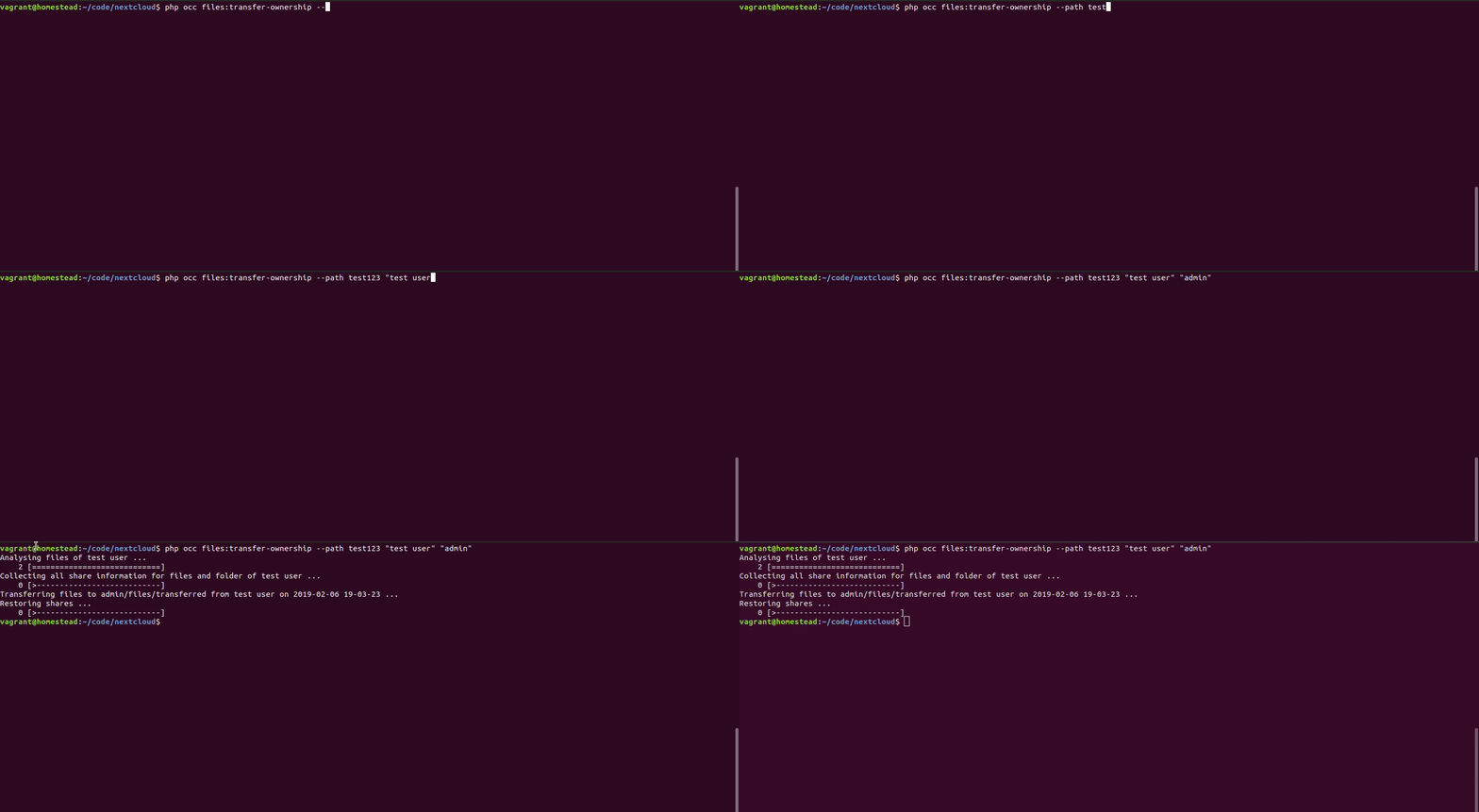
I have a user "test user" and a folder "folder with space". I want to move this folder to user admin:
files:transfer-ownership --path "folder with space" "test user" admin
kesselb
on 7 Feb 2019
So just for the record, you need to run sudo -u www-data ./occ files:transfer-ownership --path "folder with space" "test user" admin
And I just tested it with --path="New folder" and it works just fine.
nickvergessen
on 8 Feb 2019
So just for the record, you need to run
sudo -u www-data ./occ files:transfer-ownership --path "folder with space" "test user" adminAnd I just tested it with
--path="New folder"and it works just fine.
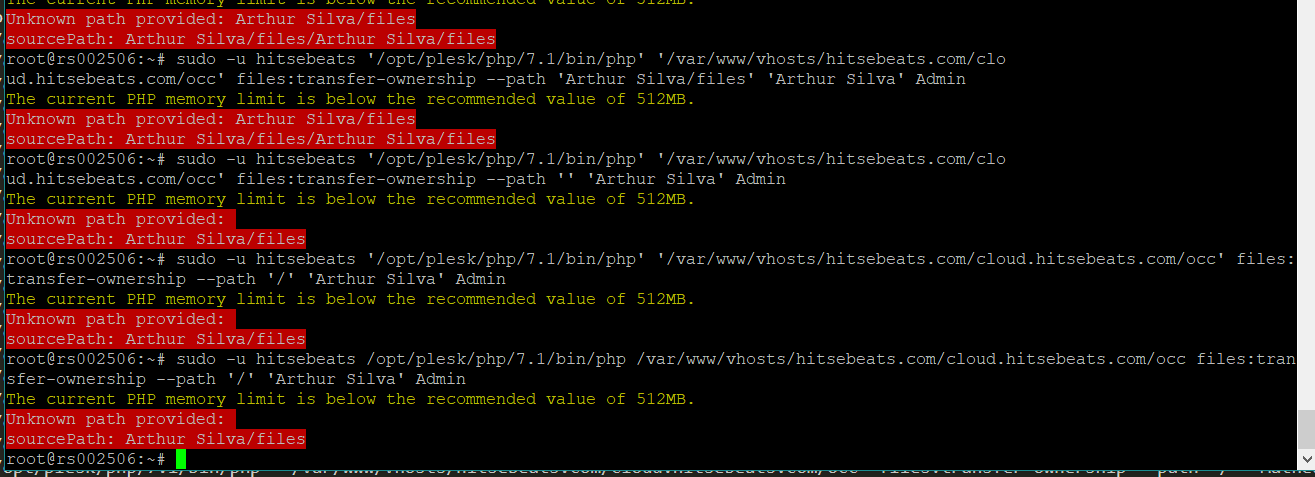
None of them works for me. Even with the folder empty.
henriquebs12
on 10 Feb 2019
Now I understand why this happens. There isn't that folder. All the files were created inside a folder that I had created. I own the files. But I need to own the shares, but without a folder I get that message. Should I create manually the folders in my webserver or there's a way to ignore the files and only move the shares? Maybe a SQL query?
Update: The command works if I manually create the folder, even empty, and the file shares are moved. Isn't there a way to recreate all folders?
I'm really curious to understand why these users doesn't have a folder. Just because they didn't upload any files to their folders? So am I obligated to create default files only for the folder to be created?
henriquebs12
on 10 Feb 2019
If you want to move over everything, just leave out the path: ..../occ files:transfer-ownership 'Arthur Silva' Admin
If that is not what you want to do, I guess a screenshot of the files view of the user together with a list what files you want to transfer is the best idea.
nickvergessen
on 11 Feb 2019
That didn't work. As I said, the user exists in the database, but there isn't a folder for it inside the data folder. I assume that's why I get
Unknown path provided:
sourcePath: User with space/files
I get the above message when using path or not. If I create a folder with the user name, and also the folder files, also empty, it works fine.
What I see as a bug is that the files:transfer-ownership command expects a folder. But in my case, ALL files are uploaded inside my user/folder, so no one is allowed to upload anything in their accounts. What I just don't understand is why the folder isn't created, even if the user doesn't upload anything.
Please note that I also don't use default files in the skeleton. So no files are uploaded in the user folder, and because of this the folder isn't created (?).
Expected behavior: Move everything. But as there aren't files to move, It should move all the file share URLs.
henriquebs12
on 13 Feb 2019
well missing folders in data/ for existing user's is a whole other story and I would ask you to seek for help in our forums at: https://help.nextcloud.com/
nickvergessen
on 14 Feb 2019
Geral support won't help me. Don't you have any idea why some users are missing its folders? Is the folder created even if the user doesn't upload anything?
henriquebs12
on 14 Feb 2019
Geral support won't help me. Don't you have any idea why some users are missing its folders? Is the folder created even if the user doesn't upload anything?
The Folder is created on the first login. If you want to have extended functionality use a bashscript like this, no warranty given, you need to test it according to your problem, we have used a similar script for ldap-user-migration
set -x
DESTINATIONUSER="$3" #mit suffix
SOURCEUSER="$2" #ohne suffix
INSTANCE="$1"
sudo mkdir -p /srv/hbox-$INSTANCE/data/$DESTINATIONUSER
sudo chown $INSTANCE:$INSTANCE /srv/$INSTANCE/data/$DESTINATIONUSER
hboxctl $INSTANCE occ files:transfer-ownership $SOURCEUSER $DESTINATIONUSER
you need to take into account some sql-statements for storages, shares and activity like:
echo "update oc_storages set id = 'home::$SOURCEUSER' where id = 'home::$DESTINATIONUSER';" | -------- psql/mariadb connect ---------
cleanup
sudo mv /srv/hbox-$INSTANCE/data/$DESTINATIONUSER /srv/hbox-$INSTANCE/data/$SOURCEUSER
filescan
occ files:scan $SOURCEUSER
 aignerat
on 15 Mar 2019
aignerat
on 15 Mar 2019
Related issues
 georgehrke
·
3Comments
georgehrke
·
3Comments
 ghost
·
3Comments
ghost
·
3Comments
 mfechner
·
3Comments
georgehrke
·
3Comments
mfechner
·
3Comments
georgehrke
·
3Comments
 mama21mama
·
3Comments
mama21mama
·
3Comments