Server: Versions of files only visible for creator of shared folder
Steps to reproduce
- Create a folder and put files in it
- Share the folder with other users or groups
- Change the file
- Get the details of a shared file
- look at the versions tab "No other versions available"
Expected behaviour
I would expect that the version of the files are shown
Actual behaviour
it says "No other versions available".
Only the user who created the folder can see the versions.
Server configuration
Operating system:
Docker 15.02 Image
Nextcloud version: (see Nextcloud admin page)
15.02
Updated from an older Nextcloud/ownCloud or fresh install:
fresh install
Where did you install Nextcloud from:
docker repository
Login as admin user into your Nextcloud and access
http://example.com/index.php/settings/integrity/failed
paste the results here.
No errors have been found.
If you have access to your command line run e.g.:
sudo -u www-data php occ app:list
from within your Nextcloud installation folder
Nextcloud configuration:
Config report
Are you using external storage, if yes which one: local/smb/sftp/...
nfs
Are you using encryption: yes/no
no
```
 FerronN
All 8 comments
I just update from Nextcloud 14 to Nextcloud 15 and i have the same behaviour, now in Nextcloud 15.
It was not the case in Nextcloud 14.
 quentinDupont
on 23 Jan 2019
quentinDupont
on 23 Jan 2019
Same problem in Nextcloud 15.0.2
 maghog
on 25 Jan 2019
maghog
on 25 Jan 2019
Currently versions are bound to the owner of the file - we are about overhaul this completely to allow shared versions. This has some side effect, because for example you don't want to expose versions from before the share was created and stuff like that.
This is currently a limitation of how versions are implemented. For the "versions 2.0" overview ticket please check out #9445.
Sorry for the bad news here - we are looking into improving this. As of now I will close this ticket here and refer to #9445, because we need this to accomplish shared versions.
 MorrisJobke
on 25 Jan 2019
MorrisJobke
on 25 Jan 2019
Sorry mixed this up. I just tested and this is a regression from #11778.
cc @icewind1991 @rullzer
MorrisJobke
on 25 Jan 2019
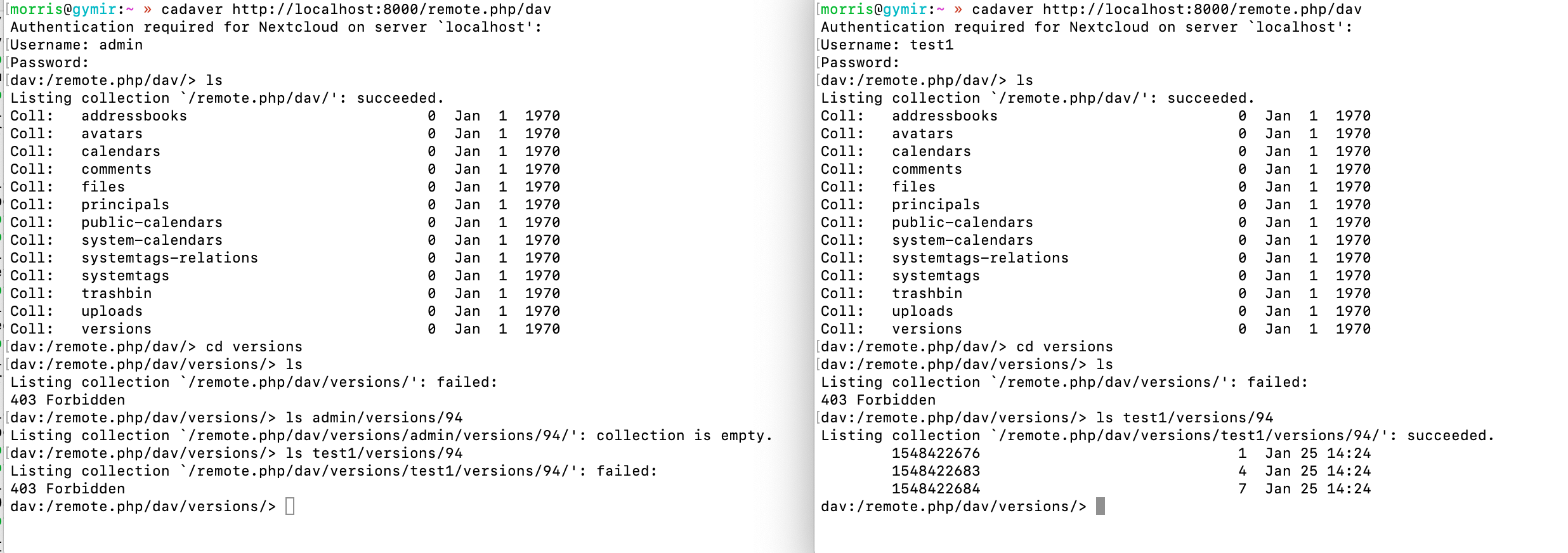
The problem here is that the versions are user specific:
I have user1 (owner) and admin (share recipient):
For the owner the files are visible via /remote.php/dav/versions/test1/versions/94/ but admin requests this via /remote.php/dav/versions/admin/versions/94/ which leads to an empty collection. (manually requesting the first URL as admin results in a 403)
Potential solutions:
- requesting
/remote.php/dav/versions/test1/versions/94/asadminand return the versions properly (requires permission checks on the backend and a slightly adjusted frontend) - requesting
/remote.php/dav/versions/admin/versions/94/asadminand mapping in the backend the versions of the other user (requires permission checks on the backend)
MorrisJobke
on 25 Jan 2019
MorrisJobke
on 25 Jan 2019
@MorrisJobke thanks you for the response!
requesting /remote.php/dav/versions/test1/versions/94/ as admin and return the versions properly (requires permission checks on the backend and a slightly adjusted frontend)
This makes more sense looking at how the files are stored on the server.
FerronN
on 25 Jan 2019
Fix is in #13830
MorrisJobke
on 28 Jan 2019
Related issues
 ghost
·
3Comments
ghost
·
3Comments
 e-alfred
·
3Comments
e-alfred
·
3Comments
 Django-BOfH
·
3Comments
Django-BOfH
·
3Comments
 georgehrke
·
3Comments
georgehrke
·
3Comments
 jancborchardt
·
3Comments
jancborchardt
·
3Comments
Most helpful comment
Fix is in #13830