Server: 13.0.3 update notification, but version up to date in 13.0.2
Steps to reproduce
- Notification of upgrade 13.0.3 appeared
Expected behaviour
Basic setting administration says my version can be upgraded :)
Actual behaviour
Basic setting administration says my version is up to date (13.0.2)
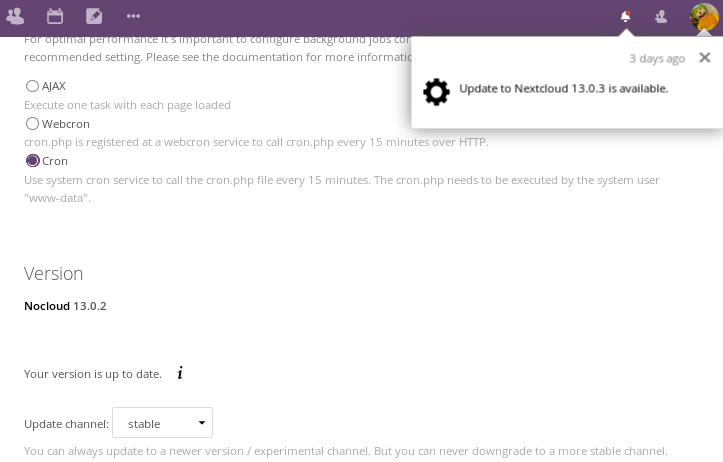
Server configuration
Operating system: Debian GNU/Linux 9 (stretch) x86_64 kernel : 3.14.32-xxxx-grs-ipv6-64
Web server: apache2 2.4.25
Database: mariadb-server 10.1.26
PHP version: PHP 7.0.27
Nextcloud version: 13.0.2
Updated from an older Nextcloud/ownCloud or fresh install: fresh from 11
Where did you install Nextcloud from: nextcloud.com
Signing status: No errors have been found.
List of activated apps:
- activity: 2.6.1
- bookmarks: 0.11.0
- bruteforcesettings: 1.0.3
- calendar: 1.6.1
- comments: 1.3.0
- contacts: 2.1.5
- dav: 1.4.6
- encryption: 2.0.0
- federatedfilesharing: 1.3.1
- federation: 1.3.0
- files: 1.8.0
- files_pdfviewer: 1.2.1
- files_sharing: 1.5.0
- files_texteditor: 2.5.1
- files_trashbin: 1.3.0
- files_versions: 1.6.0
- files_videoplayer: 1.2.0
- firstrunwizard: 2.2.1
- gallery: 18.0.0
- logreader: 2.0.0
- lookup_server_connector: 1.1.0
- mail: 0.8.1
- news: 12.0.4
- nextcloud_announcements: 1.2.0
- notes: 2.3.2
- notifications: 2.1.2
- oauth2: 1.1.0
- ocsms: 1.12.7
- password_policy: 1.3.0
- provisioning_api: 1.3.0
- serverinfo: 1.3.0
- sharebymail: 1.3.0
- survey_client: 1.1.0
- systemtags: 1.3.0
- tasks: 0.9.6
- theming: 1.4.5
- twofactor_backupcodes: 1.2.3
- twofactor_totp: 1.4.1
- updatenotification: 1.3.0
- workflowengine: 1.3.0
Nextcloud configuration:
"system": {
"instanceid": "REMOVED SENSITIVE VALUE",
"passwordsalt": "REMOVED SENSITIVE VALUE",
"secret": "REMOVED SENSITIVE VALUE",
"trusted_domains": [
"localhost",
"cloud.ionl.fr",
],
"datadirectory": "REMOVED SENSITIVE VALUE",
"overwrite.cli.url": "https:\/\/cloud.ionl.fr",
"dbtype": "mysql",
"version": "13.0.2.1",
"dbname": "REMOVED SENSITIVE VALUE",
"dbhost": "REMOVED SENSITIVE VALUE",
"dbport": "",
"dbtableprefix": "oc_",
"dbuser": "REMOVED SENSITIVE VALUE",
"dbpassword": "REMOVED SENSITIVE VALUE",
"logtimezone": "UTC",
"installed": true,
"maintenance": false,
"theme": "",
"loglevel": 1,
"memcache.local": "\OC\Memcache\APCu",
"mail_smtpmode": "sendmail",
"mail_from_address": "REMOVED SENSITIVE VALUE",
"mail_domain": "REMOVED SENSITIVE VALUE",
"default_language": "en",
"defaultapp": "calendar",
"knowledgebaseenabled": true,
"enable_avatars": true,
"mysql.utf8mb4": true,
"mail_smtpauthtype": "LOGIN"
}
Are you using external storage, if yes which one: no
Are you using encryption: yes
Are you using an external user-backend, if yes which one: no
Client configuration
Browser: Firefox 61.0b10 (64 bits) and Chromium 67.0.3396.62
Operating system: Arch Linux
 ionl
ionl
All 9 comments
Looks like a bug in the updater or you are from the future. I seen that thing happen on one of my instances running nginx and Debian.
 c0fe
on 11 Jun 2018
c0fe
on 11 Jun 2018
Looks like a bug in the updater or you are from the future. I seen that thing happen on one of my instances running nginx and Debian
No - this is expected, because we disabled the updater due to a bug we found. We will push a new release soon. See https://github.com/nextcloud/server/pull/9802#issuecomment-395780141
 MorrisJobke
on 11 Jun 2018
MorrisJobke
on 11 Jun 2018
Oki, thanks
ionl
on 11 Jun 2018
Hello, is this happening again with 14.0 ? Seeing exactly same behaviour. Thanks
 tomashejatko
on 13 Sep 2018
tomashejatko
on 13 Sep 2018
happening for me as well. Though I'm pretty sure I'm running 14.0.4 docker image (FROM nextcloud:14.0.4-apache)
Where can I check the exact version of Nextcloud? Thanks
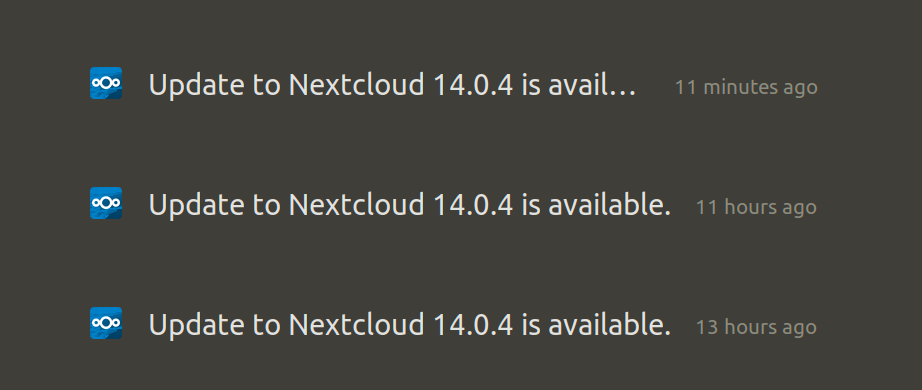

I did run:
docker-compose down
docker-compose build --pull
docker-compose up -d
 sulliwane
on 1 Dec 2018
sulliwane
on 1 Dec 2018
Hello, is this happening again with 14.0 ? Seeing exactly same behaviour. Thanks
We are working on a way to avoid this.
happening for me as well. Though I'm pretty sure I'm running 14.0.4 docker image (FROM nextcloud:14.0.4-apache)
Where can I check the exact version of Nextcloud? Thanks
Seems to not be the case. To check the version look into version.php or https://your.domain.org/status.php.
MorrisJobke
on 3 Dec 2018
@MorrisJobke thanks, I just checked the url and here is the result:
installed | true
-- | --
maintenance | false
needsDbUpgrade | false
version | "14.0.0.19"
versionstring | "14.0.0"
edition | ""
productname | "Nextcloud"
Though here is my Dockerfile:
FROM nextcloud:14.0.4-apache

RUN apt-get update && apt-get install -y \
  supervisor \
  cron \
  && rm -rf /var/lib/apt/lists/*

RUN mkdir /var/log/supervisord /var/run/supervisord && \
  echo "*/15 * * * * su - www-data -s /bin/bash -c \"php -f /var/www/html/cron.php\""| crontab -

COPY supervisord.conf /etc/supervisor/supervisord.conf

CMD ["/usr/bin/supervisord"]
and I did run docker-compose build --pull to upgrade...
Again, many thanks for your advices
sulliwane
on 3 Dec 2018
Did you set NEXTCLOUD_UPDATE=1 in the environment of your docker container (docker-compose.yml or docker run)?
I had the same issue of nextcloud staying on some old version even though the image was the correct version after I changed from the default image to using supervisord.
See the last entry in: README.md#auto-configuration-via-environment-variables
Example for docker-compose.yml:
environment:
- NEXTCLOUD_UPDATE=1
 fuse314
on 3 Dec 2018
fuse314
on 3 Dec 2018
@fuse314 thanks a lot !!! it ran db migrations and it's working now...great :)
sulliwane
on 3 Dec 2018
Related issues
 juliushaertl
·
3Comments
juliushaertl
·
3Comments
 Django-BOfH
·
3Comments
Django-BOfH
·
3Comments
 mfechner
·
3Comments
mfechner
·
3Comments
 e-alfred
·
3Comments
e-alfred
·
3Comments
 dl5rcw
·
3Comments
dl5rcw
·
3Comments
Most helpful comment
Hello, is this happening again with 14.0 ? Seeing exactly same behaviour. Thanks