Server: Favicon in NC11..NC14 not working
Still not working :(
Details see
 caco3
caco3
All 31 comments
@caco3 Is there anything in the log files?
The original error from https://github.com/nextcloud/server/issues/2900#issuecomment-298232138 should already been fixed with https://github.com/nextcloud/server/pull/4888
Now, when I enter https://*.ch/index.php/apps/theming/favicon/files?v=9 in the browser, I get a message that the graphic contains errors:
Strangely this text can not be copied from within FF...
Can you check the output file with some other browser or curl?
 juliushaertl
on 19 Jan 2018
juliushaertl
on 19 Jan 2018
Possible targetting same problem: when theming nc with custom logo favicon is not changing only logo change is ok on welcome etc. The crazy part: 2 mashines running nc13rc1 (after update to rc2 no change) - one it works one it fails.
 hawkeyexp
on 19 Jan 2018
hawkeyexp
on 19 Jan 2018
@juliushaertl No, there is no NC log entry.
Please see https://github.com/nextcloud/server/issues/2900#issuecomment-298189757 where I already provided a lot of additional information. By then there was an error listed in the log, this indeed seems to be fixed now, at least there is no log entry anymore.
How ever when I call the favicon directly (https://owncloud.ruinelli.ch/index.php/apps/theming/favicon/settings?v=13), I still get the error that the image is corrupted: "The image cannot be displayed because it contains errors".
Looking onto my servers filesystem, I see that there are many favicon files, but they are all empty:
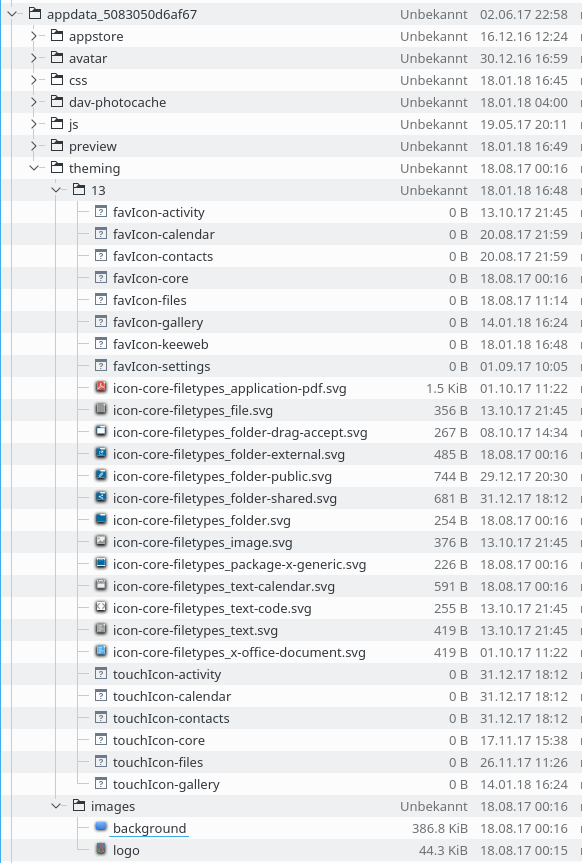
I guess the theming app fails to generate them, so they stay empty and fail to be displayed.
My expectations:
In case the theming requirements are not met, there should either be a fallback and/or a warning.
On another server (Synology), I see this message: "Install the Imagemagick PHP extension with support for SVG images to automatically generate favicons based on the uploaded logo and color" so its clear to me that it will not fully work.
caco3
on 20 Jan 2018
I have the same problem with Nextcloud version 13.0.0: https://mathes.punkt.cloud/apps/theming/favicon?v=9
 joachimmathes
on 14 Feb 2018
joachimmathes
on 14 Feb 2018
Same thing on my site 13.0.0
 ssnelgrove
on 16 Feb 2018
ssnelgrove
on 16 Feb 2018
@caco3 Could you check if the following command shows that your imagemagick setup has svg support enabled: identify -list format | grep SVG ?
juliushaertl
on 14 May 2018
@juliushaertl Sure:
> identify -list format | grep SVG
     MSVG  SVG       rw+   ImageMagick's own SVG internal renderer
      SVG  SVG       rw+   Scalable Vector Graphics (XML 2.9.7)
     SVGZ  SVG       rw+   Compressed Scalable Vector Graphics (XML 2.9.7)
Confirming the issue is still pending (and burning).
 yrammos
on 4 Jul 2018
yrammos
on 4 Jul 2018
Can confirm the problem still persists.
 BonziBuddyMonkey
on 10 Aug 2018
BonziBuddyMonkey
on 10 Aug 2018
@juliushaertl Any news on this?
Still failing on NC13.0.5.
Is there a way to tell the theming app to regenerate the image files in appdata_5083050d6af67/theming/13/?
caco3
on 10 Aug 2018
I tried to reproduce this issue but works for me on linux. Maybe unrelated but @caco3 and @joachimmathes are both running their nextcloud on freebsd. What about you @yrammos @BonziBuddyMonkey?
 kesselb
on 12 Aug 2018
kesselb
on 12 Aug 2018
@danielkesselberg I'm running my instance on Ubuntu 16.04.5 LTS.
yrammos
on 12 Aug 2018
Im running on ubuntu 18.04
BonziBuddyMonkey
on 12 Aug 2018
Could you add some more information about your setup? (e.g. https://github.com/nextcloud/server/blob/master/issue_template.md)
kesselb
on 12 Aug 2018
Its not completely filled out, as im not sure what this snap version uses.
Steps to reproduce
- Install from newly realesed snap install nextcloud) I used to have it installed from via the guide on github from my old server, where the favicon worked fine.
- Load Nextcloud in web browser
Expected behavior
The browser should show favicon that I have selected from themes.
Actual behaviour
Show the standard blue icon
Server configuration
Operating system:
Ubuntu 18.04 LTS
Web server:
Build in Nextcloud feature in Ubuntu 18.04 (Apache I geuss)
Database:
PHP version:
Nextcloud version: (see Nextcloud admin page)
Version 13.0.5
Updated from an older Nextcloud/ownCloud or fresh install:
Fresh install
Where did you install Nextcloud from:
snap install nextcloud
Signing status:
No Errors have been found
List of activated apps:
All standard Apps from snap.
Nextcloud configuration:
Config report
Are you using external storage, if yes which one: No
Are you using encryption; No
Are you using an external user-backend, if yes which one: No
Client configuration
Browser: All browsers
Operating system: All browsers
Logs
Web server error log
Nextcloud log (data/nextcloud.log)
FatalwebdavSabre\DAV\Exception\MethodNotAllowed: The resource you tried to create already exists2018-08-10T21:17:32+0200WarningcoreTrusted domain error. "23.27.154.106" tried to access using "darealniggs.dk" as host.2018-08-10T21:16:57+0200WarningcoreTrusted domain error. "23.27.154.106" tried to access using "darealniggs.dk" as host.2018-08-10T21:16:57+0200ErrorPHPAllowed memory size of 134217728 bytes exhausted (tried to allocate 16384 bytes) at /snap/nextcloud/8267/htdocs/lib/private/legacy/image.php#8922018-08-10T21:06:44+0200ErrorPHPAllowed memory size of 134217728 bytes exhausted (tried to allocate 16384 bytes) at /snap/nextcloud/8267/htdocs/lib/private/legacy/image.php#8922018-08-10T21:06:28+0200ErrorPHPAllowed memory size of 134217728 bytes exhausted (tried to allocate 16384 bytes) at /snap/nextcloud/8267/htdocs/lib/private/legacy/image.php#8922018-08-10T21:06:26+0200ErrorPHPAllowed memory size of 134217728 bytes exhausted (tried to allocate 16384 bytes) at /snap/nextcloud/8267/htdocs/lib/private/legacy/image.php#8922018-08-10T21:06:22+0200ErrorPHPAllowed memory size of 134217728 bytes exhausted (tried to allocate 12288 bytes) at /snap/nextcloud/8267/htdocs/lib/private/legacy/image.php#8922018-08-10T21:06:20+0200ErrorPHPAllowed memory size of 134217728 bytes exhausted (tried to allocate 16384 bytes) at /snap/nextcloud/8267/htdocs/lib/private/legacy/image.php#8922018-08-10T21:06:15+0200ErrorPHPAllowed memory size of 134217728 bytes exhausted (tried to allocate 12288 bytes) at /snap/nextcloud/8267/htdocs/lib/private/legacy/image.php#8922018-08-10T21:05:50+0200ErrorPHPAllowed memory size of 134217728 bytes exhausted (tried to allocate 16384 bytes) at /snap/nextcloud/8267/htdocs/lib/private/legacy/image.php#8922018-08-10T21:05:26+0200ErrorPHPAllowed memory size of 134217728 bytes exhausted (tried to allocate 12288 bytes) at /snap/nextcloud/8267/htdocs/lib/private/legacy/image.php#8922018-08-10T21:05:22+0200ErrorPHPAllowed memory size of 134217728 bytes exhausted (tried to allocate 16384 bytes) at /snap/nextcloud/8267/htdocs/lib/private/legacy/image.php#8922018-08-10T21:05:21+0200ErrorPHPAllowed memory size of 134217728 bytes exhausted (tried to allocate 12288 bytes) at /snap/nextcloud/8267/htdocs/lib/private/legacy/image.php#8922018-08-10T21:04:49+0200ErrorPHPAllowed memory size of 134217728 bytes exhausted (tried to allocate 16384 bytes) at /snap/nextcloud/8267/htdocs/lib/private/legacy/image.php#8922018-08-10T21:04:44+0200ErrorPHPAllowed memory size of 134217728 bytes exhausted (tried to allocate 12288 bytes) at /snap/nextcloud/8267/htdocs/lib/private/legacy/image.php#8922018-08-10T21:04:18+0200ErrorPHPAllowed memory size of 134217728 bytes exhausted (tried to allocate 12288 bytes) at /snap/nextcloud/8267/htdocs/lib/private/legacy/image.php#8922018-08-10T21:04:17+0200ErrorPHPAllowed memory size of 134217728 bytes exhausted (tried to allocate 12288 bytes) at /snap/nextcloud/8267/htdocs/lib/private/legacy/image.php#8922018-08-10T21:04:00+0200ErrorPHPAllowed memory size of 134217728 bytes exhausted (tried to allocate 12288 bytes) at /snap/nextcloud/8267/htdocs/lib/private/legacy/image.php#8922018-08-10T21:03:48+0200ErrorPHPAllowed memory size of 134217728 bytes exhausted (tried to allocate 16384 bytes) at /snap/nextcloud/8267/htdocs/lib/private/legacy/image.php#8922018-08-10T21:03:24+0200ErrorPHPAllowed memory size of 134217728 bytes exhausted (tried to allocate 12288 bytes) at /snap/nextcloud/8267/htdocs/lib/private/legacy/image.php#8922018-08-10T21:02:50+0200ErrorPHPAllowed memory size of 134217728 bytes exhausted (tried to allocate 16384 bytes) at /snap/nextcloud/8267/htdocs/lib/private/legacy/image.php#8922018-08-10T21:02:19+0200ErrorPHPAllowed memory size of 134217728 bytes exhausted (tried to allocate 16384 bytes) at /snap/nextcloud/8267/htdocs/lib/private/legacy/image.php#8922018-08-10T21:02:15+0200ErrorPHPAllowed memory size of 134217728 bytes exhausted (tried to allocate 12288 bytes) at /snap/nextcloud/8267/htdocs/lib/private/legacy/image.php#8922018-08-10T21:01:47+0200ErrorPHPAllowed memory size of 134217728 bytes exhausted (tried to allocate 16384 bytes) at /snap/nextcloud/8267/htdocs/lib/private/legacy/image.php#8922018-08-10T21:01:45+0200ErrorPHPAllowed memory size of 134217728 bytes exhausted (tried to allocate 16384 bytes) at /snap/nextcloud/8267/htdocs/lib/private/legacy/image.php#8922018-08-10T21:01:44+0200ErrorPHPAllowed memory size of 134217728 bytes exhausted (tried to allocate 16384 bytes) at /snap/nextcloud/8267/htdocs/lib/private/legacy/image.php#8922018-08-10T21:01:43+0200ErrorPHPAllowed memory size of 134217728 bytes exhausted (tried to allocate 12288 bytes) at /snap/nextcloud/8267/htdocs/lib/private/legacy/image.php#8922018-08-10T21:01:41+0200ErrorPHPAllowed memory size of 134217728 bytes exhausted (tried to allocate 12288 bytes) at /snap/nextcloud/8267/htdocs/lib/private/legacy/image.php#8922018-08-10T21:01:39+0200ErrorPHPAllowed memory size of 134217728 bytes exhausted (tried to allocate 16384 bytes) at /snap/nextcloud/8267/htdocs/lib/private/legacy/image.php#8922018-08-10T21:01:39+0200ErrorPHPAllowed memory size of 134217728 bytes exhausted (tried to allocate 16384 bytes) at /snap/nextcloud/8267/htdocs/lib/private/legacy/image.php#8922018-08-10T21:01:39+0200ErrorPHPAllowed memory size of 134217728 bytes exhausted (tried to allocate 12288 bytes) at /snap/nextcloud/8267/htdocs/lib/private/legacy/image.php#8922018-08-10T21:01:38+0200ErrorPHPAllowed memory size of 134217728 bytes exhausted (tried to allocate 16384 bytes) at /snap/nextcloud/8267/htdocs/lib/private/legacy/image.php#8922018-08-10T21:01:38+0200ErrorPHPAllowed memory size of 134217728 bytes exhausted (tried to allocate 16384 bytes) at /snap/nextcloud/8267/htdocs/lib/private/legacy/image.php#8922018-08-10T21:01:38+0200ErrorPHPAllowed memory size of 134217728 bytes exhausted (tried to allocate 16384 bytes) at /snap/nextcloud/8267/htdocs/lib/private/legacy/image.php#8922018-08-10T21:01:36+0200WarningcoreLogin failed: 'ncadmin' (Remote IP: '192.168.1.5')2018-08-10T20:47:50+0200WarningcoreTrusted domain error. "192.168.1.5" tried to access using "www.darealniggs.dk" as host.2018-08-10T20:47:37+0200WarningcoreTrusted domain error. "192.168.1.5" tried to access using "www.darealniggs.dk" as host.2018-08-10T20:47:37+0200
BonziBuddyMonkey
on 12 Aug 2018
@BonziBuddyMonkey do you uploaded your own custom favicon? Favicon auto-generation does not work with snap package (see https://github.com/nextcloud/nextcloud-snap/issues/592). I guess its unrelated to this issue but your are running out of memory. You should increase the memory limit (https://github.com/nextcloud/nextcloud-snap#php-memory-limit-configuration)
kesselb
on 13 Aug 2018
Steps to reproduce
- Change theme in the NextCloud GUI (no command-line tinkering).
- Open an incognito window in Safari or Chrome.
- Clear browser data (Safari or Chrome) — probably unnecessary after #2, but some browsers are known to cache favicons aggressively.
Expected behaviour
The browser should display a favicon derived from my theme.
Actual behaviour
The browser displays the standard NC favicon.
Server configuration
Operating system: Ubuntu 16.04 LTS
Web server: Apache 2.4.18
Database: MySQL 5.7.23 with Redis server 4.0.11
PHP version: 7.0.30
Nextcloud version: (see Nextcloud admin page) 13.0.5
Updated from an older Nextcloud/ownCloud or fresh install: Yes
Where did you install Nextcloud from: Progressively from 12.x without skipping updates.
From https://..../index.php/settings/integrity/failed:

"(No errors have been found.)"
Apps enabled:

  - activity: 2.6.1
  - admin_audit: 1.3.0
  - announcementcenter: 3.2.1
  - apporder: 0.5.0
  - bookmarks: 0.11.0
  - bruteforcesettings: 1.1.0
  - comments: 1.3.0
  - data_request: 1.0.1
  - dav: 1.4.7
  - encryption: 2.0.0
  - external: 3.0.4
  - federatedfilesharing: 1.3.1
  - files: 1.8.0
  - files_accesscontrol: 1.3.0
  - files_downloadactivity: 1.2.0
  - files_external: 1.4.1
  - files_markdown: 2.0.4
  - files_pdfviewer: 1.2.1
  - files_retention: 1.2.0
  - files_rightclick: 0.8.4
  - files_texteditor: 2.5.1
  - files_trashbin: 1.3.0
  - files_versions: 1.6.0
  - files_videoplayer: 1.2.0
  - firstrunwizard: 2.2.1
  - gallery: 18.0.0
  - groupfolders: 1.3.3
  - logreader: 2.0.0
  - lookup_server_connector: 1.1.0
  - nextcloud_announcements: 1.2.0
  - notes: 2.4.0
  - notifications: 2.1.2
  - oauth2: 1.1.1
  - password_policy: 1.3.0
  - piwik: 0.3.2
  - provisioning_api: 1.3.0
  - quicknotes: 0.1.3
  - quota_warning: 1.2.0
  - serverinfo: 1.3.0
  - sharebymail: 1.3.0
  - survey_client: 1.1.0
  - systemtags: 1.3.0
  - theming: 1.4.5
  - twofactor_backupcodes: 1.2.3
  - twofactor_totp: 1.4.1
  - updatenotification: 1.3.0
  - user_external: 0.4
  - workflowengine: 1.3.0
Nextcloud configuration:
Config report
{
    "system": {
        "instanceid": "***REMOVED SENSITIVE VALUE***",
        "passwordsalt": "***REMOVED SENSITIVE VALUE***",
        "secret": "***REMOVED SENSITIVE VALUE***",
        "trusted_domains": [
            "***REMOVED SENSITIVE VALUE***",
        ],
        "memcache.local": "\\OC\\Memcache\\Redis",
        "filelocking.enabled": true,
        "memcache.locking": "\\OC\\Memcache\\Redis",
        "redis": {
            "host": "***REMOVED SENSITIVE VALUE***",
            "port": 0,
            "timeout": 0,
            "password": "***REMOVED SENSITIVE VALUE***"
        },
        "datadirectory": "***REMOVED SENSITIVE VALUE***",
        "overwrite.cli.url": "***REMOVED SENSITIVE VALUE***",
        "dbtype": "mysql",
        "version": "13.0.5.2",
        "dbname": "***REMOVED SENSITIVE VALUE***",
        "dbhost": "***REMOVED SENSITIVE VALUE***",
        "dbport": "",
        "dbtableprefix": "oc_",
        "mysql.utf8mb4": true,
        "dbuser": "***REMOVED SENSITIVE VALUE***",
        "dbpassword": "***REMOVED SENSITIVE VALUE***",
        "installed": true,
        "htaccess.RewriteBase": "\/",
        "mail_from_address": "***REMOVED SENSITIVE VALUE***",
        "mail_smtpmode": "sendmail",
        "mail_smtpauthtype": "LOGIN",
        "mail_domain": "***REMOVED SENSITIVE VALUE***",
        "mail_smtphost": "***REMOVED SENSITIVE VALUE***",
        "mail_smtpauth": 1,
        "mail_smtpport": "465",
        "mail_smtpsecure": "ssl",
        "mail_smtpname": "***REMOVED SENSITIVE VALUE***",
        "mail_smtppassword": "***REMOVED SENSITIVE VALUE***",
        "maintenance": false,
        "loglevel": 2,
        "theme": "",
        "updater.release.channel": "stable"
    }
}
Are you using external storage, if yes which one: No
Are you using encryption: No
Are you using an external user-backend, if yes which one: No
Client configuration
Browser: Safari, Chrome (latest versions)
Operating system: macOS
Logs
Web server error log
Web server error log
No errors in apache2/error.log.
Nextcloud log (data/nextcloud.log)
Nextcloud log
File is too long to paste here but grep didn't indicate any favicon-related issues. I believe they were all linked to unsuccessful login attempts and a few application installs.
Browser log
Browser log
Nothing special in the log (no errors in the console, for example). Worth noting that the HTML downloaded by the client refers to href="/core/img/favicon-mask.svg", which is the standard NC favicon.
When you view the page source there should be a link like this:
<link rel="icon" href="/apps/theming/favicon/files?v=15">
What happens when you open "href" in a new tab?
kesselb
on 13 Aug 2018
On both Chrome and Safari I get this icon:

This generic icon is the one displayed by Chrome; apparently due to aggressive caching, Safari insists on using the NC logo as favicon. Importantly, neither browser displays my custom icon.
yrammos
on 13 Aug 2018
By the way:
$ identify -list format | grep SVG
     MSVG  SVG       rw+   ImageMagick's own SVG internal renderer
      SVG  SVG       rw+   Scalable Vector Graphics (RSVG 2.40.13)
     SVGZ  SVG       rw+   Compressed Scalable Vector Graphics (RSVG 2.40.13)
Weird. I have this problem on one cloud that I manage ("cloudA"), but not the other one ("cloudB"). (They run on different hosting providers but I dont think that makes a difference..)
cloudA: nextcloud 13.0.5, theming 1.4.5
I set custom icon and colors. Later I noticed that there is no favicon. Disabling the theming app gets the (standard) favicons back. Enabling the theming app makes icons disappear again.
@danielkesselberg opening that href says "graphic cannot be shown because it contains an error"
cloudB: nextcloud 13.0.1, theming 1.4.5
everything works as expected. enable theming app. set custom color and logo. custom favicons are created. disable / enable theming app, everything works as expected.
should I get some more info or try something in particular?
__edit__: I have an idea. I installed the passwords app and found this in the error log:
ImagickException: not authorized /tmp/magick-58491xog6YlbhMk95' @ error/constitute.c/ReadImage/420
OCA\Passwords\Exception\ApiException: Internal Favicon API Error
 alexanderdd
on 20 Aug 2018
alexanderdd
on 20 Aug 2018
The passwords app cannot be a causal link because I don't have it installed...
yrammos
on 23 Aug 2018
I also have no favicon, now on NC 14.0.1.
However, and this might be interesting, it is only missing in Firefox (for Windows, on different computers). On other browsers it is there.
 TomTurnschuh
on 4 Oct 2018
TomTurnschuh
on 4 Oct 2018
I also have this problem and like @TomTurnschuh it's manifesting only on Firefox.
A Chromium derivative is displaying both colored default favicons and a custom one generated from logo I use on a different server.
The link to a favicon in page source from Firefox shows the generic icon from this comment above https://github.com/nextcloud/server/issues/7945#issuecomment-412540091.
Servers are v. 14.0.3 with theming 1.5.0 and 13.0.7 with theming 1.4.5.
Both CentOS 7.5.
On both:
identify -list format | grep SVG
     MSVG  SVG       rw+   ImageMagick's own SVG internal renderer
      SVG  SVG       rw+   Scalable Vector Graphics (RSVG 2.39.0)
     SVGZ  SVG       rw+   Compressed Scalable Vector Graphics (RSVG 2.39.0)
 magikmw
on 14 Oct 2018
magikmw
on 14 Oct 2018
@TomTurnschuh @magikmw I am not sure if you guys see the same issue. It might be a different problem!
Please check if the icons got created as expected. In my (and many others) case, the icons are not generated at all, their size is 0 bytes, see https://github.com/nextcloud/server/issues/7945#issuecomment-359178010. Also there will be shown a server error, see https://github.com/nextcloud/server/issues/7945#issuecomment-365562927
Since this is a server error, it does not make sense that it works in one browser but not the other!
If your case is different, please open another issue for it and provide more details.
caco3
on 14 Oct 2018
@juliushaertl Can you please an answer to my question on https://github.com/nextcloud/server/issues/7945#issuecomment-412216117?
Also, in spring I provided the required information (see https://github.com/nextcloud/server/issues/7945#issuecomment-388896660), but it seems nobody really investigated the issue. The issue was first seen on NC11, now we are on NC14! Also I no longer am the only one having that problem! I would be happy to help investigating and solving it, how ever when the questions are not answered, that is not really possible!
caco3
on 14 Oct 2018
@caco3 Sorry, this somehow slipped my radar.
Is there a way to tell the theming app to regenerate the image files in appdata_5083050d6af67/theming/13/?
Regneration will happen every time you change the color of your theme.
identify -list format | grep SVG
MSVG SVG rw+ ImageMagick's own SVG internal renderer
SVG SVG rw+ Scalable Vector Graphics (XML 2.9.7)
SVGZ SVG rw+ Compressed Scalable Vector Graphics (XML 2.9.7)
That looks all good to me. I'm a bit out of ideas why the gernation might fail without errors and put empty files there. Maybe someone else from @nextcloud/theming has an idea?
juliushaertl
on 23 Oct 2018
Ok, I re-added now a new logo.
Interestingly, this solved the issue for me now!
The folder 13 in appdata_*/theming/ got replaced with the folders 15 and images. They contain the logo and a favicon.
caco3
on 2 Nov 2018
I added a favicon (gif) and it shows in the browser tab, but it does not show in the bookmark toolbar, even after cache clearing. Tested with IE and FF. NC14.0.3.
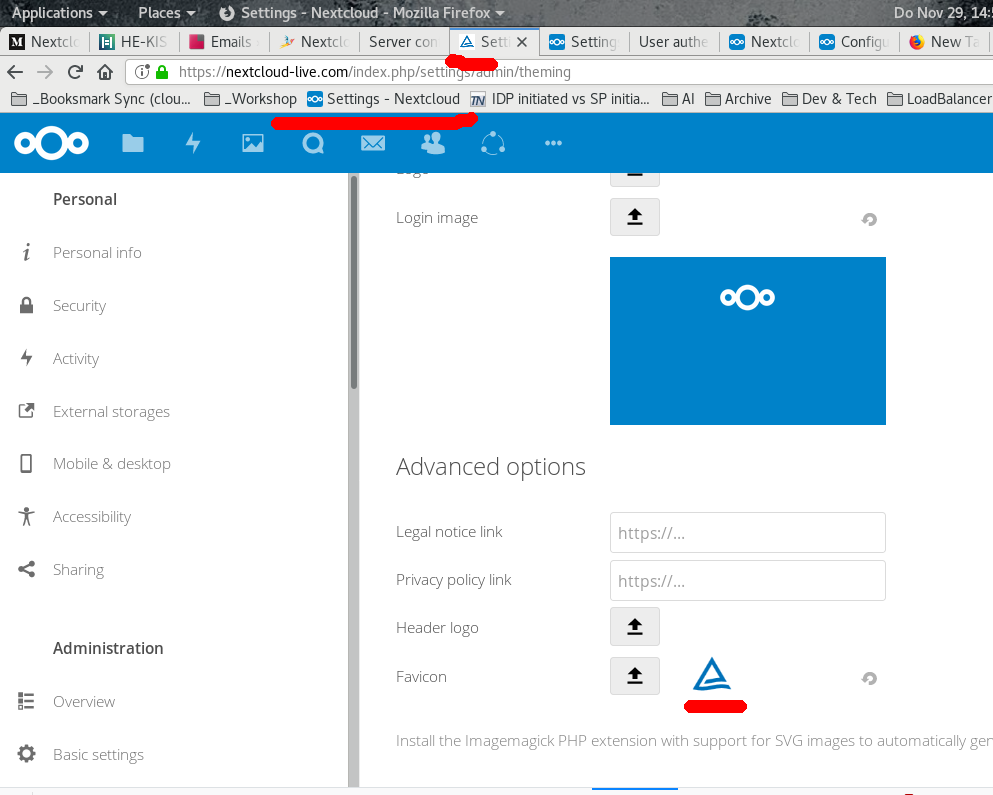
@jancborchardt @juliushaertl
 mathiasconradt
on 29 Nov 2018
mathiasconradt
on 29 Nov 2018
@caco3 My guess would be that at some point there was an error storing the files. I would actually close this, since we weren't able to reproduce this and it seems to work fine now for you.
@mathiasconradt Please open new issues next time. However this is not an issue with Nextcloud but with firefox caching the favicon. Maybe this will help: https://stackoverflow.com/questions/37859753/refresh-favicon-in-bookmarks-firefox
juliushaertl
on 4 Dec 2018
@caco3 Feel free to reopen if it occurs again.
juliushaertl
on 4 Dec 2018
Related issues
 e-alfred
·
3Comments
e-alfred
·
3Comments
 Django-BOfH
·
3Comments
Django-BOfH
·
3Comments
 j-ed
·
3Comments
j-ed
·
3Comments
 ChristophWurst
·
3Comments
ChristophWurst
·
3Comments
 georgehrke
·
3Comments
georgehrke
·
3Comments
Most helpful comment
@juliushaertl Any news on this?
Still failing on NC13.0.5.
Is there a way to tell the theming app to regenerate the image files in
appdata_5083050d6af67/theming/13/?