Sequelize-typescript: Any typing for this sequelize-typescript :)
I'm trying to find the @types/sequelize-typescript to not have a compiler error (it still run lol but it's annoying), is it avaible somewhere or it need to be created?
Thanks a lot!
 Tower450
All 23 comments
@Tower450 first of all sequelize-typescript is not a framework. And it does have typings.
 chanlito
on 3 Nov 2017
chanlito
on 3 Nov 2017
Thanks i know it's not a framework sorry for the word i used, can you share it to me i'm not able to find it .
I did this
npm install --save-dev @ types/sequelize-typescript (did a space between types because it was disapearing)
it founds nothing.
Tower450
on 3 Nov 2017
@Tower450 this lib is already written in typescript, hmm how comes u don’t have typings?
chanlito
on 3 Nov 2017
My VScode is showing me module not found but it does compile lol i will try to put the repo in the @types repository
Tower450
on 3 Nov 2017
it worked nevermind sorry thanks for your help, you should put the npm install with @types in it to npm package so people can do code clean faster :)
Tower450
on 3 Nov 2017
Hey @Tower450, what need to be done to get it working with vscode? :)
I didn‘t get the “you should put the npm install with @types...” - can you explain it again for me? :)
 RobinBuschmann
on 3 Nov 2017
RobinBuschmann
on 3 Nov 2017
Sure, when you want to use a typescript library and you install it with npm or yarn whatever, you need to install the library in the @types folder , but when you do npm install --save sequelize-typescript, it saves the folder in the root of node_modules instead of @types folder so typescript compiler says that he do not find the module even if he actually finds it in some way at the execution.
So you need to create the
npm install --save-dev @ types/sequelize-typescript
to make it easier, it would be appreciate or i can find out by myself and let you know when it's online
Tower450
on 3 Nov 2017
So the sequelize-typescript module folder is now located under node_modules/@types/sequelize-typescript? This is strange and shouldn't be necessary. I'm using JetBrains WebStorm, where it is working perfectly fine. Which typescript version are you using? I will try to reproduce it with vscode
RobinBuschmann
on 3 Nov 2017
It's not typescript the problem, pretty sure it's the TSlint or VScode but stillz would be perfect to fixes this, would be cleaner. And yes i copied paste the folder into @types and it fixed my problem.
Tower450
on 3 Nov 2017
@Tower450 In VSCode, with the way we structure our types, installing sequelize-typescript and @types/sequelize will work. I'd be interested in your tsconfig.json and the specific compile errors, as I haven't run into that error.
This is a snippet from my package.json
{
"dependencies": {
"sequelize": "4.8.4",
"sequelize-typescript": "0.5.0",
"@types/sequelize": "4.0.59",
"typescript": "2.5.2"
}
}
VSCode v1.17.2
Node 8.5.0
NPM 5.4.2
 snewell92
on 3 Nov 2017
snewell92
on 3 Nov 2017
ummm. @ types/sequelize is in devDependencies it's the only difference
Tower450
on 3 Nov 2017
Welp - if you think it's a problem with TSlint or VScode you could submit an issue on their repos.
This package doesn't need to do anything - and other modules like ava and angular, also don't need to be installed under @types to get intellisense or compilation to work properly in VSCode.
snewell92
on 3 Nov 2017
alright thanks for the info guys i appreciate! :) anyway i found a solution
Tower450
on 3 Nov 2017
Guys you really need to put the definition in @types change your README.md with
npm install --save-dev @types/sequelize-typescript
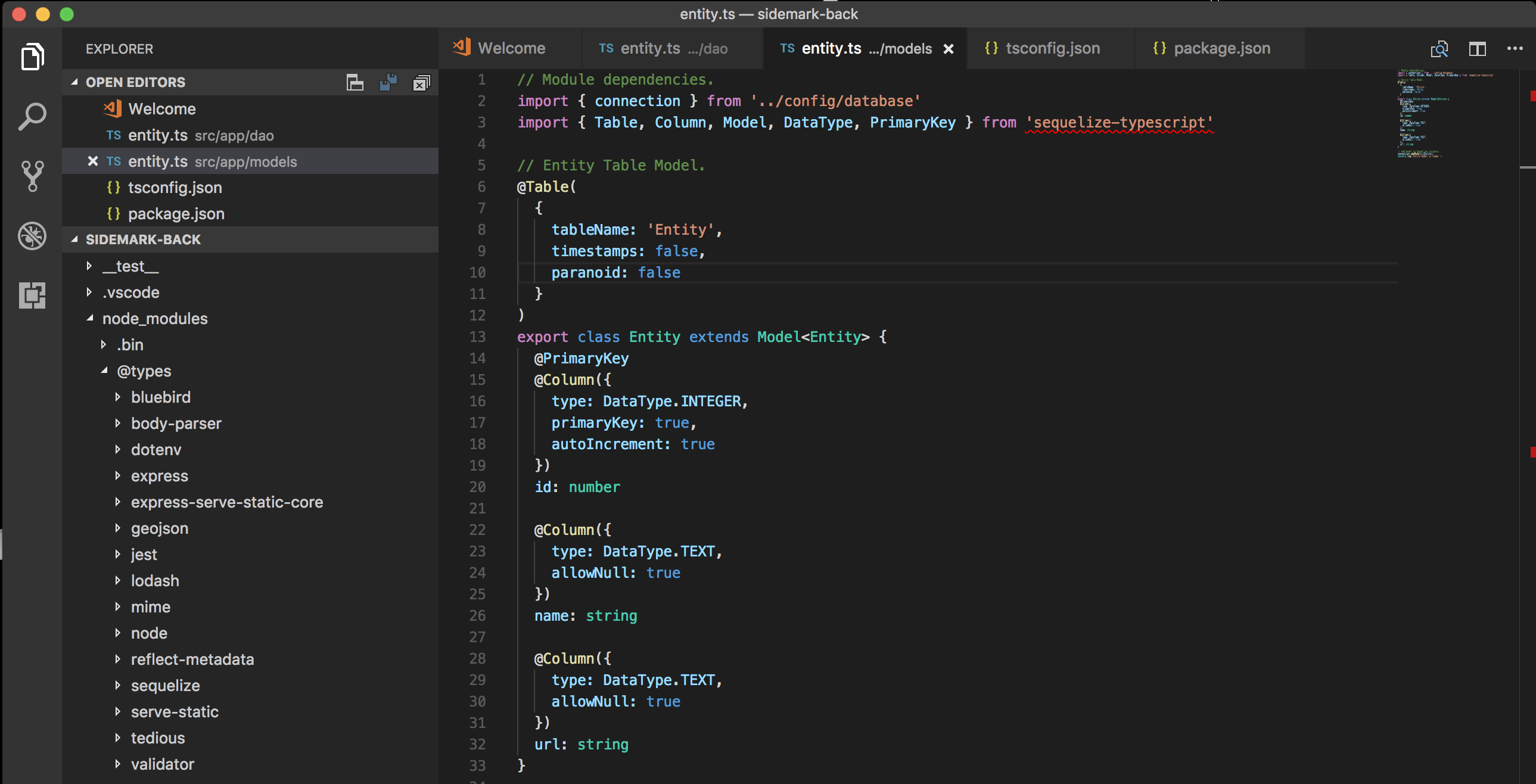
Here is a screenshot of what it's doing with all your configuration.
I hope it can help, i showed the error to a senior and he did not understand like you guys but i'm pretty i am on a defect in some way. But i do agree that everything on your side seems to be good.
Tower450
on 6 Nov 2017
@Tower450 I’m using sequelize typescript in one of my projects. This lib already provides type definition files so we don’t need to publish it to @types. U better check your tsconfig.json file or something else.
chanlito
on 7 Nov 2017
@Tower450 can you provide an example repo, which reproduces the issue?
RobinBuschmann
on 7 Nov 2017
tsc -v 2.4.2 and the only solution is to copy the repository into
node_modules\@types
By the way, here is my tsconfig.json
{
"compilerOptions": {
"strictNullChecks": true,
"rootDir": "./src",
"lib": ["es2017"],
"target": "es6",
"outDir": "dist",
"experimentalDecorators": true,
"emitDecoratorMetadata": true
},
"exclude":[
"node_modules",
"src/__test__"
]
}
@Tower450 Can you prepare a github repository for me? :) That would make it much easier for me
RobinBuschmann
on 7 Nov 2017
@Tower450 Either a small/minimal github repo (ideal) or a gist with package.json, tsconfig.json and a single typescript file that has that error you are seeing in VSCode would be helpful. None of our team has this issue, we just npm install sequelize-typescript @types/sequelize and it works (typescript can find all type definitions). In your screenshot it looks like you haven't configured tsconfig.json properly.
snewell92
on 8 Nov 2017
there is my configuration
https://github.com/team-chiru/sidemark-back/tree/dev
Tower450
on 8 Nov 2017
Try setting moduleTesolution -> node and module -> commonjs
snippet of my tsconfig.json
{
  "compilerOptions": {
    "moduleResolution": "node",
    "target": "es6",
    "module": "commonjs"
  },
  "exclude": [ "node_modules" ]
}
alright thanks :) it worked.
Tower450
on 8 Nov 2017
Related issues
 josecolella
·
4Comments
josecolella
·
4Comments
 zebkailash
·
4Comments
zebkailash
·
4Comments
 samanmohamadi
·
5Comments
samanmohamadi
·
5Comments
 libvirtadept
·
4Comments
libvirtadept
·
4Comments
 lverledens
·
4Comments
lverledens
·
4Comments
Most helpful comment
Try setting moduleTesolution ->
nodeand module ->commonjssnippet of my tsconfig.json