Sequelize-typescript: vscode intellisense broke again ?
Versions
- sequelize: 5.12.2
- sequelize-typescript: 1.1.0
- typescript 3.7.4
- vscode: 1.41
I'm submitting a ...
[x] bug report
[ ] feature request
Hello,
This issue opened only due to previous same issue was closed
I think it is returning of bug with intellisense like here https://github.com/RobinBuschmann/sequelize-typescript/issues/333
Actual behavior:
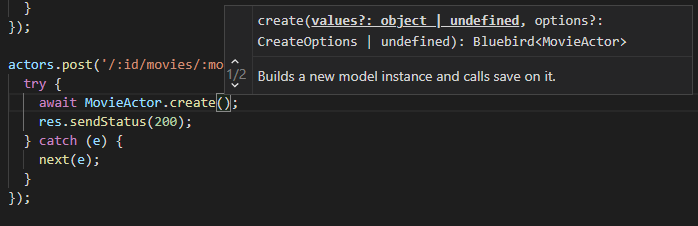
Expected behavior:
Normal autocomplete for fieds and so on
Steps to reproduce:
Just open example project with vscode.
https://github.com/RobinBuschmann/sequelize-typescript-example
 libvirtadept
All 4 comments
Duplicate of #726
Since version 1.0.0 sequelize-typescript uses the official typings provided by sequelize. These typings just don't provide typechecking for create and where options. So this feature need to be implemented in sequelize
 RobinBuschmann
on 11 Jan 2020
RobinBuschmann
on 11 Jan 2020
Hi, @RobinBuschmann
Thank you for answer! Waiting for the fix from sequelize side :)
libvirtadept
on 11 Jan 2020
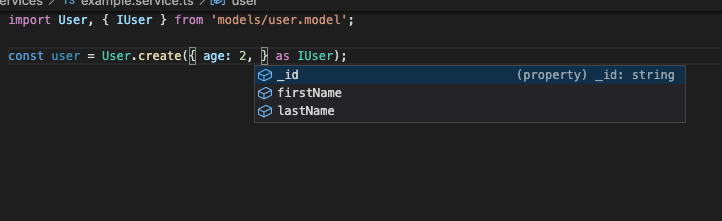
I found a solution for this, is not the best but it solve the problem
//user.model.ts
@Table
export default class User extends Model<User> {
  @Column({ })
  _id: string;

  @Column({})
  firstName: string;

  @Column({})
  lastName: string;

  @Column({})
  age: number;
}
type Fields<T> = Omit<T, keyof Pick<Model<any>, keyof Model<any>>>;

export type IUser = Fields<User>;
this helper is going to remove all the fields of Model and only will keep the fields of the model so then you can call it like is in the image
 capdilla
on 17 Nov 2020
capdilla
on 17 Nov 2020
We close this issue since it's a duplicate of #726 and sequelize-typescript is only a npm library, it has nothing to do with vscode.
 Divlo
on 17 Jan 2021
Divlo
on 17 Jan 2021
Related issues
 mikew
·
4Comments
mikew
·
4Comments
 josecolella
·
4Comments
josecolella
·
4Comments
 oscarcalvo
·
3Comments
oscarcalvo
·
3Comments
 bschveitzer
·
5Comments
bschveitzer
·
5Comments
 ghost
·
5Comments
ghost
·
5Comments
Most helpful comment
Duplicate of #726
Since version 1.0.0 sequelize-typescript uses the official typings provided by sequelize. These typings just don't provide typechecking for create and where options. So this feature need to be implemented in sequelize