Sequel-ace: Error connecting to remote database when using a password protected ssh key with (previous) incorrect password already saved in keychain
- Sequel Ace Version: 2.2.2
- macOS Version: 10.15.5
- MySQL Version: (irrelevant)
Description
When trying to connect to a remote DB via SSH, when using an rsa key without a passprhase, it fails to connect.
Steps To Reproduce
- I had an existing saved favorite with an rsa key that did not include a passphase
- updated to Sequel Ace 2.2.2
- When trying to connect, I am prompted for the passphrase. Submit a blank passphrase.
- fails to connect (full error below)
Expected Behaviour
Sequel pro should connect
Is Issue Present in Latest Beta?
The issue appeared in 2.2.2. It was not an issue in previous versions.
Additional Context
Add any other context about the problem here.
```Used command: /usr/bin/ssh -v -N -S none -o ControlMaster=no -o ExitOnForwardFailure=yes -o ConnectTimeout=10 -o NumberOfPasswordPrompts=3 -o UserKnownHostsFile=/Users/karp/Library/Containers/com.sequel-ace.sequel-ace/Data/.keys/ssh_known_hosts_strict -F /Applications/Sequel Ace.app/Contents/Resources/ssh_config -i /Users/karp/.ssh/id_rsa -o TCPKeepAlive=no -o ServerAliveInterval=60 -o ServerAliveCountMax=1 karp@dev.[redacted].com -L 55728:[redacted]:3306
OpenSSH_8.1p1, LibreSSL 2.7.3
debug1: Reading configuration data /Applications/Sequel Ace.app/Contents/Resources/ssh_config
debug1: /Applications/Sequel Ace.app/Contents/Resources/ssh_config line 1: Applying options for *
debug1: Connecting to dev.[redacted].com [redacted] port 22.
debug1: fd 5 clearing O_NONBLOCK
debug1: Connection established.
load pubkey "/Users/karp/.ssh/id_rsa": Operation not permitted
debug1: identity file /Users/karp/.ssh/id_rsa type -1
debug1: identity file /Users/karp/.ssh/id_rsa-cert type -1
debug1: identity file /Users/karp/.keys/id_rsa type -1
debug1: identity file /Users/karp/.keys/id_rsa-cert type -1
debug1: Local version string SSH-2.0-OpenSSH_8.1
debug1: Remote protocol version 2.0, remote software version OpenSSH_7.4
debug1: match: OpenSSH_7.4 pat OpenSSH_7.0,OpenSSH_7.1,OpenSSH_7.2,OpenSSH_7.3,OpenSSH_7.4,OpenSSH_7.5,OpenSSH_7.6,OpenSSH_7.7 compat 0x04000002
debug1: Authenticating to dev.[redacted].com:22 as 'karp'
debug1: SSH2_MSG_KEXINIT sent
debug1: SSH2_MSG_KEXINIT received
debug1: kex: algorithm: curve25519-sha256
debug1: kex: host key algorithm: ecdsa-sha2-nistp256
debug1: kex: server->client cipher: [email protected] MAC:
debug1: kex: client->server cipher: [email protected] MAC:
debug1: expecting SSH2_MSG_KEX_ECDH_REPLY
debug1: Server host key: ecdsa-sha2-nistp256 SHA256:[redacted]
debug1: Host 'dev.[redacted].com' is known and matches the ECDSA host key.
debug1: Found key in /Users/karp/Library/Containers/com.sequel-ace.sequel-ace/Data/.keys/ssh_known_hosts_strict:1
debug1: rekey out after 134217728 blocks
debug1: SSH2_MSG_NEWKEYS sent
debug1: expecting SSH2_MSG_NEWKEYS
debug1: SSH2_MSG_NEWKEYS received
debug1: rekey in after 134217728 blocks
debug1: pubkey_prepare: ssh_get_authentication_socket: Operation not permitted
debug1: Will attempt key: /Users/karp/.ssh/id_rsa explicit
debug1: Will attempt key: /Users/karp/.keys/id_rsa explicit
debug1: SSH2_MSG_EXT_INFO received
debug1: kex_input_ext_info: server-sig-algs=
debug1: SSH2_MSG_SERVICE_ACCEPT received
debug1: Authentications that can continue: publickey,gssapi-keyex,gssapi-with-mic
debug1: Next authentication method: publickey
debug1: Trying private key: /Users/karp/.ssh/id_rsa
debug1: read_passphrase: can't open /dev/tty: Device not configured
debug1: Trying private key: /Users/karp/.keys/id_rsa
no such identity: /Users/karp/.keys/id_rsa: No such file or directory
debug1: No more authentication methods to try.
karp@dev.[redacted].com: Permission denied (publickey,gssapi-keyex,gssapi-with-mic).
```
 karptonite
All 44 comments
Try execute chmod 400 ~/.ssh/id_rsa and try to connect again.
 stychos
on 26 Oct 2020
stychos
on 26 Oct 2020
Tried. That removed user write access for the key, but did not fix the connection error. Here is the error message:
Used command:  /usr/bin/ssh -v -N -S none -o ControlMaster=no -o ExitOnForwardFailure=yes -o ConnectTimeout=10 -o NumberOfPasswordPrompts=3 -o UserKnownHostsFile=/Users/karp/Library/Containers/com.sequel-ace.sequel-ace/Data/.keys/ssh_known_hosts_strict -F /Applications/Sequel Ace.app/Contents/Resources/ssh_config -i /Users/karp/.ssh/id_rsa -o TCPKeepAlive=no -o ServerAliveInterval=60 -o ServerAliveCountMax=1 karp@dev.[redacted].com -L 53687:[redacted]:3306

  OpenSSH_8.1p1, LibreSSL 2.7.3
debug1: Reading configuration data /Applications/Sequel Ace.app/Contents/Resources/ssh_config
debug1: /Applications/Sequel Ace.app/Contents/Resources/ssh_config line 1: Applying options for *
debug1: Connecting to dev.[redacted].com [redacted] port 22.
debug1: fd 5 clearing O_NONBLOCK
debug1: Connection established.
load pubkey "/Users/karp/.ssh/id_rsa": Operation not permitted
debug1: identity file /Users/karp/.ssh/id_rsa type -1
debug1: identity file /Users/karp/.ssh/id_rsa-cert type -1
debug1: identity file /Users/karp/.keys/id_rsa type -1
debug1: identity file /Users/karp/.keys/id_rsa-cert type -1
debug1: Local version string SSH-2.0-OpenSSH_8.1
debug1: Remote protocol version 2.0, remote software version OpenSSH_7.4
debug1: match: OpenSSH_7.4 pat OpenSSH_7.0*,OpenSSH_7.1*,OpenSSH_7.2*,OpenSSH_7.3*,OpenSSH_7.4*,OpenSSH_7.5*,OpenSSH_7.6*,OpenSSH_7.7* compat 0x04000002
debug1: Authenticating to dev.[redacted].com:22 as 'karp'
debug1: SSH2_MSG_KEXINIT sent
debug1: SSH2_MSG_KEXINIT received
debug1: kex: algorithm: curve25519-sha256
debug1: kex: host key algorithm: ecdsa-sha2-nistp256
debug1: kex: server->client cipher: [email protected] MAC: <implicit> compression: none
debug1: kex: client->server cipher: [email protected] MAC: <implicit> compression: none
debug1: expecting SSH2_MSG_KEX_ECDH_REPLY
debug1: Server host key: [redacted]
debug1: Host 'dev.[redacted].com' is known and matches the ECDSA host key.
debug1: Found key in /Users/karp/Library/Containers/com.sequel-ace.sequel-ace/Data/.keys/ssh_known_hosts_strict:1
debug1: rekey out after 134217728 blocks
debug1: SSH2_MSG_NEWKEYS sent
debug1: expecting SSH2_MSG_NEWKEYS
debug1: SSH2_MSG_NEWKEYS received
debug1: rekey in after 134217728 blocks
debug1: pubkey_prepare: ssh_get_authentication_socket: Operation not permitted
debug1: Will attempt key: /Users/karp/.ssh/id_rsa  explicit
debug1: Will attempt key: /Users/karp/.keys/id_rsa  explicit
debug1: SSH2_MSG_EXT_INFO received
debug1: kex_input_ext_info: server-sig-algs=<rsa-sha2-256,rsa-sha2-512>
debug1: SSH2_MSG_SERVICE_ACCEPT received
debug1: Authentications that can continue: publickey,gssapi-keyex,gssapi-with-mic
debug1: Next authentication method: publickey
debug1: Trying private key: /Users/karp/.ssh/id_rsa
debug1: read_passphrase: can't open /dev/tty: Device not configured
debug1: Trying private key: /Users/karp/.keys/id_rsa
no such identity: /Users/karp/.keys/id_rsa: No such file or directory
debug1: No more authentication methods to try.
Thanks. Can you also check if you have your private key added in Preferences -> Files tab?
stychos
on 26 Oct 2020
Yes, my private key is added there.
karptonite
on 26 Oct 2020
I'm connecting to a MySQL DB every day with a private key with no passphrase with no problems. Looking at the log, there's something fishy around "load pubkey "/Users/karp/.ssh/id_rsa": Operation not permitted". Just to double check, do you have the id_rsa SSH Key selected appropriately in the connection settings? If so, try un-selecting and re-selecting (manually navigating to the correct file location), and then saving changes. Additionally, in the app's preferences (Sequel Ace->Preferences) I know you said above your id_rsa key is there. If you can confirm it's still there in the files tab, could you try removing and re-adding it? It really ought to work correctly here, but looks like there may be something weird in the way you're setup - perhaps you have both a .keys and .ssh directory and moved the private key or something? I would basically try setting Sequel Ace up again because it seems something's weird about the key file-system wise.
 Jason-Morcos
on 26 Oct 2020
Jason-Morcos
on 26 Oct 2020
It's definitely possible that I'm wrong about it being an issue with the passphrase. The only reason I mentioned that is that the first time I tried to connect after updating, it asked for my passphrase (which it had never done before) then failed to connect (which it had also never done before). I should also add that although this happened after an update (via the Mac App store), I'm not certain that I was on the immediately previous version before that.
Anyway, I revoked permission for the id_rsa file in the preferences, then re-added it, and also unselected and reselected it manually, and saved the changes.
I am now getting a significantly different set of errors. Progress?
In particular, it seems that it successfully uses the id_rsa key the first time, but then gets to "No such Identity" when trying to use it a second time at the bottom.
Thinking more, it may be relevant that the ssh host is not the same as the mysql host. I am sshing to a remote host in order to connect via that host to a myql host that is behind a firewall.
Used command:  /usr/bin/ssh -v -N -S none -o ControlMaster=no -o ExitOnForwardFailure=yes -o ConnectTimeout=10 -o NumberOfPasswordPrompts=3 -o UserKnownHostsFile=/Users/karp/Library/Containers/com.sequel-ace.sequel-ace/Data/.keys/ssh_known_hosts_strict -F /Applications/Sequel Ace.app/Contents/Resources/ssh_config -i /Users/karp/.ssh/id_rsa -o TCPKeepAlive=no -o ServerAliveInterval=60 -o ServerAliveCountMax=1 karp@dev.[redacted].com -L 63491:[redacted]:3306

  OpenSSH_8.1p1, LibreSSL 2.7.3
debug1: Reading configuration data /Applications/Sequel Ace.app/Contents/Resources/ssh_config
debug1: /Applications/Sequel Ace.app/Contents/Resources/ssh_config line 1: Applying options for *
debug1: Connecting to dev.[redacted].com [redacted] port 22.
debug1: fd 5 clearing O_NONBLOCK
debug1: Connection established.
debug1: identity file /Users/karp/.ssh/id_rsa type 0
debug1: identity file /Users/karp/.ssh/id_rsa-cert type -1
debug1: identity file /Users/karp/.keys/id_rsa type -1
debug1: identity file /Users/karp/.keys/id_rsa-cert type -1
debug1: Local version string SSH-2.0-OpenSSH_8.1
debug1: Remote protocol version 2.0, remote software version OpenSSH_7.4
debug1: match: OpenSSH_7.4 pat OpenSSH_7.0*,OpenSSH_7.1*,OpenSSH_7.2*,OpenSSH_7.3*,OpenSSH_7.4*,OpenSSH_7.5*,OpenSSH_7.6*,OpenSSH_7.7* compat 0x04000002
debug1: Authenticating to dev.[redacted].com:22 as 'karp'
debug1: SSH2_MSG_KEXINIT sent
debug1: SSH2_MSG_KEXINIT received
debug1: kex: algorithm: curve25519-sha256
debug1: kex: host key algorithm: ecdsa-sha2-nistp256
debug1: kex: server->client cipher: [email protected] MAC: <implicit> compression: none
debug1: kex: client->server cipher: [email protected] MAC: <implicit> compression: none
debug1: expecting SSH2_MSG_KEX_ECDH_REPLY
debug1: Server host key: ecdsa-sha2-nistp256 SHA256:[redacted]
debug1: Host 'dev.[redacted].com' is known and matches the ECDSA host key.
debug1: Found key in /Users/karp/Library/Containers/com.sequel-ace.sequel-ace/Data/.keys/ssh_known_hosts_strict:1
debug1: rekey out after 134217728 blocks
debug1: SSH2_MSG_NEWKEYS sent
debug1: expecting SSH2_MSG_NEWKEYS
debug1: SSH2_MSG_NEWKEYS received
debug1: rekey in after 134217728 blocks
debug1: pubkey_prepare: ssh_get_authentication_socket: Operation not permitted
debug1: Will attempt key: /Users/karp/.ssh/id_rsa RSA SHA256:[redacted] explicit
debug1: Will attempt key: /Users/karp/.keys/id_rsa  explicit
debug1: SSH2_MSG_EXT_INFO received
debug1: kex_input_ext_info: server-sig-algs=<rsa-sha2-256,rsa-sha2-512>
debug1: SSH2_MSG_SERVICE_ACCEPT received
debug1: Authentications that can continue: publickey,gssapi-keyex,gssapi-with-mic
debug1: Next authentication method: publickey
debug1: Offering public key: /Users/karp/.ssh/id_rsa RSA SHA256:[redacted] explicit
debug1: Server accepts key: /Users/karp/.ssh/id_rsa RSA SHA256:[redacted] explicit
debug1: read_passphrase: can't open /dev/tty: Device not configured
debug1: Trying private key: /Users/karp/.keys/id_rsa
no such identity: /Users/karp/.keys/id_rsa: No such file or directory
debug1: No more authentication methods to try.
I'm reluctant to totally set up Sequel Ace again unless I have to, because I have quite a few favorites set up that I don't want to lose.
karptonite
on 27 Oct 2020
Just wanted to add that 2.2.2 broke all of my ssh based database connections. They are all asking for a passphrase now.
 corecoding
on 27 Oct 2020
corecoding
on 27 Oct 2020
@corecoding If you setup one of your SSH connections as a new connection, does it start working again? In other words, is this a migration bug or an all ssh bug?
The reason you're seeing the passphrase I think, @karptonite, is really just falling though all key-based auth attempts and trying a basic password. I don't think this issue has anything to do with whether or not the SSH key requires a passphrase.
I'm currently connecting to DBs with ssh keys and no passphrase all day long with 2.2.2 with no issues, so I haven't been able to reproduce this issue yet. @Sequel-Ace/all
Jason-Morcos
on 27 Oct 2020
@karptonite can you check if your key is copied into ~/Library/Containers/com.sequel-ace.sequel-ace/Data/.keys and that it's name same as in the key input?

stychos
on 27 Oct 2020
I think I see the same issue. My key is not in a file, but in a YubiKey, so the SSH agent is to be used.
In the logs shown above, debug1: pubkey_prepare: ssh_get_authentication_socket: Operation not permitted can be seen consistently. That is something I do see, too.
Making that "more readable" is not a solution, though. And not needed, as it worked with SequelPro and does work with TablePlus for me.
 kdambekalns
on 27 Oct 2020
kdambekalns
on 27 Oct 2020
Maybe cuased by the sandboxing described in #291?
kdambekalns
on 27 Oct 2020
@stychos The only file in /Users/karp/Library/Containers/com.sequel-ace.sequel-ace/Data/.keys is ssh_known_hosts_strict. So no, the key is not copied to that directory.
karptonite
on 27 Oct 2020
I think I see the same issue. My key is _not_ in a file, but in a YubiKey, so the SSH agent is to be used.
The issue with Yubikey is described in #94.
 gboudreau
on 27 Oct 2020
gboudreau
on 27 Oct 2020
The issue with Yubikey is described in #94.
Not sure about that, TBH:
- in
~/.ssh/configI haveIdentityAgent ~/.gnupg/S.gpg-agent.ssh - in
.gnupg/gpg-agent.confI haveenable-ssh-support - and finally this in my shell startup:
eval $(gpg-agent --daemon --enable-ssh-support)
GPG_TTY=$(tty)
export GPG_TTY
if [ -f "${HOME}/.gpg-agent-info" ]; then
   . "${HOME}/.gpg-agent-info"
   export GPG_AGENT_INFO
   export SSH_AUTH_SOCK
   export SSH_AGENT_PID
fi
No PKCS11 involved, AFAICT.
kdambekalns
on 27 Oct 2020
Yes, this is sandboxing issue, Sequel Ace do not process ~/.ssh/config.
stychos
on 27 Oct 2020
Yes, this is sandboxing issue, Sequel Ace do not process ~/.ssh/config.
Unless you select your custom ssh config file in Sequel Ace's settings. But even then there is the yubikey sandbox limitation (#94).
Website docs may be helpful too - https://sequel-ace.com
Jason-Morcos
on 27 Oct 2020
The reason you're seeing the passphrase I think, @karptonite, is really just falling though all key-based auth attempts and trying a basic password. I don't think this issue has anything to do with whether or not the SSH key requires a passphrase.
That may have been the case the first time, and I agree that it probably doesn't matter whether the SSH key requires a passphrase, but in my last log, you'll see that it correctly connected using the key auth the first time, before later failing.
karptonite
on 27 Oct 2020
@karptonite Would it be possible to include a screenshot of your connection settings? Be sure to redact out any private info, but do make it clear which fields are filled.
Additionally, would it be possible for you to try the last few recent releases and let us know which version it last worked fine on? Do you have an estimate what version you updated from?
@corecoding I have the same question for you - did it work in 2.1.x and break in 2.2.x?
Jason-Morcos
on 28 Oct 2020
Is this what you are looking for?
The ssh host is a url. The Mysql host is the internal name of a system on our Google Cloud installation, in the form foo-database.
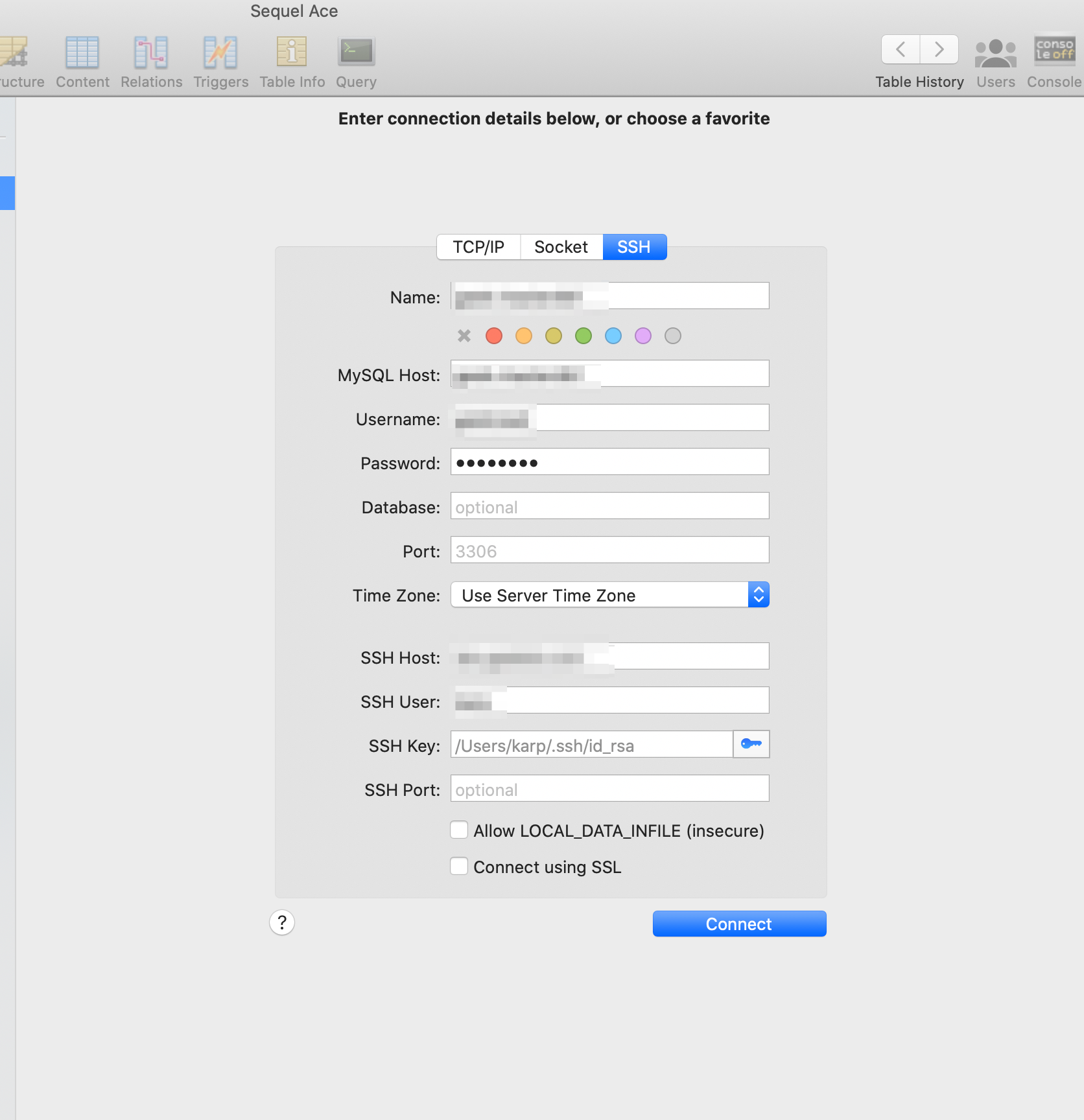
I tested the old versions. I can connect with 2.1.8 and 2.2.0 Beta 1, but I cannot connect with 2.2.0 Beta 2 (or 2.2.0 release).
karptonite
on 28 Oct 2020
Thanks for the info, @karptonite! These are the changes between Beta 1 and Beta 2. I haven't identified a specific change, yet, that I think caused the issue. @Sequel-Ace/all
https://github.com/Sequel-Ace/Sequel-Ace/compare/2.2.0-beta1…2.2.0-beta2
Jason-Morcos
on 28 Oct 2020
UseKeychain no might be the change? 😄
 Kaspik
on 28 Oct 2020
Kaspik
on 28 Oct 2020
UseKeychain nomight be the change? 😄
Perhaps, but @karptonite specifically mentioned that the key in question has no password so that shouldn't be it, I think?
Jason-Morcos
on 28 Oct 2020
You know, I’m having second thoughts about whether my key really has no passphrase. I mainly said that because for years I used a key with no passphrase, but now I recall that I generated a new key for this connection a couple of years ago. I now think that one possibility is that when I last generated this new key, I did add a passphrase, but then set up ssh-agent to handle that passphrase, so I only typed it once, then totally forgot about that. I see now in my records an “ssh key passphrase” that could be for this key.
Assuming that is the case (and if so, I’m sorry for misleading you), there is still an issue, because Sequel Ace never prompts me for that passphrase. I was only ever prompted that first time, and never again.
Edit: I just confirmed by bypassing my keychain on the command line that my ssh key DOES in fact have a password. Sorry again for the incorrect bug report. The problem appears to be that for some reason I am not being prompted for that password in Sequel Ace. However, it is confusing that, in the log above, it seems that Sequel Ace DOES successfully use my key to make a first connection. Could Sequel Ace be using my Keychain for one connection but not for another, for some reason?
karptonite
on 29 Oct 2020
You know, I’m having second thoughts about whether my key really has no passphrase. I mainly said that because for years I used a key with no passphrase, but now I recall that I generated a new key for this connection a couple of years ago. I now think that one possibility is that when I last generated this new key, I did add a passphrase, but then set up ssh-agent to handle that passphrase, so I only typed it once, then totally forgot about that. I see now in my records an “ssh key passphrase” that could be for this key.
Assuming that is the case (and if so, I’m sorry for misleading you), there is still an issue, because Sequel Ace never prompts me for that passphrase. I was only ever prompted that first time, and never again.
Edit: I just confirmed by bypassing my keychain on the command line that my ssh key DOES in fact have a password. Sorry again for the incorrect bug report. The problem appears to be that for some reason I am not being prompted for that password in Sequel Ace. However, it is confusing that, in the log above, it seems that Sequel Ace DOES successfully use my key to make a first connection. Could Sequel Ace be using my Keychain for one connection but not for another, for some reason?
@karptonite Ahhhh no worries, very interesting! The reason we turned off use keychain in the app is because Sequel Ace manually saves things in the keychain depending on a user-selectable checkbox when a user types a password. With use keychain on, macOS was always saving things to the keychain anyways regardless of user preference. My hunch is we have an invalid record in the keychain somehow for your ssh key.
Could you, using the keychain access app, delete all keychain entries for Sequel Ace and try connecting again? I'm hoping that if you do that it will prompt you for a password for the key. Bear in mind, clearing the keychain entries will delete saved password from Ace.
@corecoding Are your SSH keys password-protected as well?
Jason-Morcos
on 29 Oct 2020
Sorry for delay. Yes, my keys are password protected. While v2.2.2 caused all my connections to forget my previously entered password, entering it and re-saving to keychain fixed the problem.
corecoding
on 29 Oct 2020
Thanks for working on debugging this! In keychain access, I removed everything related to Sequel Ace (and Sequel Pro, for good measure). I did NOT remove any entries that were specifically for SSH.
Sequel Ace did not prompt me for a password after that, and still fails to connect.
The error is different: I am back to the error I reported above that included:
load pubkey "/Users/karp/.ssh/id_rsa": Operation not permitted
debug1: identity file /Users/karp/.ssh/id_rsa type -1
I don't have a pattern for when I see this error vs the other error, unfortunately.
karptonite
on 29 Oct 2020
Okay I have a hunch, and would love anyone in @Sequel-Ace/all to chime in if you find flaws/insight.
@karptonite you mentioned above "My key is not in a file, but in a YubiKey". The only change from beta 1 to beta 2 was that we turned off UseKeychain in the Sequel Ace default config. My hunch is that Sequel Ace was never working with your YubiKey - SSH was somehow working with the YubiKey and storing the access needed to unlock the SSH key in the keychain. When we turned off UseKeychain, the little hack that was working for you before is no longer working because Sequel Ace's SSH call is no longer accessing the global keychain at will.
To work around, you need to go to Sequel Ace's settings and select a custom ssh config file. This can be either your main config file, or a special one you make just for Ace. The crucial part of the SSH config is globally enabling use keychain.
My hunch is that if you allow Sequel Ace to tap into the global keychain, somehow YubiKey will authorize the ssh key via the keychain and voila.
The stuff you need in your SSH config file is this:
 host *
      IgnoreUnknown AddKeysToAgent,UseKeychain
      AddKeysToAgent yes
      UseKeychain yes
If this works, it may be a workaround for YubiKey in general? Perhaps there's a setting to allow YubiKey to "cache" in the keychain or whatever the heck it's doing that magically makes this work?
Jason-Morcos
on 30 Oct 2020
you mentioned above "My key is not in a file, but in a YubiKey".
I guess you wanted to mention me… so I tried.
This is my configuration:
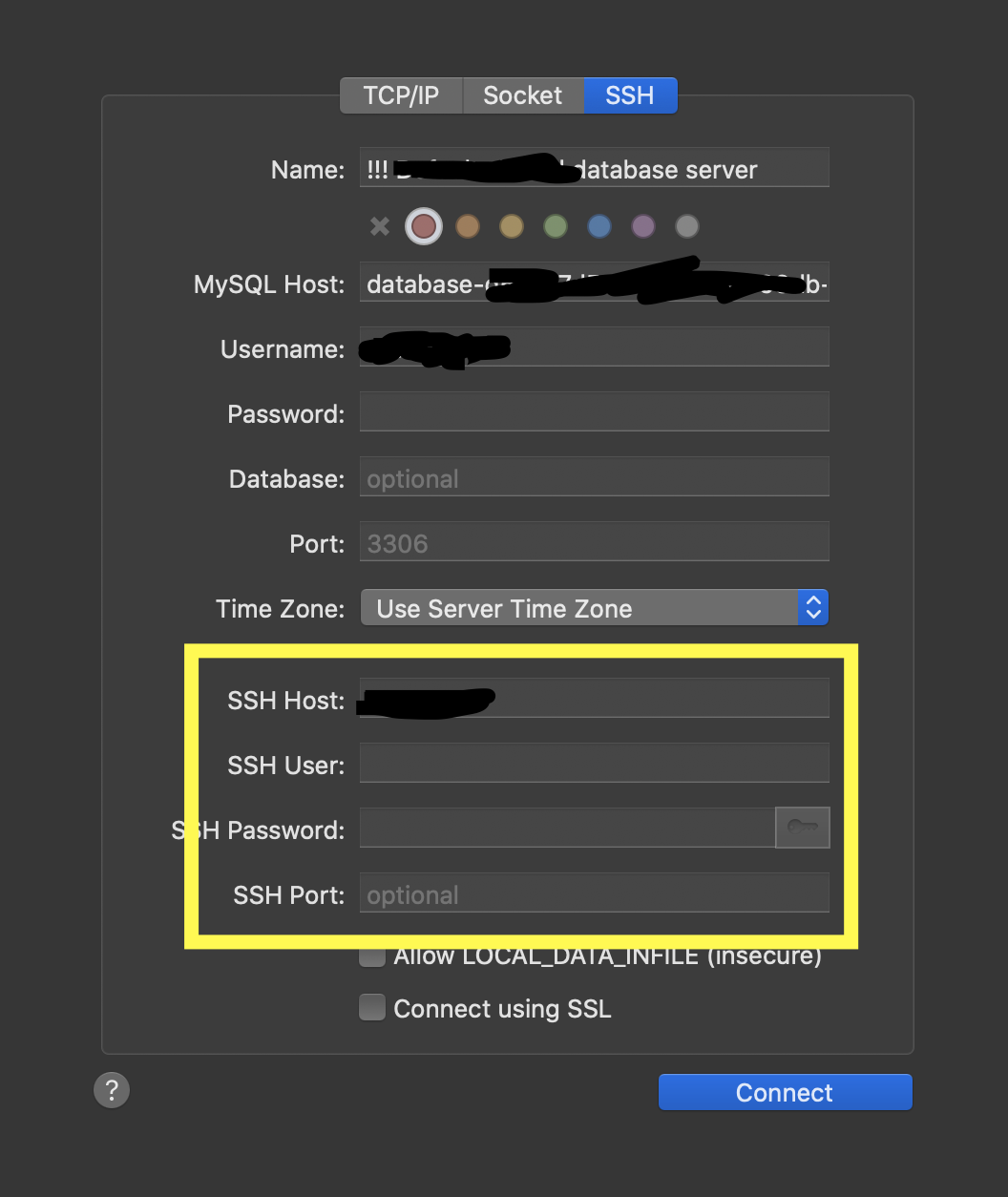
The SSH host is an alias from my ~/.ssh/config file, hostalias below. For that host options are applied to use a jump host and user (jumphost & jumpuser below) to log in to the targetserver. From there, the databaseserver can be accessed:
Host hostalias
    User jumpuser
    Hostname targetserver
    ProxyCommand ssh jumpuser@jumphost -W %h:%p
    # Sequel Ace
    IgnoreUnknown AddKeysToAgent,UseKeychain
    AddKeysToAgent yes
    UseKeychain yes
Trying to connect this is what I get in the details view afterwards:
Used command:  /usr/bin/ssh -v -N -S none -o ControlMaster=no -o ExitOnForwardFailure=yes -o ConnectTimeout=10 -o NumberOfPasswordPrompts=3 -o UserKnownHostsFile=/Users/karsten/Library/Containers/com.sequel-ace.sequel-ace/Data/.keys/ssh_known_hosts_strict -F /Users/karsten/.ssh/config -o TCPKeepAlive=no -o ServerAliveInterval=60 -o ServerAliveCountMax=1 hostalias -L 62544:databaseserver:3306

OpenSSH_8.1p1, LibreSSL 2.7.3
debug1: Reading configuration data /Users/karsten/.ssh/config
debug1: /Users/karsten/.ssh/config line 33: Applying options for hostalias
debug1: Executing proxy command: exec ssh jumpuser@jumphost -W targetserver:22
load pubkey "/Users/karsten/.ssh/id_rsa": Operation not permitted
debug1: identity file /Users/karsten/.ssh/id_rsa type -1
debug1: identity file /Users/karsten/.ssh/id_rsa-cert type -1
load pubkey "/Users/karsten/.ssh/id_dsa": Operation not permitted
debug1: identity file /Users/karsten/.ssh/id_dsa type -1
debug1: identity file /Users/karsten/.ssh/id_dsa-cert type -1
debug1: identity file /Users/karsten/.ssh/id_ecdsa type -1
debug1: identity file /Users/karsten/.ssh/id_ecdsa-cert type -1
debug1: identity file /Users/karsten/.ssh/id_ed25519 type -1
debug1: identity file /Users/karsten/.ssh/id_ed25519-cert type -1
debug1: identity file /Users/karsten/.ssh/id_xmss type -1
debug1: identity file /Users/karsten/.ssh/id_xmss-cert type -1
debug1: Local version string SSH-2.0-OpenSSH_8.1
load pubkey "/Users/karsten/.ssh/id_rsa": Operation not permitted
load pubkey "/Users/karsten/.ssh/id_dsa": Operation not permitted
Failed to add the host to the list of known hosts (/Users/karsten/.ssh/known_hosts).
Load key "/Users/karsten/.ssh/id_rsa": Operation not permitted
[email protected]: Permission denied (publickey).
load pubkey "…": Operation not permittedis a sandboxing issue, but would not be a problem (no usable keys anyway)Failed to add the host to the list of known hosts (/Users/karsten/.ssh/known_hosts).is sandboxing too, but that should affect everyone, no?debug1: pubkey_prepare: ssh_get_authentication_socket: Operation not permittedis gone now for some reason (saw that earlier) - but that would be a sandboxing issue, too.
There is no difference between having or not having
    IgnoreUnknown AddKeysToAgent,UseKeychain
    AddKeysToAgent yes
    UseKeychain yes
in the file.
That being said, it seems as if sandboxing is the culprit here, nothing to do with a password. I cannot work around that (the only option might be a second ssh agent with a socket in the sandbox, but that feels so wrong.) So, what about a non-sandboxed version for download? 😬
I put this comment in #94, too, as it seems the better place. Feel free to continue the discussion either place…
kdambekalns
on 30 Oct 2020
@Jason-Morcos I don't use a YubiKey, but I should have shared my ssh config earlier, in case there might be any clues in there for someone who understands ssh better than I do:
Host *
IdentityFile ~/.ssh/id_rsa
UseKeychain yes
ControlMaster auto
ControlPath ~/.ssh/socket-%r@%h:%p
Okay, I think I got a little confused by the issue flow above.
The Yubikey issue, see #339. That's a separate issue and should not be discussed on this thread.
@karptonite I believe your error is isolated (as in you are the only report of the issue) as CoreCoding's issue was resolved.
What is the ControlPath and ControlMaster stuff in your ssh config? And can you, all in one post for clarity share
- a screenshot of your connection page
- a screenshot of Sequel Ace's settings Network tab
- and a screenshot of Sequel Ace's settings Files tab
- a screenshot/text of the very latest full connection error log
This thread got a little scrambled and let's get it clear again. We're only working with your issue on this thread, nothing with YubiKey or unrelated issues.
Jason-Morcos
on 1 Nov 2020
Big update: I got connected. But I'm still committed to helping work through this bug, in case it affects others, and I think what I found should help.
First, I'll say that your suggestion that I look at the network tab was the key. I saw that there was an option to use a ssh config, and I switched from the Sequel Pro default to my own config file. That allowed me to connect. For simplicity, I commented out the ControlPath and ControlMaster stuff from my own config to make sure that wasn't related. I assume that the important difference was UseKeychain yes in my config.
(The ControlPath and ControlMaster stuff in my ssh config basically allows ssh to reuse an ssh connection if one is already open. It helps speed up frequent rsyncs. You can read more about it here.)
Now, for your screenshots:
Connection page:

Network tab:
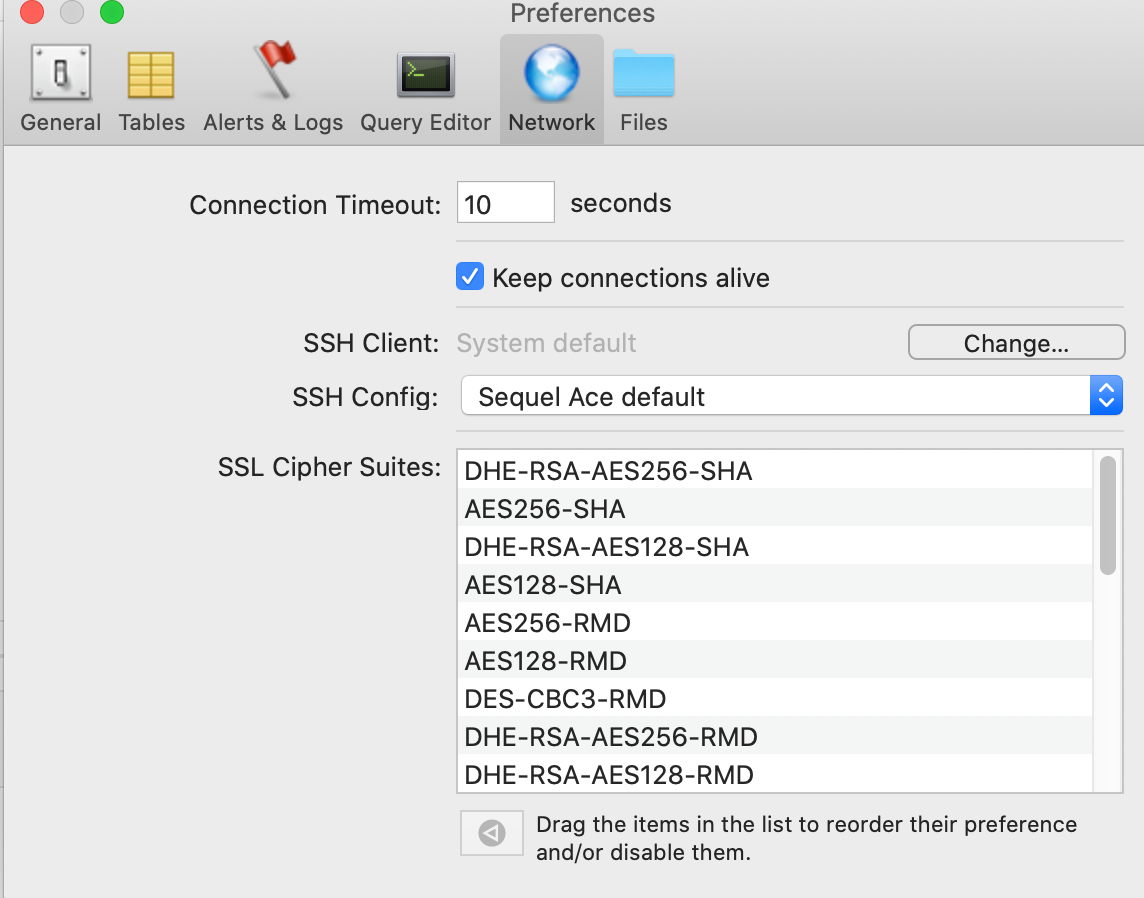
Files tab: (config was just added when I tried using that config instead of the default)

Latest full connection error log: (I think text will be more useful than a screenshot):
Used command:  /usr/bin/ssh -v -N -S none -o ControlMaster=no -o ExitOnForwardFailure=yes -o ConnectTimeout=10 -o NumberOfPasswordPrompts=3 -o UserKnownHostsFile=/Users/karp/Library/Containers/com.sequel-ace.sequel-ace/Data/.keys/ssh_known_hosts_strict -F /Applications/Sequel Ace.app/Contents/Resources/ssh_config -i /Users/karp/.ssh/id_rsa -o TCPKeepAlive=no -o ServerAliveInterval=60 -o ServerAliveCountMax=1 karp@[redacted].com -L 65260:[redacted-db-address]:3306

  OpenSSH_8.1p1, LibreSSL 2.7.3
debug1: Reading configuration data /Applications/Sequel Ace.app/Contents/Resources/ssh_config
debug1: /Applications/Sequel Ace.app/Contents/Resources/ssh_config line 1: Applying options for *
debug1: Connecting to [redacted].com [redacted IP] port 22.
debug1: fd 5 clearing O_NONBLOCK
debug1: Connection established.
load pubkey "/Users/karp/.ssh/id_rsa": Operation not permitted
debug1: identity file /Users/karp/.ssh/id_rsa type -1
debug1: identity file /Users/karp/.ssh/id_rsa-cert type -1
debug1: identity file /Users/karp/.keys/id_rsa type -1
debug1: identity file /Users/karp/.keys/id_rsa-cert type -1
debug1: Local version string SSH-2.0-OpenSSH_8.1
debug1: Remote protocol version 2.0, remote software version OpenSSH_7.4
debug1: match: OpenSSH_7.4 pat OpenSSH_7.0*,OpenSSH_7.1*,OpenSSH_7.2*,OpenSSH_7.3*,OpenSSH_7.4*,OpenSSH_7.5*,OpenSSH_7.6*,OpenSSH_7.7* compat 0x04000002
debug1: Authenticating to [redacted].com:22 as 'karp'
debug1: SSH2_MSG_KEXINIT sent
debug1: SSH2_MSG_KEXINIT received
debug1: kex: algorithm: curve25519-sha256
debug1: kex: host key algorithm: ecdsa-sha2-nistp256
debug1: kex: server->client cipher: [email protected] MAC: <implicit> compression: none
debug1: kex: client->server cipher: [email protected] MAC: <implicit> compression: none
debug1: expecting SSH2_MSG_KEX_ECDH_REPLY
debug1: Server host key: ecdsa-sha2-nistp256 SHA256:[redacted]
debug1: Host '[redacted].com' is known and matches the ECDSA host key.
debug1: Found key in /Users/karp/Library/Containers/com.sequel-ace.sequel-ace/Data/.keys/ssh_known_hosts_strict:1
debug1: rekey out after 134217728 blocks
debug1: SSH2_MSG_NEWKEYS sent
debug1: expecting SSH2_MSG_NEWKEYS
debug1: SSH2_MSG_NEWKEYS received
debug1: rekey in after 134217728 blocks
debug1: pubkey_prepare: ssh_get_authentication_socket: Operation not permitted
debug1: Will attempt key: /Users/karp/.ssh/id_rsa  explicit
debug1: Will attempt key: /Users/karp/.keys/id_rsa  explicit
debug1: SSH2_MSG_EXT_INFO received
debug1: kex_input_ext_info: server-sig-algs=<rsa-sha2-256,rsa-sha2-512>
debug1: SSH2_MSG_SERVICE_ACCEPT received
debug1: Authentications that can continue: publickey,gssapi-keyex,gssapi-with-mic
debug1: Next authentication method: publickey
debug1: Trying private key: /Users/karp/.ssh/id_rsa
debug1: read_passphrase: can't open /dev/tty: Device not configured
debug1: Trying private key: /Users/karp/.keys/id_rsa
no such identity: /Users/karp/.keys/id_rsa: No such file or directory
debug1: No more authentication methods to try.
karp@[redacted].com: Permission denied (publickey,gssapi-keyex,gssapi-with-mic).
Note that this is a bit different from the most recent full connection error log. I admit that I've lost track myself of why it has changed.
To be clear, I think the main issue here is that, for some reason, Sequel Pro is not prompting me for a passphrase for my ssh key. I did prompt me once, the very first time after I upgraded. I entered (I believe) an empty passphrase (which was wrong), and it has never prompted me again, as far as I can recall.
karptonite
on 1 Nov 2020
I'm glad you're connected!
I think you're right with that very last paragraph, you have an incorrect password stored in the keychain in Sequel Ace and when it fails to connect with that it's not falling back and prompting you for a new one
Jason-Morcos
on 1 Nov 2020
I'm glad you're connected!
I think you're right with that very last paragraph, you have an incorrect password stored in the keychain in Sequel Ace and when it fails to connect with that it's not falling back and prompting you for a new one
But I thought I cleared that keychain. Can you specify exactly what I would need to delete to be sure there isn't an incorrect password stored in Sequel Ace? And, of course, perhaps Sequel Ace should prompt for the password if the password stored in the keychain fails? I'm not sure, since theoretically if the password is right once for a given key, it should be right forever.
karptonite
on 1 Nov 2020
I'm glad you're connected!
I think you're right with that very last paragraph, you have an incorrect password stored in the keychain in Sequel Ace and when it fails to connect with that it's not falling back and prompting you for a new oneBut I thought I cleared that keychain. Can you specify exactly what I would need to delete to be sure there isn't an incorrect password stored in Sequel Ace? And, of course, perhaps Sequel Ace should prompt for the password if the password stored in the keychain fails? I'm not sure, since theoretically if the password is right once for a given key, it should be right forever.
I'm not sure exactly, but it appears to me at least that something should have been cleared that wasn't (given you recall it prompting you once for a password the very first time after you upgraded and you entered an empty passphrase and then were stuck forever). In any case, users shouldn't have to manually clear the keychain - the app should realize the password is incorrect and prompt the user for a new password. Of course we still have to verify that this is the issue, but it gives us a much clearer path to try and seems plausible.
Jason-Morcos
on 2 Nov 2020
I'm glad you're connected!
I think you're right with that very last paragraph, you have an incorrect password stored in the keychain in Sequel Ace and when it fails to connect with that it's not falling back and prompting you for a new oneBut I thought I cleared that keychain. Can you specify exactly what I would need to delete to be sure there isn't an incorrect password stored in Sequel Ace? And, of course, perhaps Sequel Ace should prompt for the password if the password stored in the keychain fails? I'm not sure, since theoretically if the password is right once for a given key, it should be right forever.
I'm not sure exactly, but it appears to me at least that something should have been cleared that wasn't (given you recall it prompting you once for a password the very first time after you upgraded and you entered an empty passphrase and then were stuck forever). In any case, users shouldn't have to manually clear the keychain - the app should realize the password is incorrect and prompt the user for a new password. Of course we still have to verify that this is the issue, but it gives us a much clearer path to try and seems plausible.
Here's something that could be super helpful -
If you turn off UseKeychain in your ssh config and try to manually ssh to your remote db with your password-protected key (like via Terminal), what is the exact text the system uses to prompt you for the password for the keyfile? Should be something like "Enter passphrase for key", but the exact text may be crucially important.
Jason-Morcos
on 2 Nov 2020
If you turn off UseKeychain in your ssh config and try to manually ssh to your remote db with your password-protected key (like via Terminal), what is the exact text the system uses to prompt you for the password for the keyfile? Should be something like "Enter passphrase for key", but the exact text may be crucially important.
Enter passphrase for key 'id_rsa':
Here is something that is probably completely unrelated, but I'm mentioning just in case: because of the ControlMaster and ControlPath settings in my config, if I already have a connection open to the remote host, it will not prompt for a passphrase, even with UseKeychain set to No, because it uses the existing connection. That means that even with UseKeychain off, there are times one might not be prompted for a passphrase with ssh.
karptonite
on 2 Nov 2020
@karptonite Would you be able to try this latest beta and see if it magically fixes prompting for your ssh key file password? Without any of the ssh config file workarounds you found before! We found and fixed one bug with prompting and I'm hoping it fixes this issue.
https://github.com/Sequel-Ace/Sequel-Ace/releases/tag/2.3.0-rc2
Jason-Morcos
on 10 Nov 2020
@Jason-Morcos I tried it out. I'm sorry to say it does not seem to have fixed the problem--I am still not being prompted for the passphrase, and it fails to connect, as before. Is there some saved preference or something I should be clearing as part of the test? (It still connects fine if I use my own ssh config.)
karptonite
on 10 Nov 2020
@Jason-Morcos I tried it out. I'm sorry to say it does not seem to have fixed the problem--I am still not being prompted for the passphrase, and it fails to connect, as before. Is there some saved preference or something I should be clearing as part of the test? (It still connects fine if I use my own ssh config.)
Darn, no I was just hoping it would work! Unfortunately not. Thanks for checking! Will need more work here to figure out a fix
Jason-Morcos
on 10 Nov 2020
TLDR of this issue:
- you are not able to connect with your password protected SSH key
- you are able to connect if you create custom config
Is that right? So "workaround available", and also not only v2.2.2 specific? (we released 2.3.0 to the MacAppStore already)
Kaspik
on 13 Nov 2020
@Kaspik Yup, that is exactly it. I just updated to 2.3.0 to confirm that the bug is still present.
karptonite
on 13 Nov 2020
@Jason-Morcos I tried it out. I'm sorry to say it does not seem to have fixed the problem--I am still not being prompted for the passphrase, and it fails to connect, as before. Is there some saved preference or something I should be clearing as part of the test? (It still connects fine if I use my own ssh config.)
Had the same issue and i managed to find where the wrong password is stored in keychain. Just search by filename with your private key and delete the entry, after that app will prompt again for password and finally you will manage to connect.

 bartasdiver
on 17 Nov 2020
bartasdiver
on 17 Nov 2020
@bartasdiver thank you for the info!! Does look like we need to somehow detect the invalid key passphrase however and clear from keychain.
Jason-Morcos
on 18 Nov 2020
@bartasdiver @Jason-Morcos thanks for helping to track this down! I will not try to clear the wrong password at my end, so that if a fix is implemented that detects the wrong password, I can test it.
karptonite
on 18 Nov 2020
Related issues
 ashatrov-realforce
·
4Comments
ashatrov-realforce
·
4Comments
 ChrisGitIt
·
5Comments
ChrisGitIt
·
5Comments
 gms8994
·
6Comments
stychos
·
6Comments
gms8994
·
6Comments
stychos
·
6Comments
 advicepyro
·
8Comments
advicepyro
·
8Comments