Sequel-ace: New line gets imported with last CSV column when importing from CSV
- Sequel Ace Version: 2.1.2
- macOS Version: 10.15.5 (Catalina)
- MySQL Version: 5.7.30
Description
When importing a CSV, whichever column is last in the CSV imports with a new line at the end (assuming that column is VARCHAR or something that supports new lines).
Steps To Reproduce
- Connect to a database with one or more tables.
- Find a table that has at least two columns, one of which is a VARCHAR column.
- Create a CSV file with a few lines of data, with column names that line up with the MySQL table. The last column in the CSV should be a value that will be imported to a VARCHAR field. I used Apple Numbers to create a CSV.
- Import the CSV file into the MySQL table.
Expected Behaviour
The new line character after each line in the CSV should not be imported.
Actual Behaviour
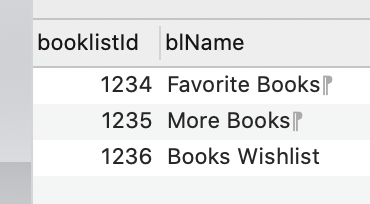
The new line character is imported with the data in the last column.
Workaround
When creating a CSV file, make sure the last column isn't a VARCHAR or other type that supports new lines,
OR When creating a CSV file, add an extra "dummy column" as the last column and exclude it from the column mapping while importing.
Is Issue Present in Latest Beta?
Yes, tested in 2.1.3 Release Candidate 1.
Additional Context
Attached are a screenshot of the CSV (in Apple Numbers), and a screenshot of the imported data in Sequel Ace. Note the new line characters in the second column. Also attached is the CSV I imported (attached as a ZIP, since GitHub doesn't let me attach a CSV file directly).

 samuelbradshaw
All 9 comments
Love to see all the investigation!
If you're looking to get started contributing to the project, this would be a great issue to get started with! I bet the fix overall is pretty straight-forward (trimming newline characters from the end of each line when parsing the CSV). Most of us are pretty swamped investigating crashes and mission-critical issues at the moment, so if you'd like to see this fixed ASAP and are interested in getting started, the Sequel Ace team and I would be glad to help you get started!
 Jason-Morcos
on 15 Jul 2020
Jason-Morcos
on 15 Jul 2020
Thanks – I've never written Mac code, or even tried to run a Mac project in Xcode, so there would be a significant learning curve even for this. Maybe I'll try playing around with it. But I wouldn't be too upset if someone else snatched it up to fix in the meantime. :)
samuelbradshaw
on 15 Jul 2020
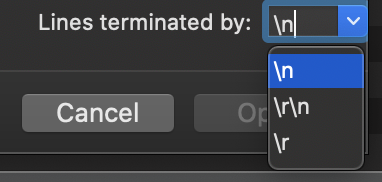
If you select Lines terminated by: \r instead of the default \n in the import options (press options in the window when selecting the file), the new line won't be imported in the last column. These options are remembered on the next import so you should only need to change it once.
I'm not sure if always trimming the line on import would create any side effects, but it would make the import option unnecessary.
 mdriessen
on 17 Jul 2020
mdriessen
on 17 Jul 2020
If you select Lines terminated by: \r instead of the default \n in the import options (press options in the window when selecting the file), the new line won't be imported in the last column. These options are remembered on the next import so you should only need to change it once.
I'm not sure if always trimming the line on import would create any side effects, but it would make the import option unnecessary.
Interesting. Perhaps we should default that option to being enabled?
Jason-Morcos
on 17 Jul 2020
The option can't be disabled, the user is expected to select the correct line ending of the file being imported. The default is on \n which I think is correct most of the time. Maybe it can be improved (auto detection?) but this is how it always has worked.
mdriessen
on 17 Jul 2020
Thanks for debugging this! I can't think of any reason a user wouldn't want it to handle all three types of line breaks automatically. Hypothetically a CSV could have a mix of all three types in the same file – that wouldn't be likely, but it would be nice if it still handled it correctly.
We would want to make sure that line breaks inside a CSV field aren't affected, but they shouldn't be, if Sequel Ace is properly escaping field values.
What's the best way to inspect a CSV to see what kind of line break is being used? It would be interesting to compare Apple Numbers, Excel on Mac, Excel on Windows, and any other common programs that create CSV files, to see what is most common. In any case, I think handling all of the line break types automatically would be ideal.
samuelbradshaw
on 18 Jul 2020
@samuelbradshaw Some code editors will have an option to show line break characters, you can do it with Sublime Text and the RawLineEdit plugin for it. I'm pretty sure it's mainly Windows that generates \r\n, Linux and Mac default to \n, it's possible that Microsoft Office generates \r\n on both Mac and Windows to improve compatibility with Windows
 DannyJJK
on 18 Jul 2020
DannyJJK
on 18 Jul 2020
This CSV was exported from Apple Numbers on a Mac, so I guess Numbers uses \r or \r\n.
samuelbradshaw
on 18 Jul 2020
This CSV was exported from Apple Numbers on a Mac, so I guess Numbers uses \r or \r\n.
Yes. I use \r\n, then there is no new line character.
 meteormatt
on 26 Nov 2020
meteormatt
on 26 Nov 2020
Related issues
 blakeyman
·
5Comments
blakeyman
·
5Comments
 lipatovroman
·
4Comments
lipatovroman
·
4Comments
 salvor-hardin
·
8Comments
salvor-hardin
·
8Comments
 rafmst
·
4Comments
rafmst
·
4Comments
 netojose
·
4Comments
netojose
·
4Comments
Most helpful comment
The option can't be disabled, the user is expected to select the correct line ending of the file being imported. The default is on \n which I think is correct most of the time. Maybe it can be improved (auto detection?) but this is how it always has worked.