Sequel-ace: Can't Connect via Socket
- Sequel Ace Version: 2.0.2
- macOS Version: 10.15.5 (Catalina)
- MySQL Version: MariaDB 10.4.13
Description
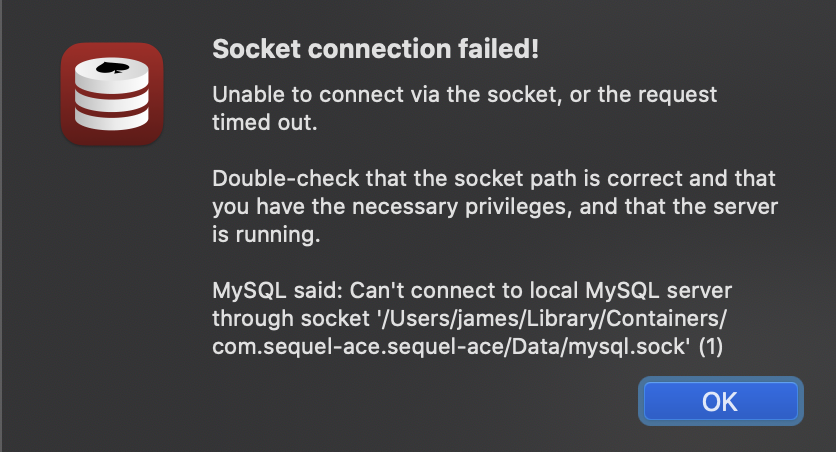
Sequel Ace can't connect to local MariaDB though socket with empty password.

Steps To Reproduce
- Install MariaDB with homebrew
brew reinstall mariadb - Setup connection with socket, your mac user username and empty password (the default credentials when installing through brew)

- Try to connect
Expected Behaviour
It should connect successfully.
Additional Context
- The exact same connection settings work fine in Sequel Pro
I have also tried to specify the socket path:
/tmp/mysql.sockMy guess is that this has something to do with the empty password.
Connecting though CLI works fine as well. Both these are working:
mysql
mysql --user=peter --socket=/tmp/mysql.sock
 pelmered
All 41 comments
I can confirm socket connections are failing...
I can connect using 127.0.0.1, user root, no password. But I can't connect using /tmp/mysql.sock, user root.
 gboudreau
on 26 Jun 2020
gboudreau
on 26 Jun 2020
We probably can't access the tmp dir maybe? Cause of sandbox. Sockets not working for me either.
On Jun 26, 2020, at 08:13, Guillaume Boudreau notifications@github.com wrote:
I can confirm socket connections are failing...
I can connect using 127.0.0.1, user root, no password. But I can't connect using /tmp/mysql.sock, user root.—
You are receiving this because you are subscribed to this thread.
Reply to this email directly, view it on GitHub, or unsubscribe.
 Jason-Morcos
on 26 Jun 2020
Jason-Morcos
on 26 Jun 2020
Indeed, we might have to use a file selector to select the socket, and use a bookmark... That would mean making that field mandatory.
gboudreau
on 26 Jun 2020
I think that's probably the right call, @gboudreau. Gonna take a look at the new SSL/SSH keys bookmarks PR (James tweaked it last night) and merge that if good - perhaps we could leverage the same stuff that does, just adding a file selector for socket?
Jason-Morcos
on 26 Jun 2020
Other PR merged if we want to leverage similar capabilities! https://github.com/Sequel-Ace/Sequel-Ace/pull/105
Jason-Morcos
on 26 Jun 2020
Indeed, we might have to use a file selector to select the socket, and use a bookmark... That would mean making that field mandatory.
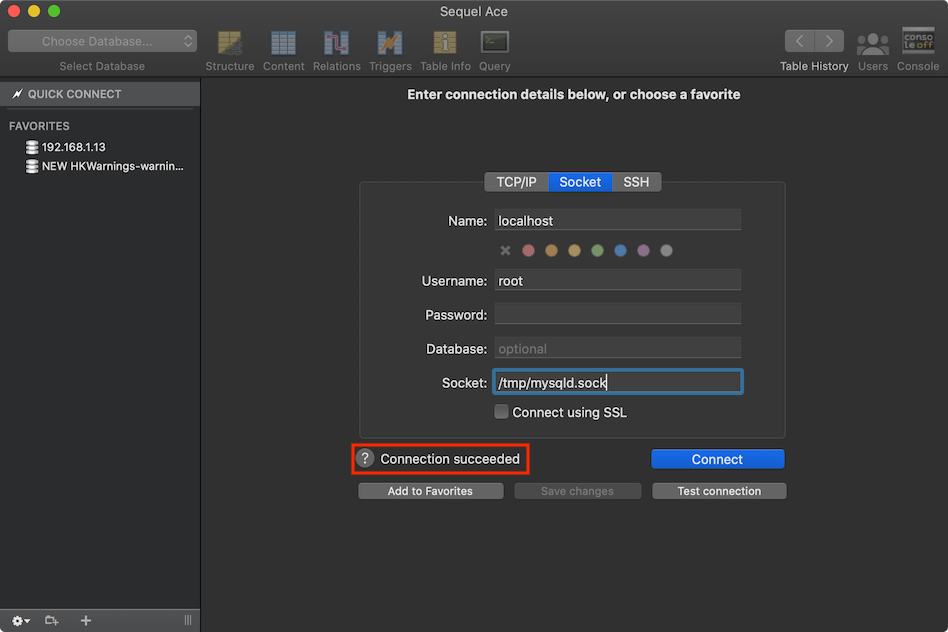
I can't get the NSOpenPanel to display the socket file... it's there on the filesystem, not shown in the panel:


 jamesstout
on 27 Jun 2020
jamesstout
on 27 Jun 2020
Indeed, we might have to use a file selector to select the socket, and use a bookmark... That would mean making that field mandatory.
I can't get the NSOpenPanel to display the socket file... it's there on the filesystem, not shown in the panel:
@jamesstout is that with show hidden files/folders enabled in the open panel?
Jason-Morcos
on 27 Jun 2020
@jamesstout is that with show hidden files/folders enabled in the open panel?
Yep.
jamesstout
on 28 Jun 2020
If you set the app to be not sandboxed, you can connect, but the socket file still doesn't appear in the open panel.
jamesstout
on 28 Jun 2020
Does it work if we require the user to give us access to the whole tmp directory via security scoped bookmark? Like if to use a socket you must go select the tmp directory and grant us access via file browser? Idk if it would get approved, but we could make it so it really only popped up if you tried to use socket and was indicated as an opt-in kind of thing?
Jason-Morcos
on 28 Jun 2020
I don't think so, pretty sure I tested that. The sockets do appear if you use
[urlArr setArray:[fm contentsOfDirectoryAtPath:selectedFilePath error:&err]];
urlArr contains the socket. But it hasn't been selected by the user. I'll try again later. Working hours here now.
jamesstout
on 29 Jun 2020
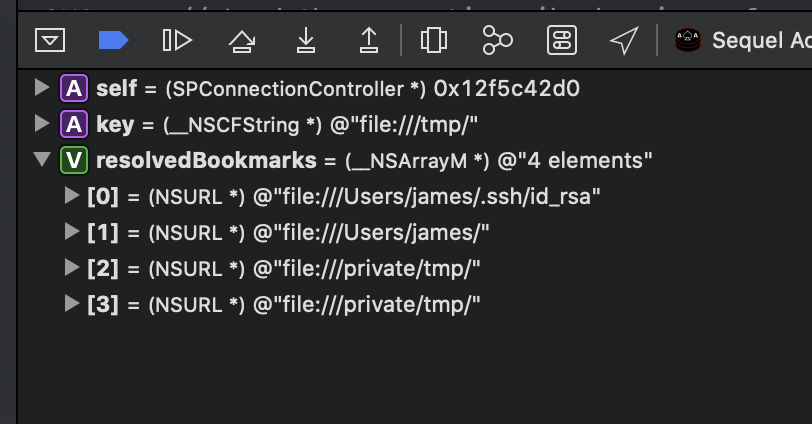
Yeah, doesn't work. You can see here I have/tmp(actually /private/tmp) in the bookmarks, but when I try to use /tmp/mysqld.sock, I get the error reported above.
jamesstout
on 29 Jun 2020
I'm also having a similar problem connecting via socket. It's not te exact same issue, so I'm not sure if I should be posting this here or as a new issue.
- Sequel Ace Version: 2.1.0, build 2042
- macOS Version: 10.15.5 (Catalina)
- MySQL Version: MySQL 8.0.16
- Using Local by Flywheel
Description
Sequel Ace can't connect to MySQL using socket located at /Users/{USERNAME}/Library/Application Support/Local/run/{SITEID}/mysql/mysqld.sock

Steps To Reproduce
- Install Local by Flywheel
- Create custom site
- Turn on site
- Setup connection with socket, user and password are both root -

- Try to connect
Expected Behaviour
It should connect successfully.
Additional Context
The exact same connection settings work fine in Sequel Pro thought the tables don't render properly once connected. I have two theories about why this isn't working.
- The socket and database are located in a user directory rather than a directory that is accessible system-wide.
- The full path has a space in it between "Application" and "Support". I've tried adding a backslash before the space to escape it, but that didn't seem to help at all.
 brandondove
on 1 Jul 2020
brandondove
on 1 Jul 2020
@brandondove Yup it's the same issue. The issue is that Sequel Ace is sandboxed and can't access _any_ socket. Nothing to do with your specific setup. We're trying to find a workaround, but the app has to be sandboxed to be available on the App Store.
Jason-Morcos
on 1 Jul 2020
We're trying to find a workaround, but the app has to be sandboxed to be available on the App Store.
TY. Incidentally, I figured that and tried granting Ace "Full Disk Access" in the Security & Privacy panel. Still wouldn't access the socket at ~/Library/Application Support/Local Beta/run/swgVOs0cS/mysql/mysqld.sock
This seems to explain all that, https://developer.apple.com/forums/thread/124895?answerId=390477022#390477022
I'll return to lurking and hoping for a solution to test
 jb510
on 1 Jul 2020
jb510
on 1 Jul 2020
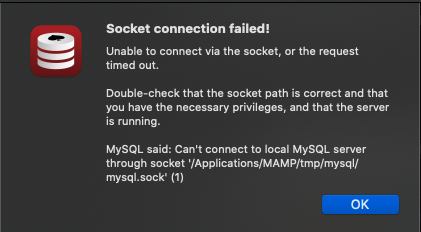

How can i fix this problem?
 CeoTang
on 8 Jul 2020
CeoTang
on 8 Jul 2020
I suspect you could skip the sandboxing and just talk to the socket without any fuss (this was a very confusing experience for me!) by doing a non-MAS release (see also #58).
 njvack
on 28 Jul 2020
njvack
on 28 Jul 2020
Indeed, we might have to use a file selector to select the socket, and use a bookmark... That would mean making that field mandatory.
I can't get the NSOpenPanel to display the socket file... it's there on the filesystem, not shown in the panel:
Quinn (The Eskimo) replied to my query: _"Can NSOpenPanel ever show a socket? e.g. /tmp/mysql.sock?"_
Doesn’t look like it. It makes sense that these are hidden because the sandbox extension it would issue to you app wouldn’t be helpful (because file sandbox extensions are for file operations, not for networking).
jamesstout
on 30 Jul 2020
This is kind of a bummer. I'd really like to finally have Sequel Pro in dark mode but I'd rather stick to just socket networking if possible.
Here's a workaround for MySQL installed with MacPorts.
- Figure out what "MySQL" variant and version you actually have installed and running. In my case I have
mariadb-10.1.
> port select --show mysql
The currently selected version for 'mysql' is 'mariadb-10.1'.
- Edit the corresponding
my.conffile at/opt/local/etc/{variant-version}/my.cnf. You will need root privileges (sudo). - Add the following:
[mysqld]
skip_networking=0
bind_address=127.0.0.1
- Restart the server.
> sudo port reload {variant-version}-server
- Set up a TCP/IP connection in Sequel Ace with Host set to "127.0.0.1". Other settings (excluding "Port") should be the same as what you had for your socket connection.
Note that if you want toi have multiple versions of MySQL running on your system concurrently, you'll need to add port={some number} with a different number for each version in step 3, and set the port number for each version in step 5.
Here's hoping Sequel Ace can get support for this worked out in the future. If it can't be done in the MAS sandbox, is a non-MAS release on the table?
 GarrettAlbright
on 2 Aug 2020
GarrettAlbright
on 2 Aug 2020
What's the benefit of using a socket exactly? Why not connect via TCP/IP? I know Sequel Pro was considering ditching socket pro support completely (as we may be forced to do as well).
Additionally, I have no desire to distribute both a sandboxed and non-sandboxed version of the app. That introduces a slew of issues for longterm support (supporting basically two apps instead of one). However, you can download the source code for Sequel Ace, disable the sandbox in Xcode, and build a custom build if you desire. I just think it's not sustainable long-term to support two different versions of the same app.
Jason-Morcos
on 2 Aug 2020
What's the benefit of using a socket exactly? Why not connect via TCP/IP? I know Sequel Pro was considering ditching socket pro support completely (as we may be forced to do as well).
It allows us to avoid the security concerns of running yet another theoretically network-accessible server, and the connection to the server is faster and has less overhead since requests go through local IPC rather than going through the network stack.
Granted, on local development machines, which I'm guessing is how most people use Sequel Pro/Ace, these things aren't as big of a concern, but they're a concern nonetheless.
Additionally, I have no desire to distribute both a sandboxed and non-sandboxed version of the app. That introduces a slew of issues for longterm support (supporting basically two apps instead of one). However, you can download the source code for Sequel Ace, disable the sandbox in Xcode, and build a custom build if you desire. I just think it's not sustainable long-term to support two different versions of the same app.
Okay, fair enough. I get it. I hope a solution to the socket issue presents itself, then.
For what it's worth, the built-in MySQL client in Coda 2, which is a MAS app, does support socket connections, so there must be a way.
GarrettAlbright
on 2 Aug 2020
For what it's worth, the built-in MySQL client in Coda 2, which is a MAS app, does support socket connections, so there must be a way.
I have Coda 2, will have a look. However, Coda 2 is no longer on the MAS: Coda 2.5 and the Mac App Store.
jamesstout
on 3 Aug 2020
I ended up using TCP connection
if anyone has trouble with that, change /usr/local/etc/my.cnf
[mysqld]
skip-grant-tables
#
# This group is read both both by the client and the server
# use it for options that affect everything
#
[client-server]

#
# include all files from the config directory
#
!includedir /usr/local/etc/my.cnf.d
⚠️ This disables all security ⚠️
But TCP connection to 127.0.0.1 will now work
I wish there was an unsandboxed release of Sequel Ace
 CaddyDz
on 3 Aug 2020
CaddyDz
on 3 Aug 2020
I have Coda 2, will have a look.
Ah, my version is the non-appstore version.
There's a link to an experimental sandboxed version, but it's broken.
jamesstout
on 3 Aug 2020
Any fix for this guys I am not able to use the tcp/ip also
 ShivamJoker
on 3 Aug 2020
ShivamJoker
on 3 Aug 2020
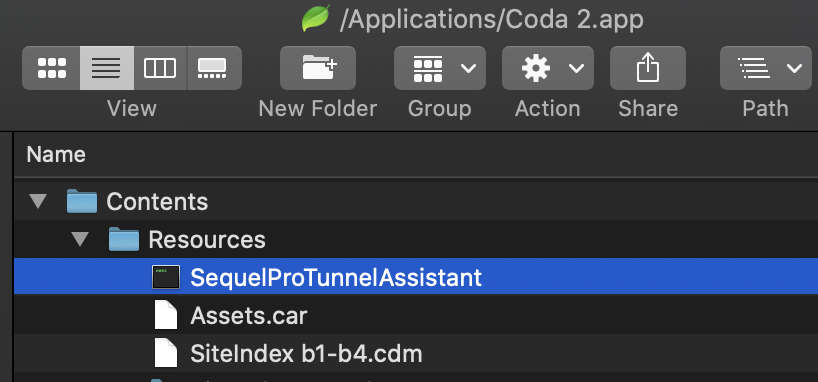
Hah, look what's inside the Coda 2 Resources folder:
jamesstout
on 3 Aug 2020
Any fix for this guys I am not able to use the tcp/ip also
Trying...
jamesstout
on 3 Aug 2020
I have Coda 2, will have a look. However, Coda 2 is no longer on the MAS: Coda 2.5 and the Mac App Store.
Ah, my mistake. I had forgotten they moved off of the MAS way back when.
GarrettAlbright
on 3 Aug 2020
OK, I've got it working, with one big caveat...
You need to change /usr/local/etc/my.cnf and add:
[mysqld]
socket=/Users/YourUser/Library/Containers/com.sequel-ace.sequel-ace/Data/mysql.sock
Is that no good?
jamesstout
on 3 Aug 2020
Does a symlink suffice?
EDIT: To clarify, I mean if I make a symlink at that location which points to the original socket location, would that work?
GarrettAlbright
on 3 Aug 2020
alas no
jamesstout
on 3 Aug 2020
Apple definitely needs to do something with sockets. Just thought what if mysqld will come sandboxed 🤣 (And they really can force everyone to do that on their hardware in some macOS version, say 12).
 stychos
on 3 Aug 2020
stychos
on 3 Aug 2020
EDIT: To clarify, I mean if I make a symlink at that location which points to the original socket location, would that work?
Nope, just tried it... it finds the symlink, but when it tries to connect it fails.
2020-08-03 19:33:06.854573+0800 Sequel Ace[53111:6224889] checking = /Users/james/Library/Containers/com.sequel-ace.sequel-ace/Data/mysql.sock
2020-08-03 19:33:06.854651+0800 Sequel Ace[53111:6224889] found = /Users/james/Library/Containers/com.sequel-ace.sequel-ace/Data/mysql.sock
james@Jamess-iMac: ~/Library/Containers/com.sequel-ace.sequel-ace/Data
$ ll /private/tmp/mysql.sock
srwxrwxrwx  1 james  wheel  0 Aug  3 19:30 /private/tmp/mysql.sock
jamesstout
on 3 Aug 2020
Until we can figure out a better sandbox workaround for sockets, I believe it may be worth adding info on this workaround into the app (if you select socket, it pops up an alert explaining this process). Does that seem like it makes sense to you too, @jamesstout?
Jason-Morcos
on 8 Aug 2020
Yeah sounds good.
jamesstout
on 9 Aug 2020
@Sequel-Ace/maintainers I forget who, but someone contacted Apple about this. Have we heard anything from Apple?
Jason-Morcos
on 18 Sep 2020
@Sequel-Ace/maintainers I forget who, but someone contacted Apple about this. Have we heard anything from Apple?
I did but got nothing back.
jamesstout
on 15 Oct 2020
Until we can figure out a better sandbox workaround for sockets, I believe it may be worth adding info on this workaround into the app (if you select socket, it pops up an alert explaining this process). Does that seem like it makes sense to you too, @jamesstout?
Done in #408 Please take a look @Jason-Morcos
jamesstout
on 16 Oct 2020

It does not work on sequel ace, MySQL Workbench also fixed this problem
CeoTang
on 22 Oct 2020
It does not work on sequel ace, MySQL Workbench also fixed this problem
@CeoTang Have you tried the instructions in the documentation?
https://sequel-ace.com/get-started/
Unfortunately, due to sandboxing nature, Sequel Ace is not allowed to connect to the sockets which are out of the Sandbox. As a workaround, you can create a socket in ~/Library/Containers/com.sequel-ace.sequel-ace/Data and connect to it. This can be done by putting these lines to your MySQL configuration file (usually, my.cnf):
[mysqld]
socket=/Users/YourUserName/Library/Containers/com.sequel-ace.sequel-ace/Data/mysql.sock
Jason-Morcos
on 22 Oct 2020
It does not work on sequel ace, MySQL Workbench also fixed this problem@CeoTang Have you tried the instructions in the documentation?
https://sequel-ace.com/get-started/Unfortunately, due to sandboxing nature, Sequel Ace is not allowed to connect to the sockets which are out of the Sandbox. As a workaround, you can create a socket in ~/Library/Containers/com.sequel-ace.sequel-ace/Data and connect to it. This can be done by putting these lines to your MySQL configuration file (usually, my.cnf):
[mysqld]
socket=/Users/YourUserName/Library/Containers/com.sequel-ace.sequel-ace/Data/mysql.sock
it's because I'm using MAMP PRO. When I stop the SQL service, the mysql.sock will be gone.
CeoTang
on 23 Oct 2020
Related issues
 ChrisGitIt
·
5Comments
ChrisGitIt
·
5Comments
 robertoschwald
·
4Comments
robertoschwald
·
4Comments
 augusl
·
6Comments
augusl
·
6Comments
 categoryshell
·
5Comments
categoryshell
·
5Comments
 ashatrov-realforce
·
4Comments
ashatrov-realforce
·
4Comments
Most helpful comment
It allows us to avoid the security concerns of running yet another theoretically network-accessible server, and the connection to the server is faster and has less overhead since requests go through local IPC rather than going through the network stack.
Granted, on local development machines, which I'm guessing is how most people use Sequel Pro/Ace, these things aren't as big of a concern, but they're a concern nonetheless.
Okay, fair enough. I get it. I hope a solution to the socket issue presents itself, then.
For what it's worth, the built-in MySQL client in Coda 2, which is a MAS app, does support socket connections, so there must be a way.