Sequel-ace: SSH Password Authentication Doesn't Work
I was excited to see someone bringing Sequel Pro back to life. I downloaded 2.0 from the App Store, and can't connect to any SSH server - the same way in which I have been using Sequel Pro for years. I get the error "The SSH Tunnel has unexpectedly closed.". When I click Show Detail, the popup disappears without telling me why.
- Sequel Pro Version: 2.0
- macOS Version: 10.15.5
- MySQL Version: 5.7
Description
A clear and concise description of what the bug is.
Steps To Reproduce


Expected Behaviour
Box appears explaining connection issue when clicking Show Detail.
 corecoding
All 43 comments
I have tried with and without a password, and, I also tried filling in the SSH user/password and port as well. Yes, Sequel Pro works with solely using the ssh alias in SSH Host.
Perhaps it is due to me running SSH on a non standard port?? I do not use 22.
corecoding
on 16 Jun 2020
You can't use an alias defined in your .ssh/config, because Sequel Ace uses a sandbox, which prevents it from accessing all files without your authorization (you selecting a file from a file selection dialog).
So you need to use the full hostname, and all other informations that might be defined in your .ssh/config file, including your SSH key if you want to use that.
But the Show Detail button should show you the output of the SSH executable trying to connect. That worked for me a few commits ago...
 gboudreau
on 16 Jun 2020
gboudreau
on 16 Jun 2020
We could make the visual more clear, regarding what values are required, and what the defaults are (using placeholder text). 22 for port, your Mac username as username, password-SSH key is mandatory, and for host, we should use text that makes it clear you need to enter an IP address or a FQDN hostname.
gboudreau
on 16 Jun 2020
@corecoding Just to be sure I have it right, you're unable to connect even after specifying all details needed in the connection view (and not relying on anything from your .ssh directory)? Sandboxing the app for the App Store means we can no longer access anything in your .ssh dir.
I'm gonna make a separate issue for the show details dialog disappearing.
 Jason-Morcos
on 16 Jun 2020
Jason-Morcos
on 16 Jun 2020
I have tried putting in all ssh details. At first I thought it was the non standard port number, so I tried setting my server back to 22. No go. So I decided to tail my auth.log and found something interesting. It seems that Sequel Ace is not using the password I put in the SSH Password box. And yes, I re-typed my password several times. I even logged in to the box without my keys to confirm by copying and pasting my password.


corecoding
on 16 Jun 2020
How about using a SSH key to login, instead of a password? Does that work?
gboudreau
on 16 Jun 2020
No, that's noted in the top part of the ticket. It doesn't work, and I was also told it won't because the app is sandboxed.
corecoding
on 16 Jun 2020
It should work, if you select the key file manually, by clicking the key button on the right of the password field. Once you select a file using a file selector dialog, the app has access to that file, and thus can use it to authenticate.
gboudreau
on 16 Jun 2020
I was selecting the public, not private cert. When picking private, I can connect in Sequel Ace. So it is just the password method that is not working.
corecoding
on 16 Jun 2020
Excellent, thanks for your time debugging this issue.
We found the issue regarding the Details button not working (see #21).
Can you rename your issue here to SSH password auth not working or something along those lines?
gboudreau
on 16 Jun 2020
Thanks @Jason-Morcos and @gboudreau for taking on this Sequel Ace refresh. I don't know how the rest of the community feels, but I for one would be willing to pay for the App Store version - after all, you have to pay a fee to get it into the store. A lot of apps support this model, where if you really wanted to, you can download the source and build your own binary for free.
corecoding
on 16 Jun 2020
The "show details" bug is set to be fixed in the next release!
We definitely need to support password authentication for ssh. Unfortunately, I don't have a test box for password auth ssh. @gboudreau do you have any idea what might be breaking ssh w/ password auth?
Jason-Morcos
on 16 Jun 2020
If you can point me to the code that passes the password, I can debug what it is sending using my box. Won’t be until later tonight though.
corecoding
on 16 Jun 2020
You probably want to look at https://github.com/Sequel-Ace/Sequel-Ace/blob/master/Source/SequelAceTunnelAssistant.m#L79-L137 - it's hopefully in the SPSSHPasswordUsesKeychain branch...
 rowanbeentje
on 16 Jun 2020
rowanbeentje
on 16 Jun 2020
I have a few minutes now; I'll take a look, and report any findings.
gboudreau
on 16 Jun 2020
Seems SequelAceTunnelAssistant is not doing its job (at all); it should prompt the user, when a new host is found, and that didn't work, and that's why we had to add -o StrictHostKeyChecking=no.
And it's also in charge of sending the password to ssh, and it's also not doing it.
I can't seem to figure out why, or how it could be debugged. Running it from the command line, I just get Killed: 9 and return code 137.
I tried replacing the content of the main() function in there with
NSLog(@"SSH Tunnel: DBG: starting...");
return 0;
But still, it errors-out...
I tried running /Applications/Sequel\ Pro.app/Contents/Resources/SequelProTunnelAssistant from Terminal, and it seems to work fine.
gboudreau
on 16 Jun 2020
Is it something about the sandbox blocking the execution of the assistant?
Jason-Morcos
on 16 Jun 2020
Don't think so, no. I tried to disable Sandbox on both SequelAce and the Assistant, and the issue persists.
gboudreau
on 16 Jun 2020
Good new I guess is if we can figure out how to get the assistant to prompt perhaps we can get #13 fixed too!
It seemed to work in the latest version of Sequel Pro so something probably broken by recent changes?
Jason-Morcos
on 16 Jun 2020
f0987c5354dcadf4a13aa5595504977b157158a0 works as expected; I'll git bisect again, to find the commit that caused the issue (pretty sure it's near the beginning, when stuff was renamed).
gboudreau
on 16 Jun 2020
I'm 99% sure it's one of my commits, @gboudreau lol. There was a lot going on there trying to rename everything, I probably screwed something up.
Jason-Morcos
on 16 Jun 2020
I was too quick to NOT blame sandboxing; commit that broke it: 8b9779a0b95278c79e8484d7ff65e6d0d4db7565
i.e. adding sandbox=YES to the assistant
One needs to Clean and Rebuild to correctly test!
gboudreau
on 17 Jun 2020
Welp I wish it _wasn't_ another sandboxing issue but I guess that's to be expected.
I wonder if it has something to do with _where_ the helper is being kept. If we kept it somewhere else if we wouldn't be having issues. Or if it's just another entitlement the app is lacking?
Jason-Morcos
on 17 Jun 2020
Interestingly @gboudreau the commit you found is the one that set sandboxing true for the tunnel assistant, not the one that set it true for the main target. Which suggests the issue is actually coming from the assistant=>app not app=>assistant! Which would be why we're not seeing any error in the logs. Almost need to set up an error log file for the assistant to try to see what's failing
Jason-Morcos
on 17 Jun 2020
https://developer.apple.com/library/archive/documentation/Miscellaneous/Reference/EntitlementKeyReference/Chapters/EnablingAppSandbox.html#//apple_ref/doc/uid/TP40011195-CH4-SW15 Suggests that maybe sandbox inheritance may smooth things out?
rowanbeentje
on 17 Jun 2020
@rowanbeentje That was a good pointer, but that didn't help.
But it seems turning Off sandbox on the Assistant works.
@Jason-Morcos Do you know (did you try?) if you could publish on the app store with the App sandboxed, and the Assistant not sandboxed?
gboudreau
on 17 Jun 2020
I believe not. I think I read somewhere that you need to sandbox every target of your application. I can try, but I'm almost certain it will get rejected.
https://developer.apple.com/library/archive/documentation/Security/Conceptual/AppSandboxDesignGuide/AboutAppSandbox/AboutAppSandbox.html#//apple_ref/doc/uid/TP40011183
Jason-Morcos
on 17 Jun 2020

For people investigating - looks like sandbox violations get thrown into Console.app
Jason-Morcos
on 17 Jun 2020
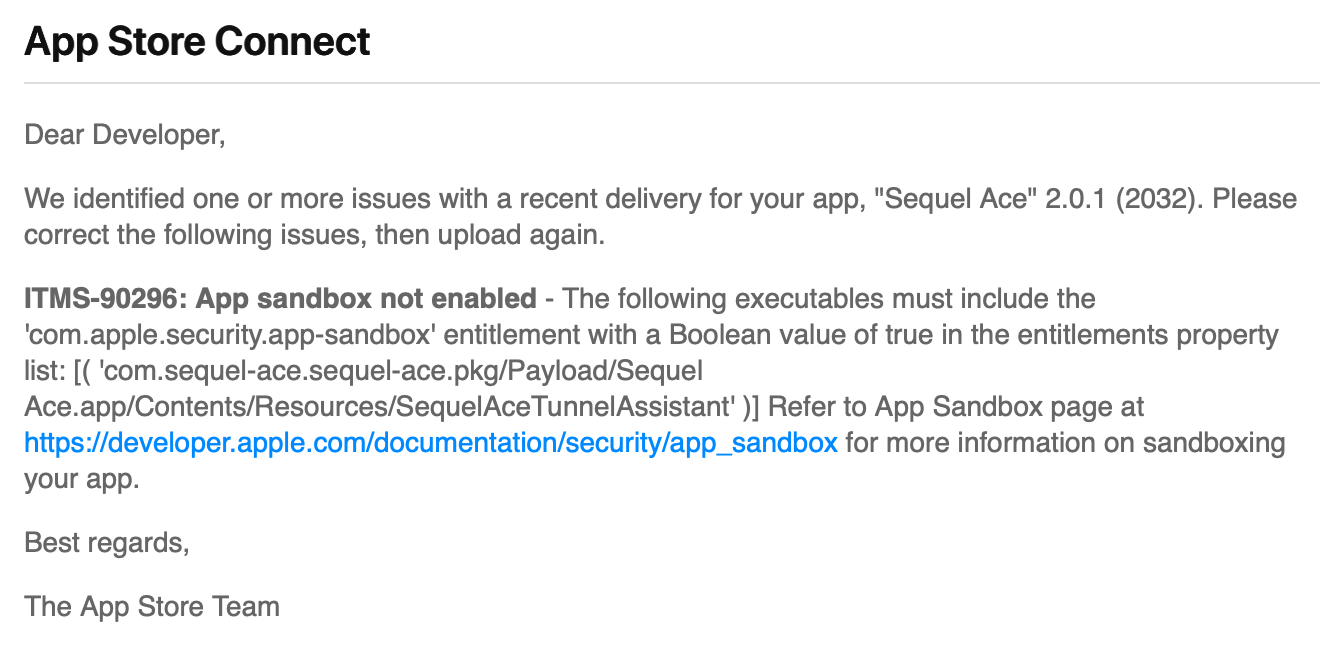
@gboudreau Nope :(
Reverted commit removing sandboxing from helper (so dev is still submittable to App Store)
Jason-Morcos
on 17 Jun 2020
From Console.app, when trying to connect using SSH and an unknown host (and removed -o StrictHostKeyChecking=no)
amfid   Requirements for restricted entitlements failed to validate, error -67050, requirements: 'anchor apple or anchor apple generic and certificate leaf[field.1.2.840.113635.100.6.1.9] /* exists */', error: (null)
amfid   Restricted entitlements not validated, bailing out. Error: (null)
kernel  AMFI: code signature validation failed.
amfid   /Users/gb/Library/Developer/Xcode/DerivedData/sequel-ace-bsqebxvxmcbhqnhfwexwrhjpqnga/Build/Products/Debug/Sequel Ace.app/Contents/Resources/SequelAceTunnelAssistant signature not valid: -67050
kernel  AMFI: bailing out because of restricted entitlements.
kernel  proc 56877: load code signature error 4 for file "SequelAceTunnelAssistant"
kernel  Security policy would not allow process: 56877, /Users/gb/Library/Developer/Xcode/DerivedData/sequel-ace-bsqebxvxmcbhqnhfwexwrhjpqnga/Build/Products/Debug/Sequel Ace.app/Contents/Resources/SequelAceTunnelAssistant
code signature validation failed
$ codesign -vv "/Users/gb/Library/Developer/Xcode/DerivedData/sequel-ace-bsqebxvxmcbhqnhfwexwrhjpqnga/Build/Products/Debug/Sequel Ace.app/Contents/Resources/SequelAceTunnelAssistant"
/Users/gb/Library/Developer/Xcode/DerivedData/sequel-ace-bsqebxvxmcbhqnhfwexwrhjpqnga/Build/Products/Debug/Sequel Ace.app/Contents/Resources/SequelAceTunnelAssistant: valid on disk
/Users/gb/Library/Developer/Xcode/DerivedData/sequel-ace-bsqebxvxmcbhqnhfwexwrhjpqnga/Build/Products/Debug/Sequel Ace.app/Contents/Resources/SequelAceTunnelAssistant: satisfies its Designated Requirement
So signature seems ok...
gboudreau
on 17 Jun 2020
Not sure it that matters, but if I codesign --verify the .app, the Assistant is not listed...
$ codesign --verify --deep --strict --verbose=2 "/Users/gb/Library/Developer/Xcode/DerivedData/sequel-ace-bsqebxvxmcbhqnhfwexwrhjpqnga/Build/Products/Debug/Sequel Ace.app"
--prepared:/Users/gb/Library/Developer/Xcode/DerivedData/sequel-ace-bsqebxvxmcbhqnhfwexwrhjpqnga/Build/Products/Debug/Sequel Ace.app/Contents/Frameworks/ShortcutRecorder.framework/Versions/Current/.
--prepared:/Users/gb/Library/Developer/Xcode/DerivedData/sequel-ace-bsqebxvxmcbhqnhfwexwrhjpqnga/Build/Products/Debug/Sequel Ace.app/Contents/Frameworks/PSMTabBar.framework/Versions/Current/.
--prepared:/Users/gb/Library/Developer/Xcode/DerivedData/sequel-ace-bsqebxvxmcbhqnhfwexwrhjpqnga/Build/Products/Debug/Sequel Ace.app/Contents/Frameworks/QueryKit.framework/Versions/Current/.
--validated:/Users/gb/Library/Developer/Xcode/DerivedData/sequel-ace-bsqebxvxmcbhqnhfwexwrhjpqnga/Build/Products/Debug/Sequel Ace.app/Contents/Frameworks/ShortcutRecorder.framework/Versions/Current/.
--validated:/Users/gb/Library/Developer/Xcode/DerivedData/sequel-ace-bsqebxvxmcbhqnhfwexwrhjpqnga/Build/Products/Debug/Sequel Ace.app/Contents/Frameworks/PSMTabBar.framework/Versions/Current/.
--prepared:/Users/gb/Library/Developer/Xcode/DerivedData/sequel-ace-bsqebxvxmcbhqnhfwexwrhjpqnga/Build/Products/Debug/Sequel Ace.app/Contents/Frameworks/SPMySQL.framework/Versions/Current/.
/Users/gb/Library/Developer/Xcode/DerivedData/sequel-ace-bsqebxvxmcbhqnhfwexwrhjpqnga/Build/Products/Debug/Sequel Ace.app: unsealed contents present in the root directory of an embedded framework
In subcomponent: /Users/gb/Library/Developer/Xcode/DerivedData/sequel-ace-bsqebxvxmcbhqnhfwexwrhjpqnga/Build/Products/Debug/Sequel Ace.app/Contents/Frameworks/SPMySQL.framework
Moved from resources => auxiliary executable but still no dice for me
https://github.com/Sequel-Ace/Sequel-Ace/commit/cd4f3602bd0fcd68971b545910ee25d75d71b74e
Jason-Morcos
on 17 Jun 2020
For people investigating - looks like sandbox violations get thrown into Console.app
I'm not sure why it's trying to read all the files from the user's ssh directory either. We should probably axe that, wherever it is
Jason-Morcos
on 17 Jun 2020
The ssh executable is looking into those folders itself; nothing we can do about it, unless there are some command-line options to ask it to not do that.
gboudreau
on 17 Jun 2020
I tinkered with this a little bit more this morning and couldn't see anything in the console logs that would explain why sandboxing is harming the helper. It's possible we have to rethink the helper more - perhaps changing the way it's compiled/signed or something. I still believe it's the helper being unable to talk to the app, not the app to the helper, that's the issue.
Jason-Morcos
on 17 Jun 2020
Thank you!
corecoding
on 19 Jun 2020
@Jason-Morcos I think this was closed by error, when you merged my PR that was reverted..? Same for #13.
gboudreau
on 19 Jun 2020
It looks like the Sequel Pro team (@dmoagx) had done a little work on the password auth system that never got merged in. Is this something we'd want to consider merging over to Sequel Ace? Probably doesn't fix our password auth error directly, but it perhaps might (I know I have no idea really why password auth doesn't work). https://github.com/sequelpro/sequelpro/commits/callback-auth
Jason-Morcos
on 21 Jun 2020
I think I've got this fixed! I don't have a DB that doesn't use keys to connect to to test on. The issue should be fixed on the dev branch. Could someone give it a try and let me know if it works now or not?
Jason-Morcos
on 21 Jun 2020
Made an RC to make it easier to test! https://github.com/Sequel-Ace/Sequel-Ace/releases/tag/2.0.2-rc1
Please give it a try, @corecoding!
Jason-Morcos
on 21 Jun 2020
It is working! I can connect to my local box and a production box perfectly. I tried using passwords and keys. I also noticed that Sequel Ace is asking me about new SSH fingerprints as well. NICE!!
corecoding
on 21 Jun 2020
Woot woot!!! So happy to hear it!
Jason-Morcos
on 21 Jun 2020
Related issues
 robertoschwald
·
4Comments
robertoschwald
·
4Comments
 vuon9
·
4Comments
vuon9
·
4Comments
 stychos
·
6Comments
stychos
·
6Comments
 gms8994
·
6Comments
Jason-Morcos
·
7Comments
gms8994
·
6Comments
Jason-Morcos
·
7Comments