Sentry: User Self Registration does not work as expected
Important Details
On-Premise w/ Docker, version 10.1.0.dev0f879199
Description
~- customization of sentry.conf.py is not copied into image (.dockerignore)~
- Registration of new User results in
No Organization Access - No possibility to add a registered user to Organisation or Team (also not visible under Members page)
- No possibility to configure automated joining an organisation/team for new users
Steps to Reproduce
- clone repository
~-cp sentry/sentry.conf.example.py sentry/sentry.conf.py~ ./install.sh&&docker-compose up -d- Login as superuser:
- Allow Registration
- enable Open Membership
- disable Join Requests (because they require manual work by superuser. this is stupid)
- Logout / inkognito browser -> Register as new User, complete email verification. After successful Login sentry now tells:
No Organization Access
Things going wrong
~- sentry.conf.py is not copied into image, because it's .dockerignore'd~
- New User is not visible under Members page so it even can not be added to Organisation/Team manually. Admin/Users page is completely useless
How is that whole procedure supposed to work?
Edit: Edited text to strip down actual problem
 sgohl
sgohl
All 12 comments
The sentry.conf.py config file is volume-mounted at runtime here: https://github.com/getsentry/onpremise/blob/master/docker-compose.yml#L27 - that is, it is never meant to be built/copied into the image (hence its inclusion in .dockerignore).
The install.sh script will also automatically generate a sentry.conf.py file, which is meant to be modified _after_ install.sh runs.
After going through that process (enabling Open Membership and disabling Join Requests), I was able to register as a new user with the e-mail invite link and join the default sentry organization.
(note: not a maintainer here or anything. Just happened to be searching for another issue related to running in Docker and ran across yours)
 schrodingersket
on 14 May 2020
schrodingersket
on 14 May 2020
The sentry.conf.py config file is volume-mounted at runtime here:
I see, I just looked at the wrong place.
and join the default sentry organization
how exactly did you do this? I use the validation Link from the Button in the Mail, then I'm logged in but all I have access to is my users settings ... I'm clicking around like an idiot, but I can't find a way to join the Organization. I just see on the settings startpage

If I refresh the page, I am locked to see nothing but this:

sgohl
on 14 May 2020
Here are my organization settings:
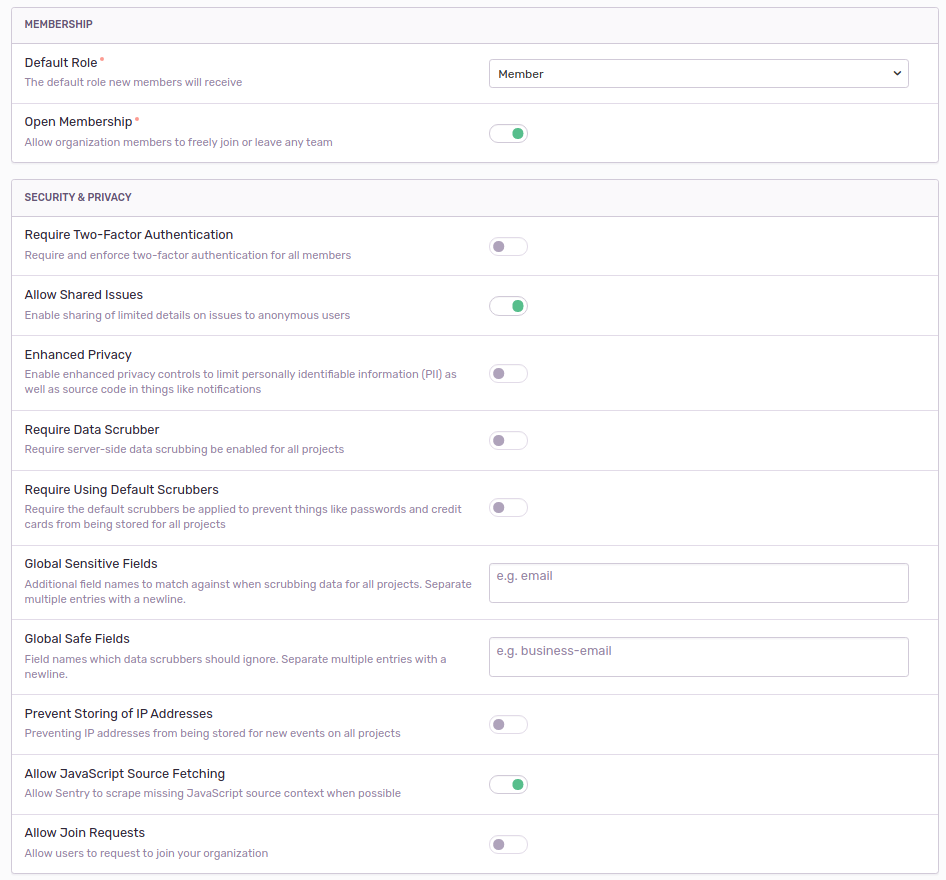
Then sent an invite as such:

Since I don't have an e-mail config lying around, I just pulled up the invite link directly and opened in an incognito window:

Then clicked "Create a new account":

Went to the "Register" tab:

...which then brought me to the main page where I could join a team:

_et voilà_:

Apologies for all the screenshots, but figured it'd be the easiest way to convey what worked for me (:
schrodingersket
on 14 May 2020
You showed the Invitation process. This not a User's Registration .. Yes, Inviting works for me, too.
But Users can not register for themselves. I don't want to be bothered once every hour for a new user to accept a Join Request or even create Invites.
Actually, this all is even a workaround for the removed ability to auth-ldap or Gitlab :-(
sgohl
on 14 May 2020
Ahhhhh, I see what you mean now. You're looking for a way for new users to automatically be added to an _Organization_, and not just the ability to join a team. I haven't seen a way to do that, unfortunately.
That said, since you're looking for the ability to authenticate via GitLab, Sentry does have generic SAML2 support, which it looks like GitLab supports: https://docs.gitlab.com/ee/user/group/saml_sso/
Hopefully that helps (:
schrodingersket
on 15 May 2020
Unfortunately, Gitlab (onpremise) is only able to act as a Service Provider for an already existing SAML IdP Provider and sentry itself already can be connected to an ADFS, so you can login to Gitlab using your already existing Identity Provider.
https://docs.gitlab.com/ee/integration/saml.html
GitLab can be configured to act as a SAML 2.0 Service Provider (SP). This allows GitLab to consume assertions from a SAML 2.0 Identity Provider (IdP) such as Microsoft ADFS to authenticate users.
We have Active Directory (ompremise), but I can't figure out how this ADFS stuff is working, I don't have a clue about this microsoft stuff and their docs about that topic are useless.
Trying to set up GitLab Omniauth for SAML, this was the point where I was hitting a wall:
gitlab_rails['omniauth_providers'] = [
  {
    name: 'saml',
    args: {
             idp_sso_target_url: 'https://login.example.com/idp',
You're looking for a way for new users to automatically be added to an Organization
well, in the first place I just wanted that the Users Self Registration actually works how it should.
But a users registration is pointless, when
1) user doesnt have the possibility to join a team and just see a NO ORG page
2) yet administrator is not able to add this new user to an organization or team because the admin/users page is useless
sgohl
on 16 May 2020
- user doesnt have the possibility to join a team and just see a NO ORG page
If I understand correctly, the Organization/Team construct is hierarchical in that a Team cannot exist independently of an Organization. With that in mind, I wouldn't expect to be able to join a team without joining the Organization.
Regarding SAML auth (and this is getting a bit off-topic for this issue, I admin) - Since GitLab seems to support OpenID Connect as an authentication backend and ADFD exposes an OIDC endpoint (https://docs.microsoft.com/en-us/windows-server/identity/ad-fs/development/ad-fs-openid-connect-oauth-concepts), you might be able to chain that all together with Sentry.
At this point, my expertise ends and I must simply wish you the best of luck (:
schrodingersket
on 16 May 2020
Pretty sure this is due to #16247: User registration gets broken when SSO is enabled.
/cc @EvanPurkhiser who said we may look into this.
 BYK
on 18 May 2020
BYK
on 18 May 2020
I have none of the available Auth Providers enabled; how else to check if SSO is enabled ?
sgohl
on 18 May 2020
@port22 just verified that this exactly the same issue but even w/o SSO enabled.
Will see how we can resolve this ASAP, thanks for reporting.
BYK
on 19 May 2020
Have a fix brewing here: https://github.com/getsentry/sentry/pull/18922
 EvanPurkhiser
on 20 May 2020
EvanPurkhiser
on 20 May 2020
Related issues
 dcramer
·
4Comments
dcramer
·
4Comments
 Aletz-Arce
·
3Comments
Aletz-Arce
·
3Comments
 maefinho
·
3Comments
dcramer
·
4Comments
maefinho
·
3Comments
dcramer
·
4Comments
 mattrobenolt
·
3Comments
mattrobenolt
·
3Comments
Most helpful comment
@port22 just verified that this exactly the same issue but even w/o SSO enabled.
Will see how we can resolve this ASAP, thanks for reporting.