Sentry: VSTS Integration: Cannot set up Azure DevOps with On premise sentry
I'm just trying to set up sentry to work with Azure DevOps, and when I press the Add Installation button, all I get is a big fancy error dialog. Any help would be much appreciated.
Error Text:
BAD REQUEST
We didn't understand the syntax of the request
More information about this error
Exception of type 'Microsoft.VisualStudio.Services.Web.Profile.Controllers.DelegatedAuthorizationException' was thrown.

Additional technical details:
Activity ID: cd13b21d-eb9c-4396-8d5c-4ab38e10d482
Date and Time: 5/7/2019 6:13:30 PM (UTC)
Other info:
Sentry on-premise, version 9.1.1, using docker image.
 josh-degraw
All 16 comments
Did you configure the integration? Theis issue #12675 has some more context.
 markstory
on 7 May 2019
markstory
on 7 May 2019
I was under the impression that that is what I was about to do after installing. Would I just put that in my sentry.conf.py file? I can't seem to find any documentation on where or how to set that up.
josh-degraw
on 10 May 2019
The integration setup is for pairing sentry and azure. You first need to create an oauth consumer. The docs don't exist just yet, but there are a few values in sentry.options that need to be setup in your config file.
markstory
on 10 May 2019
Okay thanks. And where exactly am I supposed to set up the oauth consumer?
josh-degraw
on 10 May 2019
@josh-degraw You would need to create the oauth application in azure and the put the credentials into sentry configuration.
markstory
on 13 May 2019
Okay great, thanks, I'll close this issue.
For future reference for myself and anyone else who may have this same problem, this looks like the right place to set this up:
josh-degraw
on 13 May 2019
Okay, I know I closed this, but I could use just a little more clarification.
I found conflicting documentation as to what settings need to be configured where.
In this documentation, it says to do:
VISUALSTUDIO_APP_ID = 'App ID'
VISUALSTUDIO_APP_SECRET = 'App Secret'
VISUALSTUDIO_CLIENT_SECRET = 'Client Secret'
VISUALSTUDIO_SCOPES = ['vso.project', 'vso.work_write', 'vso.code', 'vso.release']
I was given all of these values, I plugged then into my sentry.conf.py, but it didn't work still- same error.
But then, I checked with the config.yml I used with the bootstrap docker project, and it's expecting vsts.client-id and vsts.client-secret in the yaml, or SENTRY_VSTS_CLIENT_ID and SENTRY_VSTS_CLIENT_SECRET as environment variables. The values did at least get loaded using this approach, but my problem is I'm not even given a client id when registering the application, which makes me wonder if there may be a disconnect between previous versions of the integration or something like that.
josh-degraw
on 15 May 2019
The documentation page you linked to is for the project level plugin version of vsts which is not the same as the organization integration you are trying to configure.
The option names are what you want to use.
markstory
on 15 May 2019
Okay thanks for the clarification. Then my real question is just which id/secret am I actually supposed to use? I'm given an App Id, App Secret, and Client Secret, but no Client id like it's expecting. I've put the App id as clientid and tried both secrets and I still get the same 400 error.
josh-degraw
on 15 May 2019
You should use App Id as client id, and Client Secret as the secret. You will need to hard restart sentry for those option changes to take effect.
markstory
on 15 May 2019
Okay, so I just did that and still no dice.
The only other thing that I can think of that would be causing the issue is the callback url? I used the template I got from one of those sources above and did
<our site>/account/settings/social/associate/complete/visualstudio/
Is that correct or should that be changed to something else?
(Thanks for all the help, by the way)
josh-degraw
on 15 May 2019
Can VSTS reach your sentry install? Often lack of network connectivity causes problems with integrations and on-premise.
markstory
on 15 May 2019
Yes, we've verified that it's public and that ssl is configured correctly.
So you're saying that should at least be the correct callback path above?
josh-degraw
on 16 May 2019
I finally figured it out!
Posting how I resolved this for if anyone else having similar issues stumbles upon this:
I checked the authorization url that sentry was using that was showing me the Microsoft 400 error, and modified my app accordingly.
I changed my callback url to <our site>/extensions/vsts/setup/, and I finally got different errors, and these error messages were at least finally from sentry, not microsoft.
The first one I got was Invalid Scope. I had originally specified the scopes via the legacy integration above, as vso.code, vso.project, vso.release, and vso.work_write.
The authorization url that I saw the Microsoft error on specified scopes:
vso.code, vso.graph, vso.serviceendpoint_manage, and vso.work_write.
So I tried those, and then I got the following error message from sentry in the popup window:
Whoops! Looks like something went wrong! Give that another try.

An error occurred while validating your request.
After a while, just before I was about to post here again asking for more help, just for the heck of it I clicked install again and this time it worked!
Now I just need to figure out how to associate the commits.. 😂
josh-degraw
on 17 May 2019
Here are all the steps for connecting sentry/onpremise to Azure DevOps, in 15 minutes or fewer, together in one place:
Step 1. Tell Azure DevOps about your onpremise Sentry instance
- Register an app at https://app.vsaex.visualstudio.com/app/register, use the following settings:
- Authorization callback url:
https://sentry.yourcompany.com/extensions/vsts/setup/.
So,http(s)://+<hostname of your Sentry installation>+/extensions/vsts/setup/. If you use Sentry in multi-organisation mode, then it's still the same formula, do n͟o͟t add extra path segments. - Authorized scopes:
vso.code,vso.graph,vso.serviceendpoint_manage, andvso.work_write. Use these four scopes exactly -
do n͟o͟t add extra scopes. If you encounter anInvalidScopeerror message later, check this step first, and any changes to this method of the sentry plugin source code. - After registering the app, write down the
App IDand theClient Secret(the longest of the two secret strings) that Azure DevOps shows you.
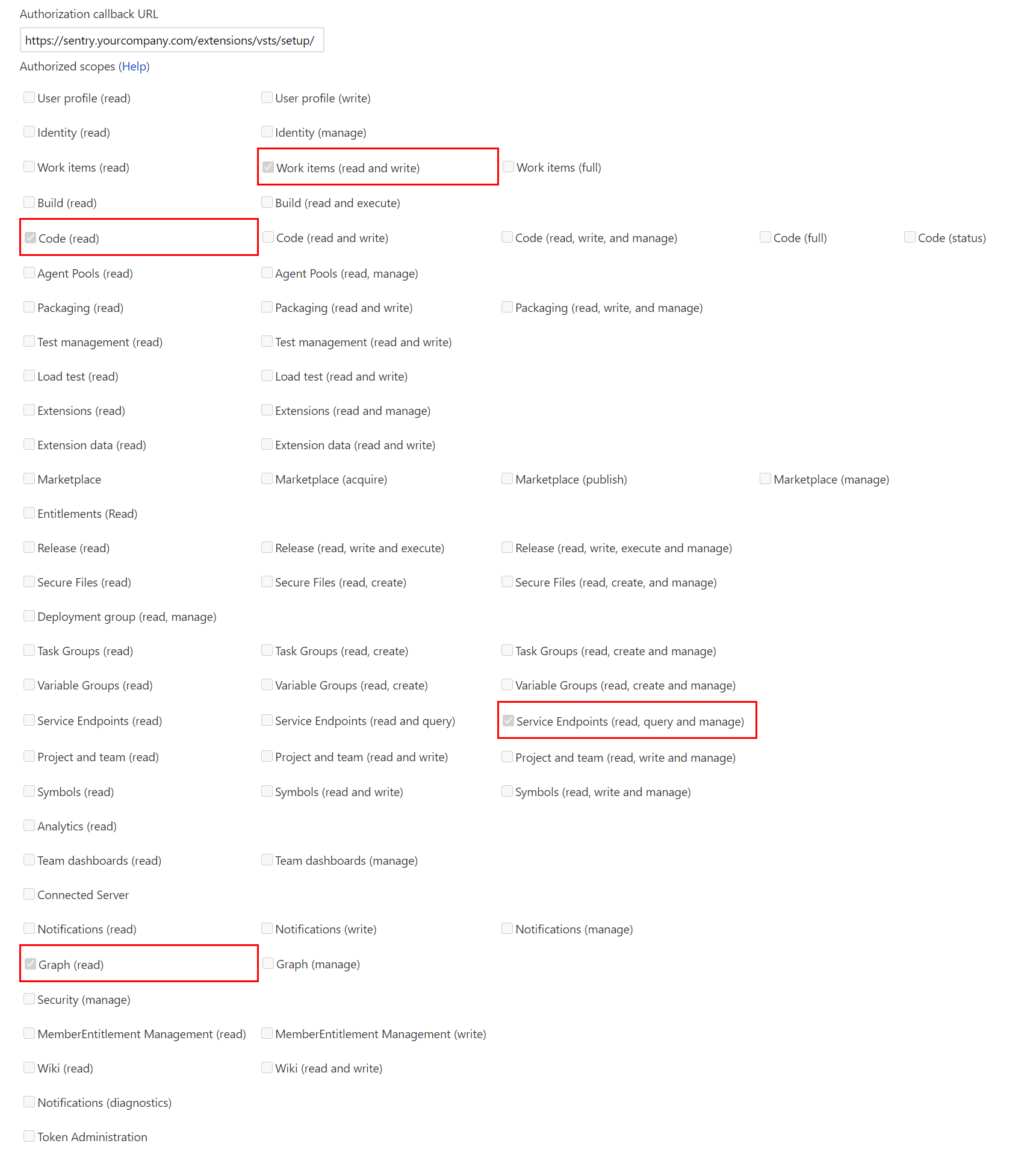
Step 2. Tell your onpremise Sentry instance about your new Azure DevOps app
- Edit
sentry/config.ymland add:
vsts.client-id: '<your App ID>'
vsts.client-secret: '<your client secret>'
- Run
install.shagain to have Sentry pick up the change. This will take a few minutes of downtime for you Sentry installation. It will also upgrade you to the latest version of Sentry. It does not (at least, it should not) erase any of your data. - Run
docker-compose up -dto start Sentry.
Step 3. Connect your Sentry to Azure DevOps
- In your Sentry installation, find the Azure DevOps integration page, click the
Add Installationbutton, and follow the steps.
 georghendrik
on 29 Jul 2020
georghendrik
on 29 Jul 2020
it doesnt work for me, whenever i select the azure account, it keeps going back in circles to select the account ....
btw, i have multi project azure
 Perfect-Web
on 5 Aug 2020
Perfect-Web
on 5 Aug 2020
Related issues
 zoltanlaczko
·
29Comments
zoltanlaczko
·
29Comments
 adamreisnz
·
30Comments
adamreisnz
·
30Comments
 anthonyangel
·
58Comments
anthonyangel
·
58Comments
 dcramer
·
34Comments
dcramer
·
34Comments
 saytik
·
24Comments
saytik
·
24Comments
Most helpful comment
I finally figured it out!
Posting how I resolved this for if anyone else having similar issues stumbles upon this:
I checked the authorization url that sentry was using that was showing me the Microsoft 400 error, and modified my app accordingly.
I changed my callback url to
<our site>/extensions/vsts/setup/, and I finally got different errors, and these error messages were at least finally from sentry, not microsoft.The first one I got was
Invalid Scope. I had originally specified the scopes via the legacy integration above, asvso.code,vso.project,vso.release, andvso.work_write.The authorization url that I saw the Microsoft error on specified scopes:
vso.code,vso.graph,vso.serviceendpoint_manage, andvso.work_write.So I tried those, and then I got the following error message from sentry in the popup window:
After a while, just before I was about to post here again asking for more help, just for the heck of it I clicked install again and this time it worked!
Now I just need to figure out how to associate the commits.. 😂