Sentry: vsts: UnsupportedResponseType: text/html; charset=utf-8
https://sentry.io/share/issue/312e333535313939393137/
UnsupportedResponseType: text/html; charset=utf-8
  File "sentry_plugins/client.py", line 56, in from_response
    raise UnsupportedResponseType(response.headers['Content-Type'], response.status_code)
  File "sentry_plugins/client.py", line 140, in _request
    return BaseApiResponse.from_response(resp)
  File "sentry_plugins/client.py", line 205, in _request
    *args, **kwargs)
  File "sentry_plugins/vsts/client.py", line 26, in request
    return self._request(method, path, headers=headers, data=data, params=params)
  File "sentry_plugins/client.py", line 153, in patch
    return self.request('PATCH', *args, **kwargs)
...
(3 additional frame(s) were not displayed)

text/html; charset=utf-8
 dcramer
All 34 comments
I've still yet to determine exactly why its unhappy about this, as we seem to be doing everything correctly per the docs. Google'ing for this hasn't yield much help other than people having this issue on some microsoft services, which could simply be related to the webserver they use.
dcramer
on 25 Sep 2017
Struggling to repro again locally, but fixed a couple of more items here:
https://github.com/getsentry/sentry-plugins/pull/251
And improving the response handling (at least our assumptions) here:
dcramer
on 25 Sep 2017
I was seeing if there was anything I could potentially help with from my side. I thought I'd check the URL formats you are hitting (Projects and Work Items) and they both return valid data for my instance.
That's when I noticed a "my bad". As a typical user, I didn't read/understand the labels and entered this:
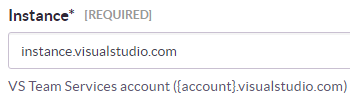
... where you were probably expecting this:
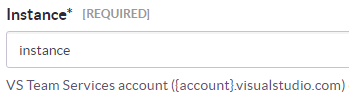
Using instance.visualstudio.com produces the text/html; charset=utf-8 error. Using just instance produces a different error:
An internal error occurred with the integration and the Sentry team has been notified
As a suggestion, perhaps the integration could do some form validation and prevent strings ending in .visualstudio.com.
 stajs
on 26 Sep 2017
stajs
on 26 Sep 2017
It's actually expecting 'example.visualstudio.com'. If you put 'instance', then we would query 'https://instance/'.
dcramer
on 26 Sep 2017
Ah, good to know that I was right first time ;) Sorry about the diversion...
stajs
on 26 Sep 2017
Just to share one other thing, VSTS allows you to query the Web API for projects by name or GUID. I tried changing the Sentry integration to use the project GUID but it didn't work.
stajs
on 26 Sep 2017
@stajs So I've pushed out a few various improvements. I dont think its going to resolve anything, but can you try again and let me know if you're seeing this issue?
dcramer
on 27 Sep 2017
Still, got the charset error when linking. Is the Work Item ID expecting an integer? I'll re-add the identity to see if that affects anything...
stajs
on 27 Sep 2017
Re-adding the identity didn't help.
stajs
on 27 Sep 2017
Yeah linking is the issue # which is an integer. Will try to find someone at visual studio to help us figure out what’s going on at this point. I don’t actually even know how to reproduce it anymore, but I definitely hit this in some cases early in development.
dcramer
on 27 Sep 2017
Not ideal I know, but feel free to ping me if you want me to reproduce it.
You guys have got way more detail than I do, but perhaps I can throw out some thoughts to try reverse-rubber ducking. I'm definitely not attempting to teach you how to suck eggs here!
- What's the content/headers of the response? When I first saw HTML content, I thought VSTS might be throwing up a sign-in page, but it's not a 401.
- A 203 suggests a proxy server has transformed the content. I don't suppose you have a proxy on your side fiddling with things? Can you un-transform it?
- Is it actually unauthorized? This guy got a 203 with a sign-in page.
- You are using OAuth, right? Access token hasn't expired (or nearly expired)? Docs say they "expire relatively quickly", how long do they last? Perhaps a call to refresh the token, right before the actual API call? You mentioned this is errorring on the refresh, so might not be relevant.
- Can you test with a Personal Access Token instead? It might help prove it is an OAuth problem.
- I assume this works for other VSTS users. I wouldn't be surprised if there was something unusual with the way our company has set up VSTS. I could potentially try and set up a personal VSTS account to test.
stajs
on 27 Sep 2017
@stajs
- I also assumed it was a signup page. I will try to grab the output when I get a moment, but it was some page saying 'the browser doesnt support blah blah'
- No proxies anywhere on our side.
- I'm not sure its unauthorized, but I'm pretty confident that when I refreshed a token previously it resolved the 203 page.
- We automatically fetch a new access token when the refresh token has expired
- Even if the personal access token works, it doesnt really help our situation, so unlikely to invest any effort there
- I doubt its related to your company, but hoping the VSTS team can shed more light. Again we saw it on our test account at least at one point.
dcramer
on 27 Sep 2017
Received a note to make sure we're using the application/json-patch+json. I mistakenly thought we had deployed the latest changes to sentry-plugins, and it turns out that we had an issue in our system that automatically bumps these revisions and it never happened. I'm going to get that out today.
dcramer
on 2 Oct 2017
@stajs mind giving it a shot now?
dcramer
on 2 Oct 2017
New problem:
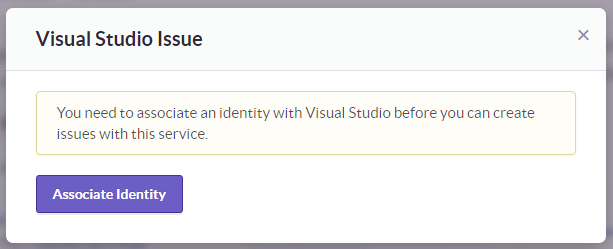
You need to associate an identity with undefined before you can create issues with this service.
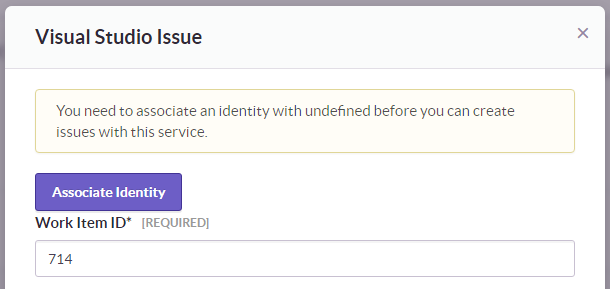
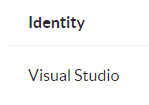
Before doing anything else, I double checked that I had an identity and I did:

I disconnected it, and then tried to Associate Identity under the error message (first screenshot). I followed the flow to VSTS and back to Sentry and confirmed that the Identity was showing up again under My Settings > Identities. I tried to Link with Existing Issue again but the new problem still shows.
stajs
on 2 Oct 2017
@stajs to confirm, you're just getting a "Not Authenticated" problem?
dcramer
on 2 Oct 2017
Sorry, not understanding the question. I don't see any authentication problems...
If you mean with the Identity flow to VSTS, I can screenshot the flow:
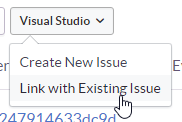
- Disconnect the Visual Studio identity:

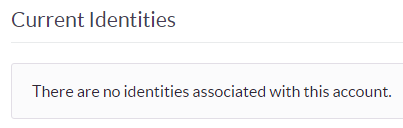
- Link:
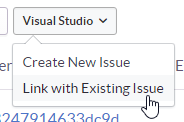
- Associate identity:
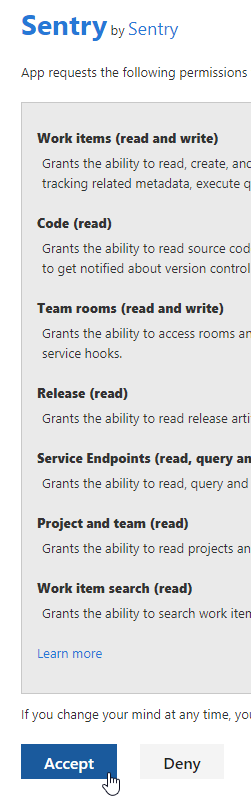

- Confirm identity:
- Try linking again:
- New problem:
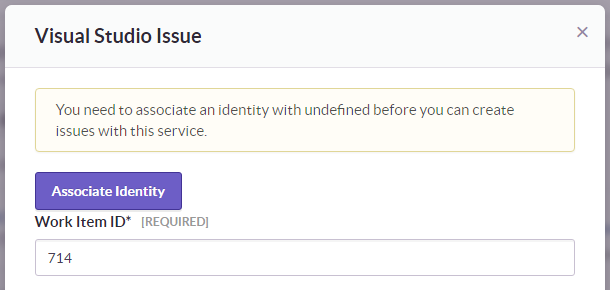
The request to https://sentry.io/api/0/issues/{id}/plugins/vsts/link/ responds with a 400 Bad request:
{"error_type": "auth", "auth_url": "/account/settings/social/associate/visualstudio/"}
@stajs k so sounds like its still having the same issue. I'm going to rip out this 'handle the 203 like an unauthenticated request' code, as its clearly not correct.
dcramer
on 2 Oct 2017
What's the undefined part of the error message supposed to be?
stajs
on 3 Oct 2017
@stajs Im also looking into that, but its simply an error message being reported incorrectly
dcramer
on 3 Oct 2017
dcramer
on 3 Oct 2017
@stajs can you confirm things are still problematic? I believe we might have 'fixed' the 203 error (it shouldnt show up anymore, at least to my understanding).
Sorry for the trouble. This would be a lot easier if we could repro it ourselves.
dcramer
on 9 Oct 2017
I can confirm: still problematic with text/html; charset=utf-8 error.
stajs
on 9 Oct 2017
@stajs could you drop me an email with your account username (thats authenticated with VSTS) on sentry.io? (david at sentry.io). I'm going to try to debug what the exact error we're receiving is here.
dcramer
on 13 Oct 2017
Email sent.
stajs
on 14 Oct 2017
@stajs I didn't see it come through.Mind trying again? You can also send it to dcramer at gmail
dcramer
on 16 Oct 2017
OK, tried your Gmail...
stajs
on 16 Oct 2017
We've got a full response fixture now to work with thanks to @stajs.
For record keeping, the response is a 203 that resembles a login page
Visual Studio Team Services | Sign In
dcramer
on 17 Oct 2017
A smoking 🔫 ...!
stajs
on 17 Oct 2017
Ok it looks like our API client redirects by default, and the API endpoint is returning a 302.
I've redacted details, but the redirect looks like this:
https://app.vssps.visualstudio.com/_signin?realm=INSTANCE&reply_to=API_URL&redirect=1&force=1&context=CONTEXT#ctx=CONTEXT
Context seems to be base64 encoded, and isnt sensitive:
>>> base64.b64decode('eyJTaWduSW5Db29raWVEb21haW5zIjpbImh0dHBzOi8vbG9naW4ubWljcm9zb2Z0b25saW5lLmNvbSIsImh0dHBzOi8vbG9naW4ubWljcm9zb2Z0b25saW5lLmNvbSJdfQ2==')
'{"SignInCookieDomains":["https://login.microsoftonline.com","https://login.microsoftonline.com"]}\r'
Sorry, not understanding the question. I don't see any authentication problems...
If you mean with the Identity flow to VSTS, I can screenshot the flow:
1. Disconnect the Visual Studio identity:   2. Link:  3. Associate identity:    4. Confirm identity:  5. Try linking again:  6. New problem: The request to
https://sentry.io/api/0/issues/{id}/plugins/vsts/link/responds with a400 Bad request:{"error_type": "auth", "auth_url": "/account/settings/social/associate/visualstudio/"}
I have the same problem with on-premise installation on Kubernetes, couldn't figure it out whatever I tried. Since this issue is still open, I guess there is no fix for it yet?
 iboware
on 9 Oct 2018
iboware
on 9 Oct 2018
The old vsts plugin is now deprecated in favor of the new integration. They said I’m pretty sure these problems are resolved but likely not in whichever version of sentry you’re running.
dcramer
on 9 Oct 2018
The old vsts plugin is now deprecated in favor of the new integration. They said I’m pretty sure these problems are resolved but likely not in whichever version of sentry you’re running.
I am using the official docker image which is released 4 days ago.
iboware
on 9 Oct 2018
@iboware im pretty sure thats not the current version of Sentry unless its actually building from source (which most people don't do)
dcramer
on 9 Oct 2018
Related issues
 saytik
·
24Comments
saytik
·
24Comments
 urbany
·
21Comments
urbany
·
21Comments
 adamreisnz
·
30Comments
adamreisnz
·
30Comments
 mitchhentges
·
22Comments
mitchhentges
·
22Comments
 benvinegar
·
33Comments
benvinegar
·
33Comments