Sentry-cli: Codepush not found. Is it installed and configured on the PATH?
OS: Windows 10
RN: 0.52.0
Android
react-native-sentry: 0.33.0
react-native-code-push: 5.2.1
I`m trying to upload updated sourcemap to sentry. but no luck.
I built bundle files with below command and it worked as I expected.
code-push release-react MyApp-Android android --outputDir build
and tried to upload sourcemap to sentry, but failed.
SET SENTRY_PROPERTIES=android\sentry.properties
sentry-cli react-native codepush MyApp-Android android build was not work.
I thought this is kind of path problem, so i did
node_modules\@sentry\cli\bin\sentry-cli react-native codepush MyApp-Android android build
result
> Fetching latest code-push package info
error: Codepush not found. Is it installed and configured on the PATH?
I did npm install -g code-push-cli and tried again, but still seeing same error.
please help!
 nopedev
All 6 comments
Are you using nvm?
 HazAT
on 19 Feb 2018
HazAT
on 19 Feb 2018
@HazAT I can't use nvm on windows 10.
nopedev
on 20 Feb 2018
@nopedev Have you tried globally npm installing sentry-cli-binary and code-push and then running the sentry-cli react-native codepush MyApp-Android android build command?
Also, we are using this on Windows 10:
 HAMPLENI
on 2 Mar 2018
HAMPLENI
on 2 Mar 2018
I also encountered same problem after switching from Microsoft/code-push to Microsoft/appcenter-cli
(because they announced like below).
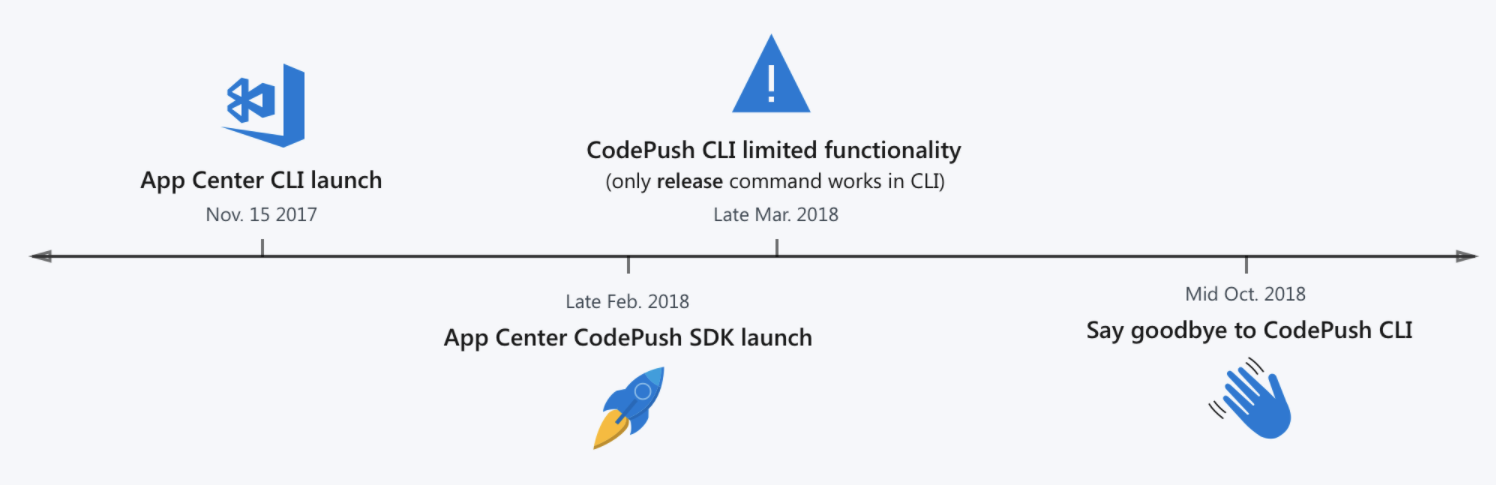
So I think this line and related logic should be fixed.
 nerd0geek1
on 23 Mar 2018
nerd0geek1
on 23 Mar 2018
@HazAT
How about this progress?
nerd0geek1
on 15 May 2018
We've added an appcenter command in version 1.33.0. The react native SDK will follow soon. Note that you have to specify the entire appcenter app name including your user slug (e.g. myuser/myapp):
Upload react-native projects for AppCenter.

USAGE:
    sentry-cli react-native appcenter [OPTIONS] <APP_NAME> <PLATFORM> <PATH>...

OPTIONS:
        --bundle-id <BUNDLE_ID>      Explicitly provide the bundle ID instead of parsing the source
                                     projects.  This allows you to push codepush releases for iOS on
                                     platforms without Xcode or codepush releases for Android when
                                     you use different bundle IDs for release and debug etc.
        --deployment <DEPLOYMENT>    The name of the deployment. [Production, Staging]
    -h, --help                       Prints help information
    -o, --org <ORG>                  The organization slug
        --print-release-name         Print the release name instead.
    -p, --project <PROJECT>          The project slug
    -V, --version                    Prints version information

ARGS:
    <APP_NAME>    The name of the AppCenter application.
    <PLATFORM>    The name of the app platform. [ios, android]
    <PATH>...     A list of folders with assets that should be processed.
 jan-auer
on 22 Jun 2018
jan-auer
on 22 Jun 2018
Related issues
 fungilation
·
4Comments
fungilation
·
4Comments
 kkdev163
·
5Comments
kkdev163
·
5Comments
 tbergq
·
3Comments
tbergq
·
3Comments
 EskelCz
·
3Comments
EskelCz
·
3Comments
 tclindner
·
3Comments
tclindner
·
3Comments
Most helpful comment
I also encountered same problem after switching from Microsoft/code-push to Microsoft/appcenter-cli

(because they announced like below).
So I think this line and related logic should be fixed.