Selenium: Missing .headless() equivalent for Safari (Node)
Meta -
OS: macOS *
Selenium Version: [email protected]
Browser: Safari
Browser Version: *
Expected Behavior -
Chrome and Firefox allow a .headless() method to indicate the browser should run in headless mode.
Actual Behavior -
safari.js has no mention of "headless" at all.
 JoshuaKGoldberg
All 12 comments
Again, can you provide documentation on how to run Safari in headless mode?
 lmtierney
on 4 Jun 2018
lmtierney
on 4 Jun 2018
As far as i know, this is not currently possible with Safaridriver. Perhaps @burg could weigh in.
 patthiel
on 4 Jun 2018
patthiel
on 4 Jun 2018
This is not possible with safaridriver. What exactly is the use case for headless?
 burg
on 4 Jun 2018
burg
on 4 Jun 2018
Closing issue as this is confirmed by @burg to not be possible
lmtierney
on 4 Jun 2018
@burg: What exactly is the use case for headless?
Headless mode is super useful! When using Selenium in a test suite, it's very frustrating to have GUIs pop up randomly as those particular tests get run. Browser popups can take OS-level focus away from us, especially if we're using browsers while running tests in the background.
In general, when writing apps that interact with a real browser instance, it's common to want a "real" browser (so Chrome/Safari/etc. but not SlimerJS/PhantomJS/etc.) to best simulate users. End-to-end tests are a common example, as are web scrapers and monitors. I know of several teams that use headless browsers as a form of production service monitoring for user-facing websites. We very much want to be able to run these scripts on our machines without constant browser window popups.
Chrome and Firefox support headless mode. Edge, IE, and Safari do not.
JoshuaKGoldberg
on 4 Jun 2018
When using Selenium in a test suite, it's very frustrating to have GUIs pop up randomly as those particular tests get run.
I'm not quite sure what this means. Using WebDriver API, you can set a prompt handler to automatically dismiss alerts. Are there some other prompts which are hanging your tests? If that is the case, please file bug reports because that shouldn't be happening. (We seem to fix a few of these every release.) Of course, you need to provision your machine appropriately if you don't want alerts, software update, etc. to pop up. This is not an issue specific to Selenium.
Browser popups can take OS-level focus away from us, especially if we're using browsers while running tests in the background.
Safari attempts to refocus the selected window when delivering events, because this is the only way to accurately simulate input given our input handling stack. So you can't really run tests in the background with safaridriver.
The best path forward for "headless" / background testing is to add support for controlling WKWebView with safaridriver, and someone can maintain their own harness that doesn't allow popups etc. This is not supported right now, but there are no moral objections to doing so.
burg
on 4 Jun 2018
GUIs pop up randomly
Dismissing alerts programmatically isn't the issue, it's that the browser itself pops up. This is what happens when, for example, you debug tests that launch browsers with Selenium:
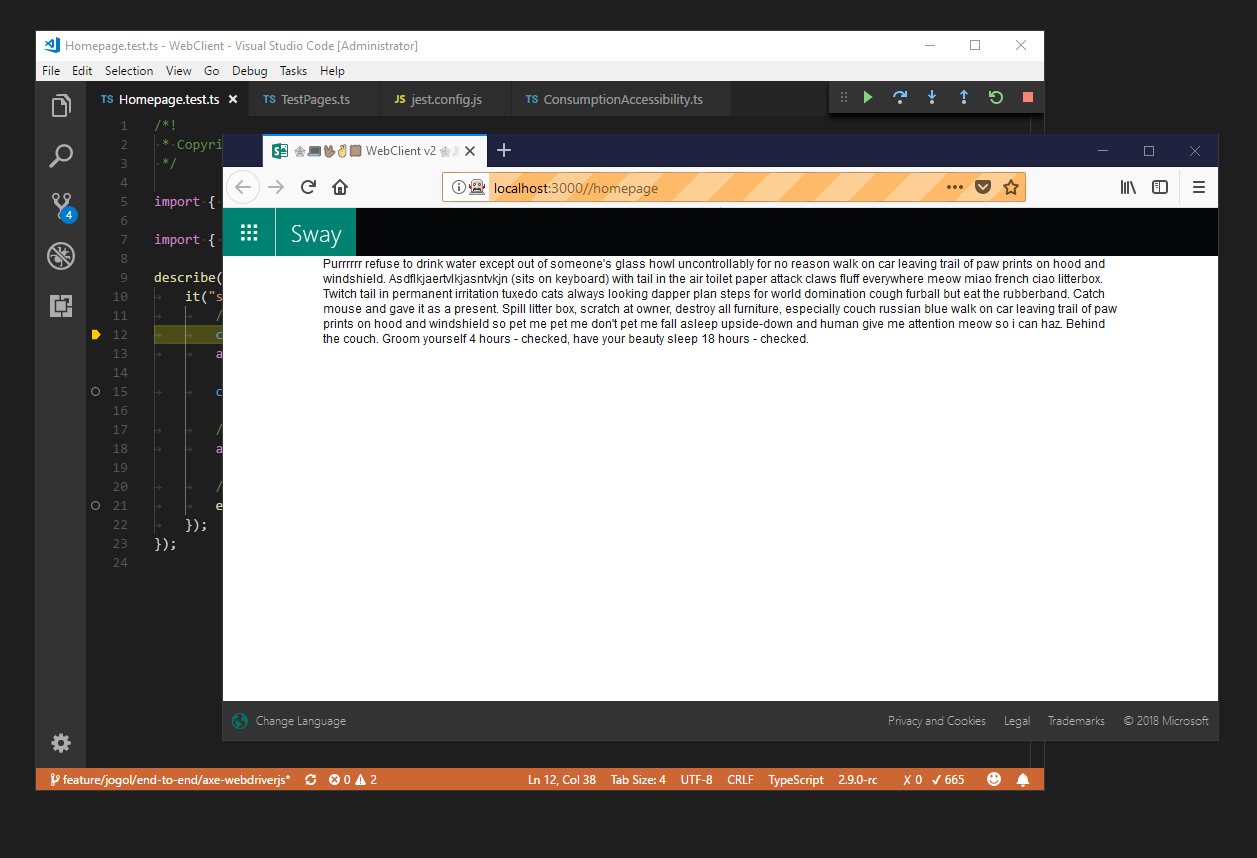
_(apologies for the Windows screenshot; I don't have a Mac on my person right now_ 😊)
this is the only way to accurately simulate input given our input handling stack
Where would you recommend I file an issue? It sounds like this is more of of a discussion on the Safari side, so I can discuss further there and link back here.
JoshuaKGoldberg
on 4 Jun 2018
I completely agree with @JoshuaKGoldberg . In order for me to currently run my automation test branch against an environment without being bothered by browser windows launching and running, i have to run it on a remote server. The issue with testing out some local changes against our remote server is that it keeps track of those runs and ends up polluting our reporting. I realize their other ways to solve this but the easiest route to a fix would be including a --headless option for Safari.
 dahano
on 22 Jun 2018
dahano
on 22 Jun 2018
But how can that be possible if Safari does not support headless mode? Or am I missing something?
 diemol
on 23 Jun 2018
diemol
on 23 Jun 2018
We'll implement this option as soon as headless mode will be implemented in Safari.
 barancev
on 23 Jun 2018
barancev
on 23 Jun 2018
@diemol I believe the response was to @burg asking the use case
lmtierney
on 23 Jun 2018
Thanks for the feedback, everyone. Let's keep this issue closed since it's blocked on Safari adding support for headless mode.
burg
on 25 Jun 2018
Related issues
 fdeamicis
·
3Comments
fdeamicis
·
3Comments
 austinrr
·
4Comments
austinrr
·
4Comments
 jasonfb
·
3Comments
jasonfb
·
3Comments
 VishnuAtDevopStation
·
3Comments
VishnuAtDevopStation
·
3Comments
 gouchaoer
·
4Comments
gouchaoer
·
4Comments
Most helpful comment
I completely agree with @JoshuaKGoldberg . In order for me to currently run my automation test branch against an environment without being bothered by browser windows launching and running, i have to run it on a remote server. The issue with testing out some local changes against our remote server is that it keeps track of those runs and ends up polluting our reporting. I realize their other ways to solve this but the easiest route to a fix would be including a --headless option for Safari.