Selenium: JAR files seems to be missing for the java 3.3.1 version
Meta -
OS: Windows 10
Selenium Version:
3.3.1
Browser:
Firefox & General
Browser Version:
General
Expected Behavior -
The following JAR files should be included in the downloadable package:
selenium-java-3.xx.x.jar
selenium-java-3.xx.x-srcs.jar
Actual Behavior -
The above files are not present which makes it unable to import libraries.
Steps to reproduce -
- Download the java 3.3.1 file.
- Unzip those files
These 2 JAR files are not included in the package:
selenium-java-3.xx.x.jar
selenium-java-3.xx.x-srcs.jarImport all the other JAR files in the Eclipse SDK
Run the following code:
package demo;
import org.openqa.selenium.By;
import org.openqa.selenium.WebDriver;
import org.openqa.selenium.WebElement;
import org.openqa.selenium.firefox.FirefoxDriver;
import org.openqa.selenium.htmlunit.HtmlUnitDriver;
public class testFaceBookReg

{ public static void main(String[] args)

{
    WebDriver driver = new FirefoxDriver();
    driver.get("http://www.google.com/");
    WebElement element = driver.findElement(By.name("q"));
    element.sendKeys("mysql excel 2013");
    element.submit();

}
}
- I get these errors:
-> "The import org.openqa.selenium.firefox.FirefoxDriver cannot be resolved"
->"FirefoxDriver cannot be resolved to a type"
"The type java.lang.CharSequence cannot be resolved. It is indirectly referenced from required .class files"
 bilalian
All 37 comments
The class org.openqa.selenium.firefox.FirefoxDriver is in the client-combined-3.3.1-nodeps.jar. I've followed your steps, and everything is working as expected. I suspect the root cause is the second error (about CharSequence not being resolved)
 shs96c
on 26 Mar 2017
shs96c
on 26 Mar 2017
I have added the client-combined-3.3.1-nodeps.jar too. But it still shows the same error
Exception in thread "main" java.lang.Error: Unresolved compilation problem:
FirefoxDriver cannot be resolved to a type
 Venusv123
on 5 Apr 2017
Venusv123
on 5 Apr 2017
I have added all the jar files including "client-combined-3.3.1-nodeps.jar" but i get an error for Webdriver
 anishtpt
on 11 Apr 2017
anishtpt
on 11 Apr 2017
Looks like this issue is still not fixed. I have downloaded the selenium-java-3.4.0 but still I am facing the issue with FirefoxDriver(); You can see the screenshot that I am not getting the option to import the FirefoxDriver

 sumant213
on 1 May 2017
sumant213
on 1 May 2017
Is this issue resolved? I am also facing same issue with Selenium 3.4. I even tried to use geckodriver but no luck. Could someone help?
 mansigit86
on 14 May 2017
mansigit86
on 14 May 2017
I think there is no default support for the firefox browser. You have to download the geckodriver and set the property to even use firefox. Use the below code
import org.openqa.selenium.WebDriver;
import org.openqa.selenium.firefox.FirefoxDriver;
public class FireFox {
public static void main(String[] args) {
WebDriver driverFireFox;
System.getProperty("webdriver.gecko.driver","C:\GeckoFireFox\geckodriver.exe");
driverFireFox = new FirefoxDriver();
String baseURL="https://www.google.com";
driverFireFox.get(baseURL);
}
}
Hope it helps
sumant213
on 14 May 2017
Thanks Sumant. Is the above solution working for you? It doesnt seem to be working for me.
mansigit86
on 15 May 2017

mansigit86
on 15 May 2017
Hi Mansi, first change System.getProperty to System.setProperty in my code and see what happens.
Have you added all the Jar files to you java build path? If yes then the only other thing I can think of is using the latest version of java. Let me know how it pans out.
sumant213
on 16 May 2017
I have been searching this solution for past few days. Same issue as above picture my Firefox does not get invoked. I have tried countless things.
So here is the issue: Basically I'm trying to invoke Firefox browser with selenium.
package basics;
import org.openqa.selenium.WebDriver;
public class BrowserInvocation {

/**
 * @param args
 */
public static void main(String[] args) {
    // TODO Auto-generated method stub
    System.setProperty("webdriver.gecko.driver","C:\\geckodriver.exe");
WebDriver driver=new FirefoxDriver();
// There is no import option displaying when mouse over FirefoxDriver such as import org.openqa.selenium.firefox.FirefoxDriver;
Console output:
Exception in thread "main" java.lang.Error: Unresolved compilation problem:
FirefoxDriver cannot be resolved to a type at basics.firefox.main(firefox.java:19)
I'm using latest versions of all software involve (as of May 15 2017) like firefox, java, eclipse and selenium. I have use 32 bit versions and 64 bit versions. Chromedriver in same environment works fine and get invoked .
package basics;
import org.openqa.selenium.WebDriver;
public class BrowserInvocation {

/**
 * @param args
 */
public static void main(String[] args) {
    // TODO Auto-generated method stub
    System.setProperty("webdriver.gecko.driver","C:\\geckodriver.exe");
WebDriver driver=new FirefoxDriver();
// There is no import option displaying when mouse over FirefoxDriver such as import org.openqa.selenium.firefox.FirefoxDriver;
Console:
Exception in thread "main" java.lang.Error: Unresolved compilation problem:
FirefoxDriver cannot be resolved to a type
at basics.BrowserInvocation.main(BrowserInvocation.java:16)
 jabed66
on 16 May 2017
jabed66
on 16 May 2017
@Jabed66. Have you completed step 5 from the below link
https://www.codeproject.com/Tips/826914/How-to-Setup-and-Configure-Selenium-Webdriver-With
sumant213
on 16 May 2017
Yes. like I said on my post Chromedriver and EDGE in same environment work fine and get invoked. Only firefoxdriver giving me the issue.
jabed66
on 16 May 2017
Hi,
I am new to selenium.
Today, I have configured selenium Java 3.4.
I am getting same issue. Please suggest how to resolve it.

 Nigam90
on 31 May 2017
Nigam90
on 31 May 2017
Hi,
I am also facing the exact same issue with Selenium 3.4. Any idea how to get it resolved?
Thanks.
 anuassi
on 14 Jun 2017
anuassi
on 14 Jun 2017
no solution for this. Just use another computer or reset your pc. Those 2 methods will work for sure.
jabed66
on 14 Jun 2017
@jabed66 hi, thanks for your active answers. I replicated exact issue. As per your recent answer. I am a bit skeptical on "Reset" in ur answer. Would you plz eloborate? In what sense , I tried re-installing everything but of no use.
Help appreciated. Thanks
 venkateshpisupati
on 26 Jul 2017
venkateshpisupati
on 26 Jul 2017
Hi Everyone, i m also facing the same issue-its show stopper for me.can anyone help...Thanks
 suman002
on 5 Aug 2017
suman002
on 5 Aug 2017
hi,
I am also facing same issue with Selenium version2.53.1. Can somebody help to resolve this issue.
 kishorevarama
on 20 Aug 2017
kishorevarama
on 20 Aug 2017
It might be because of IDE, you can try cleaning your cache and re-importing your project.
Eclipse : Update project

IntelliJ : Maven > Re-import , or File > Invalidate cache & Restart
Try purging selenium artifact
mvn dependency:purge-local-repository -Dinclude=org.seleniumhq.selenium:selenium-java
 kumar-nitish
on 20 Aug 2017
kumar-nitish
on 20 Aug 2017
Hi Guys,
The below solution is working for me. Please try -
System.setProperty("webdriver.firefox.bin","/Applications/Firefox.app/Contents/MacOS/firefox-bin");
System.setProperty("webdriver.gecko.driver", "/Users/UD/Desktop/geckodriver");
WebDriver driver=new FirefoxDriver();
Thanks,
Mansi
mansigit86
on 22 Aug 2017
Hi Mansi,
Can you please explain bit more about how you got the below:
System.setProperty("webdriver.firefox.bin","/Applications/Firefox.app/Contents/MacOS/firefox-bin");
I can see that you are using MacOs, but I'm using Windows 7 and where can i get the following path
Thanks
Raja
 elayarajavethamurthy
on 15 Sep 2017
elayarajavethamurthy
on 15 Sep 2017
I am quite new to selenium world. Plese help me in going forward.
The basic code I am using is as follow:
Package TestSelenium;
import org.openqa.selenium.WebDriver;
public class MyFirstClass {
public static void main(String[] args) {
WebDriver driver=new FirefoxDriver();
driver.get("http://www.google.com")
}}
How ever I am getting error " FirefoxDriver cannot be resolved to a type". I have included all required jars but still I am getting this error.
I am using Selenium 3.60. C:\Users\Ankur>javac -version javac 1.8.0_144

 connect-Ankur
on 15 Oct 2017
connect-Ankur
on 15 Oct 2017
Is this still an ongoing issue. I have followed some of the answers provided here but nothing works. I have my code running with Chrome no problem. When I try to run my code with Firefox it refuses to import the FirefoxDriver. I am using Selenium 3.6.0 with Windows 10. A colleague of mine has the exact same code running on Linux? Could it be possible the operating system is the cause here?
 ghost
on 24 Oct 2017
ghost
on 24 Oct 2017
Hi guys
has any of you managed to resolve the above issue? I've been battling with for 2 days now, I cannot seem to come alright
 iTsietsi
on 31 Oct 2017
iTsietsi
on 31 Oct 2017
Pat-Legault
What code did you use for chrome?
I'm using a selenium website tutorial and it's using firefox. There's a step for using the geckodriver.exe, but that's not working either.
I'll use chrome, I just don't know what all I'd have to change. I imagine the import path along with the = path.
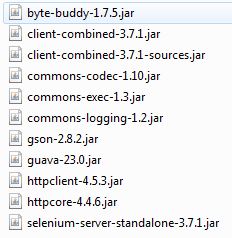
but one other person mentioned the jar files. I've followed all instructions to import what's on my system, but when I see captures of the jar files I should see, my list is much shorter.
So first off, here's the code I'm using:
package Testing_Pack;
import org.openqa.selenium.WebDriver;
import org.openqa.selenium.firefox.FirefoxDriver;
public class mytestclass {
public static void main(String[] args) {
//set geckodriver path.
System.setProperty("webdriver.gecko.driver","D:\Selenium Files\geckodriver.exe");
//initialize firefox driver object to open firefox browser.
WebDriver driver = new FirefoxDriver();
//open URL in browser.
driver.get("http://only-testing-blog.blogspot.in");
String i = driver.getCurrentUrl();
System.out.println(i);
driver.close();
}
}
And I'll add a capture of the jar files on my system:
This is one of the pages from the tutorial I'm using:
Lastly, I don't know what version of eclipse is appropriate. I follow the tutorial, but it must be dated, because it wants me to use luna and that's older, but when I try newer versions, well, the steps to follow are not perfect and I worry that eclipse might be part of the problem.
If anyone can help, I'd appreciate it. I'm a new QA Tester and I need to learn automation for my job.
Alternatively, does anyone have a tutorial or udemy course they know of that has the latest software versions and such? I can follow instructions, but this tutorial I'm using was given to me by a colleague and it's not seamless.
 ybocajm
on 10 Nov 2017
ybocajm
on 10 Nov 2017
Hi ybocajm,
I am also new to selenium but I suppose that
below mentioned line should be throwing you some error:
System.setProperty("webdriver.gecko.driver","D:\Selenium Files\geckodriver.exe");
if, yes try below mentioned code:
System.setProperty("webdriver.gecko.driver","D:\\Selenium Files\geckodriver.exe");
I don't know the reason but what i wrote above is not reflecting after saving my comment, you should be using '\' 4 times after 'D:' and 2 times after 'selenium files'. it's working for me on windows machine.
apart from it you should not use ""driver.close();"
your jar files seems ok to me.
just want to confirm that have you added your gecko driver path to system variables or not. if not please add it and try again.
hope it'll resolve your issues.
 abhisqa
on 11 Nov 2017
abhisqa
on 11 Nov 2017
Hi,
I was also facing the same issue of WebDriver and FirefoxWebDriver giving error of not getting resolved but i was able to proceed further and resolve the compilation issue by removing reference of byte-buddy module [snapshot below].
Note: System.getProperty of geckodriver need to be added, based on the version of your firefox would be required.

 gleejv
on 16 Jan 2018
gleejv
on 16 Jan 2018
Exception in thread "main" java.lang.Error: Unresolved compilation problems:
WebDriver cannot be resolved to a type
FirefoxDriver cannot be resolved to a type
public class Sampl_Selenium {
public static void main(String[] args) {
System.setProperty("webdriver.gecko.driver","D:\geckodriver-v0.19.1-win64\geckodriver.exe");
WebDriver driver = new FirefoxDriver();
driver.get("http://www.google.com");
}
}
I am using Eclipse: Photon, jdk:- 9.0.1, Windows:64 bit, Selenium:3.7.1
Please help
 tituswesley
on 14 Feb 2018
tituswesley
on 14 Feb 2018
        System.setProperty("webdriver.gecko.driver","/cucumberJVMPOM/src/test/resources/geckodriver.exe");
        //driver = new FirefoxDriver(); ........https://github.com/SeleniumHQ/selenium/issues/3691
 agilematrix
on 6 Mar 2018
agilematrix
on 6 Mar 2018
Hello @gleejv, @Nigam90 , @mansigit86 some file missing,
See Screenshot
http://prntscr.com/j5vuq4
Please download this file (https://www.seleniumhq.org/download/)
& "Add external Jar" in downloaded File,
Code Below
package TestPack;
import org.openqa.selenium.WebDriver;
import org.openqa.selenium.chrome.ChromeDriver;
public class TestClass {
public static void main(String[] args) {
System.setProperty("webdriver.chrome.driver", "C:\Users\Teknomines-5\Downloads\chromedriver.exe");
WebDriver driver=new ChromeDriver();
driver.get("http://zd.stage.n-framescorp.com/");
}
}
 PratikModh
on 16 Apr 2018
PratikModh
on 16 Apr 2018
I also faced the same issue so performed below steps and it got fixed.

- Updated system java-JRE library to latest.
- Updated eclipse to latest version - oxygen - <Actual root cause>
After that I validated the import individually from selenium standalone server as well as from selenium-Java jars one by one. And the import was successful for FirefoxDriver.
-> org.openqa.selenium.firefox.FirefoxDriver;
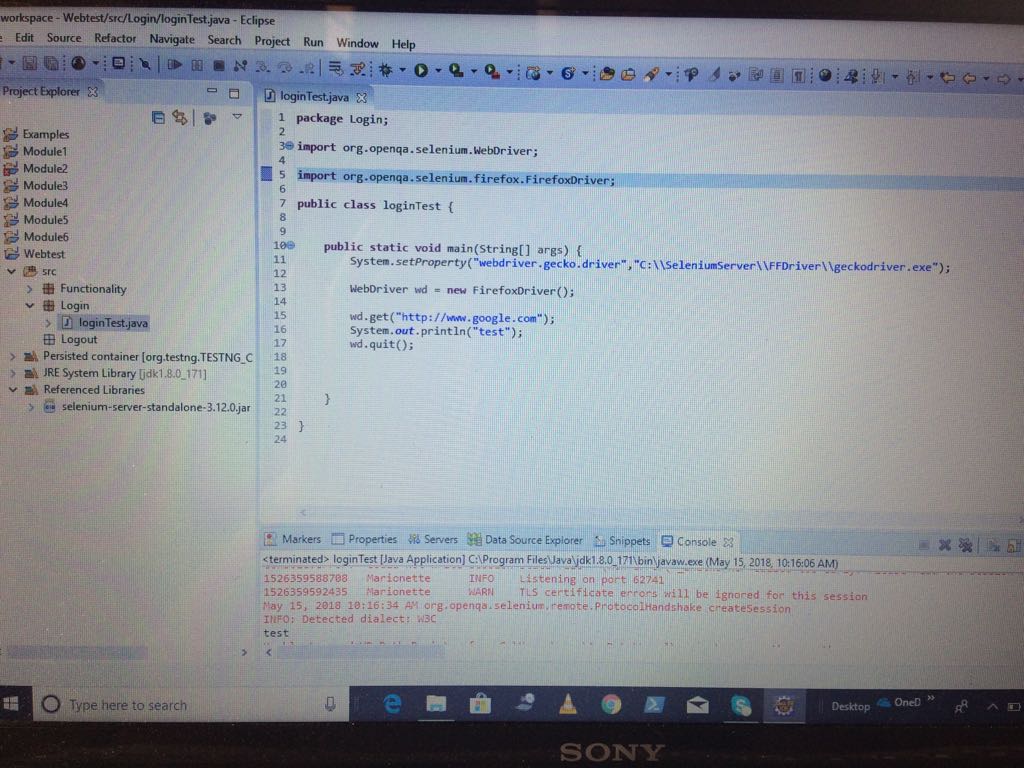
So if you are using selenium 3, dont forget to update editors and system JRE/JDK.
Root Cause :
It looks like the issue is due to older eclipse editors. I reproduced the issue by pointing the same workplace by Eclipse - Luna and Indigo. Even though these two editors I had updated but they are unable to recognize the Firefox driver class.
org.openqa.selenium.firefox.FirefoxDriver
But if I open the same project with Eclipse-Oxygen, It allows to import the same class (it also shows a message that the workplace is build with older version-Added screen shots for your reference.)
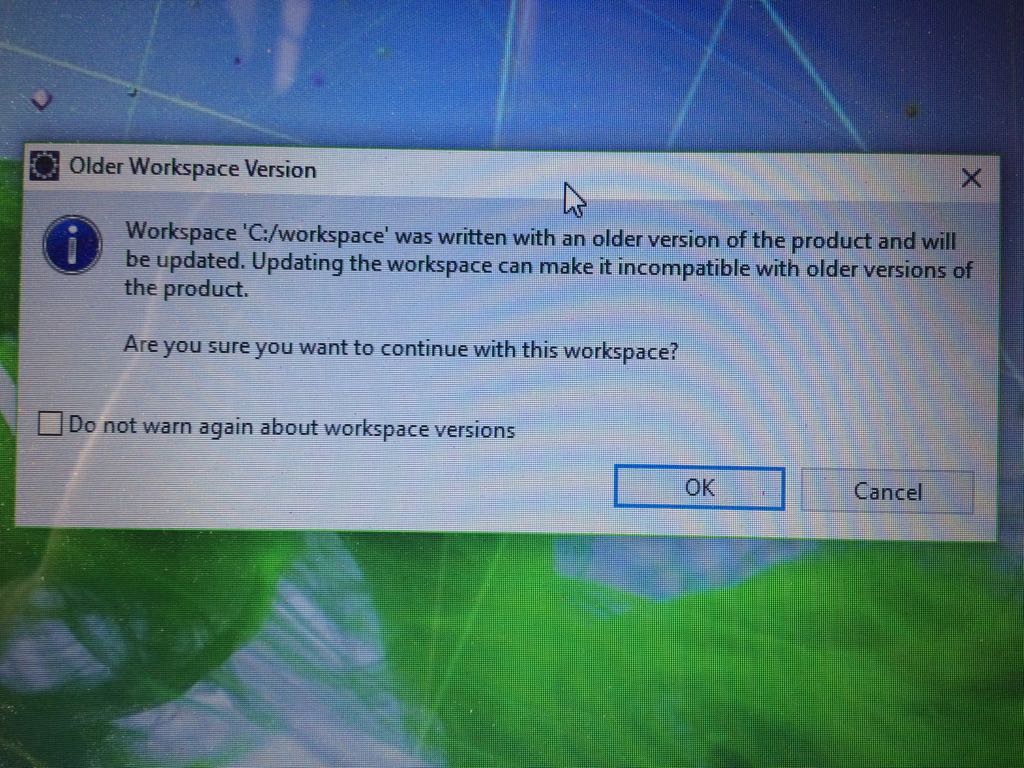
.
So use new eclipse editor if you hit this issue.
 pravkum5
on 15 May 2018
pravkum5
on 15 May 2018
I had same issue . I am using Latest Eclipse- Oxygen. Add the drivers library to the class path and not to Module path.

 umavaja
on 1 Jun 2018
umavaja
on 1 Jun 2018
I added jar files to the classpath but still having error "The import org cannot be resolved" i have downloaded selenium-java-3.13.0 jar files. Please help
 RanjKGit
on 4 Aug 2018
RanjKGit
on 4 Aug 2018
I was having the same issue for the last couple of days (this is my first time using Selenium / Eclipse.)
The fix that worked for me was creating a new project and changing the JRE from JavaSE10 to JavaSE1.8
After doing that the
import org.openqa.selenium.WebDriver; import org.openqa.selenium.chrome.ChromeDriver;
worked fine.
 Bilbodotcom
on 8 Aug 2018
Bilbodotcom
on 8 Aug 2018
Yes it worked for me too. Thank you 😊
RanjKGit
on 8 Aug 2018
Yes exactly it works with JavaSE1.8 . thank you :)
 tutkuayavefe
on 3 Sep 2018
tutkuayavefe
on 3 Sep 2018
Hi guys,
I had the same problem. But I added a line about importing.
import org.openqa.selenium.firefox.FirefoxDriver;
Then I clicked on the FirefoxDriver() and chose to organize the import or smth. After that it worked!
Good luck!
 yybond
on 12 Feb 2019
yybond
on 12 Feb 2019
Related issues
ghost
·
4Comments
 Toilal
·
4Comments
Toilal
·
4Comments
 austinrr
·
4Comments
austinrr
·
4Comments
 elaich
·
4Comments
elaich
·
4Comments
 gouchaoer
·
4Comments
gouchaoer
·
4Comments
Most helpful comment
I was having the same issue for the last couple of days (this is my first time using Selenium / Eclipse.)
The fix that worked for me was creating a new project and changing the JRE from JavaSE10 to JavaSE1.8
After doing that the
import org.openqa.selenium.WebDriver; import org.openqa.selenium.chrome.ChromeDriver;worked fine.