Select2: In multi-select, selections do not appear in the order in which they were selected
On this page: https://select2.github.io/examples.html
...All the tags appended to the end show up in an arbitrary place in the Select2 box. There seems to be no rhyme or reason where they will appear, neither alphabetical nor sorting by list matching. It just randomly sorts each time. This seems to be the reverse of issue #2283, so I'm not sure how to actually force the tags to append.
 matthew-dean
All 75 comments
I'm not quite sure what you mean here.
For me, the tags are appended to the end of the selection when they are created. In the dropdown, they appear at the bottom after they are created, and at the top when they do not yet exist.
 kevin-brown
on 4 Mar 2015
kevin-brown
on 4 Mar 2015
Hawaii selected, then Alaska.


matthew-dean
on 4 Mar 2015
Order these were added: bar, foo, green, blue, red

matthew-dean
on 4 Mar 2015
Ah, now I understand.
The order that the items are displayed is the same order that they will be sent to the server. This is also the same order that they are displayed in the dropdown (usually).
kevin-brown
on 5 Mar 2015
That's..... huh? Why would you want tags to appear in a different place than the cursor position? The dropdown position is not relevant to the order in which I add tags. I could see them rearranged in a certain order on page reload, but while typing / selecting is jarring. If you add emails to an email, your email program doesn't swap the tags based on alphabetical position. It represents a linear, comma-separated list that just happens to be tokenized for easy removal of items, or to drag/drop items, or match to a list. I don't get this behavior. OR: if this is intuitive to others, can linear append be an option?
matthew-dean
on 5 Mar 2015
_Usually_ when working with tagging, there isn't an existing data set or it's pulled from a remote data source when there is (which is unordered on our end). In both of these cases, new additions are always appended to the end.
You can test this by always creating new tags and seeing the order that they appear once they are selected. It should be in the order that they were created, and they should be sent to the server in that same order. If this _isn't the case_, then yes there is definitely an issue.
The difficulty comes when there are new additions to the end and then an existing one is selected, as it most likely isn't at the end as well. There used to be complaints (which made sense) because what was displayed did not match what was being sent to the server, as the ordering was off.
kevin-brown
on 5 Mar 2015
If you tag a post in Wordpress, you can add arbitrary members, but you can also select from a list of tags. Either way, selections are added linearly as that's the way they were selected chronologically. Tags always indicate the order in which a user selected them (or typed them). This is done because a backspace then deletes them from right-to-left reverse chronologically. Or you could say it's done because of left-to-right reading conventions corresponding to order of operations.
If the complaint is that the ordering to the server doesn't match the selection order, then I would change the ordering sent to the server. OR allow a switch to the current behavior of partial sorting of tags within the list by two sets of criteria (matches and non-matches, the first sorted by list order, the second by chronological selection order), but I would expect that to be the outlier in terms of expected behavior, since a two-method partial-list-sort algorithm seems hard to intuit. In fact, at first I thought the list was completely randomized each time, until I figured out that the list was invisibly divided between matches and non-matches, with each one sorting independently by different criteria.
So.... select2 is a great component. I'd really like to use it more. Can another option be added?
matthew-dean
on 5 Mar 2015
So, ultimately the issue here is that Select2 is trying to normalize how the results are displayed to match how the data is sent to the server. This is because that previously wasn't consistent (or documented) and it had some really strange side effects ("what you see is not what you get") and inconsistencies ("only when working with a <select> though!").
If the complaint is that the ordering to the server doesn't match the selection order, then I would change the ordering sent to the server.
Great idea! I just took a shot at doing this by automatically re-inserting the most recently selected element to the end of the <select> and that worked pretty well.
http://jsbin.com/cizehajema/1/edit

Of course, this means that now the results list changes every time, because the <option> is being moved. But this can be worked around by just moving all selected tags to the top of the results, which might appear more natural.
http://jsbin.com/cizehajema/2/edit

kevin-brown
on 10 Mar 2015
I think a few things are being conflated. For example, this:
Of course, this means that now the results list changes every time, because the
The drop-down order shouldn't really have anything to do with tag order. The tags (tokens) are the order of selection. The drop down is really the fixed dataset, usually alphabetical or whatever the sort method was. If the drop down is being populated BY arbitrarily-added tags, then it probably makes some sense, and in that case the drop-down should mimic selection order. (Although I can't think of a case where having arbitrary added values in the drop-down makes sense anyway. It seems like the dropdown is only useful when it shows imported data, not user-added data.)
But, if, say, the dataset is an imported list of U.S. states., then of course the selected tags should never re-order the drop-down, because it's a fixed list of available options.
So, I think it's important to have three distinct datasets:
- The drop-down list data
- Selections
- Data to the server
It sounds like 1 and 3 need to be synced to avoid confusion, but number 2 needn't be.
Just my $0.02.
matthew-dean
on 10 Mar 2015
Yeah it looks like that's another select2 oddity here...
So, I think it's important to have three distinct datasets (...)
+1. That's definitely the expected behavior.
 ppawel
on 24 May 2015
ppawel
on 24 May 2015
Also when using multiple= true (no tags), the order that I would like to have is not the order in which the options are ordered but the order in which the user is selecting the options. Any ideas about this?
 janscas
on 30 Jun 2015
janscas
on 30 Jun 2015
+1 on @janscas's concern.
It's particularly problematic when adding a tag by mistake then pressing backspace to remove it, if the tag is inserted in another position, you'll start deleting the wrong tag
 Intrepidd
on 21 Sep 2015
Intrepidd
on 21 Sep 2015
I just ran into the issue that on server-side I need the order in which the items were selected. I wrote a simple script that just reorders the options inside the select every time, an item is selected:
$this.on('select2:select', function(e){
var elm = e.params.data.element;
$elm = jQuery(elm);
$t = jQuery(this);
$t.append($elm);
$t.trigger('change.select2');
});
Here is also a JsFiddle.
This addresses all the issues in here and I think it would be a nice feature for select2.
 xelax90
on 14 Mar 2016
xelax90
on 14 Mar 2016
@kevin-brown Your code worked for me except the unselect. The unselected item was getting removed completely after you add/remove it multiple times.
`$("select").select2({
tags: true
});
// On select, place the selected item in order
$("select").on("select2:select", function (evt) {
var element = evt.params.data.element;
var $element = $(element);
window.setTimeout(function () {
if ($("select").find(":selected").length > 1) {
var $second = $("select").find(":selected").eq(-2);
$element.detach();
$second.after($element);
}
else {
$element.detach();
$("select").prepend($element);
}
$("select").trigger("change");
}, 1);
});
// on unselect, put the selected item last
$("select").on("select2:unselect", function (evt) {
var element = evt.params.data.element;
$("select").append(element);
});`
 shashilo
on 18 Mar 2016
shashilo
on 18 Mar 2016
Hi
How to make this work as i already have a $element with the select2 object
if($element.data("order")==true){
$element.select2();
//view the current data.
console.log($element.select2('data'));
}
Now how do i hook into this with above code example?
Please assist. Thank you.
And another question. Will their be a update of the script where the multiselect select order is adjustable?
And how to load the correct order of the selected items on modification of the items? My list of options is created in php where the selected=selected is set based on the setting stored in the database.
this is how my code looks on init
But they were selected this way
b|infomation,p|document,s|building
<select id="_slideshow_category" class="themechosen select2-hidden-accessible" style="width:60%;height:auto" size="5" multiple="" name="_slideshow_category[]" .="" data-order="true" data-placeholder="Select Source.." tabindex="-1" aria-hidden="true">
<option value="g">Self Gallery</option>
<optgroup label="SlideShow Category">
<option value="s">(s) All</option>
<option selected="selected" value="s|building">(s) building</option>
<option value="s|homepage">(s) homepage</option>
<option value="s|videos">(s) video</option>
</optgroup>
<optgroup label="Blog Posts Category">
<option value="b">(b) All</option>
<option selected="selected" value="b|infomation">(b) Infomation</option>
<option value="b|news">(b) News</option>
</optgroup>
<optgroup label="Portfolio Category">
<option value="p">(p) All</option>
<option value="p|animals">(p) Animals</option>
<option selected="selected" value="p|document">(p) Document</option>
</optgroup>
</select>
What i want is to have the result screen to present the order of the items as they are selected once the data-order="true"
Best regards,
BackuPs
 BackuPs
on 2 May 2016
BackuPs
on 2 May 2016
I think I solved that by adding custom _DataAdapter_ which:
- adds a timestamp to option when selected
- removes it when unselected
- sorts options by timestamp when retrieved
Adapter inherits native methods which don't have specified API visibility (public/ protected) so there is no guarantee it will work in future versions. Tested on Select2 v4.0.2
See this gist
 piotr-cz
on 3 Jun 2016
piotr-cz
on 3 Jun 2016
Hi,
The Adapter works, but it's not possible to create tag anymore (it's only possible to choose an existing one). Would you have a solution for that ?
Thank you
 aropixel
on 15 Jun 2016
aropixel
on 15 Jun 2016
- agree with matthew-dean that this behavior is confusing and unexpected to the user.
- fwiw, i found this code fix effective, though it doesn't work for token separators:
(found on https://github.com/angular-ui/angular-ui-OLDREPO/issues/406 )
// with this element...
$("select").select2({
tags: true,
tokenSeparators: [',', ' '] // note: doesn't work for these! hitting comma or space will reorder tags
});
// apply tag order fix
$("select").on("select2:select", function (evt) {
var element = evt.params.data.element;
var $element = $(element);
$element.detach();
$(this).append($element);
$(this).trigger("change");
});
 benjiwheeler
on 23 Jul 2016
benjiwheeler
on 23 Jul 2016
@benjiwheeler Unfortunately, that approach (also found here: http://stackoverflow.com/questions/31431197/select2-how-to-prevent-tags-sorting) does not maintain the order of the options list.
Select a value from the list and another; notice it preserves the selection order, but that also modifies the selection list. Clear them and try to select them via mouse again and notice they appear at the end of the options list (no longer in the original sort).
 vol7ron
on 25 Aug 2016
vol7ron
on 25 Aug 2016
The order that the items are displayed is the same order that they will be sent to the server. This is also the same order that they are displayed in the dropdown (usually).
@kevin-brown While this is great from a developer's standpoint, this is assuming that the select data is being sent to the server. In many cases, select options are used for UI to modify the data internal to the page and not even sent to the server.
For those cases, this is very confusing. Better UX is to display the data as it is selected and not make the user hunt through the selected options to verify that it was selected. If a developer needs to preserve that order when sending to the server, they will need to account for that in their AJAX or form submission event.
vol7ron
on 25 Aug 2016
The workaround that I've quickly got up and running is to reorder the HTML after the selection is made:
jsFiddle Example
let $select2 = $('select').select2();
/**
* defaults: Cache order of the initial values
* @type {object}
*/
let defaults = $select2.select2('data');
defaults.forEach(obj=>{
let order = $select2.data('preserved-order') || [];
order[ order.length ] = obj.id;
$select2.data('preserved-order', order)
});
/**
* select2_renderselections
* @param {jQuery Select2 object}
* @return {null}
*/
function select2_renderSelections($select2){
const order = $select2.data('preserved-order') || [];
const $container = $select2.next('.select2-container');
const $tags = $container.find('li.select2-selection__choice');
const $input = $tags.last().next();
// apply tag order
order.forEach(val=>{
let $el = $tags.filter(function(i,tag){
return $(tag).data('data').id === val;
});
$input.before( $el );
});
}
/**
* selectionHandler
* @param {Select2 Event Object}
* @return {null}
*/
function selectionHandler(e){
const $select2 = $(this);
const val = e.params.data.id;
const order = $select2.data('preserved-order') || [];
switch (e.type){
case 'select2:select':
order[ order.length ] = val;
break;
case 'select2:unselect':
let found_index = order.indexOf(val);
if (found_index >= 0 )
order.splice(found_index,1);
break;
}
$select2.data('preserved-order', order); // store it for later
select2_renderSelections($select2);
}
$select2.on('select2:select select2:unselect', selectionHandler);
Description
This ensures that the options list is kept in the original sort order, but the selection list is kept in a FIFO manner.
Uncertainties
- selected list items: there may be a better approach to finding the selection container or selected list items. I couldn't find much documentation on the Select2 v4.0.x API
- plugins: there's probably a better way to extend the select2 object class by protoyping the render function; here it's a standalone function, which is good enough for an example, but would be better if could be integrated to the class object (something like
select2.fn.renderer = select2_renderSelections)
Other
The code could be greatly reduced and simplified in many regards, but the method is good enough for my use case.
vol7ron
on 25 Aug 2016
The handler can be made DRYer
function selectionHandler(e){
const $select2 = $(this);
const val = e.params.data.id;
const order = $select2.data('preserved-order') || [];
if (e.type == 'select2:select'){
order[ order.length ] = val;
} else if ( e.type == 'select2:unselect'){
let found_index = order.indexOf(val);
if( found_index >= 0 )
order.splice(found_index,1);
}
$select2.data('preserved-order', order); // store it for later
select2_render($select2,val);
}
$select2.on('select2:select select2:unselect', selectionHandler);
Note: Original comment has been updated (refer to edit history of comment above to see prior state)
vol7ron
on 26 Aug 2016
to @shashilo minor fixes to your code that can work for multiple select in a page. and replaced with $(this) instead of select within the function.
and thanks sharing the code.
$("#element").on("select2:select", function (evt) {
var element = evt.params.data.element;
var $element = $(element);
window.setTimeout(function () {
if ($(this).find(":selected").length > 1) {
var $second = $(this).find(":selected").eq(-2);
$element.detach();
$second.after($element);
}
else {
$element.detach();
$(this).prepend($element);
}
$(this).trigger("change");
}, 1);
});
// on unselect, put the selected item last
$("#element").on("select2:unselect", function (evt) {
var element = evt.params.data.element;
$(this).append(element);
});
 rangav
on 26 Sep 2016
rangav
on 26 Sep 2016
These solutions don't work on nested options (JSFiddle).
event.params.data.element doesn't exist, maybe a bug?
Update1: @vol7ron's solution visually works, but doesn't change the $(select).val() output.
Update2: I found this works with nested options.
$('select').on('select2:select', function(e) {
var element = $(this).find('[value="' + e.params.data.id + '"]');
$(this).append(element);
$(this).trigger('change');
});
 schang933
on 22 Oct 2016
schang933
on 22 Oct 2016
@schang933 Correct. I can't remember if this was intentional, as I've been back-and-forth over the UX vs DX (user experience vs developer experience). Below are some thoughts on behavior and other considerations -- please look at the _considerations_ section.
Behavior
Behavior and experience go hand-in-hand. There needs to be some decisions between expected behavior by the user and developer. There should also be some consideration given to consistency of behavior, given browser and historical behavior.
User Behavior
At the time, I wanted to send feed back to the user in the order they interact with the element; such that when they select an item, it should be right next to the cursor as the last thing they see (no need to scan the list).
Developer Behavior
I wanted the values to be sent in the order the system generated the list. I'm not sure this the right decision, or even if there is a right one here.
Is it better to preserve the selected order when sending/retrieving the values? Imagine a login form with two text inputs, the first for _login_, the next for _password_. If we fill out the password field before the login field, the form doesn't re-position the value-entered order when generating the HTTP request. It sends the order in which the form element appears on the page. Left to right, top to bottom.
Like other form elements, I imagine I was purposely sending the values in the order the options were created on the page (as I also preserved in the options list). I don't know if this is ideal though. Not all form elements send data to the server, many are used for UI behavior (e.g., a checkbox to show an item on a map).
Other Considerations
Selecting items out of order, then issuing $('select').select2().val() would re-order the items in @schang933 's options list. While that may not be the proper way to select the value, older versions of Select2 may have required something like that at some point.
Here's the jsfiddle to test with the firebug. Simply select items out of order, then run $('select').select2().val() in the in-browser firebug console. Then put focus on the select2 to expand the options list again. Notice the ordering.
Doing this in my example above would reorder the selected values, but still preserve the order of the list.
vol7ron
on 9 Dec 2016
I truly believe after such a long time that it is unbelievable there is no buildin support for keeping the order of the items as they are selected. I really appreciate the given solutions by others, but i keep on wondering why a build in solution is not within this code. I totally disagree with the developer to keep it this way. By adding a option to the script the user can decide on this. Why does it take that long to come up with a working solution. Or am i missing it at all? Please guide me then !
In addition to this. How to set a selection in a certain order when getting back to the selected items after the values are stored and the settings are opened again to be changed?
Chang933's solution works on the selecting part. But how to get this to work on when you return to settings and you want to add or remove items in the order set? Its defaulting again to the sorted list of selected items.
The downside of Chang933's solution is when you deselect a value. It's added again in the selection drop down list at the bottom. So its in there twice then.
So far i had to stick to the old 3.4.8 script as it works perfectly in there.
I want to be able to select images in a order, modify them in a order and display them in that order in a slider or list or whatever plugin following the selected order. I do not want any sorting applied to the list on selecting or when modifying a existing list. Its bizar that something that worked perfectly has been stripped out. Why keep the order on how its send to the server?
BackuPs
on 11 Dec 2016
@BackuPs I'm trying to close this issue.
After read the source, here is the reason why select2 is not sorted the value by how they selected.
I'm using ajax data so maybe this won't work on your page.
When select2 trigger 'select', select2 will find the select data in the hidden \ So the solution is add a option to decide how select2 unselect item. To keep the order how we selected, select2 should remove the \ I used a ugly way to cover the source. Hope author will resolve this issue soon.
Search SelectAdapter.prototype.unselect on source, and find data.element.selected = false. Get the option you set, if need to keep the order, use $(data.element).remove() instead of set prop. And find if (id !== data.id && $.inArray(id, val) === -1). Add an else branch to remove the
 woshiguabi
on 22 Dec 2016
woshiguabi
on 22 Dec 2016
@woshiguabi. Thanks for the headsup on this. So far i only have one problem left... How to set the selected elements at start in the order i desire before the user can select stuff at all. The current script starts ordering them already.
I hope that the author comes up with a solution as this is unbelievable that something that worked in old versions is just dropped. What is the use of selecting elements and not using the order selected and not being able to set some pre selected elements on the outset in the way users selected them before.
I cant change my list of items in that order on every page load as that would be a stupid resource consuming solution but more over the lists are created on what users adds as categories in various custom post types. So it can be a huge list in which items are grouped per post type.. So in order to make this work i have to reorder the several lists? Bizar ! I will probably start looking at other select scripts.
BackuPs
on 22 Dec 2016
@BackuPs. Because i use ajax resouce, select2 doesn't render my data list on the hidden \ But there is another way. Do not render all list from server-rending. Just render \ I use this way to skip select2's restriction, maybe it's cumbersome, but i can do more personalized customization on select2. For more info about select2 ajax options, you can read this page.ajax option to get all list. Also you can use transport option to search result offline. Here is a part of my code.ajax:{
transport: function (params, success, failure) {
var term = $.trim(params.data.term);
// trim the term
var data = selectListData;
// just put your list data here, you can get the data from your server by ajax, and render select2 after the data loaded.
success(dataSearch(term, data))
// then use yourself's search function get result
}
}
Options - Select2
woshiguabi
on 22 Dec 2016
@BackuPs did you see my workaround above? https://github.com/select2/select2/issues/3106#issuecomment-242544761
vol7ron
on 25 Dec 2016
@vol7ron
Yes i saw your reply. Thank you for that. I think i will contact you on customization soon. Is there a email address i can contact you on?
BackuPs
on 25 Dec 2016
I would recommend asking it on Stack Overflow, since I don't know my availability and for your issue to reach a a broader audience.
vol7ron
on 25 Dec 2016
👍 UPPPPPPPPPPP
 Oliboy50
on 26 Mar 2017
Oliboy50
on 26 Mar 2017
@kevin-brown
http://jsbin.com/cizehajema/2/edit from your comment from on 10 Mar 2015
This small extension sends the selection in the custom order of the user to the server. This is absolutely wanted in my case. Is there a way to sort the select-list again in this order when the data come back from the server for editing?
Otherwise, the tags are sorted in the order of the default list (alphabetically) and stored on the server when the form is submitted again. The custom order made by the user is then lost.
 sunfish
on 3 Apr 2017
sunfish
on 3 Apr 2017
I am stuck in this problem long time.
@vol7ron 's solution only change the order of select2-selection__choice, but can't change the value of $(select).val(). Usually we use $(select).val() to save value, but the order is different from the select2-selection__choice.
@kevin-brown 's solution is worked, the order of select2-selection__choice and $(select).val() are changed as selected order.But these is another question, it isn't work for init value.
Example: $(select).val(['2','1']).trigger('change');
Result: $(select).val() output is ['1','2'] and the order of select2-selection__choice also is text of 1, text of 2;
The order of selected is important to my situation, hope someone can assist.
 Richard-WZH
on 27 Apr 2017
Richard-WZH
on 27 Apr 2017
To see a workaround (and an example that uses preserved-order) go here:
JSFiddle Preserved-Order Demo
- console output shows the difference between
val()anddata('preserved-order')
@Richard-WZH In my example, the values as they are rendered (appear as tags) are stored internally in a preserved-order data key. For more information:
$(select).val(): yields the value selected in the order they were initialized in the select. In other words, this returns the values as they appear in the select2 options list.$(select).data('preserved-order'): yields the values in the order they were selected. In other words, this returns the values as they appear rendered as tags (selected options)
Caveat
Something to consider when setting multiple values programmatically ( e.g., $('select').val(['c','a','d']).trigger('change') ) is that val() still sets them in the order they appear in the list (a,b,c), not in order supplied to be set (c,a,d)
This can be avoided by binding the preserved-order and then re-rendering the selections, using the function I defined in comments above:
var values = ['c', 'a', 'd'];
var $select2 = $('select').select2();
$select2.val(values).data('preserved-order',values).trigger('change');
select2_renderSelections($select2);
@vol7ron It's work for me! Thank u!
Richard-WZH
on 2 May 2017
I cannot understand how I have to put 50 lines of code just to do something that I actually don't want to happen at all! If you make such a change then ask the people if they want it or not! Have to downgrade just because of that!
 fourpixels
on 5 May 2017
fourpixels
on 5 May 2017
the order changed when post to the server-side.
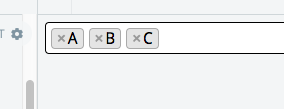
chosed B 、A 、C, but becomes to A、B、C,that is what i dont`t wanted!
 javasgl
on 18 Jul 2017
javasgl
on 18 Jul 2017
August 29, 2017, this is still not fixed.
 wx2228
on 30 Aug 2017
wx2228
on 30 Aug 2017
Is there a reason why this is not yet picked up?
 Gyvastis
on 31 Aug 2017
Gyvastis
on 31 Aug 2017
@Gyvastis basically, the problem is that Select2 is displaying the selected items in the order that the underlying <option>s appear in the DOM, rather than the order in which they are selected by the user.
This is obviously a bad user experience, but I'm not sure if this is a simple fix or would require some more in-depth refactoring.
 alexweissman
on 29 Sep 2017
alexweissman
on 29 Sep 2017
So, here's my idea:
- By default, dropdown options should appear in the order in which they appear in the DOM/data source. By default, selections should appear in the order in which they were selected.
- We should have custom
sortResultandsortSelectioncallbacks, similar totemplateResultandtemplateSelection, that can be used to override the default ordering of dropdown items and selections. This would also involve deprecating the currentsorterconfiguration option (which appears to only apply to results).
alexweissman
on 29 Sep 2017
Cannot agree more, @alexweissman Unfortunately it seems nobody will listen here :(
fourpixels
on 29 Sep 2017
@fourpixels it's not that no one will listen. It's that there are over 600 open issues and lots of bugs, coupled with a lack of horsepower to fix these issues properly. Meanwhile, the lead developer has had to step away for a while due to work and other commitments.
The best we can do as a community is to try and consolidate the open issues, learn how the code works internally, and submit PRs. I'll do my best to review and merge in patches 😄
alexweissman
on 29 Sep 2017
This is from March 2015. For me, this means that this is no longer supported, there is no reason why an issue is not resolved for two and a half years.
I hope you'll have luck with that!
fourpixels
on 29 Sep 2017
By that argument, this 11.5-year-old open bug means GCC is no longer supported…
 jonahgreenthal
on 29 Sep 2017
jonahgreenthal
on 29 Sep 2017
@fourpixels it's not that no one will listen. It's that there are over 600 open issues and lots of bugs, coupled with a lack of horsepower to fix these issues properly. Meanwhile, the lead developer has had to step away for a while due to work and other commitments.
Many have been reporting this issue since the change in V 3.5x when select2 moved away from the input field keeping the selected order. And at that moment there weren't over 600 open reported issues.
So now its because of 600 and more open threads that this can not be fixed? Really Funny ! Not !
It should have been fixed straight away when they changed the code. Many users were using the selected order. This was one of the big advantages of the old code and why we were using this script. The developer just ripped it out by the rewrite of the script and never, imho, provided a good working solution. Replies like if you want this ability you should write it yourselves can be read above in the replies. What a funny joke !
BackuPs
on 30 Sep 2017
Thanks for the effort @alexweissman and all the contributors in this project. But I am going to switch to other library... too many issues with select2.
wx2228
on 30 Sep 2017
Honestly @wx2228, in that case this might be a good opportunity to migrate away from jQuery altogether. The other major jQuery search/typeahead plugins seem to suffer from similar maintenance issues, and jQuery as a whole is losing ground to newer, faster virtual-DOM based frameworks.
The main reason I'm interested in seeing this project succeed is because, despite the fact that jQuery is not a great choice for new projects, it's going to be around for a long time in legacy and enterprise applications (as an analogy, think about all the banking software that still runs on COBOL). Someone needs to maintain all these plugins that have been written in jQuery.
Unfortunately, the problem with open source in general is that the best developers are going to be attracted to the newer technologies. There's not a lot of excitement or glory in maintaining legacy software (and you don't generally get paid to maintain open source either), so great projects like this get left to rot.
@BackuPs I agree with you, a lot of bugs seemed to have been introduced in 4.x that should have been resolved before letting the project stagnate. Just keep in mind that Select2 only has one lead developer, and life is unpredictable. It seems like this was an unfortunate coincidence of a major rewrite intended to improve the underlying architecture of the plugin, and life circumstances that prevented him from ironing out the bugs that always follow a major rewrite.
alexweissman
on 30 Sep 2017
@alexweissman do you guys think of getting another lead developer?
wx2228
on 30 Sep 2017
@wx2228 I mean that would be great! All we need is someone with the experience, free time, and willingness to spend that free time on this project 😁
alexweissman
on 30 Sep 2017
I think the issue isn't necessarily needing more lead developers, but instead needing a community that is more committed to contributing patches.
I could have taken the time to read the 4.x architecture and make a pull request, but I haven't been available (or I was lazy) and that never happened. None the less, _complaining_ that something isn't working correctly is great to identify an issue, but does nothing to actually solving it. Select2 could use more people solving issues via contributions (pull requests).
Given the advancements of browsers, most being able to process ES6 almost fully, jQuery is becoming less and less necessary (except for AJAX requests and some event handling), so Select2 5.x may be the new focus.
For me, my workaround has been good enough, which might be more useful to others that learned how to extend Select2 to incorporate some of its functionality:
.data('preserved-order')
let $select2 = $('select').select2();
/**
* defaults: Cache order of the initial values
* @type {object}
*/
let defaults = $select2.select2('data');
defaults.forEach(obj=>{
let order = $select2.data('preserved-order') || [];
order[ order.length ] = obj.id;
$select2.data('preserved-order', order)
});
/**
* select2_renderselections
* @param {jQuery Select2 object}
* @return {null}
*/
function select2_renderSelections($select2){
const order = $select2.data('preserved-order') || [];
const $container = $select2.next('.select2-container');
const $tags = $container.find('li.select2-selection__choice');
const $input = $tags.last().next();
// apply tag order
order.forEach(val=>{
let $el = $tags.filter(function(i,tag){
return $(tag).data('data').id === val;
});
$input.before( $el );
});
}
/**
* selectionHandler
* @param {Select2 Event Object}
* @return {null}
*/
function selectionHandler(e){
const $select2 = $(this);
const val = e.params.data.id;
const order = $select2.data('preserved-order') || [];
switch (e.type){
case 'select2:select':
order[ order.length ] = val;
break;
case 'select2:unselect':
let found_index = order.indexOf(val);
if (found_index >= 0 )
order.splice(found_index,1);
break;
}
$select2.data('preserved-order', order); // store it for later
select2_renderSelections($select2);
}
$select2.on('select2:select select2:unselect', selectionHandler);
How would you implement a stable order of selection in Select2? Sure you could do a "one-shot" solution where newly selected options show up at the end of the select fields, but in order to make that stable in a <form> (those POST things people used to use), Select2 would need to reorder the <option> tags and the server would need to store the order so that it can be restored on re-render.
I'm all for the flexibility to allow people to implement that, but I'd propose the simpler solution is to order both the selected options as well as the dropdown options in the same manner and have a way to reorder change both orderings at the same time.
 rbu
on 3 Oct 2017
rbu
on 3 Oct 2017
any suggestions? i formerly use chosen, i switch to select2 for the order reason, unfortunately... the same with chosen
 shushenghong
on 17 Oct 2017
shushenghong
on 17 Oct 2017
@rbu this is basically what I suggested: https://github.com/select2/select2/issues/3106#issuecomment-333186839
With remote data sources, the server would be responsible for handling the ordering (much like it is responsible for handling the filtering).
alexweissman
on 20 Oct 2017
Select2 4.0.3
this works for me:
.on('select2:select', function(e){
      var id = e.params.data.id;
      var option = $(e.target).children('[value='+id+']');
      option.detach();
      $(e.target).append(option).change();
    });
 2rba
on 26 Oct 2017
2rba
on 26 Oct 2017
Maybe I missed an important comment or did not find the correct spot in the docs, but: any news on how to keep the input-order of the tags, when gettign the data with AJAX ?
 Tagirijus
on 8 May 2018
Tagirijus
on 8 May 2018
@Tagirijus either:
use one of the 50+ workaround provided in this looooong and ooooold issue (this one seems to be trusted by the community)
stop to use jQuery
Oliboy50
on 8 May 2018
@Oliboy50 :
- I already tested every workaround here and no-one worked when using AJAX fr filling the data.
- Doesn't select2 depend on jQuery?
Tagirijus
on 8 May 2018
@Tagirijus unfortunately, not a single of the workarounds @Oliboy50 refers to works at the moment without side effects that render the select box unusable in one way or the other.
https://github.com/jshjohnson/Choices might be a solution for your use case. It's a dependency-free multi-select library. For my use cases it worked well and solves the order problem.
 artjomsimon
on 8 May 2018
artjomsimon
on 8 May 2018
Hey, @artjomsimon , thanks for the hint. I will have a look. (=
Tagirijus
on 8 May 2018
@artjomsimon Choices looks nice, good to be able to specify shouldSortItems: false without a workaround...
But I still had a problem, when I reloaded the saved form, the chosen options were reordered depending on the order of the collection, there was no obvious option to prevent that in the Choices.js doc . Neither is there one in Select2, but rather than add a whole new library, I stayed with this workaround, Select2, and manually ordering my collection when rendering the html, putting saved items in their present order at the top of the collection.
// NOTE - you also have to massage the options and put the chosen persisted options in the correct order at top of the collection
function preserveOrderOnSelect2Choice(e){
  var id = e.params.data.id;
  var option = $(e.target).children('[value='+id+']');
  option.detach();
  $(e.target).append(option).change();
}
po_select2s = $('select.select2-preserve-order').select2()
po_select2s.each(function(){
  $(this).on('select2:select',preserveOrderOnSelect2Choice);
});
 ryan2johnson9
on 17 May 2018
ryan2johnson9
on 17 May 2018
@Tagirijus I posted a solution earlier that works. I imagine it's not being adopted because it contains more lines of code, but it is also more robust than most of the solutions posted here. There was a race condition for some reason, which AJAX introduced, which I have since patched with a timeout.
You can view it here:
https://jsfiddle.net/bkc7qt36/292/
When wanting to retrieve the values in presented order it is important to use $select2.data('preserved-order'): ["c", "a", "b"] (and not $select2.val()). The demo shows what both resolve to; _val_ is in list-order, _preserved-order_ is in selection order (desired behavior).
vol7ron
on 21 Aug 2018
Thanks for the reply. I'll check it out, if I have some time.
Tagirijus
on 21 Aug 2018
For remote data I was solved problem with help schang933 message https://github.com/select2/select2/issues/3106#issuecomment-255492815. Thank you.
 dejurin
on 6 Sep 2018
dejurin
on 6 Sep 2018
We don't have immediate plans to provide this. We are focused to fix some major UI bugs (that are majority of issues and PR's). But if you open a PR with unit tests, I will be glad to review and approve if everything is ok :+1:
 pedrofurtado
on 18 Sep 2018
pedrofurtado
on 18 Sep 2018
I think I solved that by adding custom _DataAdapter_ which:
- adds a timestamp to option when selected
- removes it when unselected
- sorts options by timestamp when retrieved
Adapter inherits native methods which don't have specified API visibility (public/ protected) so there is no guarantee it will work in future versions. Tested on Select2 v4.0.2
See this gist
I'm facing the problem when using customAdapter,

were I clicked [13,22,11], I expected to display were last selected get into first like this [11,22,13],
if I removed customAdapter working fine.
 sk-karthik
on 8 Oct 2018
sk-karthik
on 8 Oct 2018
none of above provided sugestions worked for me, finally came to this solution:
`//to prevent auto ordering after select
$('#yourElementId').on("select2:select", function (evt) {
var element = evt.params.data.element;
var $element = $(element);
$element.detach();
$(this).append($element);
$(this).trigger("change");
});
//allow ordering
$.fn.select2.amd.require([
'select2/utils',
'select2/dropdown',
'select2/dropdown/attachBody'
], function (Utils, Dropdown, AttachBody) {
var select = $('#yourElementId');
var container = select.select2().data('select2').$container;
container.find('ul').sortable({
containment: 'parent',
update: function(event, ui) {
    $(ui.item[0]).parent().find('.select2-selection__choice').each(function(){
        var elm = Utils.__cache[$(this).data('select2Id')];
        var element = elm.data.element;
        var $element = $(element);
        $element.detach();
        select.append($element);
        select.trigger("change");
    })
    }
});
})
`
 gwcms
on 14 Jan 2019
gwcms
on 14 Jan 2019
So, ultimately the issue here is that Select2 is trying to normalize how the results are displayed to match how the data is sent to the server. This is because that previously wasn't consistent (or documented) and it had some really strange side effects ("what you see is not what you get") and inconsistencies ("only when working with a
<select>though!").If the complaint is that the ordering to the server doesn't match the selection order, then I would change the ordering sent to the server.
Great idea! I just took a shot at doing this by automatically re-inserting the most recently selected element to the end of the
<select>and that worked pretty well.http://jsbin.com/cizehajema/1/edit
Of course, this means that now the results list changes every time, because the
<option>is being moved. But this can be worked around by just moving all selected tags to the top of the results, which might appear more natural.http://jsbin.com/cizehajema/2/edit
the function for reordering after deselect should be:
$("select").on("select2:unselect", function (evt) {
if ($("select").find(":selected").length > 0) {
var element = evt.params.data.element;
var $element = $(element);
$
("select").find(":selected").eq(-1).after($element);
}
});
 sarangtc
on 5 Aug 2019
sarangtc
on 5 Aug 2019
@sarangtc
if you try to set a value to selected (ex: <option selected four>) you will see that when try to add a new value (ex: two) ... and you will see that value will disappear!
 bci24
on 19 Aug 2019
bci24
on 19 Aug 2019
Select2 4.0.3
this works for me:.on('select2:select', function(e){ var id = e.params.data.id; var option = $(e.target).children('[value='+id+']'); option.detach(); $(e.target).append(option).change(); });
I am using icon/image and ,it only worked with double quotes .
$(e.target).children('[value="'+id+'"]');
 ercanertan
on 8 Oct 2019
ercanertan
on 8 Oct 2019
The solution from @ercanertan works well (original solution from @2rba).
 jeffpowell
on 9 Oct 2019
jeffpowell
on 9 Oct 2019
These follow-up solutions are solving one problem or another, but not most of the problems all at once.
For anyone reading this (untested on newer version of Select), I still recommend tracking and applying the preserved order during selection and unselection as mentioned here: https://github.com/select2/select2/issues/3106#issuecomment-333341636
It is important for the ordering in the dropdown to remain in tact, while the selection order (and sent to the server) reflects the order the items are selected/displayed. It is also important for this process to be reset and undone.
vol7ron
on 17 Aug 2020
+1 please add this feature
Meanwhile - workaround
This worked for me:
After much hacking around - this hack messes around with the Select2 display elements directly, namely the <li> elements in the salect2 display <ul>. So it does not change the <select>'s <option>s
Warning: Makes use of the internal undocumented _resultId property, I don't know if that means there's no guarantee this property will always be there 🤷♂️
$("select").on("select2:selecting select2:unselecting", function (evt) {
    var _id = evt.params.args.data._resultId.match(/select2-(\w+)-result/)[1];
    var ul = $(`ul#select2-${_id}-container`)
    var tmpord = ul.children('li').map((idx, elm) => CSS.escape(elm.title)).get()
    tmpord.push(CSS.escape(evt.params.args.data.text))
    ul.data('tmpord', tmpord)
}).on("select2:select select2:unselect", function (evt) {
    var _id = evt.params.data._resultId.match(/select2-(\w+)-result/)[1];
    var ul = $(`ul#select2-${_id}-container`);
    ;(ul.data('tmpord')||[]).forEach(tp => {
        var li = ul.children(`li[title="${tp}"]:contains("${tp}")`)
        li.detach().appendTo(ul)
    })
});
 kingIZZZY
on 23 Feb 2021
kingIZZZY
on 23 Feb 2021
Related issues
 JuanWilde
·
3Comments
JuanWilde
·
3Comments
 efusionsoft
·
3Comments
efusionsoft
·
3Comments
 videsignz
·
3Comments
videsignz
·
3Comments
 pbkracker
·
3Comments
pbkracker
·
3Comments
 jiny90
·
3Comments
jiny90
·
3Comments
Most helpful comment
Select2 4.0.3
this works for me: