Sdwebimage: FLAnimatedImageView blink and flash when collectionView reload
New Issue Checklist
Issue Info
Info | Value |
-------------------------|-------------------------------------|
Platform Name | ios
Platform Version | 9
SDWebImage Version | 4.2.2
Integration Method | cocoapods
Xcode Version | e.g. Xcode 9.1
Repro rate | all the time (100%)
Demo project link | https://github.com/yichengchen/SDWebimageBlinkBug
Issue Description and Steps
A collectionView or TableView with cell fill with FLAnimatedImageView. when reload the collection view.the image would flash.
I found when we use the FLAnimatedImageView which enable shouldUseGlobalQueue by default still cause imageview blink and flash when tableview/collection reload. especially obviously in iOS9. I thought it's bette to make it user configurable.
HRER is the screenshot
https://github.com/yichengchen/SDWebimageBlinkBug/blob/master/blink%20when%20reload.mov
2092 #2093
 yichengchen
All 9 comments
OK. Try your demo and it looks the same as that screenshot.
I think our FLAnimatedImageView intergrate is something wrong. After our performance enhancement changes, this will cause UIKit render in seperate draw call and have a blink.
Let's see the logic, assume you have downloaded a GIF and save to disk cache.
When click reloadData, all things begin:
Step 1: SD will setImage with a placeholder, but default is nil, so it then trigger [setImage:nil] and [setAnimatedImage:nil]. This is a immediately call without any async wait or queue switch.

Step 2: SD fetch the data from disk cache(async function), and create a FLAnimatedImage from global queue, then dispatch to main queue and trigger [setAnimatedImage:gifImage] and [setImage:nil].

This looks normally OK, unless you call something to force UIKit draw call. For example, [CALayer setNeedsDisplay:]. This will trigger UIKit(Core Animation) to render immediately. Step 1 here, image is a nil and so it will clear anything. And then Step 2, GIF image is set, it then draw the first frame. So finally there will be a blink. See this code in FLAniamtedImageView.
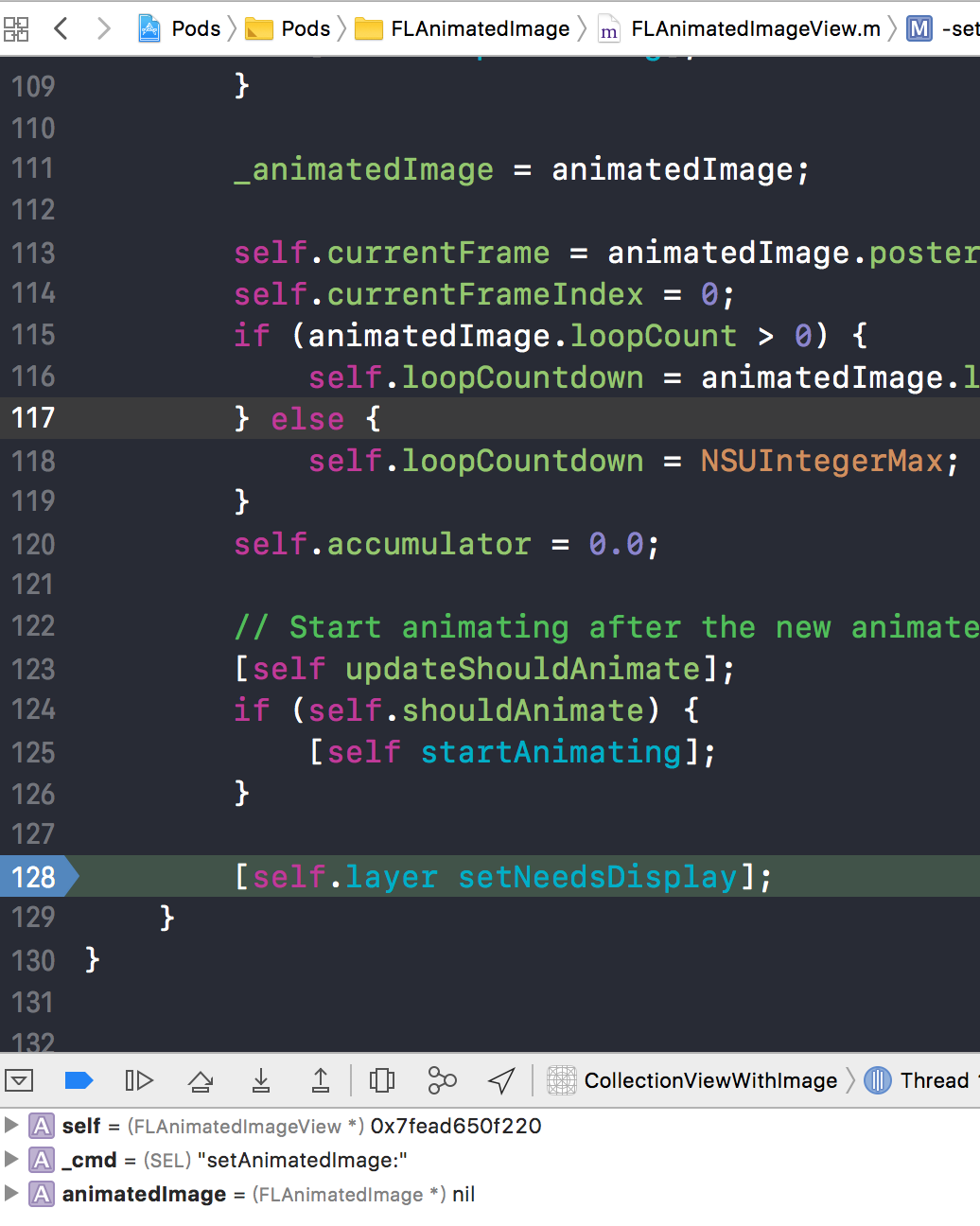
Previously, it all happend into main queue(whatever setPlaceHolder with nil, or setImageWith gifImage). So UIKit(Core Animatition) is smart enough and will not actually render between these two call (But actually, I don't know more about this draw call logic. These two set image will not on same run loop because load disk cache is async function, so these must be a little time wait). If you comments that line:128 [self.layer setNeedsDisplay];, this should not blink. But this is a bad idea maybe not follow what FLAnimatedImageView designed usage.
Maybe we should find a way to avoid this. For example, if setPlaceholder with nil, do not immediately trigger [setAnimatedImage:nil] ? Any idea about this one ?
If we can't find a way to avoid this, maybe it's time to roll back code 😢
 dreampiggy
on 13 Nov 2017
dreampiggy
on 13 Nov 2017
After I delete the line:128 [self.layer setNeedsDisplay]. It still blink when I reload the tableView.😂
yichengchen
on 14 Nov 2017
@yichengchen Any way to fix this ? Maybe we should disable that config shouldUseGlobalQueue to NO by default. Or we can give that options to users. ?
This will not blinking when you scroll and cell reusing, but only for reloadData. In fact, I think some user may prefer that frame rate enhancement to this disadvantage.
dreampiggy
on 16 Nov 2017
I think we have no way to fix this by current design. I'll explain the reason.
This Blinking is just two rendering state of that imageView.
- After you call
sd_setImageWithURL:withoutSDWebImageDelayPlaceholder, it triggerself.image = placeholder(Your example placeholder is nil), and UIKit are trying to clear all the content of that UIImageView - After we get the image and data, we call
setImageBlock. Then it triggerself.image = cacheImage
UIKit have a rendering cycle. It means that UIKit will commit all your changes to specify view during the same run loop together, and rendering to screen. So, if these two process is on same runloop, it will only show the last state. If not, it will show twice(looks like a Blinking).
So, why previous version not Blinkiing ? Because we put all function call into Sync on main queue to make sure same runloop. Looks at the code here:
- (nullable NSOperation *)queryCacheOperationForKey:(nullable NSString *)key done:(nullable SDCacheQueryCompletedBlock)doneBlock {
// ...not related
// First check the in-memory cache...
UIImage *image = [self imageFromMemoryCacheForKey:key];
if (image) {
NSData *diskData = nil;
if (image.images) {
diskData = [self diskImageDataBySearchingAllPathsForKey:key];
}
if (doneBlock) {
doneBlock(image, diskData, SDImageCacheTypeMemory);
}
return nil; // return here
}
// ...not related
}
- (nullable NSData *)diskImageDataBySearchingAllPathsForKey:(nullable NSString *)key {
NSString *defaultPath = [self defaultCachePathForKey:key];
NSData *data = [NSData dataWithContentsOfFile:defaultPath options:self.config.diskCacheReadingOptions error:nil];
if (data) {
return data;
}
//...not related
}
When a image is cached into memory, we load disk cache synchronously by [NSData dataWithContentsOfFile:]. So that actually, all these code are on main queue. So finally it trigger the setImageBlock. UIKit mark these two state and only rendering the last one because they are in the same runloop.
But after that FLAnimatedImageView perfermance enhancement, we change that setImageBlock from main queue to a global queue. This will make a queue switch and mark it to next runloop to run. So the two states will all be rendered. It will have a fast Blinking, one for placeholder(Your example is nil, means clear color), one for finally image.
dreampiggy
on 16 Nov 2017
The reason why we try to optimise that setImageBlock for FLAnimatedImageView is that we need FLAnimatedImage to feed it for GIF image. But it's not a subclass of UIImage. So it will not be able to cached in our memory cache since our memory cache is just allow <NSString, UIImage> pair. When you cell with FLAniamtedView reused, we need to create a new FLAniamtedImage instance each time. You can check that FLAniamtedImage code to find that the create cost is not really small. All that create time is happended into main queue, means it reduce your cell scroll frame rate.
We want to enhance that performance issue through dispatch the setImageBlock to global queue to avoid it block main queue and increase the frame rate. But sadly, as I talked above, it's could not be solved because it's by design. We should give up this enhancement way. I think we could just firstly disable that shouldUseGlobalQueue. Leave it as a customable value for our FLAniamtedImageView+WebCache category or a new SDWebImageOptions(I preferred the last).
Then, we can consider some other way to reduce that extra FLAniamtedImage cost on main queue. I think these direction can be taken, but all of these need a lot of work to do, this will not be marked 4.x, but can leave here for further discussion:
- Keep that
setImageBlockhappened on main queue if not GIF image. But find a way to avoid that visualBlinking, such as fake the first frame for GIF. When global queueFLAniamtedImagecreated, set it to begin animating. - Find a way to wrap that
FLAniamtedImageto UIImage, such as a new subclass fromUIImagewith a property point to it. - Change our API to allow non-UIImage instance to cache into image, and change
setImageBlockwith that non-UIImage instance. Maybe a new args like context or something.
dreampiggy
on 16 Nov 2017
For that idea 1, here is a demo code, we do not want to block main queue to reduce frame rate, so maybe we can fake the first image and dispatch to global queue to create FLAnimatedImage, then set it back to avoid visual Blinking:
if (imageFormat == SDImageFormatGIF) {
   weakSelf.image = image;
   dispatch_async(dispatch_get_global_queue(DISPATCH_QUEUE_PRIORITY_HIGH, 0), ^{
       FLAnimatedImage *animatedImage = [FLAnimatedImage animatedImageWithGIFData:imageData];
       dispatch_main_async_safe(^{
           weakSelf.animatedImage = animatedImage;
       });
   });
} else {
   weakSelf.image = image;
   weakSelf.animatedImage = nil;
}
@dreampiggy For that idea 1,the demo code something with else block isn't in main queue to reduce frame rate, update the UI 、 and when is it expected to be completed ?
 osbornZ
on 3 Dec 2017
osbornZ
on 3 Dec 2017
@osbornZ See the total #2106. I've remove that setImageBlock in global way, just use a dispatch_group to manage queue order, so this demo code is not accurate. That way can ensure both queue order(completion block after setImage block) and global queue dispatch(to generate FLAnimatedImage)
dreampiggy
on 3 Dec 2017
Fixed and PR merged via #2106
dreampiggy
on 15 Dec 2017
Related issues
 diogot
·
4Comments
diogot
·
4Comments
 ToLengSon
·
3Comments
ToLengSon
·
3Comments
 bembem1011
·
6Comments
bembem1011
·
6Comments
 devshen
·
6Comments
devshen
·
6Comments
 ankit-betterbutter
·
4Comments
ankit-betterbutter
·
4Comments
Most helpful comment
For that idea 1, here is a demo code, we do not want to block main queue to reduce frame rate, so maybe we can fake the first image and dispatch to global queue to create
FLAnimatedImage, then set it back to avoid visualBlinking: