Screentogif: feature_request(save_data): preventing all data loss
1. Summary
If user pressed Ctrl+Delete:
it would be nice if he didn’t irrevocably lose all record data.
2. Argumentation
Preventing unwanted data loss. It’s no good when the data on which the user worked for many minutes may disappear at once.
3. Steps to reproduce
ScreenToGif 2.27.3.
I made any recording → I made any actions in ScreenToGif editor → Ctrl+Delete (I wanted Ctrl+End, but missed the keyboard).
4. Behavior
4.1. Current
All data of my recording loss 😿. Ctrl+Z and Home → Undo have no effect. I need to record my apng again.
4.2. Example of desired
Dialog box with Yes and No buttons. Example text:
WARNING
Are you sure you want to delete all data of your recording? You can’t undo this action.
Thanks.
 Kristinita
All 2 comments
Hi @Kristinita.
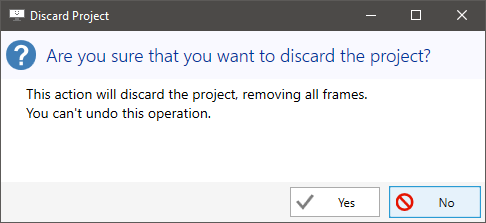
There's already a confirmation dialog for that action (it defaults to No too, as a safeguard):
It's enabled by default, but it can be disabled:
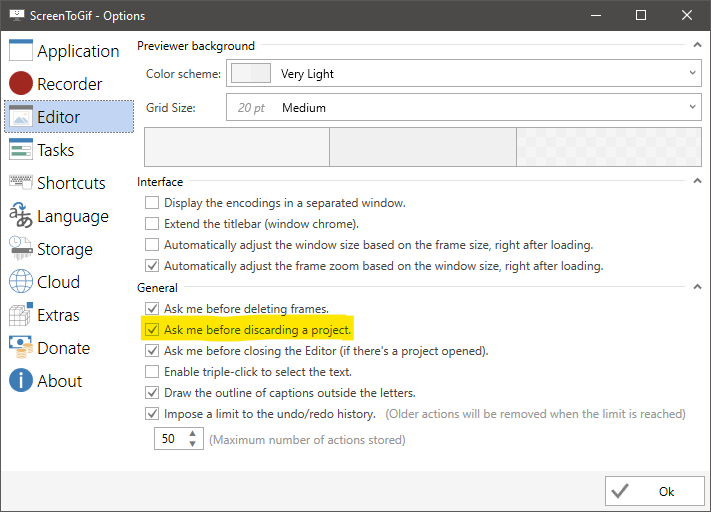
Perhaps it was disabled, unless there is somehow, a way to bypass that.
 NickeManarin
on 7 Oct 2020
NickeManarin
on 7 Oct 2020
Status: CONFIRMED :heavy_check_mark:
Yes, it solves the problem. Sorry for wasting your time.
I don’t remember ever changing anything in the Editor settings, so I didn’t even look there.
Thanks.
Kristinita
on 7 Oct 2020
Related issues
 JKSnd
·
10Comments
Kristinita
·
18Comments
JKSnd
·
10Comments
Kristinita
·
18Comments
 HChuitailang
·
18Comments
HChuitailang
·
18Comments
 u2shana
·
14Comments
u2shana
·
14Comments
 TimDoesCode
·
15Comments
TimDoesCode
·
15Comments
Most helpful comment
Hi @Kristinita.
There's already a confirmation dialog for that action (it defaults to No too, as a safeguard):
It's enabled by default, but it can be disabled:
Perhaps it was disabled, unless there is somehow, a way to bypass that.