Screentogif: Unable to record full screen
We should be able to record the full screen with a single click. The toolbar hides the top part of the screen, so it doesn't record the full screen.
 TopStudyWorld
All 2 comments
I'm not sure about single click, but I can see some advantages to full screen recording, especially with an editor component that can crop later. After all, if you have a fast computer, why not get everything and decide what to use later?
I guess with full screen the toolbar should float or be temporarily invisible? Maybe some kind of "full screen" mode with a "maximize" box in the top bar. then it would switch floating bar near the bottom that doesn't get recorded, maybe with just a stop/start function? Or just a brief floating pop up mentioning the record, stop, and pause key combos.
In terms of interface, I could mock something up if that's helpful.
 vatterspun
on 23 Jun 2018
vatterspun
on 23 Jun 2018
@TopStudyWorld Go to Options > Application > Check the "Enable the new recorder UI".
After that, open the recorder, click on the dropdown button and select "Screen".
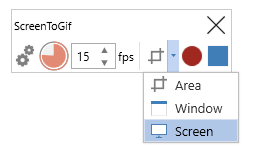
The app will prompt you to select one screen to record, just click to select it.
When you start recording, the UI will be minimized.
The recording will be paused when you bring the recorder UI to the foreground.
 NickeManarin
on 24 Jun 2018
NickeManarin
on 24 Jun 2018
Related issues
 daniloalonso
·
5Comments
daniloalonso
·
5Comments
 ForkandBeard
·
4Comments
ForkandBeard
·
4Comments
 duarteframos
·
3Comments
duarteframos
·
3Comments
 hanzhangyu
·
3Comments
hanzhangyu
·
3Comments
 Tox86
·
3Comments
Tox86
·
3Comments
Most helpful comment
@TopStudyWorld Go to Options > Application > Check the "Enable the new recorder UI".
After that, open the recorder, click on the dropdown button and select "Screen".
The app will prompt you to select one screen to record, just click to select it.
When you start recording, the UI will be minimized.
The recording will be paused when you bring the recorder UI to the foreground.